
1. Introducció
The FeinTech VAX00102 is an advanced HDMI 2.0 audio extractor designed to separate audio from an HDMI signal and route it to an AV receiver, soundbar, or active speakers. It supports resolutions up to Ultra-HD / 4K HDR (up to 18 Gbps data rate) with lossless HDMI signal transmission. This device is backward compatible with all lower resolutions and includes features to enhance compatibility with older HDMI 1.3/1.4 devices.
The VAX00102 also supports Audio Return Channel (ARC), allowing audio from your TV to be output through the extractor's digital outputs. An audio mode switch provides control over the audio format output by the HDMI source, ensuring optimal sound delivery even when connected to stereo TVs.
2. Informació de seguretat
- Assegureu-vos que el dispositiu estigui col·locat en una superfície plana i estable.
- No exposeu el dispositiu a la humitat, la pluja ni a temperatures extremes.
- Utilitzeu només l'adaptador d'alimentació subministrat.
- Eviteu bloquejar les obertures de ventilació per evitar el sobreescalfament.
- No intenteu obrir ni reparar el dispositiu vosaltres mateixos. Encarregueu totes les tasques de manteniment a personal qualificat.
3. Contingut del paquet
Si us plau, comproveu el paquet per veure si hi ha els elements següents:
- FeinTech VAX00102 HDMI 2.0 Audio Extractor
- Adaptador d'alimentació
- Manual d'usuari
4. Producte acabatview
The FeinTech VAX00102 features a compact design with clearly labeled ports and controls for easy integration into your home theater system.
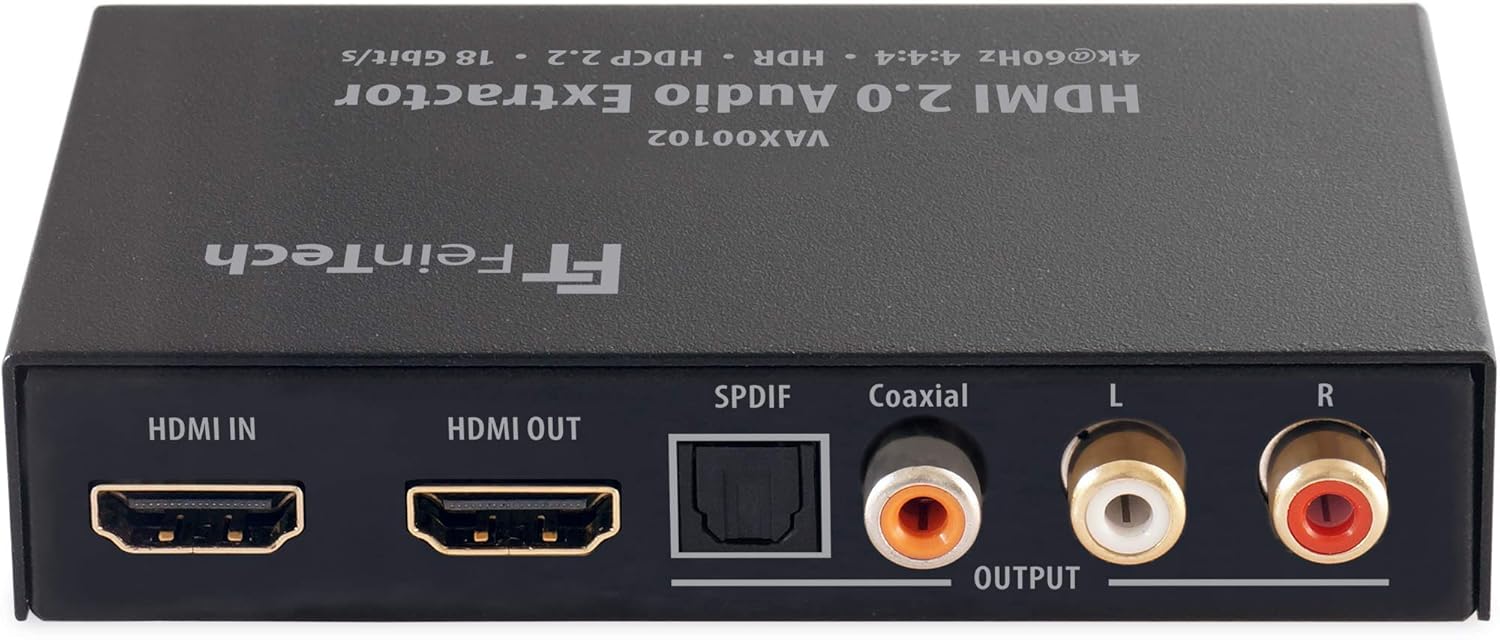
Imatge 4.1: Davant i posterior view of the FeinTech VAX00102 HDMI Audio Extractor, showing HDMI In, HDMI Out, SPDIF (Toslink), Coaxial, and Analog L/R RCA audio output ports.
Controls i connectors:
- Entrada d'alimentació: Connection for the included power supply.
- Indicadors LED: Lights up when functions are active.
- Audio EDID Switch: Selects audio format (Auto/Bypass, 2.0, 5.1).
- HDMI 1.3/1.4 Downgrade Switch: Improves compatibility with older HDMI devices.
- Video Stop Switch: Disables video output, allowing only audio output.
- ARC (Audio Return Channel) Switch: Enables TV audio output via SPDIF and Coaxial (not analog).
- Interruptor d'encesa/apagada: Control de potència per al dispositiu.
- Entrada HDMI: Connects to your media player or source device.
- Sortida HDMI: Connects to your TV, monitor, or projector.
- SPDIF Digital Audio Output (Toslink): Optical digital audio output.
- Sortida d'àudio digital coaxial: Sortida d'àudio digital coaxial.
- Analog Stereo L+R Audio Output (RCA): Sortida d'àudio estèreo analògic.
5. Configuració
5.1 Connexió bàsica
- Connect your HDMI source (e.g., Blu-ray player, streaming device) to the Entrada HDMI port on the VAX00102.
- Connect your display (TV, monitor, projector) to the SORTIDA HDMI port on the VAX00102.
- Connect your audio receiver, soundbar, or active speakers to the desired audio output port on the VAX00102 (SPDIF, Coaxial, or Analog RCA).
- Connect the included power adapter to the VAX00102 and then to a power outlet.
- Enceneu tots els dispositius connectats.
5.2 Connecting to a 5.1 Sound System
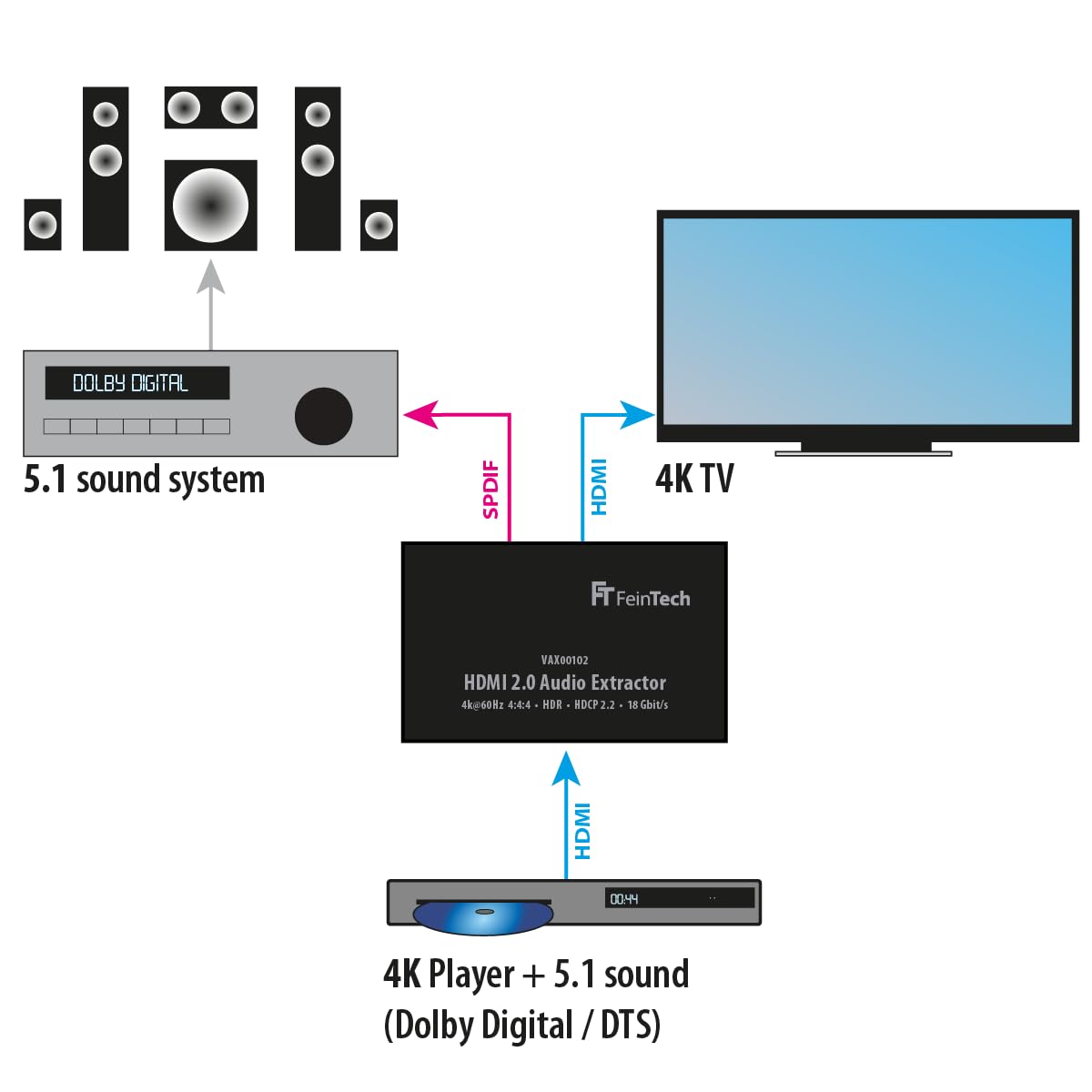
Imatge 5.1: Connection diagram for a 4K player with 5.1 sound (Dolby Digital / DTS) to a 5.1 sound system and 4K TV via the VAX00102.
For 5.1 channel audio, connect your 4K player to the HDMI IN of the VAX00102. Connect the HDMI OUT to your 4K TV. Use the SPDIF or Coaxial output from the VAX00102 to connect to your 5.1 sound system. Ensure your HDMI source is configured to output Bitstream (Dolby Digital or DTS) instead of PCM for 5.1 audio via SPDIF/Coaxial.
5.3 Using Audio Return Channel (ARC)

Imatge 5.2: Connection diagram for ARC functionality, where TV audio is sent back to the VAX00102 and then to a 5.1 sound system via SPDIF. Note that analog RCA outputs do not support ARC audio.
To use ARC, connect the HDMI OUT port of the VAX00102 to the ARC-enabled HDMI input on your TV. Connect the SPDIF or Coaxial output of the VAX00102 to your audio system. Ensure ARC is enabled on both your TV and the VAX00102. Note that ARC audio is only available via the digital SPDIF and Coaxial outputs, not the analog RCA outputs.
6. Instruccions de funcionament
6.1 Audio Mode Switch (EDID)
The audio mode switch allows you to manually control the audio format output by the HDMI source. This is useful when your audio system has specific format requirements or when you want to ensure a particular audio output.
- Auto / Bypass: The output audio format is determined by the best format supported by the connected HDMI display device.
- 2.0 (Stereo): The output is stereo (LPCM 2.0) on all audio outputs.
- 5.1: The output is in 5.1 audio format (Dolby Digital / AC-3 or DTS), provided the 5.1 soundtrack is available from the source.
Important Note on 5.1 Audio via SPDIF/Coaxial: For 5.1 audio transmission via SPDIF or Coaxial, set your HDMI source to output Bitstream (e.g., Dolby Digital or DTS) instead of PCM. Ensure you select Dolby Digital, not Dolby Digital Plus, if applicable.
6.2 HDMI 1.3/1.4 Compatibility Switch
If you are connecting an older HDMI 1.3 or 1.4 source device to a newer HDMI 2.0 TV, you may encounter compatibility issues. Use this switch to downgrade the HDMI signal to 1.3/1.4, which can improve compatibility.
6.3 Video Stop Switch
This switch allows you to disable the video output, making the TV screen go black. This feature is useful if you only require audio output from the HDMI source and want to conserve power or avoid display issues.
6.4 Control de volum
Volume control should be managed at the source device (e.g., media player) or your audio system (AV receiver, soundbar), not on the TV, to ensure proper audio levels.
6.5 Supported Audio Formats
- Digital Outputs (SPDIF, Coaxial): AC3 / Dolby Digital 2.0 and 5.1, DTS 5.1, Stereo PCM.
- Sortides RCA analògiques: Stereo PCM only.
- Sortida HDMI: All formats, including Dolby Atmos, Dolby TrueHD, DTS-HD, and multi-channel PCM. Note that Dolby Atmos can ONLY be transmitted via HDMI, not via other audio outputs.
7. Manteniment
To ensure the longevity and optimal performance of your FeinTech VAX00102, follow these simple maintenance guidelines:
- Mantingueu el dispositiu net netejant-lo amb un drap suau i sec.
- No utilitzeu netejadors líquids ni aerosols.
- Assegureu-vos una ventilació adequada al voltant del dispositiu per evitar el sobreescalfament.
- Disconnect the power adapter if the device will not be used for an extended period.
8. Solució De Problemes
If you encounter issues with your VAX00102, please refer to the following common troubleshooting steps:
- Sense sortida d'àudio:
- Comproveu totes les connexions del cable per assegurar-vos que estiguin segures.
- Verify the audio mode switch (EDID) setting. Try "Auto/Bypass" first.
- Ensure your audio source is outputting a compatible audio format for your connected audio system.
- If using SPDIF/Coaxial for 5.1 audio, confirm the source is set to Bitstream (Dolby Digital/DTS), not PCM.
- Check the volume levels on your source device and audio system.
- Sense sortida de vídeo:
- Ensure the HDMI cables are connected correctly and are not damaged.
- Check if the "Video Stop" switch is accidentally activated.
- Try connecting the HDMI source directly to the TV to rule out source or TV issues.
- ARC Not Working:
- Confirm that your TV's HDMI port supports ARC and that ARC is enabled in your TV's settings.
- Ensure the HDMI cable is connected to the ARC-enabled HDMI port on your TV.
- Remember that ARC audio is only available via SPDIF and Coaxial outputs, not analog RCA.
- Compatibility Issues with Older Devices:
- Utilize the HDMI 1.3/1.4 compatibility switch to improve connection stability with older source devices.
9. Especificacions
| Número de model | VAX00102 |
| Dimensions del producte (L x A x A) | 10.5 x 6.2 x 2.2 cm |
| Pes de l'article | 160 grams |
| Tipus d'interfície | Coaxial, HDMI |
| Nombre de canals | 2 (estèreo) |
| Dispositius compatibles | TV, AV Receivers, Soundbars, Active Speakers |
| Tipus de muntatge | Wall Mount (if applicable, based on product design) |
| País d'origen | Xina |
| Versió HDMI | HDMI 2.0 |
| Resolució màxima | 4K 60Hz HDR |
| Velocitat de dades | Fins a 18 Gbps |
| Suport ARC | Yes (SPDIF, Coaxial) |
Cable Length Recommendation: With standard 24AWG HDMI cables, maximum range for 1080p is 10m input + 8m output. For 4K, maximum range is 5m input + 5m output.
10. Informació de la garantia
FeinTech products are designed for reliability and performance. This product comes with a standard manufacturer's warranty. Please refer to the warranty card included in your package or visit the official FeinTech weblloc web per obtenir informació detallada sobre els termes i condicions de la garantia.
11. Atenció al client
For any questions, technical assistance, or support regarding your FeinTech VAX00102, please contact FeinTech customer service. Contact details can typically be found on the official FeinTech weblloc o a l'embalatge del producte.