
1. Introducció i finalview
This manual provides detailed instructions for the safe and efficient use of your Esperanza ERW017 Monitor Desk Mount. Please read this manual thoroughly before installation and operation, and retain it for future reference. This adjustable desk mount is designed to support monitors up to 27 inches and a maximum weight of 8 kg (17.6 lbs), featuring VESA compatibility for 75x75mm and 100x100mm mounting patterns.
2. Informació de seguretat
ADVERTIMENT: Failure to read, thoroughly understand, and follow all instructions can result in serious personal injury, damage to the product, or property damage. Keep this manual for future reference.
PRECAUCIÓ: Do not exceed the maximum weight capacity of 8 kg (17.6 lbs). Serious injury or property damage may occur. Ensure the mounting surface can safely support the combined weight of the mount and the monitor. This product is intended for indoor use only. Keep small parts away from children.
3. Contingut del paquet
Before installation, verify that all components are present and undamaged. If any parts are missing or damaged, contact your retailer for assistance.
- Conjunt del braç del monitor
- Escriptori Clamp / Grommet Base (components for both options)
- Placa VESA
- Hardware Kit (various screws, washers, Allen keys)
- Manual d'usuari
4. Configuració i instal·lació
Follow these steps carefully to install your monitor desk mount.
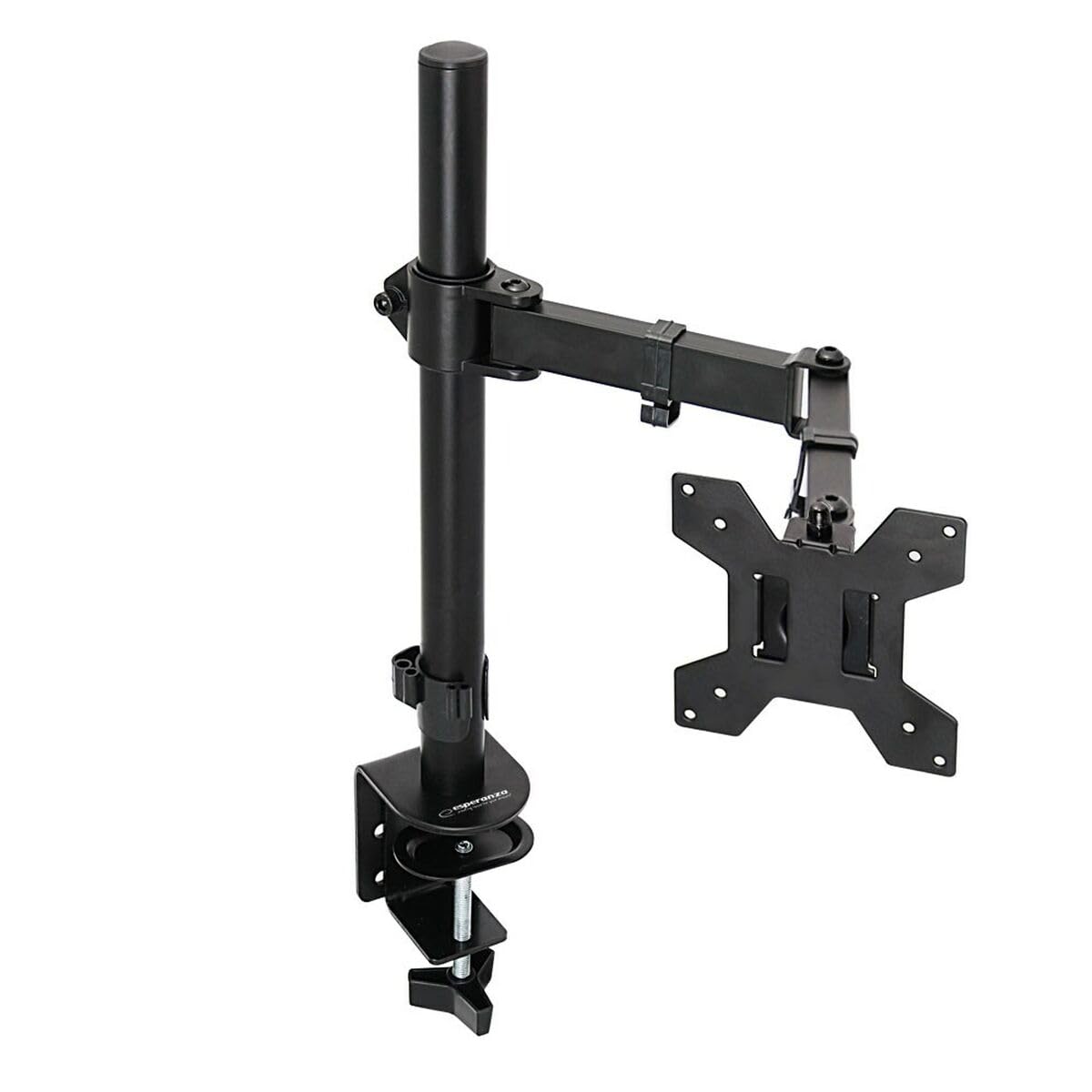
An image showing the Esperanza ERW017 monitor desk mount, featuring its adjustable arm and desk clamp.
Pas 1: Trieu l'opció de muntatge
El suport admet tant els suports d'escriptori com els de l'escriptori.amp and grommet hole installation. Select the option suitable for your desk.
- Escriptori Clamp: Enganxeu el clamp components al pol principal. Posicioneu el clamp on the edge of your desk and tighten the knob until it is secure. Ensure the desk thickness is within the specified range for the clamp.
- Grommet Base: If your desk has a grommet hole, assemble the grommet base components to the main pole. Insert the pole through the grommet hole and secure it from underneath the desk using the provided plate and nut.
Pas 2: Fixeu la placa VESA al monitor
Carefully place your monitor face down on a soft, clean surface. Attach the VESA plate to the back of your monitor using the appropriate screws and washers from the hardware kit. The mount supports VESA patterns of 75x75mm and 100x100mm. Ensure screws are tightened securely but do not overtighten.
Step 3: Attach Monitor to Arm
With assistance, carefully lift the monitor (with the VESA plate attached) and slide it onto the mounting head of the arm. Ensure it clicks into place or is secured with the provided locking screw. Verify that the monitor is firmly attached before releasing això.
Pas 4: Gestió de cables
Route your monitor cables (power, video, etc.) through the integrated cable management clips or channels on the arm to maintain a tidy workspace.
5. Instruccions d'ús (ajustos)
The Esperanza ERW017 monitor mount offers various adjustment options to optimize your viewexperiència.
- Ajust d'alçada: Loosen the collar on the main pole (if applicable) or gently move the arm up or down to your desired height. Retighten any locking mechanisms.
- Ajust d'inclinació: Grasp the top and bottom edges of your monitor and gently tilt it up or down to achieve the perfect viewing angle. If the monitor does not hold its tilt, use the provided Allen key to adjust the tension screw on the tilt mechanism.
- Ajust de gir: Rotate the monitor arm horizontally left or right to share your screen or adjust your viewposició d'ingrés.
- Ajust de rotació: Gireu el monitor 360 graus per canviar entre les orientacions horitzontal i vertical.
- Ajust de tensió: If the arm feels too loose or too stiff, use the provided Allen key to adjust the tension screws located at the arm joints. Adjust gradually until the desired movement resistance is achieved.
6. Manteniment
Per garantir la longevitat i el rendiment òptim del suport del monitor, seguiu aquestes pautes de manteniment:
- Neteja: Netegeu el suport amb un drap suau i sec. Eviteu utilitzar netejadors abrasius o productes químics agressius, ja que poden danyar l'acabat.
- Comprovacions periòdiques: Reviseu periòdicament tots els cargols i connexions per assegurar-vos que estiguin ben ajustats i segurs. Torneu a apretar-los si cal.
- Capacitat de pes: Always ensure that the total weight of your monitor and any accessories does not exceed the maximum load capacity of 8 kg.
7. Solució De Problemes
If you encounter issues with your monitor mount, refer to the following common problems and solutions:
- Issue: Monitor sags or does not stay in position.
Solució: The arm tension may be too loose. Use the provided Allen key to tighten the tension screw(s) on the arm joints or tilt mechanism until the monitor holds its position. - Issue: Difficulty attaching VESA plate to monitor.
Solució: Ensure you are using the correct VESA pattern (75x75mm or 100x100mm) and the appropriate screw length for your monitor. Do not force screws. - Issue: Mount feels unstable on the desk.
Solució: Verifiqueu que l'escriptori estigui ben tancatamp or grommet base is securely tightened to the desk. Ensure the desk surface is stable and can support the weight. - Issue: Arm movement is too stiff.
Solució: The arm tension may be too tight. Use the provided Allen key to slightly loosen the tension screw(s) on the arm joints until movement is smooth.
8. Especificacions
| Atribut | Especificació |
| Model | ERW017 |
| Marca | Esperanza |
| Tipus | Muntatge de l’escriptori del monitor |
| Color | Negre |
| Mida màxima de la pantalla | 27 polzades |
| Compatibilitat VESA | 75x75mm, 100x100mm |
| Capacitat de càrrega màxima | 8 kg (17.6 lliures) |
| Número de model (SKU) | S91099657 |
9. Garantia i Suport
For warranty information or technical support, please refer to the warranty card included with your product or contact Esperanza customer service through their official website or your retailer. Keep your purchase receipt as proof of purchase for warranty claims.