
1. Introducció
This manual provides essential information for the safe and efficient operation of your PowerDrive 1000W Bluetooth Pure Sine Wave Power Inverter. This device converts 12V DC power from your vehicle's battery into 110V AC power, suitable for sensitive electronics. Please read this manual thoroughly before installation and use.
2. Informació de seguretat
WARNING: Improper installation or use can result in electric shock, fire, or damage to the inverter and connected devices. Always follow these safety guidelines.
- Ventilació: Ensure the inverter is installed in a well-ventilated area. Do not block ventilation openings.
- Humitat: Do not expose the inverter to rain, moisture, or water.
- Materials inflamables: Do not operate the inverter near flammable materials, gases, or vapors.
- Connexió: Connect the inverter only to a 12V DC power source. Ensure correct polarity (+ to + and - to -). Incorrect connection will damage the inverter.
- Posada a terra: L'inversor ha d'estar correctament connectat a terra.
- Capacitat de càrrega: Do not exceed the inverter's continuous power rating of 1000 watts. Overloading can cause damage or fire.
- Nens: Mantingueu l'inversor fora de l'abast dels nens.
- Manteniment: Do not attempt to service the inverter yourself. Refer all servicing to qualified personnel.
- Advertència de la proposta 65: Aquest producte pot contenir productes químics coneguts a l’Estat de Califòrnia per causar càncer i defectes congènits o altres danys reproductius.
3. Característiques del producte
- 1000W Continuous Power: Powers AC devices up to 1000 watts.
- Pure Sine Wave Output: Provides clean, stable power for sensitive electronics.
- Bluetooth Connectivity: Monitor and control the inverter via a smartphone app.
- Dual AC Outlets: Two 3-prong 110V AC outlets.
- USB Charging Ports: One Standard USB 2.4A port and one USB-C 3.0A port for charging smartphones, tablets, and other devices.
- Detachable Front Panel: Allows for remote placement of controls.
- Integrated Protection: Features LED indicator lights for various protection modes.
4. Contingut del paquet
Verifiqueu que tots els elements siguin presents al paquet:
- PowerDrive PDIPS1000B 1000 Watt Bluetooth Pure Sine Wave Power Inverter
- 5 replaceable 30 amp fusibles
- Cables de connexió de la bateria (vermell i negre)
- Detachable front panel cable

Image: The PowerDrive 1000W Bluetooth Pure Sine Wave Power Inverter shown within its retail packaging.
5. Configuració i instal·lació
5.1 Inversor acabatview

Imatge: Anglesa view of the PowerDrive 1000W Inverter, showing the front panel with display and outlets, and the main casing.
5.2 Connexió a una font d'alimentació de 12 V CC
- Preparació: Ensure the vehicle engine is off and the inverter's power switch is in the OFF position.
- Connexions de la bateria: Connect the red (positive) battery cable to the positive (+) terminal of the inverter and then to the positive (+) terminal of the 12V battery. Connect the black (negative) battery cable to the negative (-) terminal of the inverter and then to the negative (-) terminal of the 12V battery. Ensure connections are tight and secure.
- Posada a terra: Connect the inverter's grounding terminal to a good chassis ground in your vehicle.

Imatge: Lateral view of the PowerDrive 1000W Inverter showing the red and black battery connection terminals with cables attached.
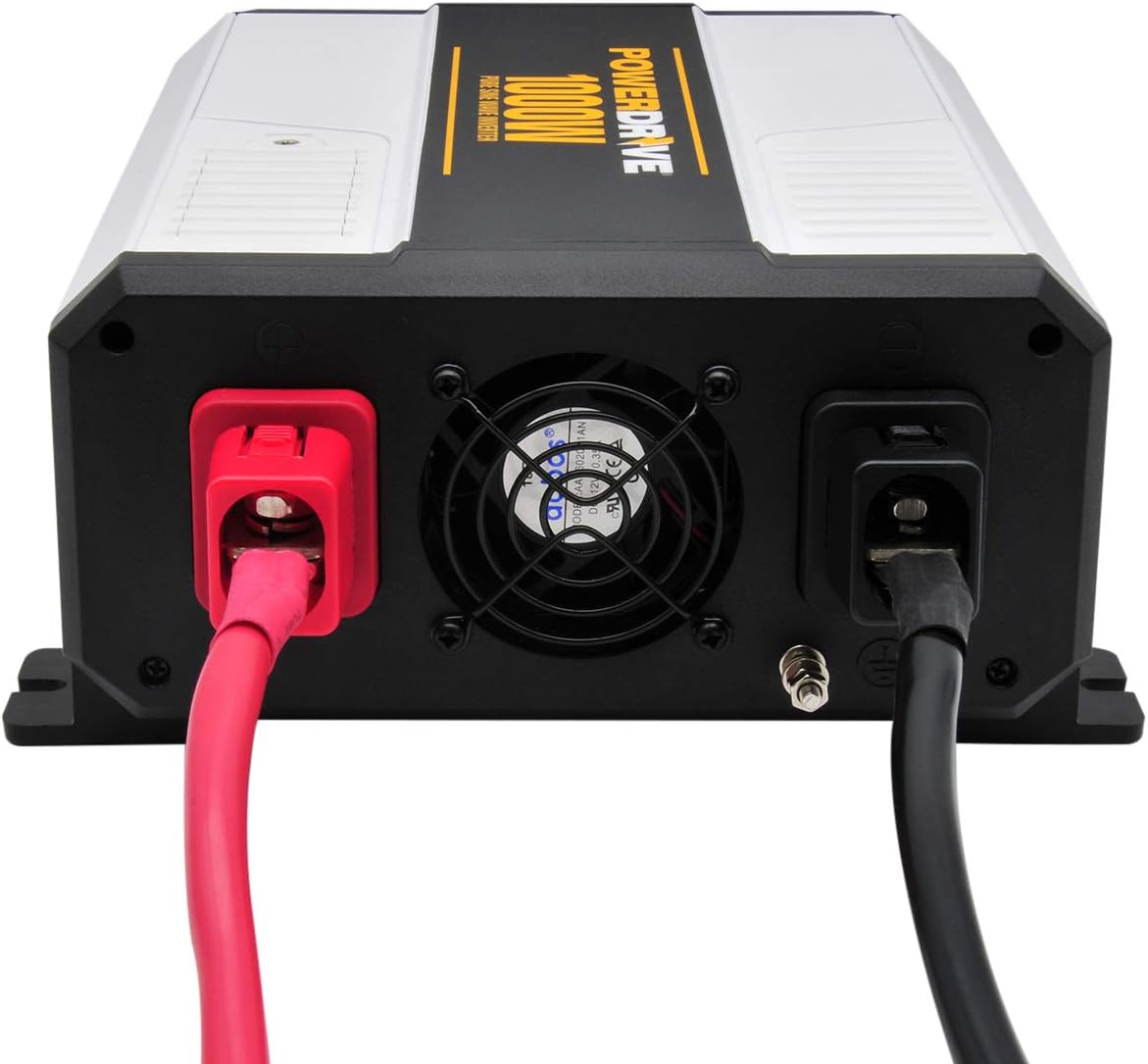
Imatge: Part posterior view of the PowerDrive 1000W Inverter, highlighting the cooling fan and the main power input connection.
5.3 Detachable Front Panel
The inverter features a detachable front panel for remote control and monitoring. To use it:
- Gently pull the front panel away from the main unit.
- Connect the provided cable to the port on the back of the detachable panel and the corresponding port on the inverter.
- Mount the detachable panel in a convenient location.
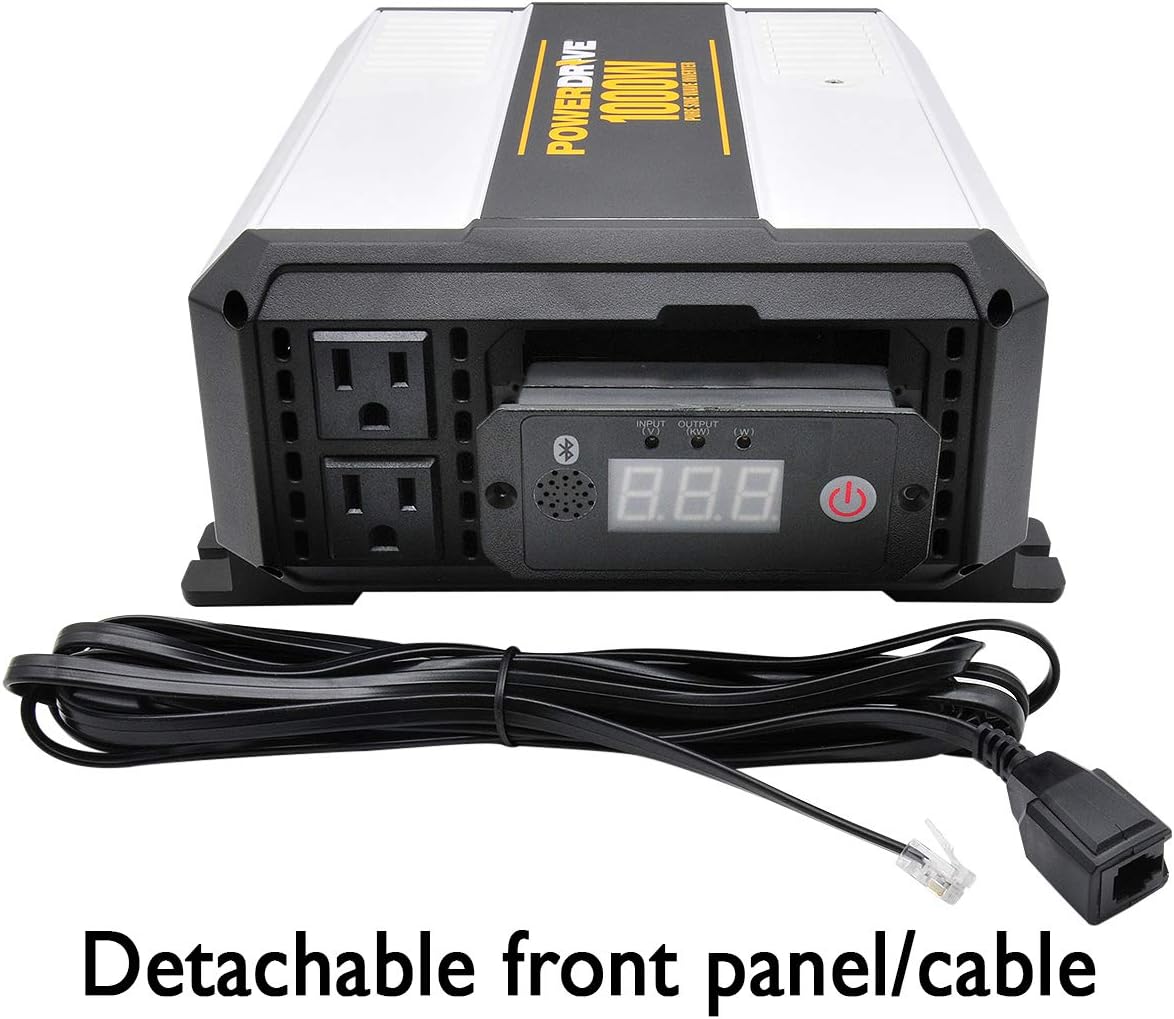
Image: The PowerDrive 1000W Inverter with its front control panel detached and connected via a cable, illustrating the remote control feature.
6. Funcionament
6.1 Engegada/apagada
- After securing all connections, press the power button on the front panel to turn the inverter ON. The display will illuminate.
- Per apagar, premeu el botó d'engegada de nou.

Imatge: Primer pla view of the PowerDrive 1000W Inverter's front panel, showing the digital display, power button, AC outlets, and USB ports.
6.2 Ús de preses de corrent altern i ports USB
- Plug your 110V AC devices into the two 3-prong AC outlets.
- Connect your USB-powered devices to the Standard USB (2.4A) or USB-C (3.0A) ports for charging.
- Assegureu-vos el wat totaltagLa potència de tots els dispositius connectats no supera els 1000 watts.
6.3 Bluetooth App Connectivity
The PowerDrive inverter can be monitored and controlled via a Bluetooth-enabled smartphone app.
- Download the official PowerDrive app from your device's app store.
- Assegureu-vos que el Bluetooth estigui habilitat al vostre telèfon intel·ligent.
- Enceneu l'inversor.
- Open the PowerDrive app and follow the on-screen instructions to pair with your inverter.
- Once connected, you can monitor input/output voltage, vatage, and potentially control the inverter remotely.
7. Manteniment
7.1 Canvi de fusibles
The inverter includes replaceable 30 amp fuses. If the inverter stops functioning due to an overload or short circuit, a fuse may need replacement.
- Turn off the inverter and disconnect it from the 12V power source.
- Locate the fuse access door (refer to the product diagram if available).
- Open the fuse access door and carefully remove the blown fuse.
- Insereix un nou 30 amp fuse. Use only fuses of the specified rating.
- Close the fuse access door and reconnect the inverter.
7.2 Atenció general
- Mantingueu l'inversor net i lliure de pols i deixalles. Feu servir un drap sec per netejar-lo.
- Ensure ventilation openings are clear at all times.
- Regularly check battery cable connections for tightness.
8. Solució De Problemes
If you encounter issues with your PowerDrive inverter, refer to the following common problems and solutions:
| Problema | Causa possible | Solució |
|---|---|---|
| No hi ha sortida d'energia / l'inversor no s'encén | Connexions soltes de la bateria Fusible cremat Vol de bateria baixatage Inverter protection mode activated | Check and tighten battery cable connections. Replace blown fuses (see Section 7.1). Recharge or replace the 12V battery. Turn off the inverter, disconnect load, and restart. |
| Overload warning / Inverter shuts down | Connected device(s) exceed 1000W High surge current from device | Redueix el wat totaltage dels dispositius connectats. Try connecting devices one at a time. Some devices have high startup (surge) power requirements. |
| Problemes de connexió Bluetooth | Bluetooth no habilitat al telèfon App not installed or updated Interferència | Assegureu-vos que el Bluetooth estigui actiu al vostre telèfon intel·ligent. Download or update the PowerDrive app. Move closer to the inverter; minimize other wireless devices. |
| Fan running constantly or loudly | Alta temperatura interna Dust buildup in fan | Ensure adequate ventilation around the inverter. Clean fan vents carefully with compressed air (inverter off and disconnected). |
If the problem persists after attempting these solutions, contact PowerDrive customer support.
9. Especificacions
| Característica | Especificació |
|---|---|
| Número de model | PDIPS1000B |
| Potència contínua | 1000 watts |
| Entrada Voltage | 12V DC |
| Vol. De sortidatage | 110 V AC |
| Forma d'ona de sortida | Onda senyal pura |
| Preses de corrent altern | Two 3-prong |
| Ports USB | 1x Standard USB 2.4A, 1x USB-C 3.0A |
| Connectivitat | Bluetooth |
| Dimensions (L x A x A) | 11.53 x 9.05 x 4.20 polzades |
| Pes de l'article | 5.2 lliures |
| Included Fuses | 5 replaceable 30 amp fusibles |
10. Garantia i Suport
For warranty information and customer support, please refer to the documentation provided with your purchase or visit the official PowerDrive weblloc web. Conserveu el comprovant de compra per a reclamacions de garantia.
Marca: PowerDrive