
Introducció
This manual provides instructions for the Sharper Image Motion Activated Candy Dispenser. This device is designed to dispense small, hard-shelled candies, nuts, and snacks using a touchless motion sensor, promoting hygiene and convenience. It is suitable for use in various settings, including homes and offices.
Informació important de seguretat
- Aquest producte no està pensat per a nens menors de 12 anys.
- The dispenser is designed for small, dry food items only. Do not use with liquids or sticky substances.
- Store the dispenser in a cool, dry area to maintain optimal performance and food quality.
- Assegureu-vos que les piles estiguin inserides correctament respectant les marques de polaritat. No barregeu piles velles i noves, ni piles de diferents tipus.
- Remove batteries if the dispenser will not be used for an extended period to prevent leakage.
Contingut del paquet
- 1x Sharper Image Motion Activated Candy Dispenser Unit
- Manual d'usuari
Note: 4 "AA" batteries are required and not included. An optional 6V DC 0.5A (300mA) AC power adapter is also not included.
Configuració
1. Instal·lació de la bateria
- Locate the battery compartment on the underside of the dispenser base.
- Obriu la tapa del compartiment de la bateria.
- Insert 4 "AA" batteries (not included), ensuring correct polarity (+/-) as indicated inside the compartment.
- Tanqueu bé la tapa del compartiment de la bateria.
Alternatively, an optional 6V DC 0.5A (300mA) AC power adapter can be used (not included).
2. Filling the Dispenser
- Before first use, clean the transparent container thoroughly.
- Remove the lid from the top of the dispenser.
- Carefully pour your desired treats into the container. Ensure the items are suitable for dispensing (see "Operating Instructions" for details).
- Col·loqueu la tapa amb seguretat.

Figure 1: Filling the dispenser with treats.
Instruccions de funcionament
Ús del sensor de moviment
- Place your hand directly under the dispensing chute.
- The built-in motion sensor will detect your hand and activate the dispensing mechanism.
- Hold your hand under the chute for a moment to allow the treats to dispense. The amount dispensed may vary. If no treats dispense on the first attempt, briefly remove your hand and place it back under the sensor.
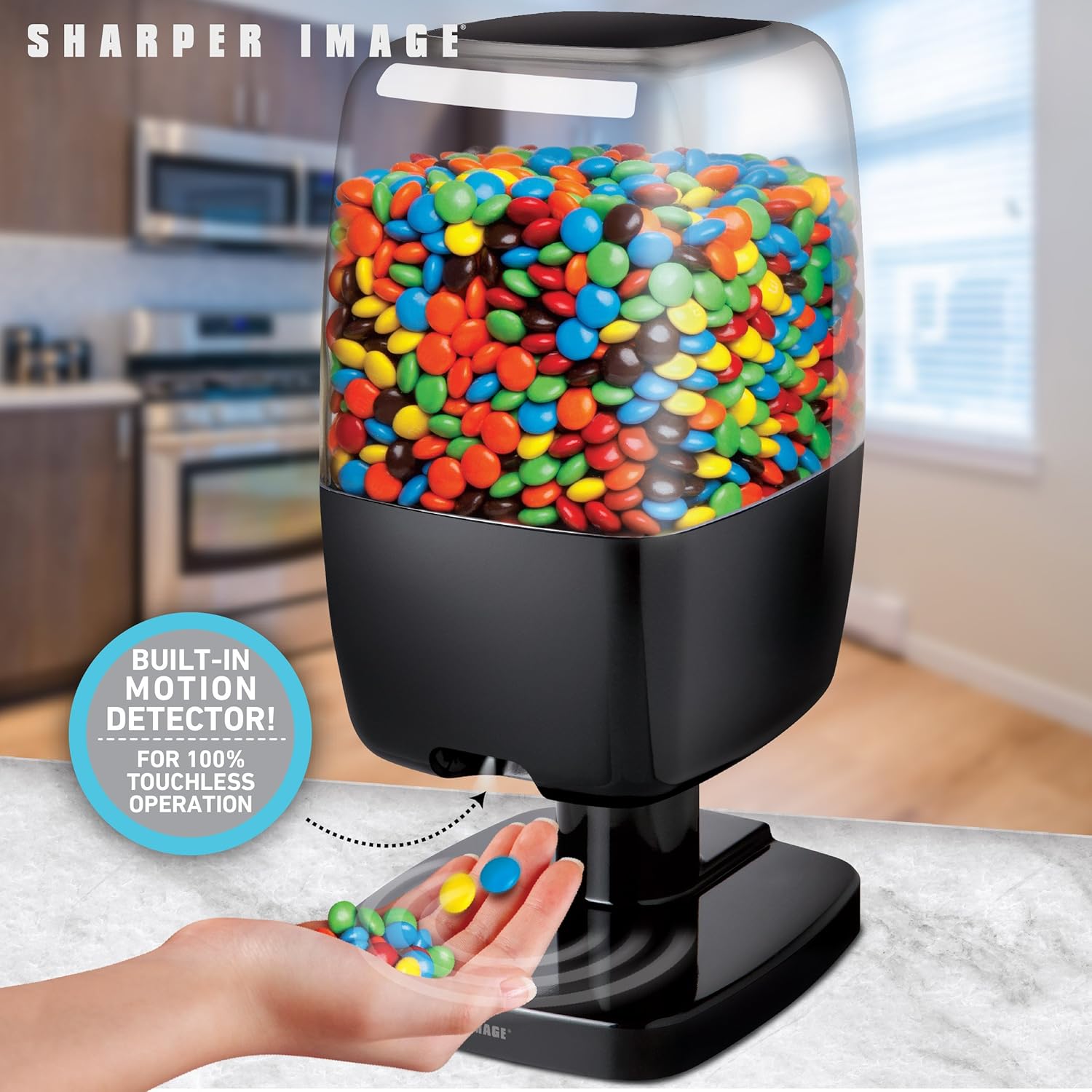
Figure 2: Hands-free dispensing in action.
Disabling Dispensing (Hidden Button)
A hidden button is located on the back of the dispenser. Pressing this button will temporarily disable the dispensing function, preventing treats from being dispensed even when the motion sensor is activated. Press it again to re-enable dispensing.
Recommended Items for Dispensing
For optimal performance, use items that are hard-shelled, dry, and approximately 0.75 inches (1.9 cm) or smaller in size. Examples inclouen:
- Small Gumballs
- Hard shell, chocolate coated candy (e.g., M&M's)
- Hard shell, fruit flavored candy
- Avellanes
- Gominoles
- Small Jawbreakers
- Nou de macadàmia
- Pinyons
- Shelled, unsalted peanuts
- Pistatxos amb closca
- Small Jordan almonds
- Nous de soja
- Llavors de gira-sol
- Ametlles senceres
- Cacauets Salats
Items NOT Recommended for Dispensing
Avoid using the following items to prevent blockages or damage to the dispenser:
- Candy that is wrapped
- Candy that has a soft chocolate coating
- Candy that is cylindrically or barrel-shaped
- Candy that is gummy
- Raisins or similar dried fruit
- Candy that is sticky
- Items larger than 0.75 inches (1.9 cm)
- Objectes metàl·lics

Figure 3: Guide for suitable and unsuitable items.
Manteniment
Neteja
- To clean the dispenser, first ensure it is empty of all treats and batteries are removed.
- Netegeu les superfícies exteriors amb un damp tela.
- The transparent container can be detached and washed with mild soap and water. Ensure it is completely dry before reassembling and refilling.
- Do not immerse the base unit in water or place it in a dishwasher.
Emmagatzematge
When not in use, store the dispenser in a cool, dry place away from direct sunlight and moisture. Remove batteries if storing for an extended period.
Resolució de problemes
Dispenser Not Activating or Dispensing
- Comproveu les bateries: Ensure batteries are correctly installed and have sufficient charge. Replace with fresh "AA" batteries if necessary.
- Obstrucció del sensor: Verify that the motion sensor area is clean and free from obstructions.
- Col·locació de les mans: Ensure your hand is placed directly under the sensor and held steady for a moment.
- Hidden Button: Check if the hidden button on the back of the dispenser has been pressed, disabling the dispensing function. Press it again to re-enable.
Treats Not Dispensing Properly or Getting Stuck
- Item Suitability: Confirm that the items being dispensed are suitable for the dispenser (refer to "Recommended Items" section). Avoid sticky, wrapped, or oversized items.
- Ompliment excessiu: Do not overfill the dispenser, as this can impede the dispensing mechanism.
- Bloqueig: Gently shake the dispenser or use a soft, non-abrasive tool to clear any blockages in the chute.
Durada de la bateria curta
- Qualitat de la bateria: Use high-quality alkaline batteries for best performance and longevity.
- Freqüència d'ús: Frequent use will naturally deplete batteries faster. Consider using an optional AC adapter for continuous power if available.
Especificacions
| Marca: | Imatge més nítida |
| Model: | B07KGMDK96 |
| Material: | Plàstic |
| Color: | Negre |
| Dimensions (A x A x P): | Approximately 13.125 in. x 6.00 in. x 6.75 in. (33.3 cm x 15.2 cm x 17.1 cm) |
| Font d'alimentació: | 4 "AA" batteries (not included) or optional 6V DC 0.5A (300mA) AC adapter (not included) |
| Max Item Size: | Up to 0.5 inches (1.27 cm) in size (for optimal dispensing) |

Figura 4: Dimensions del producte.
Garantia i Suport
For warranty information or technical support, please refer to the contact details provided with your product packaging or visit the official Sharper Image weblloc web. Conserveu el rebut de compra com a comprovant de compra.