
Introducció
This manual provides instructions for the Fotodiox C-Mount to Canon EOS (EF, EF-S) Lens Mount Adapter with Gen10 Focus Confirmation Chip. This adapter allows the use of C-Mount CCTV/Cine lenses on Canon EOS D/SLR camera bodies.
The adapter features a durable all-metal design and includes a Generation v10 Focus Confirmation Chip to assist with manual focusing on Canon EOS cameras.
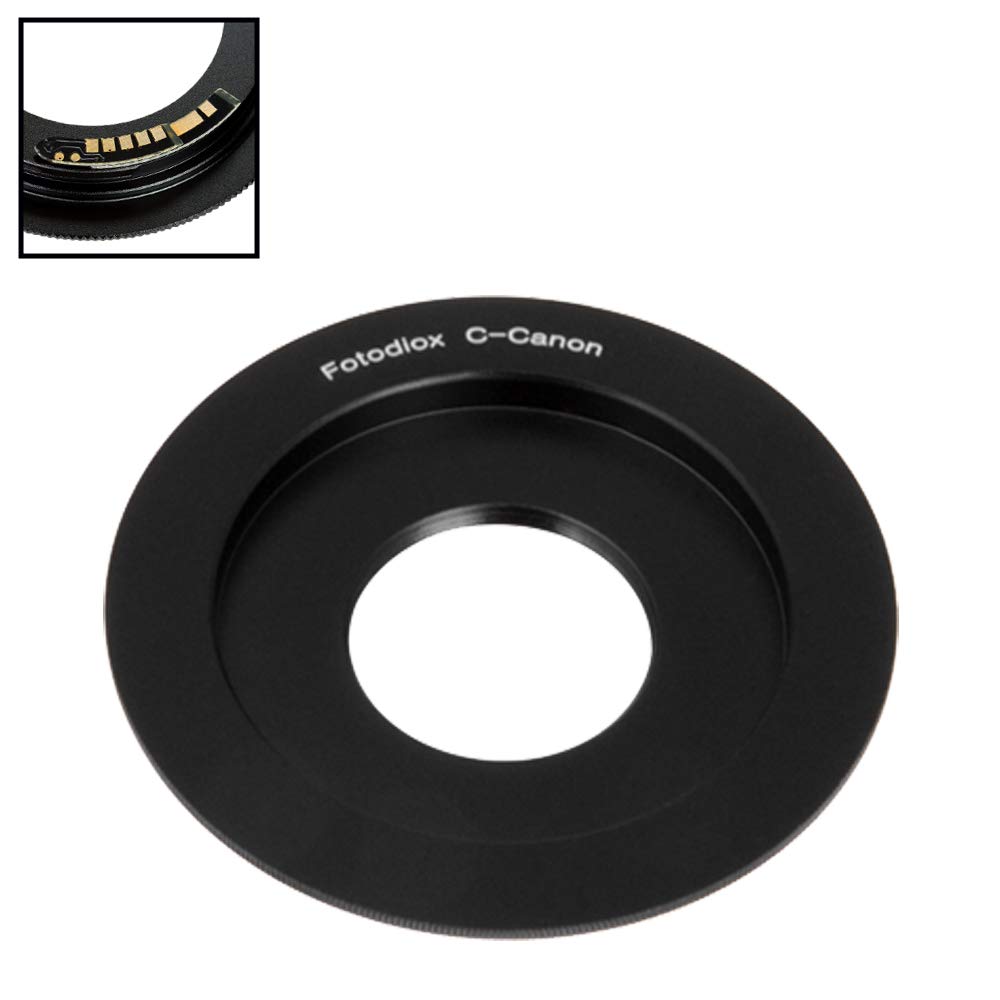
Image: The Fotodiox C-Mount to Canon EOS Lens Mount Adapter.
Informació de seguretat
- Handle the adapter and lenses with care to prevent damage.
- Avoid exposing the adapter to extreme temperatures, moisture, or dust.
- Do not attempt to disassemble or modify the adapter, as this will void the warranty.
- Ensure the adapter is securely attached to both the lens and camera body before use.
Contingut del paquet
- Fotodiox FC10 Lens Mount Adapter
Configuració
Attaching the Adapter to the Camera Body
- Assegureu-vos que la càmera estigui apagada.
- Align the red dot on the adapter with the red dot on your Canon EOS camera body mount.
- Insert the adapter into the camera mount and rotate it clockwise until it clicks into place.
Attaching a C-Mount Lens to the Adapter
- Align the C-Mount lens threads with the adapter's C-Mount threads.
- Carefully screw the lens into the adapter until it is finger-tight.
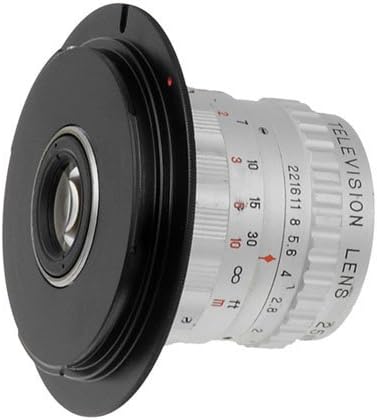
Image: A C-Mount lens attached to the Fotodiox adapter.

Image: The Fotodiox adapter with a C-Mount lens mounted on a Canon EOS camera body.
Instruccions de funcionament
This is a manual adapter. Lens functions that rely on electronic communication with the camera body (such as autofocus, AE metering, and image stabilization) will not function.
Focusing and Exposure
- Enfocament manual: Focus must be adjusted manually on the lens.
- Exposició: Configureu la càmera a Aperture Priority (Av) mode or Manual (M) mode to control exposure.
- Control de l'obertura: If your C-Mount lens has a manual aperture control ring, adjust it directly on the lens. If the lens does not have a manual aperture control ring, the aperture will revert to its default position (either fully open or fully closed, depending on the lens design).
Gen10 Focus Confirmation Chip
The integrated Generation v10 Focus Confirmation Chip "tricks" the Canon EOS camera body into recognizing an EF-compatible lens. This enables the camera's visual (green dot in viewfinder) and audible focus confirmation indicators to function, assisting with manual focusing.
Nota: The chip provides focus confirmation, but does not enable autofocus or electronic aperture control.
Consideracions importants
- No Infinity Focus: This adapter does not allow for infinity focus. It is designed for macro and close-focus applications only.
- Vinyetatge: Due to the image circle of C-Mount lenses, significant vignetting may occur, especially on full-frame camera bodies.
- "Focus-By-Wire" Lenses: Lenses that require power to engage their manual focus rings (e.g., Canon STM or Nikon AF-P lenses) will not be able to focus when used with this manual adapter, as the adapter does not provide power.
- Crop Factor: The effective focal length of the C-Mount lens will be affected by your camera's crop factor. For more information, refer to the Fotodiox Knowledge Base.
Manteniment
- Neteja: Use a clean, dry microfiber cloth to wipe the adapter. Avoid using harsh chemicals or abrasive materials.
- Emmagatzematge: Store the adapter in a dry, dust-free environment when not in use. Keep lens caps on both ends if possible.
Resolució de problemes
"Error Lens Not Attached" Message
Some Canon EOS cameras may display an "Error Lens Not Attached - Check lens" message when a manual adapter is used. To resolve this, ensure your camera settings are configured to allow shooting without a lens. Refer to your camera's instruction manual for specific settings, or consult the Fotodiox Knowledge Base for potential solutions related to various camera brands.
Problemes d'enfocament
- Ensure the lens is securely attached to the adapter and the adapter to the camera.
- Remember that this adapter does not allow for infinity focus; it is for macro and close-focus only.
- Verify that your camera's focus confirmation indicators are active (green dot/beep) if the Gen10 chip is functioning correctly.
Especificacions
| Model de producte | C-EF-FC10 |
| Muntatge de la lent | C-Mount CCTV / Cine Lens |
| Muntatge del cos | Canon EOS (EF, EF-S) Mount D/SLR Camera Body |
| Material | Anodized Aluminum, Chrome Plated Brass Mounts |
| Focus Confirmation | Gen10 Focus Confirmation Chip |
| Infinity Focus | Not Supported (Macro/Close Focus Only) |
| Dimensions del producte | 3 x 0.5 x 3 polzades |
| Pes de l'article | 1.06 unces |
| Fabricant | Fotodiox |
Garantia
This Fotodiox adapter comes with a Limited 24-Month Manufacturer Warranty. Please retain your proof of purchase for warranty claims. For full warranty terms and conditions, please refer to the official Fotodiox weblloc.
Suport
For additional information, detailed instructions, and support articles, please visit the Fotodiox Knowledge Base:
For specific inquiries regarding the Generation 10 Focus Confirmation Chips, you may find relevant articles there.