
Introducció
This manual provides instructions for the Disney Princess Style Collection Cash Register Shop 'N Play Market Set. This interactive toy is designed to enhance imaginative play with features such as realistic sounds, phrases, and a working calculator. It includes various play pieces to simulate a shopping experience.

Image: The Disney Princess Style Collection Cash Register set, including the pink cash register, a shopping basket, play money, a credit card, and various play food items.
Informació important de seguretat
ADVERTÈNCIA: PERILL D'ENFUGAMENT – Small parts. Not suitable for children under 3 years due to small parts which could be swallowed.
- Superviseu sempre els nens durant el joc.
- Mantingueu les piles fora de l'abast dels nens petits.
- No barregeu piles velles i noves. No barregeu piles alcalines, estàndard (carboni-zinc) o recarregables (níquel-cadmi).
Què hi ha a la caixa
The Disney Princess Style Collection Cash Register Shop 'N Play Market Set includes the following components:
- 1 x Cash Register with drawer for storage
- 1 x Water-Activated Stylus
- 12 x Pieces of Play Money
- 1 x Play Credit Card
- 1 x Shopping Basket
- 5 x Chip Art Food Containers

Imatge: Vista de dalt a baix view of all included items: the pink cash register, play money, coins, a credit card, a shopping basket, and various play food boxes.
Configuració
Instal·lació de la bateria
- Locate the battery compartment on the underside of the cash register.
- Amb un tornavís Phillips (no inclòs), desenrosqueu la tapa del compartiment de la bateria.
- Insert 2 x AAA batteries (included) into the compartment, ensuring correct polarity (+/-).
- Substituïu la tapa del compartiment de la bateria i fixeu-la amb el cargol.
Assemblea Inicial
The cash register comes pre-assembled. Ensure the stylus is securely attached to its holder on the side of the register.
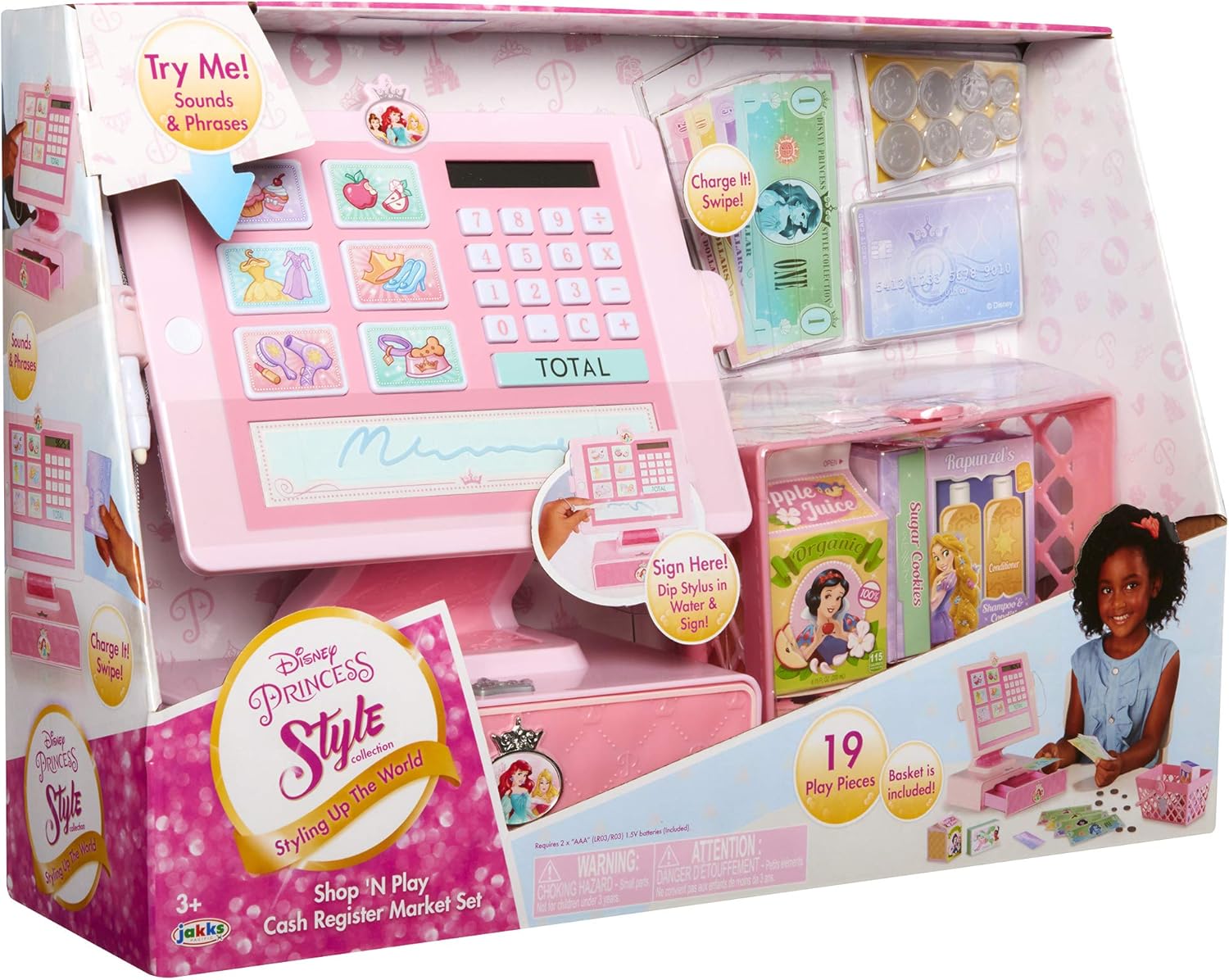
Image: The back of the pink cash register, highlighting the battery compartment and the stylus holder.
Instruccions de funcionament
Encès/Apagat
Press the power button (usually located on the side or front) to turn the cash register on. It will emit a welcoming sound or phrase. To turn off, press the power button again or it may automatically power off after a period of inactivity.
Ús de la calculadora
- Use the numbered buttons (0-9) to input prices.
- Press the '+' or '-' buttons for basic arithmetic operations.
- Press the 'TOTAL' button to display the final sum.
- Press 'C' to clear the current entry.
Interactive Item Buttons
The cash register features several picture buttons representing different items (e.g., cupcakes, apples, dresses). Pressing these buttons will trigger unique sounds and phrases related to the item, enhancing imaginative play.
Cash Drawer Operation
To open the cash drawer, press the crown-shaped button located on the front of the register base. The drawer will spring open, allowing access to the play money and coins. Push the drawer firmly to close it.

Image: The pink cash register with its drawer open, revealing compartments for play money and coins. A shopping basket with play food is next to it.
Credit Card Swipe Feature
Insert the play credit card into the slot on the side of the cash register and swipe it through. The register will play a sound indicating a successful transaction.
Water-Activated Signature Pad
To use the signature pad, dip the tip of the included stylus in water. Then, use the wet stylus to "sign" on the designated pad area on the register. The water will temporarily reveal a signature, which fades as it dries.
Manteniment
- Wipe the cash register and accessories with a soft, damp tela. No submergir en aigua.
- Eviteu utilitzar productes químics aggressivs o netejadors abrasius.
- Guardeu la joguina en un lloc fresc i sec, allunyat de la llum solar directa quan no l'utilitzeu.
- Traieu les piles si la joguina no s'utilitzarà durant un període prolongat per evitar fuites.
Resolució de problemes
No Power or Sound
- Ensure batteries are correctly installed with the proper polarity.
- Substituïu les piles velles per unes de noves.
- Comproveu si el botó d'engegada està premut fermament.
Cash Drawer Not Opening
- Check for any obstructions preventing the drawer from opening.
- Ensure the crown button is pressed completely.
Especificacions
| Dimensions del producte | 16 x 4.5 x 11 polzades |
| Pes de l'article | 2.05 lliures |
| Número de model | 202411 |
| Edat recomanada | 36 mesos - 6 anys |
| Piles necessàries | 2 x AAA (incloses) |
| Fabricant | Jakks Pacific Inc. |
Garantia i Suport
For warranty information or customer support, please contact Jakks Pacific Inc. directly. Refer to the product packaging or their official weblloc web per obtenir les dades de contacte i les polítiques de garantia més actualitzades.