
Introducció
Thank you for choosing the SIMOLIO Kids Wireless Headphones Model JH-711. This manual provides essential information for the proper setup, operation, and maintenance of your headphones. Please read it carefully to ensure safe and optimal use.
Característiques del producte
- 3-Level Volume Limiting: Protects children's hearing with switchable volume limits (75dB for toddlers, 85dB for kids, 94dB for adults). This feature is active in both wired and wireless modes.
- Aïllament del soroll: Over-ear design provides passive noise reduction, helping to block external sounds for improved listening focus.
- Wireless & Wired Modes: Offers Bluetooth connectivity for wireless use and includes a 3.5mm audio cable for wired connection when the battery is depleted or for non-Bluetooth devices.
- Micròfon integrat: Enables hands-free calling and voice chat.
- Audio Sharing Port: Allows another headphone to connect and share audio from the same device.
- Durable & Flexible Design: Constructed with memory stainless steel strips in the headband for impressive durability and flexibility, designed to withstand active use. Earmuffs feature an anti-shedding design.
- Foldable & Compact: Easy to fold and store in the included EVA carrying case, ideal for travel and school.
- Llarga vida útil de la bateria: Fins a 15 hores de joc amb una sola càrrega.

The headphones feature a 3-level volume limiter to protect hearing, adjustable for toddlers, kids, and adults.
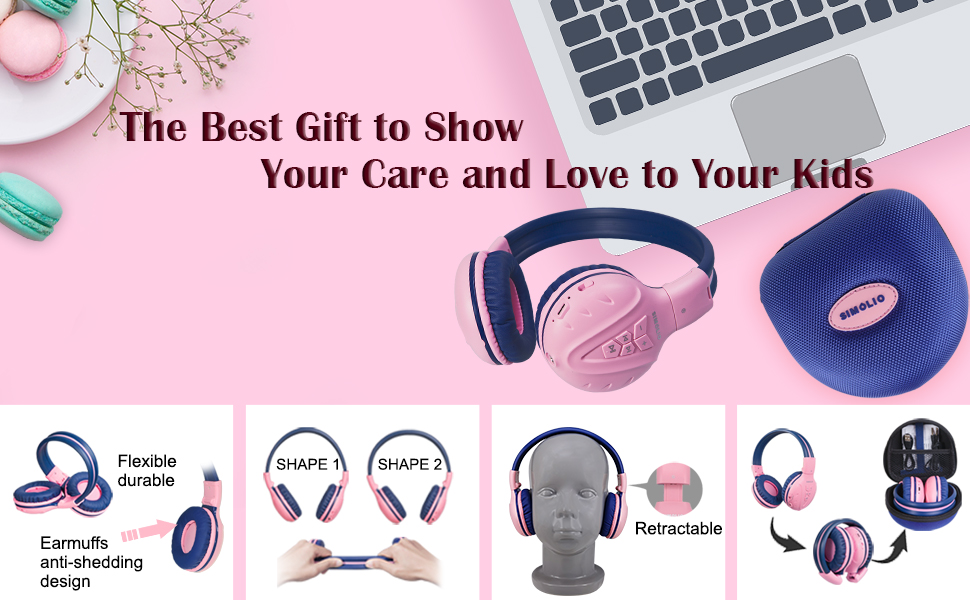
The flexible and durable design allows the headphones to withstand bending and twisting.
Què hi ha a la caixa
El paquet inclou els articles següents:
- SIMOLIO Kids Wireless Headphones JH-711
- Cable de càrrega (USB)
- Cable AUX (cable d'àudio de 3.5 mm)
- Manual d'usuari
- Carrying EVA Case
Configuració
1. Càrrega dels auriculars
Before first use, fully charge the headphones. Connect the provided USB charging cable to the charging port on the headphones and to a USB power source (e.g., computer, wall adapter). The LED indicator will show charging status and turn off when fully charged.
2. Emparellament Bluetooth
- Assegureu-vos que els auriculars estiguin apagats.
- Press and hold the Multi-Function Button (MFB) until the LED indicator flashes blue and red alternately, indicating pairing mode.
- Al dispositiu (telèfon intel·ligent, tauleta, etc.), activeu el Bluetooth i cerqueu els dispositius disponibles.
- Select "SIMOLIO JH-711" from the list of devices.
- Un cop connectat, l'indicador LED parpellejarà blau lentament.
3. Wired Mode Connection
To use the headphones in wired mode, connect one end of the 3.5mm AUX cable to the audio jack on the headphones and the other end to the audio output of your device. The headphones will automatically switch to wired mode, even if the battery is dead.

The headphones support both wireless Bluetooth mode and wired mode via the included AUX cable.
4. Volume Limiter Adjustment
Locate the 3-level volume limiter switch on the headphones. Adjust the switch to the desired maximum volume level:
- 75dB (S): Recommended for toddlers or very quiet environments.
- 85dB (M): Recommended for children in general listening environments.
- 94dB (L): Recommended for adults or noisy environments.

Adjust the physical switch to select the appropriate volume limit.
5. Using the Sharing Port
The headphones feature an additional sharing jack on the right side. To share audio, plug another headphone into this port. This allows two users to listen to the same audio source simultaneously.

Connect another headphone to the sharing port to share audio with a friend.
Instruccions de funcionament
1. Encendre/apagar
- Encès: Press and hold the MFB for approximately 3 seconds until the LED indicator lights up.
- Apagar: Premeu i manteniu premut el botó multifunció durant aproximadament 3 segons fins que l'indicador LED s'apagui.
2. Reproducció de música
- Reproduir/pausa: Premeu breument el MFB.
- Pista següent: Premeu breument el botó "+".
- Pista anterior: Premeu breument el botó "-".
- Pujar el volum: Premeu llargament el botó "+".
- Baixar el volum: Premeu llargament el botó "-".
3. Gestió de trucades
When connected via Bluetooth:
- Respondre/Finalitzar la trucada: Premeu breument el MFB.
- Rebutja la trucada: Premeu llargament la tecla MFB.

El micròfon integrat permet fer trucades amb mans lliures.
Manteniment
- Netegeu els auriculars amb un drap suau i sec. No utilitzeu productes de neteja abrasius ni dissolvents.
- Eviteu exposar els auriculars a temperatures extremes, humitat o llum solar directa.
- Store the headphones in the provided EVA carrying case when not in use to protect them from dust and damage.
- No intenteu desmuntar ni modificar els auriculars, ja que això anul·larà la garantia i els pot fer malbé.

The headphones fold compactly and fit into the included EVA case for easy storage and transport.
Resolució de problemes
| Problema | Causa possible | Solució |
|---|---|---|
| Els auriculars no s'engeguen. | Bateria baixa. | Carregueu els auriculars completament. |
| No es pot emparellar per Bluetooth. | Auriculars no en mode d'emparellament; Bluetooth del dispositiu desactivat; massa lluny del dispositiu. | Assegureu-vos que els auriculars estiguin en mode d'emparellament (vermell/blau intermitent). Activeu el Bluetooth del dispositiu. Acosteu els auriculars al dispositiu (a menys de 9 metres). |
| No hi ha so en mode sense fil. | Volum massa baix; no connectat; sortida d'àudio incorrecta seleccionada al dispositiu. | Increase headphone and device volume. Re-pair headphones. Check device audio settings. |
| No hi ha so en mode amb cable. | AUX cable not fully inserted; cable damaged; device volume too low. | Ensure AUX cable is securely connected at both ends. Try a different AUX cable. Increase device volume. |
Especificacions
| Característica | Detall |
|---|---|
| Nom del model | Kids Bluetooth Headphones JH-711 |
| Tecnologia de connectivitat | Sense fil (Bluetooth), amb cable (connector de 3.5 mm) |
| Versió Bluetooth | 4.0 |
| Interval Bluetooth | 9 metres |
| Control de soroll | Aïllament acústic |
| Sensibilitat | 94 dB (màx.) |
| Durada de la bateria | 15 hores |
| Temps de càrrega | 3 hores |
| Pes de l'article | 187 grams (6.6 unces) |
| Dimensions del producte | 5.51 x 3.15 x 5.31 polzades |
| Material | Nylon, Stainless Steel (headband) |
| Material de la funda de transport | EVA |
| Característiques especials | 3 Adjustable Volume Limited, Microphone, Durable, Flexible, Foldable, Wired & Wireless, Share Port, EVA Case |
Vídeo oficial del producte
Aquest vídeo ofereix una visió generalview of the SIMOLIO Bluetooth Headphones for Kids with Case JH-711, demonstrating its features and functionality.
Garantia i Suport
SIMOLIO products are designed for quality and reliability. For specific warranty information, please refer to the warranty card included with your product or visit the official SIMOLIO website. If you encounter any issues or require technical assistance, please contact SIMOLIO customer support through their official channels.
