
1. Introducció
This manual provides comprehensive instructions for the installation, operation, and maintenance of your Right Weigh 202 Series Bluetooth-Enabled Interior Digital Load Scale. Designed for air suspension tractors, straight trucks, and tractor-trailer dedicated sets, this gauge offers a color touchscreen display and Bluetooth capabilities for convenient weight monitoring. After proper calibration, the device accurately displays on-the-ground axle group weights in pounds or kilograms, helping to ensure compliance with weight regulations.

The Right Weigh 202 Series digital load scale features a color touchscreen display for easy viewing of axle group weights and total gross weight.
2. Informació de seguretat
Please read and understand all safety instructions before installing or operating the Right Weigh 202 Series load scale. Failure to follow these instructions may result in damage to the product, vehicle, or personal injury.
- Instal·lació professional: It is recommended that installation be performed by a qualified technician to ensure proper wiring and air line connections.
- Font d'alimentació: Connect the gauge only to a 12V DC power source as specified in the wiring diagram. Incorrect voltagpot fer malbé la unitat.
- Pressió de l'aire: Ensure all air lines are properly secured and free from leaks. Do not exceed the maximum specified air pressure for the sensors.
- Calibració: Accurate weight readings depend on proper calibration. Always perform empty and loaded calibrations at a certified ground scale.
- Seguretat de conducció: Do not attempt to operate or adjust the gauge while driving. Always pull over to a safe location before interacting with the device.
3. Contingut del paquet
Verifiqueu que tots els elements siguin presents al paquet:
- Right Weigh 202 Series Digital Load Scale Gauge
- Power/Ground Pigtail
- Chrome Bezel Cover
- Manual d'instruccions (aquest document)

Included power and ground pigtail for connecting the gauge to the vehicle's electrical system.

The chrome bezel cover provides a finished look for the in-dash installation.
4. Guia d'instal·lació
4.1 Mounting the Gauge
The 202 Series gauge is designed for in-dash mounting. It fits into a standard 2-1/16 inch (52mm) gauge opening. Ensure there is sufficient depth behind the dashboard for the gauge body and wiring connections.
- Carefully cut or locate a 2-1/16 inch (52mm) diameter hole in the desired dashboard location.
- Insert the gauge body into the opening from the front of the dashboard.
- Secure the gauge from the rear using the provided mounting nut or bracket, ensuring it is snug but not overtightened.
- Attach the chrome bezel cover to the front of the gauge for a finished appearance.
The gauge is designed for in-dash mounting, fitting into a standard gauge opening.
4.2 Connexions de cablejat
Connect the power and ground pigtail to the vehicle's electrical system. Refer to your vehicle's service manual for appropriate connection points.
- Fil vermell: Connect to a switched 12V DC power source.
- Fil negre: Connecteu-vos a una presa de terra fiable del xassís.
Connect the air sensors to the rear ports of the gauge. This model supports up to four air sensors for monitoring multiple axle groups.

The rear of the gauge features four ports for connecting air sensors to monitor different axle groups.
5. Instruccions de funcionament
5.1 Engegada inicial
Upon first power-up, the gauge will display a welcome screen and then prompt for initial setup or calibration. Follow the on-screen instructions.
5.2 Procediment de calibratge
Accurate weight readings require proper calibration. This involves performing both an empty and a loaded calibration at a certified ground scale.
- Empty Calibration: With the vehicle empty, drive onto a certified ground scale and record the actual empty axle group weights. Enter these values into the gauge as prompted.
- Loaded Calibration: Load the vehicle to a typical operating weight. Drive onto a certified ground scale and record the actual loaded axle group weights. Enter these values into the gauge as prompted.
- The gauge will use these two data points to create a linear calibration curve for each monitored axle group.
5.3 Viewing Weights
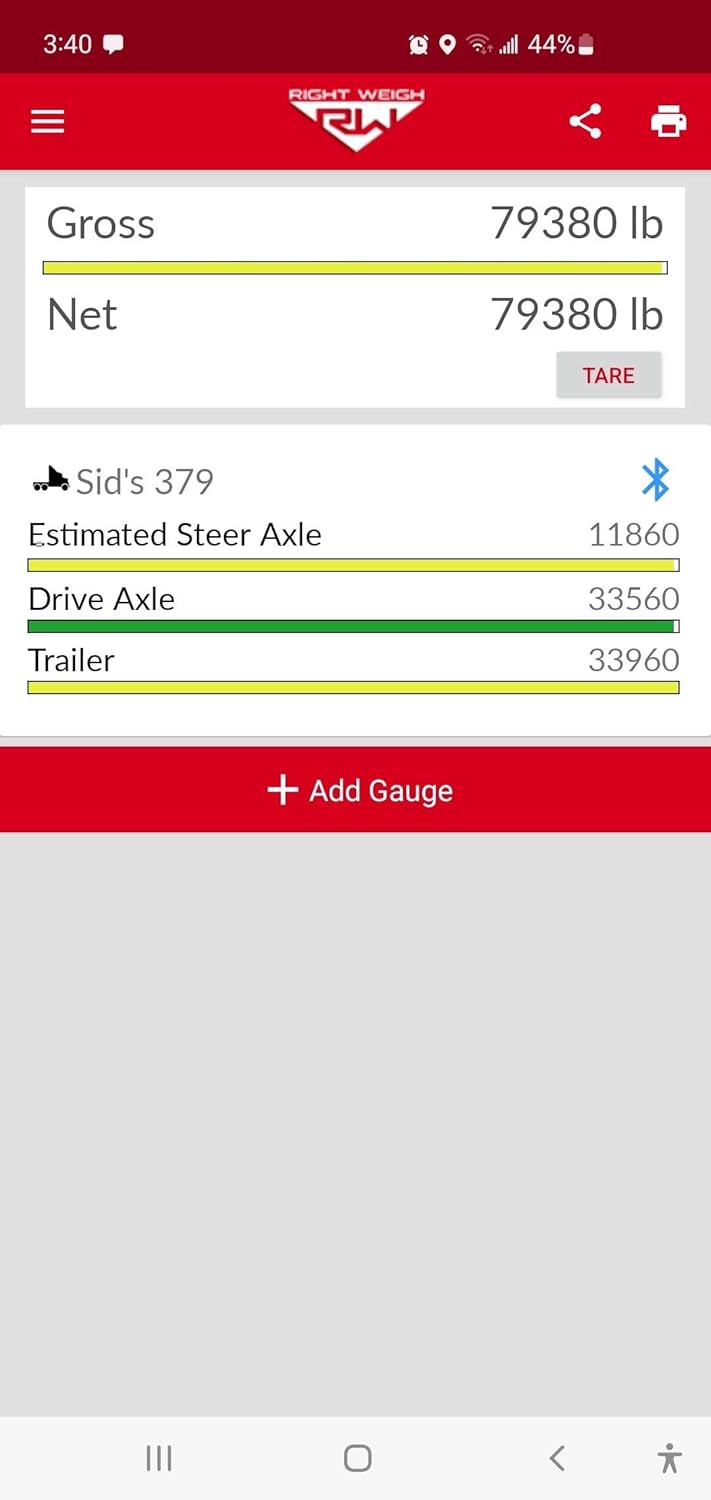
The color touchscreen allows for easy navigation to view current axle group weights and the total gross weight. The display will show estimated steer weight (for tractor-trailer configurations), drive axle weight, and trailer axle weight, along with a calculated total.
5.4 Connectivitat Bluetooth
The 202 Series gauge is Bluetooth enabled, allowing you to view weight information on your smartphone or tablet using the Right Weigh app. Download the official Right Weigh app from your device's app store.
- Assegureu-vos que el Bluetooth estigui habilitat al vostre telèfon intel·ligent o tauleta.
- Open the Right Weigh app.
- The app will scan for nearby Right Weigh devices. Select your 202 Series gauge from the list.
- Once connected, the app will display real-time weight data, mirroring the gauge's display.
The color touchscreen allows for intuitive navigation and display of weight information.
6. Manteniment
The Right Weigh 202 Series digital load scale requires minimal maintenance to ensure continued accurate operation.
- Neteja: Wipe the touchscreen and exterior with a soft, damp cloth. Avoid abrasive cleaners or solvents that could damage the display or housing.
- Air Line Inspection: Periodically inspect air lines for kinks, cracks, or leaks. Repair or replace damaged lines promptly to maintain accuracy.
- Recalibració: If you notice significant discrepancies in weight readings compared to ground scales, or if major changes are made to the vehicle's suspension, perform a recalibration.
7. Solució De Problemes
If you encounter issues with your Right Weigh 202 Series load scale, refer to the following common troubleshooting steps:
- Sense energia: Check the power and ground connections. Ensure the 12V DC power source is active and the fuse (if applicable) is intact.
- Incorrect Weight Readings: Verify that the gauge has been properly calibrated (empty and loaded) at a certified ground scale. Check for air leaks in the sensor lines. Ensure the vehicle is on a level surface when taking readings.
- Problemes de connexió Bluetooth: Ensure Bluetooth is enabled on your mobile device and the Right Weigh app is installed and up to date. Try restarting both the gauge (by cycling vehicle power) and your mobile device.
- La pantalla no respon: If the touchscreen is unresponsive, try cycling power to the gauge. If the issue persists, contact customer support.
8. Especificacions
| Característica | Especificació |
|---|---|
| Número de model | 4 Air Sensor (4 Height Control Valves) |
| Tipus de visualització | Pantalla tàctil a color |
| Connectivitat | Bluetooth habilitat |
| Requisit d'energia | 12V DC |
| Axle Group Monitoring | Up to 4 air sensors / 4 Height Control Valves |
| Unitats de mesura | Lliures (lb) o quilograms (kg) |
| Dimensions del paquet | 12 x 9 x 8 polzades |
| Fabricant | Right Weigh, Inc. |
| ASIN | B07L9JP7K4 |
9. Garantia i Suport
Right Weigh products are manufactured to high-quality standards and are backed by a manufacturer's warranty. For specific warranty details, please refer to the warranty card included with your product or visit the official Right Weigh website. For technical support, troubleshooting assistance, or to inquire about replacement parts, please contact Right Weigh customer service through their official channels.