
Introducció
Thank you for choosing the ChenFec Bluetooth Beanie. This beanie integrates wireless stereo headphones, allowing you to enjoy music and hands-free calls while staying warm. This manual provides detailed instructions for setup, operation, and maintenance to ensure optimal performance and longevity of your device.
Producte acabatview
The ChenFec Bluetooth Beanie is designed for comfort and convenience, featuring:
- Tecnologia Bluetooth V5.0: Ensures stable and wide compatibility with various Bluetooth-enabled devices.
- Llarga vida útil de la bateria: Offers up to 60 hours of standby time and 8–10 hours of continuous music playback.
- Tauler de control fàcil d'utilitzar: Integrated on the left earpiece for easy management of music and calls.
- Built-in Stereo Speakers and Microphone: Provides clear audio for music and hands-free communication.
- Warm and Comfortable Material: Keeps your head warm in cold weather.
Què hi ha a la caixa
En obrir el paquet, hauríeu de trobar els següents elements:
- 1 x ChenFec Bluetooth Beanie
- 1 x cable de càrrega micro USB
- 1 x User Welcome Guide
Vídeo: Desempaquetatge i mésview of the ChenFec Bluetooth Beanie, showing the beanie, charging cable, and welcome guide.
Instruccions de configuració
1. Charging the Beanie
Before first use, fully charge your Bluetooth Beanie.
- Locate the Micro USB charging port on the control panel, typically on the left earpiece.
- Connect the provided Micro USB cable to the beanie's charging port.
- Plug the other end of the USB cable into a USB power source (e.g., computer, wall adapter).
- The LED indicator light will illuminate during charging and turn off or change color when fully charged.
2. Emparellament Bluetooth
Follow these steps to connect your beanie to your device:
- Premeu llargament el botó Reproduir/Pausa (usually about 4 seconds) on the beanie's control panel until the LED indicator light flashes blue and red, indicating pairing mode.
- On your mobile device (smartphone, tablet, etc.), open Bluetooth settings.
- Cerca nous dispositius and select "BT-03S" from the list of available devices.
- Once connected, the LED indicator light will typically show a solid blue or flash blue slowly.

Imatge: Visual guide for connecting the Bluetooth beanie to a smartphone. It illustrates pressing the play button, opening device settings, and selecting "BT-03S" for connection.
Instruccions de funcionament
Funcions del tauler de control
The control panel is located on the left earpiece of the beanie. Familiarize yourself with its buttons:
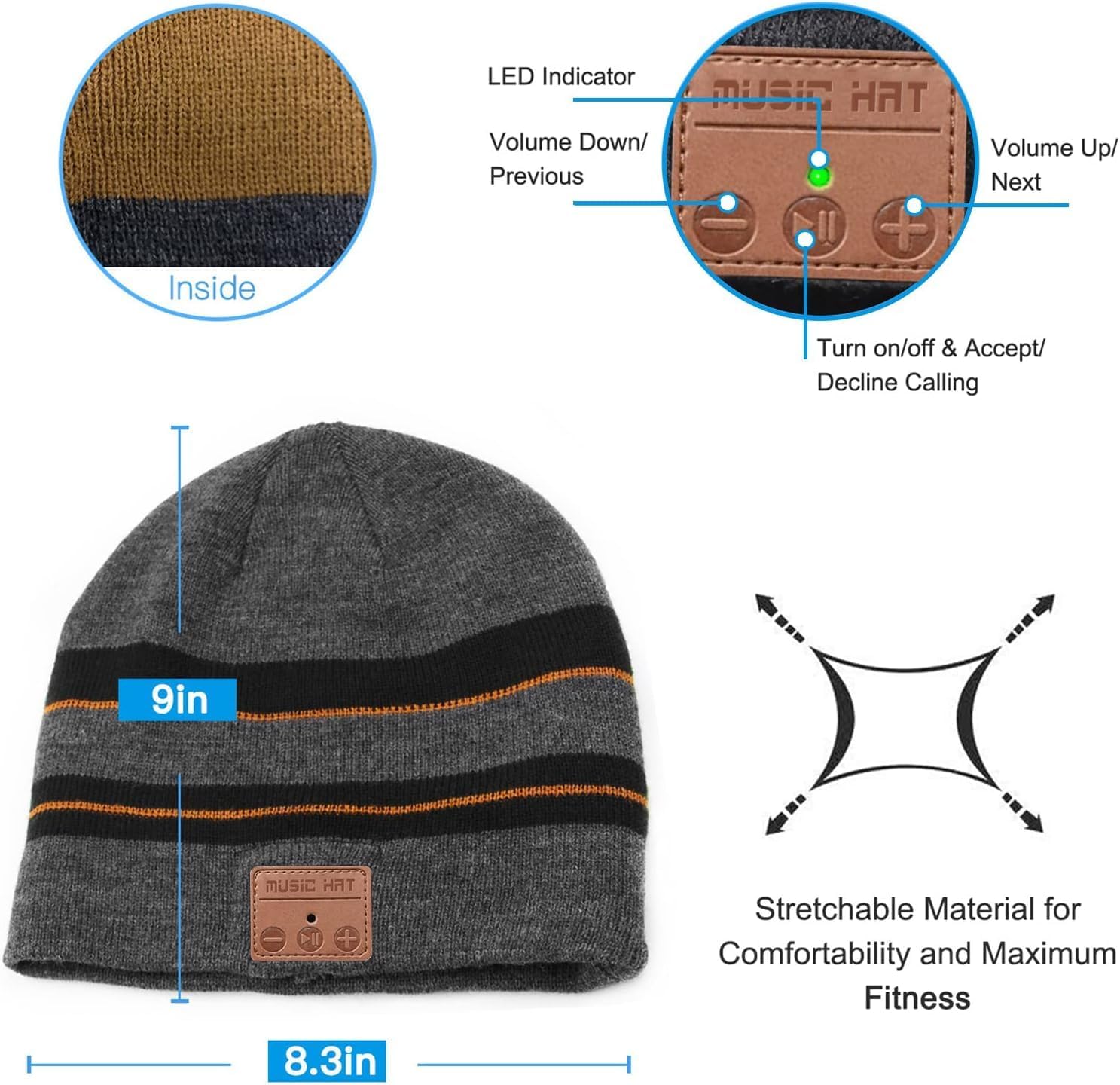
Imatge: Detallada view of the beanie's control panel, highlighting the LED indicator, Volume Down/Previous Track button, Play/Pause/Power/Call button, and Volume Up/Next Track button.
- Encès/apagat: Premeu llargament el botó Reproduir/Pausa.
- Reproduir/pausar música: Premeu breument el botó Reproduir/Pausa.
- Pujar el volum: Premeu breument el botó "+".
- Baixar el volum: Premeu breument el botó "-".
- Pista següent: Premeu llargament el botó "+".
- Pista anterior: Premeu llargament el botó "-".
- Respondre/Finalitzar la trucada: Premeu breument el botó Reproduir/Pausa durant una trucada entrant.
- Rebutja la trucada: Premeu llargament el botó Reproduir/Pausa durant una trucada entrant.
- Torna a marcar l'últim número: Premeu dues vegades el botó Reproduir/Pausa.
Manteniment
Washing Instructions (Detachable Speakers)
To wash your ChenFec Bluetooth Beanie, you must first remove the electronic components:
- Find the pocket between the double layers of the beanie where the control unit and speakers are housed.
- Gently take out one of the speakers from its pocket.
- Remove the other speaker and the main control unit. Ensure all electronic parts are completely removed before washing.
- Hand wash the beanie with mild detergent and cold water. Do not machine wash or tumble dry with electronics inside.
- Allow the beanie to air dry completely before reinserting the electronic components.
- Once dry, carefully reinsert the speakers and control unit into their designated pockets.
Imatge: Step-by-step visual guide demonstrating how to locate the inner pocket, gently remove the speakers, and detach the control unit from the beanie for washing.
Resolució de problemes
- No es pot encendre: Ensure the beanie is fully charged. Connect it to a power source and try again.
- No es pot emparellar amb el dispositiu:
- Ensure the beanie is in pairing mode (LED flashing red and blue).
- Assegureu-vos que el Bluetooth estigui habilitat al vostre dispositiu.
- Check if the beanie is already connected to another device. Disconnect from other devices if necessary.
- Move your device closer to the beanie.
- Sense so o volum baix:
- Increase the volume on both the beanie and your connected device.
- Ensure the beanie is properly paired.
- Check if the speakers are correctly positioned over your ears.
- Connexió intermitent:
- Ensure there are no obstructions between the beanie and your device.
- Stay within the effective Bluetooth range (up to 33 feet).
- Restart both the beanie and your device.
Especificacions
| Característica | Detall |
|---|---|
| Dimensions del producte | 8.66 x 9.44 x 0.59 polzades |
| Pes de l'article | 4.2 unces |
| Número de model de l'article | Gorra Bluetooth |
| Bateries | Necessita 1 bateria de ions de liti (inclosa) |
| Tecnologies de comunicació sense fil | Bluetooth |
| Tecnologies de connectivitat | Bluetooth, Wired (for charging) |
| Característiques especials | Bluetooth connectivity, Built-in headphones and microphone, Volume control |
| Jack d'àudio | Micro USB |
| Color | marró |
| Fabricant | Shenzhen CFZC technology co., LTD |
| Data de primera disponibilitat | 17 de desembre de 2018 |
Informació de seguretat
- Do not expose the electronic components to water or extreme temperatures.
- Avoid disassembling the control unit or speakers.
- Feu servir només el cable de càrrega proporcionat o un equivalent certificat.
- Mantenir fora de l'abast dels nens.
- Do not wear the beanie in situations where hearing external sounds is critical for safety (e.g., driving, operating heavy machinery).
Garantia i Suport
Your ChenFec Bluetooth Beanie comes with a standard manufacturer's warranty. For specific warranty details, please refer to the packaging or contact ChenFec customer support. If you encounter any issues or have questions not covered in this manual, please reach out to our support team for assistance.
Contact information for support can typically be found on the product packaging or the official ChenFec weblloc.