
Introducció
This manual provides essential information for the safe and effective use of your Canon PowerShot SX740 HS Digital Camera. Please read it thoroughly before operating the camera to ensure proper handling and to maximize its features. The Canon PowerShot SX740 HS is a compact digital camera featuring a 20.3-megapixel CMOS sensor, 40x optical zoom, 4K video recording capabilities, and built-in Wi-Fi and Bluetooth connectivity.

Figura 1: Frontal view of the Canon PowerShot SX740 HS Digital Camera with the lens retracted.
Què hi ha a la caixa
Verifiqueu que tots els elements següents estiguin inclosos al vostre paquet:
- Càmera digital Canon PowerShot SX740 HS
- NB-13L Lithium-Ion Battery Pack
- CB-2LH Battery Charger
- Corretja de canell
- Cable HDMI
- Trípode
- SanDisk 64GB SDHC Memory Card
- Premium Camera Case
- High Speed USB Card Reader
Configuració
1. Càrrega i instal·lació de la bateria
- Insert the NB-13L battery into the CB-2LH charger.
- Connecteu el carregador a una presa de corrent. El llum indicador de càrrega mostrarà l'estat de càrrega.
- Un cop estigui completament carregat, traieu la bateria del carregador.
- Obriu la tapa del compartiment de la bateria a la part inferior de la càmera.
- Introduïu la bateria carregada al compartiment, assegurant-vos que estigui correctament orientada. Tanqueu bé la tapa.
2. Inserció de la targeta de memòria
- Obriu la tapa de la ranura de la targeta de memòria, que normalment es troba a prop del compartiment de la bateria.
- Insert the SDHC memory card with the label facing the front of the camera until it clicks into place.
- Tanqueu la tapa de la ranura de la targeta de memòria.
3. Engegada inicial i configuració bàsica
- Premeu el botó d'encesa per encendre la càmera.
- Seguiu les instruccions que apareixen a la pantalla per definir la data, l'hora i l'idioma.
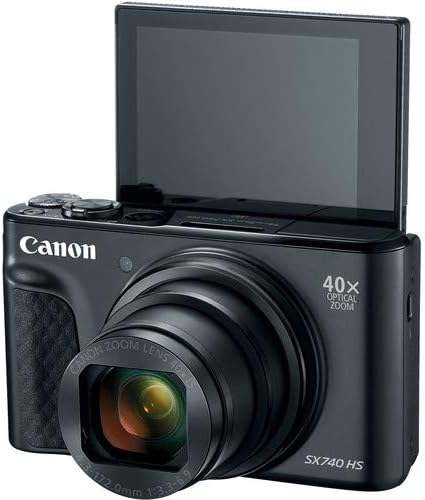
Figura 2: Frontal view of the camera with the LCD screen tilted upwards, ready for use.
Funcionament de la càmera
1. Encendre/apagar
Premeu el botó PODER botó situat a la part superior de la càmera per encendre-la o apagar-la.
2. Modes de tir
The camera offers various shooting modes. Use the mode dial or menu options to select:
- Mode automàtic: For simple point-and-shoot operation, where the camera automatically adjusts settings.
- Mode de programa (P): Permet més control sobre la configuració mentre la càmera defineix l'exposició.
- Modes d'escena: Optimized settings for specific scenarios like portraits, landscapes, or night scenes.
- Feature Assistant: Provides on-screen explanations to help you understand and use various camera features.
3. Operació de zoom
The camera features a 40x optical zoom lens. Use the zoom lever around the shutter button to zoom in (telephoto) or out (wide-angle). Digital zoom can extend the range further, but may reduce image quality.

Figura 3: Frontal view of the camera with the lens extended for zooming.
4. Enfocament
The camera primarily uses autofocus. Point the camera at your subject and half-press the shutter button to focus. The focus frame will appear on the LCD screen. For specific situations, manual focus options may be available in the menu.
5. Gravació de vídeo
To record videos, switch to video mode (if available via a dedicated button or mode dial) or press the dedicated movie recording button. The camera supports 4K video capture. Press the button again to stop recording.
6. Using the Tilting LCD Screen
The 3.0-inch LCD screen can tilt 180 degrees, allowing for easy framing of selfies or shots from various angles. Adjust the screen to your desired position.

Figura 4: Esquena view de la càmera, mostrant la pantalla LCD i la disposició dels controls.
7. Connectivitat Wi-Fi i Bluetooth
The camera features built-in Wi-Fi and Bluetooth for connecting to compatible mobile devices. Download the Canon Camera Connect app to your smartphone or tablet to transfer images, remotely control the camera, and share photos.
- Enable Wi-Fi or Bluetooth in the camera's menu.
- Open the Canon Camera Connect app on your mobile device and follow the pairing instructions.
Manteniment
1. Neteja de la càmera
- Lent: Use a soft, lint-free cloth or a lens brush to gently remove dust. For smudges, use a specialized lens cleaning solution and cloth. Avoid touching the lens directly with your fingers.
- Pantalla LCD: Wipe gently with a soft, dry cloth. Do not use harsh chemicals.
- Cos de la càmera: Use a soft, dry cloth to wipe away dust and dirt.
2. Cura de la bateria
- Guardeu les piles en un lloc fresc i sec quan no les utilitzeu.
- Eviteu descarregar completament la bateria amb freqüència per allargar-ne la vida útil.
- Traieu la bateria de la càmera si no la fareu servir durant un període prolongat.
3. Emmagatzematge
When storing the camera for long periods, ensure it is clean, dry, and stored in a protective case to prevent dust and damage. Remove the battery and memory card.
Resolució de problemes
Si teniu problemes amb la càmera, consulteu les solucions habituals següents:
- La càmera no s'encén: Assegureu-vos que la bateria estigui completament carregada i inserida correctament. Proveu amb una altra bateria carregada si en teniu.
- Error de la targeta de memòria: Check if the memory card is inserted correctly. Format the card (this will erase all data) if the error persists, or try a different compatible SDHC card.
- Les imatges són borroses: Ensure the lens is clean. Check your focus settings and make sure the camera has successfully focused on your subject before taking the shot. Use optical image stabilization for handheld shots.
- Wi-Fi/Bluetooth connection issues: Ensure Wi-Fi/Bluetooth is enabled on both the camera and your mobile device. Restart both devices and try pairing again. Confirm the Canon Camera Connect app is up to date.
- El flaix no s'activa: Check the flash mode settings. Ensure the flash is popped up if it's a manual pop-up type.
For more complex issues or persistent problems, please consult the official Canon support weblloc o contacteu amb el servei d'atenció al client.
Especificacions
| Característica | Especificació |
|---|---|
| Nom del model | PowerShot SX740 HS |
| Resolució del sensor fotogràfic | 20.3 megapíxels |
| Zoom òptic | 40x |
| Format de captura de vídeo | 4K |
| Processador d'imatges | Canon DIGIC 8 |
| Connectivitat | Bluetooth, HDMI, USB, Wi-Fi |
| Tipus de visualització | Tilting LCD |
| Estabilització d'imatge | Òptic |
| Tipus de bateria | Ió de liti (NB-13L) |
| Memòria compatible | SDHC (up to 64 GB) |
| Tir continu | 10 fotogrames per segon |
| Admet File Format | JPEG, RAW |
Garantia i Suport
Your Canon PowerShot SX740 HS Digital Camera is covered by a manufacturer's warranty. Please refer to the warranty card included with your product for specific terms and conditions. For technical support, service, or additional information, please visit the official Canon weblloc web o poseu-vos en contacte directament amb el servei d'atenció al client de Canon. Conserveu el rebut de compra com a comprovant de compra per a reclamacions de garantia.
Recursos en línia: Canon USA Official Weblloc