
1. Introducció
The Cellularline EASYSPORT GPS is a smartwatch designed for sports enthusiasts, enabling comprehensive monitoring of athletic performance. Its integrated GPS allows tracking of workout routes without needing a smartphone. The ultra-bright touch display ensures clear visibility of settings in various outdoor conditions. With IP68 certification, the Easysport GPS is suitable for use during showering or swimming, making it an ideal companion for achieving fitness goals.
2. Contingut del paquet
Si us plau, comproveu que tots els elements siguin presents al paquet:
- Cellularline EASYSPORT GPS Smartwatch
- Charging Cable / Charging Dock
- Manual d'usuari (aquest document)
3. Producte acabatview
Familiarize yourself with the components of your EASYSPORT GPS smartwatch.
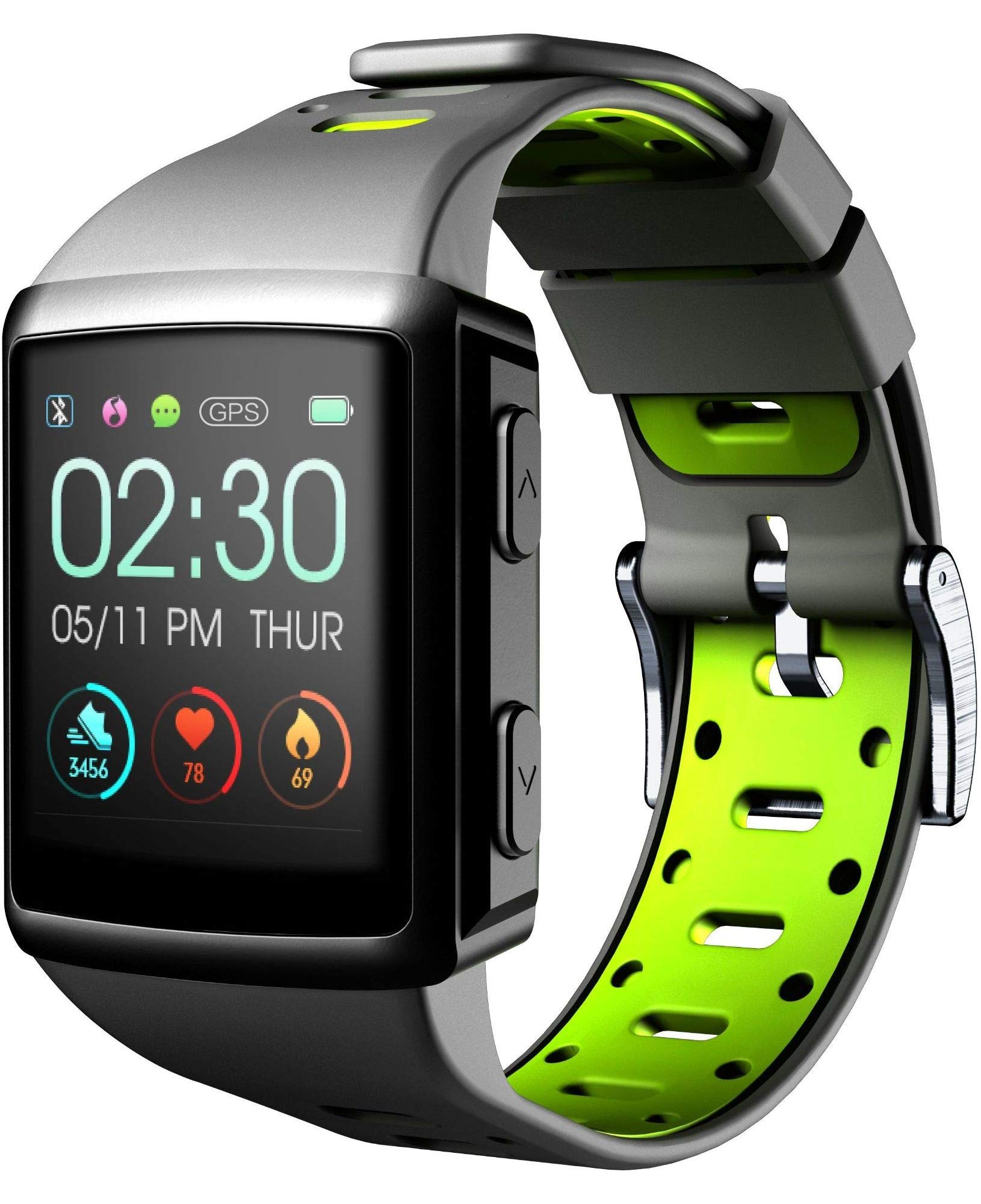
Figura 3.1: Davant view of the smartwatch display, showing current time, date, and activity metrics like steps, heart rate, and calories burned.

Figura 3.2: En angle view of the smartwatch, highlighting the sporty lime and black silicone strap and the physical control buttons on the side.

Figura 3.3: posterior view of the smartwatch, illustrating the integrated heart rate (HR) sensor designed for continuous monitoring during activities.
4. Configuració
4.1 Càrrega del dispositiu
Before first use, fully charge your EASYSPORT GPS smartwatch. A full charge typically takes approximately 3 hours.
- Connect the charging cable to the charging dock.
- Align the smartwatch with the charging dock's contacts until it securely snaps into place.
- Plug the USB end of the charging cable into a compatible USB power adapter (not included) or a computer's USB port.
- La pantalla indicarà l'estat de càrrega.

Figura 4.1: The smartwatch connected to its charging dock, illustrating the charging process.
4.2 Encès/Apagat
- Per encendre: Press and hold the power button (usually located on the side) for a few seconds until the screen lights up.
- Per apagar: Navigate to the settings menu on the smartwatch, locate the "Power Off" option, and confirm. Alternatively, press and hold the power button until a power-off prompt appears, then confirm.
4.3 Emparellament amb un telèfon intel·ligent
To unlock the full potential of your smartwatch, pair it with your smartphone via Bluetooth.
- Assegureu-vos que el Bluetooth estigui habilitat al vostre telèfon intel·ligent.
- Download and install the companion app for Cellularline EASYSPORT GPS from your smartphone's app store.
- Obriu l'aplicació i seguiu les instruccions a la pantalla per crear un compte o iniciar sessió.
- In the app, select "Add Device" or "Pair New Device" and choose "EASYSPORT GPS" from the list of available devices.
- Confirma la sol·licitud d'emparellament tant al teu telèfon intel·ligent com al rellotge intel·ligent si se't demana.
5. Instruccions de funcionament
5.1 Navegació amb pantalla tàctil
The EASYSPORT GPS features a responsive touchscreen for intuitive navigation.
- Llisca cap amunt/avall: Desplaça't pels menús o les notificacions.
- Llisca cap a l'esquerra/dreta: Accediu a diferents widgets o configuracions ràpides.
- Toca: Selecciona un element o confirma una acció.
- Mantén premut: May activate specific functions or customize watch faces.
5.2 Seguiment GPS
The integrated GPS allows you to track your distance and route during outdoor activities without needing your smartphone.
- Start an outdoor activity (e.g., running, cycling) from the sports mode menu on your smartwatch.
- Ensure you are in an open area for optimal GPS signal acquisition.
- The smartwatch will automatically begin tracking your route and distance.
- Review your activity data, including maps, in the companion app after syncing.
5.3 Heart Rate Monitoring (HR Function)
The smartwatch continuously monitors your heart rate, providing valuable insights into your fitness and workout intensity.
- Ensure the smartwatch is worn snugly on your wrist, with the sensor making good contact with your skin.
- Access the heart rate widget or start a workout to view dades de freqüència cardíaca en temps real.
- Historical heart rate data can be vieweditat a l'aplicació complementària.

Figura 5.1: The smartwatch display showing heart rate data (e.g., 78 bpm) along with steps and calories, indicating active monitoring.
5.4 Notifications and Caller ID
Stay connected with full text notifications and caller ID directly on your wrist.
- Once paired with your smartphone, the smartwatch will display incoming call names (Caller ID) and full text of messages from WhatsApp, Twitter, and other social applications.
- Manage notification settings through the companion app on your smartphone.
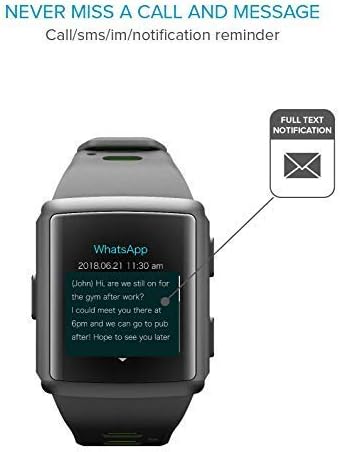
Figura 5.2: The smartwatch screen showing a detailed WhatsApp message notification, demonstrating the full text display feature.
6. Manteniment
6.1 Water Resistance (IP68 Certified)
The EASYSPORT GPS is IP68 certified, meaning it is resistant to dust and can withstand immersion in water up to 1.5 meters for 30 minutes. This makes it suitable for showering and swimming.
- Rinse the smartwatch with fresh water after exposure to chlorinated or salt water.
- No premeu botons sota l'aigua.
- Avoid exposing the device to hot water, steam, or high-pressure water jets.
- The water resistance is not permanent and may decrease over time with normal wear and tear.

Figura 6.1: Visual representation of the smartwatch's IP68 certification, showing its suitability for water-related activities like swimming and showering.
6.2 Neteja
Clean your smartwatch regularly to maintain its appearance and functionality.
- Netegeu la pantalla i la corretja amb un drap suauamp, drap sense pelusa.
- No utilitzeu productes químics ni productes de neteja abrasius.
- Assegureu-vos que els contactes de càrrega estiguin nets i secs abans de carregar.
7. Solució De Problemes
If you encounter issues with your EASYSPORT GPS smartwatch, try the following solutions:
| Problema | Possible solució |
|---|---|
| El dispositiu no s'encén | Ensure the device is fully charged. Connect it to the charging dock and power source for at least 30 minutes. |
| No es pot emparellar amb el telèfon intel·ligent |
|
| El GPS no segueix amb precisió | Assegureu-vos que esteu en una zona oberta a l'aire lliure amb una vista clara view of the sky. Wait for the GPS signal to acquire before starting your activity. |
| No apareixen notificacions |
|
| Heart rate readings are inaccurate | Ensure the smartwatch is worn snugly on your wrist, not too tight or too loose. Clean the sensor on the back of the device. |
8. Especificacions
| Característica | Detall |
|---|---|
| Nom del model | Easysport GPS |
| Número de model | BTEASYSPORTHRGPSK |
| Marca | Línia cel·lular |
| Tecnologia de connectivitat | Bluetooth |
| Comunicació sense fils estàndard | Bluetooth |
| GPS | GPS integrat |
| Tipus de visualització | Pantalla tàctil LCD |
| Mida de la pantalla | 2 polzades |
| Característica especial | Touchscreen, Heart Rate Monitor, GPS |
| Nivell de resistència a l'aigua | IP68 (Waterproof up to 1.5 meters) |
| Material de la banda | Silicona |
| Color | Lime, Black |
| Aplicació compatible | GPS (and companion app for notifications/data sync) |
| Dispositius compatibles | Telèfons intel·ligents |
| Públic destinat | Adult unisex |
9. Garantia i Suport
The Cellularline EASYSPORT GPS Smartwatch comes with a warranty as specified by the manufacturer. For detailed warranty information and support, please refer to the official Cellularline weblloc o poseu-vos en contacte amb el seu servei d'atenció al client.
- Tipus de garantia: Tota la vida
- Per obtenir assistència tècnica, assistència per a la resolució de problemes o reclamacions de garantia, visiteu Cellularline official weblloc or contact their authorized service center.