
1. Introducció
This manual provides instructions for the Superior Electronics Universal Replacement Remote Control, model SUPTRB015. This remote is designed to be a direct replacement for original remote controls of LG, Samsung, and Sony televisions, including Smart TV models. It is ready to use without any programming.
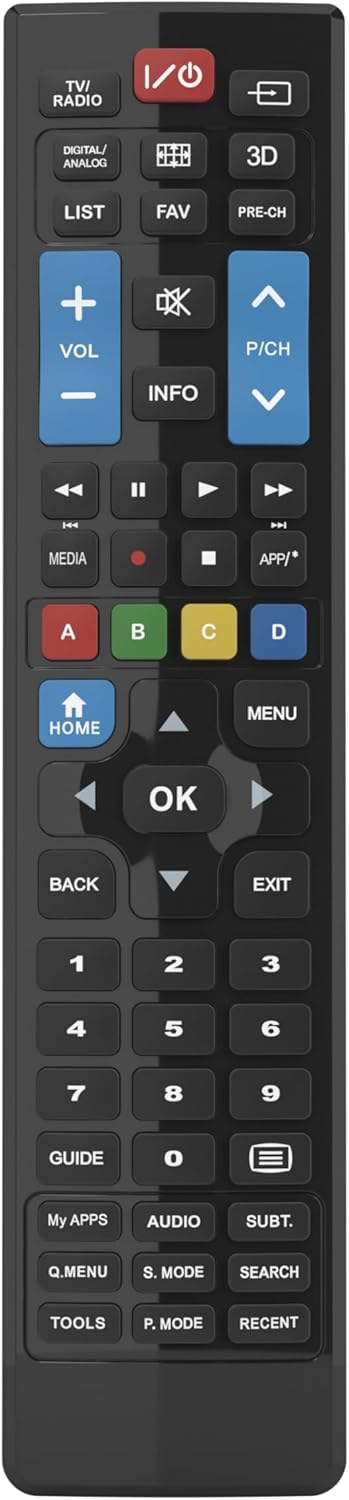
Figure 1: Superior Electronics Universal Remote Control (SUPTRB015)
2. Configuració
2.1. Instal·lació de la bateria
El comandament a distància requereix dues piles AAA (no incloses). Segueix aquests passos per instal·lar-les:
- Localitzeu el compartiment de la bateria a la part posterior del comandament a distància.
- Premeu el pestell i feu lliscar la tapa de la bateria per treure-la.
- Introduïu dues piles AAA, assegurant-vos que els terminals positiu (+) i negatiu (-) coincideixin amb els diagrames de l'interior del compartiment.
- Feu lliscar la coberta de la bateria al seu lloc fins que faci un clic de manera segura.

Figure 2: Battery Compartment on the back of the remote.
2.2. Ús inicial (no cal programació)
This universal remote control is designed for immediate use with LG, Samsung, and Sony televisions. Once batteries are installed, it is ready to operate your TV without any additional programming or code setup.
3. Instruccions de funcionament
The remote control features an intuitive layout with dedicated buttons for common functions and Smart TV access. Refer to Figure 3 for a visual guide to the buttons.

Figure 3: Remote Control Button Layout.
3.1. Funcions bàsiques del televisor
- Botó d'encendre (ⓘ): Encén o apaga el televisor.
- Pujar/baixar volum (VOL +/-): Adjusts the sound volume.
- Channel Up/Down (P/CH +/-): Canvia els canals de televisió.
- Botó Silenciar (🔇): Silencia o activa el so del televisor.
- Botons numèrics (0-9): Selecciona directament els canals de televisió.
- Botó d'entrada/font (⎌): Selecciona la font d'entrada (HDMI, AV, etc.).
3.2. Navigation and Menu Functions
- Directional Pad (Up, Down, Left, Right Arrows): Navega pels menús i les opcions.
- Botó D'acord: Confirma les seleccions.
- Botó HOME: Accesses the TV's main home screen or Smart Hub.
- Botó MENÚ: Opens the TV's main menu.
- Botó TORNAR: Torna a la pantalla o al menú anterior.
- Botó EXIT: Surt del menú o de l'aplicació actual.
- Botó INFO: Mostra informació sobre el programa o l'entrada actual.
3.3. Smart TV and Media Functions
- Dedicated Smart TV Buttons: Access popular streaming apps directly (e.g., Netflix, YouTube, Prime Video). These buttons are typically labeled or have recognizable logos.
- Botons de control multimèdia (Reproduir, Pausa, Aturar, Rebobinar, Avançar ràpidament): Controla la reproducció multimèdia.
- Botons de colors (vermell, verd, groc, blau): These buttons often have specific functions within Smart TV apps or teletext, as indicated on your TV screen.
4. Manteniment
4.1. Neteja del comandament a distància
Per mantenir l'aspecte i la funcionalitat del comandament a distància:
- Netegeu la superfície amb un drap suau i sec.
- Per a la brutícia persistent, lleugerament dampal drap amb aigua o un netejador suau i no abrasiu.
- No utilitzeu productes químics agressius, dissolvents ni esponges de neteja abrasives, ja que poden danyar l'acabat del comandament a distància o els components interns.
4.2. Substitució de la bateria
Replace batteries when the remote's response becomes sluggish or it stops functioning. Always replace both batteries at the same time with new AAA batteries. Do not mix old and new batteries, or different types of batteries.
5. Solució De Problemes
Si teniu problemes amb el comandament a distància, proveu les solucions següents:
- El comandament a distància no respon:
- Check if the batteries are correctly inserted with the correct polarity (+/-).
- Substituïu les piles per unes de noves.
- Assegureu-vos que no hi hagi obstacles entre el comandament a distància i el receptor d'infrarojos del televisor.
- Assegureu-vos que esteu dins del rang de funcionament efectiu (fins a 10 metres).
- Alguns botons no funcionen:
- This remote is designed for LG, Samsung, and Sony TVs. Ensure your TV is one of these brands.
- Some advanced functions or very specific buttons might not be universally supported across all TV models, especially older ones.
- Clean the remote control, especially around the unresponsive buttons, to ensure no debris is preventing contact.
- Smart TV buttons not working:
- Ensure your TV is a Smart TV and is connected to the internet.
- The dedicated Smart TV buttons (e.g., Netflix, YouTube) are compatible with most LG, Samsung, and Sony Smart TV models. If they don't work, you may need to access these apps through your TV's main Smart Hub/Home menu using the navigation buttons.
6. Especificacions
| Marca | Electrònica Superior |
| Nom del model | Superior Electronics Replacement LG/Samsung/Sony SUPTRB015 |
| Característica especial | Universal |
| Color | Negre |
| Màxim de dispositius compatibles | 3 (LG, Samsung, Sony) |
| Dispositius compatibles | Televisió |
| Tecnologia de connectivitat | infrarojos |
| Tipus de controlador | Control de botons |
| Interval màxim | 10 metres |
| Nombre de bateries | 2 AAA (Required) |

Figure 4: Remote Control Dimensions (approx. 20 cm length, 4.5 cm width).
7. Garantia i Suport
Superior Electronics products are manufactured to high-quality standards. For information regarding warranty coverage, please refer to the documentation provided with your purchase or visit the official Superior Electronics website. For technical support or further assistance, please contact Superior Electronics customer service through their official channels.
Conserveu aquest manual per a futures consultes.