
1. Introducció
The Turbosound iNSPIRE iP2000 V2 is a modular column loudspeaker system designed for portable PA applications and high-quality music playback. It features a 1000 Watt power amplifier, a 12-inch subwoofer, 17 neodymium drivers, Klark Teknik Spatial Sound Technology (SST), a digital mixer, reverb, and remote control capabilities via iPhone/iPad, along with Bluetooth audio streaming.
This manual provides essential information for the safe and efficient operation of your iP2000 V2 system. Please read it thoroughly before initial use and retain it for future reference.
2. Instruccions de seguretat
- Font d'alimentació: Connecteu la unitat només al voltatge de xarxa especificat.tage. Assegureu-vos que el cable d'alimentació no estigui malmès ni pinçat.
- Ventilació: No bloquegeu les obertures de ventilació. Assegureu-vos que hi hagi un flux d'aire adequat al voltant de la unitat.
- Humitat: No exposeu la unitat a la pluja ni a la humitat. Eviteu col·locar objectes plens de líquid a sobre de la unitat.
- Calor: Mantingueu la unitat allunyada de fonts de calor com ara radiadors, registres de calor, estufes o altres aparells que produeixin calor.
- Manteniment: No intenteu atendre aquest producte vosaltres mateixos. Consulteu tots els serveis a personal de servei qualificat.
- Col·locació: Ensure the loudspeaker is placed on a stable, level surface to prevent tipping.
3. Contingut del paquet
Verifiqueu que tots els components siguin presents en desembalar-lo:
- iP2000 V2 Subwoofer Unit
- Column Loudspeaker Elements (typically two sections)
- Cable d'alimentació de xarxa
- Manual d'usuari (aquest document)
4. Configuració
4.1 Muntatge
- Place the iP2000 V2 subwoofer unit on a stable, flat surface.
- Carefully insert the first column loudspeaker element into the pole mount socket on top of the subwoofer. Ensure it is securely seated.
- Insert the second column loudspeaker element on top of the first, aligning the connectors.
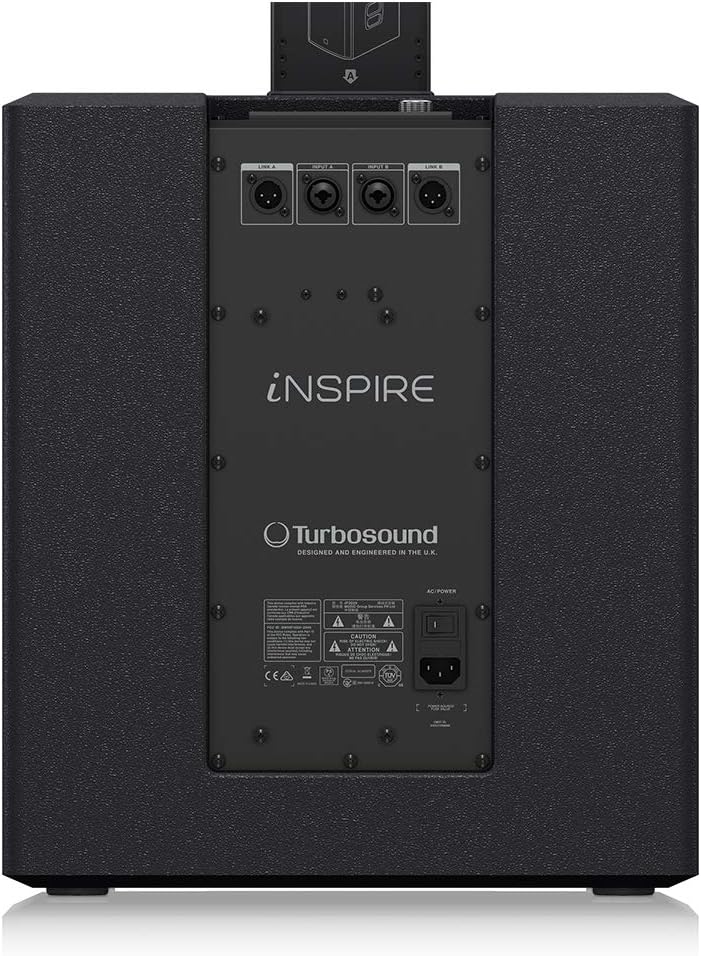
Image: The column loudspeaker elements being inserted into the subwoofer unit, illustrating the modular assembly process.
4.2 Connexió d'alimentació
Connect the supplied mains power cable to the AC IN socket on the rear panel of the subwoofer and then to a suitable power outlet.
4.3 Connexions d'entrada d'àudio
The iP2000 V2 features a 3-channel digital mixer. Connect your audio sources (microphones, instruments, mixing consoles) to the XLR/TRS combo input jacks on the rear panel. Use balanced XLR cables for optimal audio quality.

Image: The rear panel of the iP2000 V2 subwoofer, displaying the various input and output connectors, including XLR/TRS combo jacks and the AC power input.
5. Funcionament
5.1 Tauler de control acabatview
The control panel, located on the top of the subwoofer, provides access to all system settings and features.

Imatge: Un primer pla view of the iP2000 V2 control panel, featuring the LCD display, a large rotary encoder for navigation, and buttons labeled PROCESS, SETUP, EXIT, ENTER, and Bluetooth.
- Visualització: Shows current settings and menu options.
- Codificador rotatiu: Gireu per navegar pels menús i ajustar els paràmetres. Premeu per confirmar les seleccions.
- Botó PROCÉS: Accesses sound processing presets and equalization settings.
- Botó SETUP: Enters the system setup menu for advanced configurations.
- Botó EXIT: Returns to the previous menu or the main display.
- Botó ENTER: Confirma una selecció o entra a un submenú.
- Botó Bluetooth: Inicia el mode d'emparellament Bluetooth.
5.2 Digital Mixer
The integrated 3-channel digital mixer allows for individual gain control and recall of settings for each input. Use the rotary encoder and display to adjust input levels and apply effects like reverb.
5.3 Klark Teknik Spatial Sound Technology (SST)
The iP2000 V2 utilizes Klark Teknik's SST to create immersive 3D acoustic environments. This technology enhances the sound dispersion, providing a consistent audio experience for both the audience and performers across a wide area.
Transmissió d'àudio Bluetooth 5.4
To stream audio wirelessly:
- Premeu el botó Bluetooth del tauler de control per activar el mode d'emparellament. La icona de Bluetooth de la pantalla parpellejarà.
- On your Bluetooth-enabled device (smartphone, tablet), search for available devices and select "iP2000 V2".
- Once paired, the Bluetooth icon on the iP2000 V2 display will become solid, and you can stream audio from your device.
5.5 Control remot
The iP2000 V2 can be remotely controlled via a dedicated app available for iPhone and iPad. Download the app from the respective app store and follow the in-app instructions to connect and control your loudspeaker system.
6. Manteniment
- Neteja: Feu servir un drap suau i sec per netejar l'exterior de la unitat. No utilitzeu productes de neteja abrasius ni dissolvents.
- Emmagatzematge: When not in use, store the loudspeaker in a dry, dust-free environment. Consider using protective covers for transport and storage.
- Inspecció: Reviseu periòdicament els cables i les connexions per detectar qualsevol signe de desgast o dany.
7. Solució De Problemes
| Problema | Causa possible | Solució |
|---|---|---|
| Sense poder | Cable d'alimentació desconnectat; presa de corrent defectuosa; fusible de la unitat fundit. | Check power cable connection; try a different outlet; contact service for fuse replacement. |
| Sense sortida de so | Input cables disconnected; input gain too low; master volume too low; incorrect source selection. | Verify all audio cable connections; increase input gain and master volume; ensure correct input is selected on the mixer. |
| Bluetooth no connectat | iP2000 V2 not in pairing mode; device too far; interference. | Press Bluetooth button to enter pairing mode; move device closer; reduce interference sources. |
| So distorsionat | Input signal too high (clipping); faulty cable. | Reduce input gain; try a different audio cable. |
8. Especificacions
- Model: iP2000 V2
- Tipus d'altaveu: Modular Column Loudspeaker with Subwoofer
- Potència de sortida màxima: 1000 watts
- Diàmetre del subwoofer: 12 polzades
- Conductors: 17 Neodymium Drivers (16 x 2.75" MF, 1 x 1" HF Compression Driver)
- Spatial Sound Technology: Klark Teknik SST (3D Acoustic Environments)
- Digital Mixer: 3-Channel with Gain Setting Recall
- Connectivitat: Bluetooth Audio Streaming, Remote Control via iPhone/iPad
- Mode de sortida d'àudio: 3D Spatial Audio
- Tipus de muntatge: Autònom
- Font d'alimentació: Elèctric amb cable
9. Garantia i Suport
For detailed warranty information and support, please refer to the official manufacturer's weblloc:
http://www.music-group.com/warranty.aspx
You may also contact Turbosound customer support for assistance with product operation, troubleshooting, or service inquiries.