
Other M99
M99 Sport Smart Watch User Manual
Model: M99 | Brand: Other
1. Introducció
Thank you for choosing the M99 Sport Smart Watch. This device is designed to enhance your daily life with its advanced features, including Bluetooth calling, a full touch screen, and comprehensive health monitoring. It boasts an IP68 water resistance rating, making it suitable for various activities. This manual provides essential information on setting up, operating, maintaining, and troubleshooting your new smart watch to ensure optimal performance.

Figura 1: Frontal view of the M99 Sport Smart Watch, showcasing la seva pantalla rodona i la corretja negra.
2. Configuració
2.1 Càrrega del dispositiu
Before first use, fully charge your M99 Smart Watch. Connect the magnetic charging cable to the charging points on the back of the watch and plug the USB end into a compatible power adapter (not included). A full charge typically takes approximately 2 hours.

Figure 2: The smart watch display showing the charging indicator and estimated battery life. The watch offers 5-7 days of daily use and up to 30 days of standby time on a single charge.
2.2 Encès/Apagat
- Encès: Premeu i manteniu premut el botó lateral durant uns segons fins que la pantalla s'il·lumini.
- Apagar: Mantingueu premut el botó lateral i, a continuació, seleccioneu l'opció "Apagar" a la pantalla.
2.3 Instal·lació i emparellament de l'aplicació
To unlock the full functionality of your M99 Smart Watch, download the companion application on your smartphone. The watch is compatible with both Android and iOS operating systems.
- Scan the QR code provided in the watch's packaging or search for the designated app in your phone's app store.
- Instal·leu i obriu l'aplicació.
- Activa el Bluetooth al teu telèfon intel·ligent.
- In the app, follow the on-screen instructions to search for and pair with your M99 Smart Watch. Ensure the watch is powered on and within Bluetooth range.
- Confirma la sol·licitud d'emparellament tant al telèfon com al rellotge.
3. Instruccions de funcionament
3.1 Navegació bàsica
- Llisca cap amunt/avall: Navega pels menús i les notificacions.
- Llisca cap a l'esquerra/dreta: Accediu a funcions ràpides o a diferents pantalles de dades.
- Toca: Selecciona un element o confirma una acció.
- Botó lateral: Premeu per tornar a la pantalla d'inici o activar el dispositiu.
3.2 Funcionalitat de trucades Bluetooth
The M99 Smart Watch allows you to make and receive calls directly from your wrist when connected to your smartphone via Bluetooth.
- Fer trucades: Access the dial pad or contact list on the watch to initiate a call.
- Recepció de trucades: Quan rebi una trucada, el rellotge mostrarà l'identificador de la persona que truca. Pots respondre o rebutjar la trucada directament des de la pantalla del rellotge.
- Historial de trucades: View your recent call history on the watch.

Figure 3: Illustrations of the M99 Smart Watch's Bluetooth call features, including the dial pad, recent call log, and options to answer or reject incoming calls.
3.3 Vigilància de la salut
The M99 Smart Watch is equipped with sensors to monitor various health metrics. Please note: This device is not a medical device and should not be used for medical diagnosis or treatment.
- Monitorització de la freqüència cardíaca: Seguiment en temps real de la freqüència cardíaca.
- Monitorització de la pressió arterial: Proporciona lectures estimades de la pressió arterial.
- Monitorització d'oxigen en sang: Mesura els nivells de saturació d'oxigen a la sang (SpO2).
- Monitorització del son: Fa un seguiment dels teus patrons i la qualitat del son.
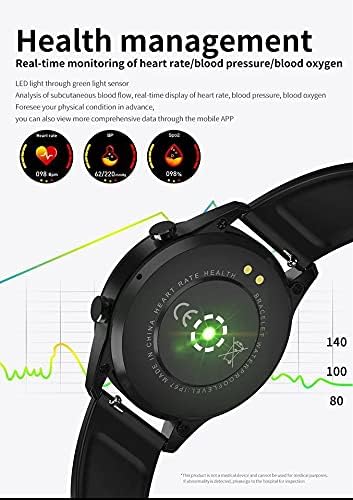
Figure 4: The back of the M99 Smart Watch showing the green light sensors used for heart rate, blood pressure, and blood oxygen monitoring.
3.4 Monitorització de l'activitat
Track your daily activities and workouts:
- Modes esportius: Select from various sports modes to track specific activities.
- Comptador de passos: Registra els teus passos diaris, la distància i les calories cremades.
- Recordatori sedentari: Notifies you to move after periods of inactivity.
3.5 Notificacions i altres funcions
Receive notifications from your smartphone directly on your watch. The M99 also includes:
- Recordatori de missatge: Get alerts for incoming messages.
- Despertador: Set alarms to wake you up or remind you of tasks.
- Cerca el telèfon: Use your watch to locate your paired smartphone.
- Bluetooth Pictures: Controla la càmera del teu telèfon de forma remota.
- Suport multi-idioma: The watch supports various languages.

Figura 5: Un excésview of the M99 Smart Watch's capabilities, including low power consumption, Bluetooth phone, activity monitoring, heart rate, sleep, blood pressure, blood oxygen, alarm clock, find phone, and multi-language support.
4. Manteniment
4.1 Resistència a l'aigua (IP68)
The M99 Smart Watch has an IP68 water resistance rating, meaning it is protected against dust ingress and can withstand immersion in water up to 1.5 meters for 30 minutes. It is suitable for daily use, such as hand washing, rain, and shallow swimming. However, it is not recommended for hot showers, saunas, or diving, as steam and high water pressure can compromise the seals.
4.2 Neteja i cura
- Netegeu el rellotge i la corretja regularment amb un drap suau i sec.amp tela.
- Eviteu utilitzar productes químics agressius, dissolvents de neteja o detergents forts, ja que poden danyar l'acabat i els segells del rellotge.
- Assegureu-vos que els contactes de càrrega estiguin nets i secs abans de carregar-los per evitar la corrosió.
4.3 Emmagatzematge
When not in use for extended periods, store the watch in a cool, dry place away from direct sunlight and extreme temperatures. It is advisable to charge the watch periodically to maintain battery health.
5. Solució De Problemes
- El rellotge no s'encén: Ensure the watch is fully charged. If it still doesn't turn on, try holding the side button for an extended period (10-15 seconds) for a forced restart.
- No es pot emparellar amb el telèfon intel·ligent:
- Assegura't que el Bluetooth estigui activat al telèfon i al rellotge.
- Make sure the watch is within the phone's Bluetooth range (typically 10 meters).
- Reinicieu tant el rellotge com el telèfon.
- Clear the Bluetooth cache on your phone or forget the device and try pairing again.
- Lectures de salut inexactes:
- Assegureu-vos de portar el rellotge ben ajustat al canell, ni massa ajustat ni massa fluix.
- Mantingueu neta la zona del sensor a la part posterior del rellotge.
- Eviteu el moviment excessiu durant les lectures.
- Notificacions que no apareixen:
- Comprova els permisos de notificacions a la configuració del telèfon per a l'aplicació complementària.
- Assegura't que l'aplicació s'executa en segon pla i que la configuració d'optimització de la bateria no la tanqui.
- Verify that notifications are enabled within the companion app for specific applications.
6. Especificacions
| Característica | Descripció |
|---|---|
| Número de model | M99 |
| Mostra | 1.28 inch Full Touch Screen |
| Connectivitat | Bluetooth |
| Sistema operatiu compatible | Android i iOS |
| Mida de la memòria RAM | 128 MB |
| Resistència a l'aigua | IP68 |
| Durada de la bateria (ús diari) | 5-7 dies |
| Durada de la bateria (mode d'espera) | Fins a 30 dies |
| Temps de càrrega | Aprox. 2 hores |
| Material | Plàstic |
| Pes de l'article | 120 g |
| Característiques especials | Lightweight, Bluetooth Call, Health Monitoring (HR, BP, SpO2), Activity Tracking |
7. Garantia i Suport
Specific warranty terms and conditions for the M99 Sport Smart Watch may vary depending on your region and point of purchase. Please refer to the warranty information provided at the time of purchase or contact your retailer for details.
For technical support or further assistance, please contact the seller or manufacturer through the contact information provided with your product or on their official website. Ensure you have your model number (M99) and proof of purchase ready when seeking support.
Ask a question about this manual
Ask about setup, troubleshooting, compatibility, parts, safety, or missing instructions. Manuals+ will review the question and use this page’s manual context to help answer it.