
Introducció
This manual provides essential instructions for the safe and efficient operation of your KINGONE K9 Super Bass Portable Bluetooth Speaker. Please read this manual thoroughly before using the device and retain it for future reference.
The KINGONE K9 is a portable Bluetooth speaker featuring powerful stereo sound, multiple input options including Bluetooth, MicroSD, and AUX, and convenient touch controls. It also supports hands-free calling and NFC for easy pairing.
Contingut del paquet
Assegureu-vos que tots els elements siguin presents al paquet:
- KINGONE K9 Super Bass Portable Bluetooth Speaker
- Cable de càrrega micro USB
- Cable d'àudio de 3.5 mm (AUX)
- Manual d'usuari (aquest document)
Producte acabatview
The KINGONE K9 speaker is designed for portability and high-quality audio. Below is an image illustrating the speaker and its packaging.
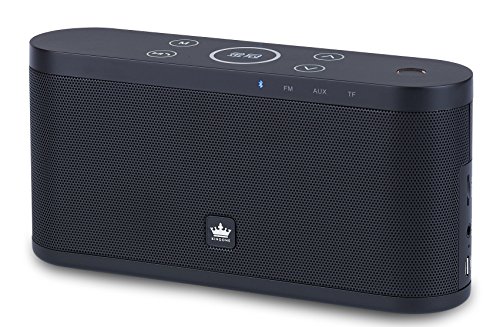
Image: The KINGONE K9 Super Bass Portable Bluetooth Speaker (left) shown next to its metallic-finish packaging (right).
Característiques principals:
- Connectivitat Bluetooth 4.0: Supports A2DP, AVRCP, HFP, HSP profiles for stable wireless audio streaming.
- Suport NFC: For quick and easy pairing with compatible devices.
- Múltiples modes de reproducció: Bluetooth, MicroSD card, and AUX input.
- Trucades mans lliures: Built-in microphone for answering phone calls.
- Controls tàctils: Intuitive touch-sensitive buttons for volume, track navigation, and play/pause.
- So estèreo potent: 2 x 5W output for a rich audio experience.
- Disseny portàtil: Compact dimensions and a 2200mAh battery for extended use.
Controls i Funcions
The speaker features touch-sensitive controls located on the top panel. Familiarize yourself with these controls for optimal use:
- Botó d'encesa: Manteniu premut durant 3 segons per encendre/apagar.
- Botó Reproduir/Pausa: Tap to play or pause audio. During a call, tap to answer/end.
- Puja el volum (+): Tap to increase volume.
- Baixar el volum (-): Tap to decrease volume.
- Pista següent (>>): Toqueu per passar a la pista següent.
- Pista anterior (<<): Toqueu per anar a la pista anterior.
- Botó de mode (M): Tap to switch between Bluetooth, MicroSD, and AUX input modes.
Configuració
1. Carregant l’altaveu
- Connecteu el cable de càrrega micro USB al port de càrrega de l'altaveu.
- Connect the other end of the USB cable to a DC 5V USB power source (e.g., computer USB port, USB wall adapter).
- El llum indicador de càrrega s'il·luminarà.
- La càrrega completa sol trigar de 4 a 5 hores. L'indicador lluminós canviarà o s'apagarà un cop carregat completament.
2. Encès / apagat
- To power on, press and hold the Power button for approximately 3 seconds until you hear an audible prompt.
- To power off, press and hold the Power button for approximately 3 seconds until you hear an audible prompt.
3. Emparellament Bluetooth
- Assegureu-vos que l'altaveu estigui encès i en mode Bluetooth (indicat per un LED blau intermitent). Si no, premeu el botó "M" (Mode) per canviar al mode Bluetooth.
- Activa el Bluetooth al teu dispositiu mòbil (telèfon intel·ligent, tauleta, ordinador portàtil).
- Cerca available Bluetooth devices. You should see "KINGONE K9" in the list.
- Select "KINGONE K9" to pair. Once paired, the speaker will emit an audible confirmation, and the blue LED will stop flashing and remain solid.
- L'altaveu es tornarà a connectar automàticament al darrer dispositiu emparellat quan s'engegui, si el Bluetooth del dispositiu està actiu i dins del seu abast.
4. NFC Pairing (for compatible devices)
- Assegureu-vos que l'NFC estigui activat al vostre telèfon intel·ligent o tauleta compatible.
- Power on the KINGONE K9 speaker.
- Gently tap your NFC-enabled device against the NFC area on the speaker (refer to the speaker's diagram for exact location, usually marked with an NFC logo).
- Your device will prompt you to confirm the pairing. Accept the connection.
5. Connexió d'entrada AUX
- Connect one end of the 3.5mm audio cable to the AUX port on the speaker.
- Connecteu l'altre extrem del cable d'àudio de 3.5 mm a la presa d'auriculars o al port de sortida d'àudio del dispositiu d'àudio extern.
- Press the 'M' (Mode) button on the speaker to switch to AUX mode.
- Audio will now play through the speaker from your connected device. Control playback and volume from your external device.
6. MicroSD Card Playback
- Insert a MicroSD (TF) card with MP3 audio files a la ranura per a targetes MicroSD de l'altaveu.
- Press the 'M' (Mode) button to switch to MicroSD card mode.
- L'altaveu començarà a reproduir àudio automàticament files de la targeta.
- Use the speaker's touch controls for play/pause, next track, and previous track.
Instruccions de funcionament
Control de volum
- Tap the 'Volume Up (+)' button to increase the volume.
- Tap the 'Volume Down (-)' button to decrease the volume.
Track Navigation (Bluetooth/MicroSD modes)
- Tap the 'Next Track (>>)' button to skip to the next song.
- Tap the 'Previous Track (<<)' button to go back to the beginning of the current song or to the previous song.
Trucades mans lliures
- Quan rebi una trucada mentre està connectat via Bluetooth, l'altaveu sonarà.
- Tap the 'Play/Pause' button to answer the incoming call.
- Tap the 'Play/Pause' button again to end the call.
- To reject an incoming call, press and hold the 'Play/Pause' button for a few seconds.
Manteniment
- Mantingueu l'altaveu allunyat de l'aigua, la humitat i les temperatures extremes.
- Netegeu l'altaveu amb un drap suau i sec. No utilitzeu productes de neteja abrasius ni dissolvents.
- Eviteu deixar caure l'altaveu o sotmetre'l a impactes forts.
- Quan no l'utilitzeu durant períodes prolongats, guardeu l'altaveu en un lloc fresc i sec i carregueu-lo periòdicament per mantenir la bateria en bon estat.
Resolució de problemes
- Sense energia:
- Assegureu-vos que l'altaveu estigui completament carregat.
- Comproveu si el cable de càrrega i l'adaptador de corrent estan danyats.
- Sense so:
- Augmenta el volum tant de l'altaveu com del dispositiu connectat.
- Ensure the speaker is in the correct input mode (Bluetooth, AUX, MicroSD).
- If using Bluetooth, ensure the device is properly paired and within the 10-meter operating range.
- If using AUX, ensure the 3.5mm cable is securely connected to both devices.
- Desconnexió Bluetooth:
- Move your device closer to the speaker.
- Assegureu-vos que no hi hagi obstacles entre l'altaveu i el dispositiu.
- Turn off and on Bluetooth on your device, then try re-pairing.
- Els controls no responen:
- Assegureu-vos que l'altaveu estigui encès.
- Try restarting the speaker.
Especificacions
| Model | K9 |
| Versió Bluetooth | 4.0 |
| Bluetooth Profiles | A2DP, AVRCP, HFP, HSP |
| Interval d'operació | Fins a 10 metres (33 peus) |
| Potència de sortida | 2 x 5 W (Total 10 W) |
| Configuració del canal | 2.0 estèreo |
| Opcions d'entrada | Bluetooth, MicroSD (TF Card), AUX (3.5mm) |
| Capacitat de la bateria | 2200 mAh |
| Entrada de càrrega | DC 5V (Micro USB) |
| Temps de càrrega | 4-5 hores |
| Dimensions (L x A x A) | 22 cm x 12 cm x 15 cm (aprox.) |
| Pes | 1.5 kg (aprox.) |
| Mètode de control | Toca |
| Característiques especials | NFC, Hands-free Calling, Portable |
Informació de seguretat
- Do not expose the speaker to direct sunlight, heat sources, or open flames.
- Do not disassemble, repair, or modify the device yourself. This may void the warranty and cause damage.
- Mantenir fora de l'abast dels nens.
- Desfeu-vos del producte i de la bateria de manera responsable d'acord amb la normativa local.
- Eviteu escoltar música a volums alts durant períodes prolongats per evitar danys auditius.
Garantia i Suport
Per obtenir informació sobre la garantia o assistència tècnica, consulteu la documentació proporcionada en el moment de la compra o poseu-vos en contacte amb el vostre distribuïdor. Conserveu el comprovant de compra per a reclamacions de garantia.