
1. Introducció
The ENHANCE Infiltrate USB Gaming Mouse is designed for an enhanced gaming experience, featuring customizable controls and dynamic lighting. This manual provides instructions for setting up, operating, and maintaining your gaming mouse.

Image: The ENHANCE Infiltrate USB Gaming Mouse, showcasing its ergonomic design and sleek black finish.
2. Característiques clau
- Multi-Color LED Light: Dynamic rainbow lighting pattern illuminates the mouse accents, slowly fading between colors.
- Ajust de DPI sobre la marxa: Quickly select from 4 DPI intervals (800, 1200, 1600, 2400) using the dedicated DPI button.
- Ergonomic Design with Smooth Rubber Grip: The top features a sleek rubber coating, while the side includes two extra thumb buttons with a textured grip for comfort.
- 6 botons programables: Customize your gaming experience with additional buttons for macros or specific functions.
- Disseny Plug & Play: Connects easily to your PC via a gold-plated USB connector for immediate use.
- Cable trenat resistent: Designed for longevity and resistance to tangles.
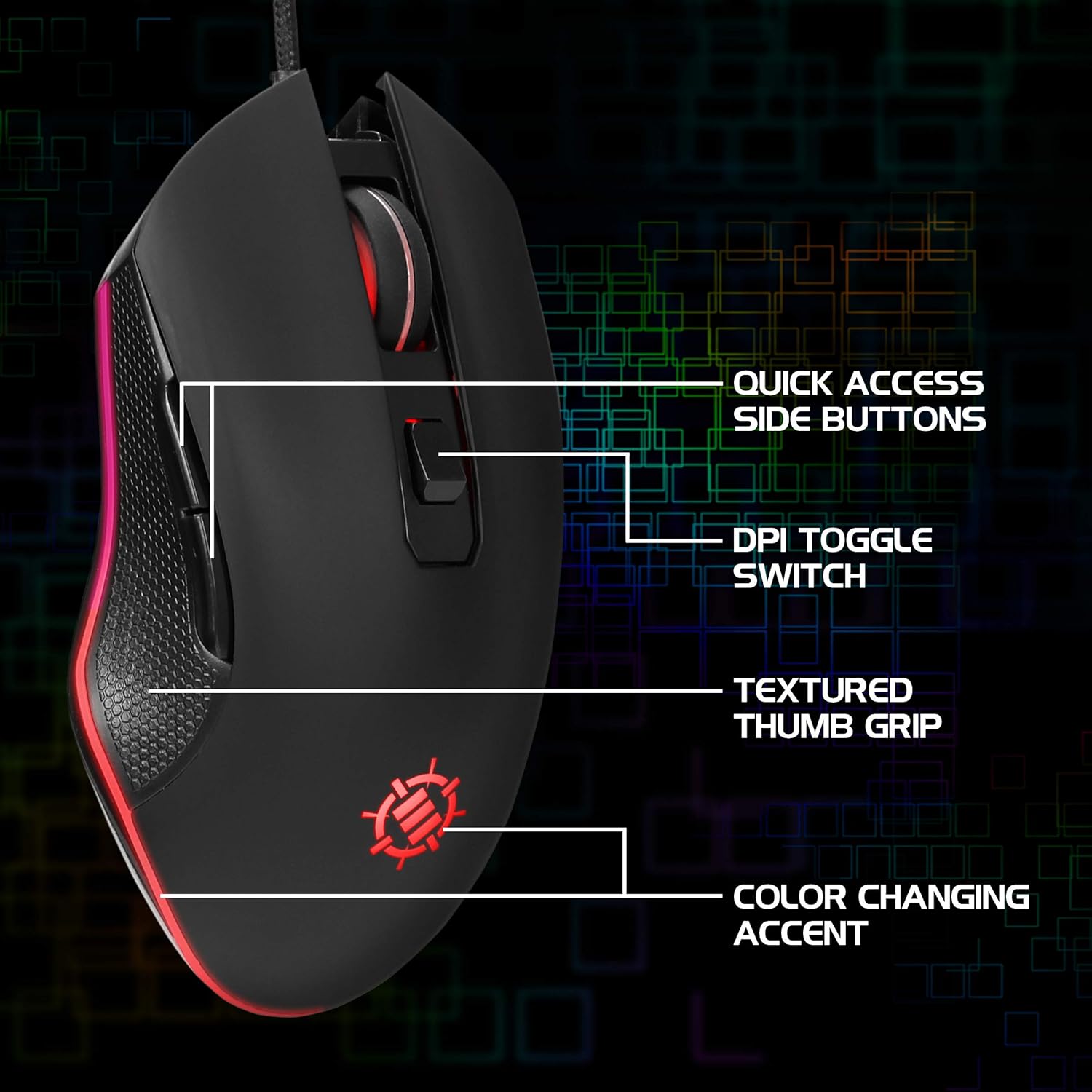
Image: Diagram highlighting key features of the ENHANCE Infiltrate mouse, including quick access side buttons, DPI toggle switch, textured thumb grip, and color-changing accent.
3. Guia de configuració
- Desempaqueta el ratolí: Carefully remove the ENHANCE Infiltrate USB Gaming Mouse from its packaging.
- Connexió a l'ordinador: Locate an available USB port on your computer. Insert the gold-plated USB connector of the mouse into the USB port. The mouse is plug-and-play, so no additional drivers are typically required for basic functionality.
- Reconeixement inicial: El vostre sistema operatiu hauria de detectar i instal·lar automàticament els controladors necessaris. Aquest procés pot trigar uns instants.
- Verificació de la funcionalitat: Once installed, the mouse's LED lighting should activate, and you should be able to move the cursor on your screen.

Imatge: Un primer pla view of the heavy-duty braided cable and gold-plated USB connector, ready for connection.
For a visual guide on connecting and using the mouse, please watch the official product video below.
Video: Official product video demonstrating the ENHANCE Infiltrate USB Gaming Mouse, including connection and feature highlights.
4. Instruccions de funcionament
4.1 Funcions bàsiques del ratolí
The ENHANCE Infiltrate mouse functions like a standard USB mouse. It includes left-click, right-click, and a scroll wheel with a clickable middle button.

Image: A hand demonstrating the ergonomic grip of the ENHANCE Infiltrate Gaming Mouse on a gaming mouse pad.
4.2 Ajust de DPI
The mouse features a dedicated DPI button located behind the scroll wheel. Press this button to cycle through four preset DPI (Dots Per Inch) sensitivity levels:
- 800 DPI
- 1200 DPI
- 1600 DPI
- 2400 DPI
Each DPI setting may correspond to a different LED color on the mouse, providing visual feedback for the current sensitivity level.
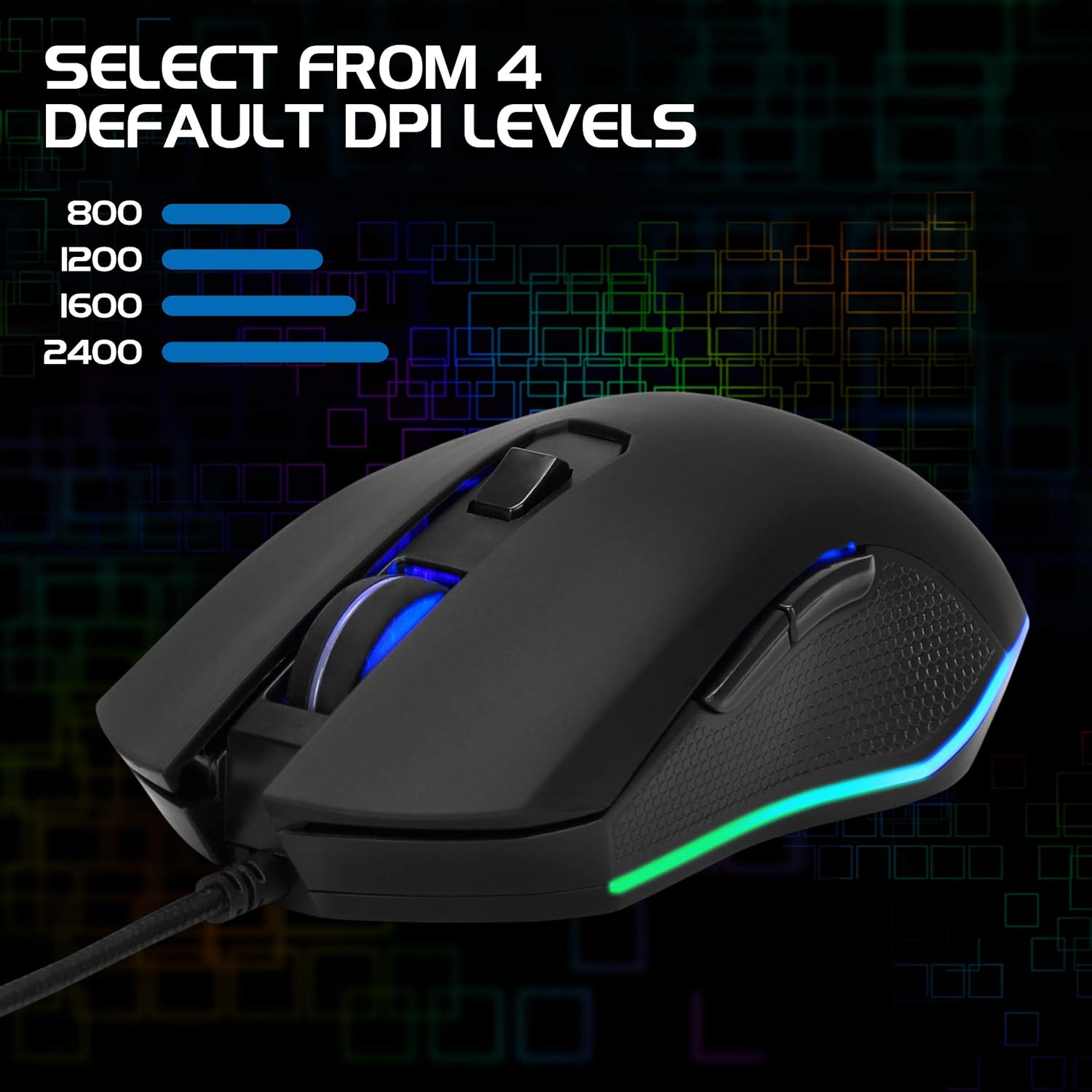
Image: The ENHANCE Infiltrate Gaming Mouse illustrating the four selectable DPI levels (800, 1200, 1600, 2400) and their corresponding LED indicators.
4.3 Multi-Color LED Lighting
The Infiltrate mouse features dynamic multi-color LED lighting that cycles through a rainbow pattern. This lighting is automatic and provides an aesthetic enhancement to your gaming setup.

Image: The ENHANCE Infiltrate Gaming Mouse displaying its sleek color-changing lighting accents.

Imatge: Side profile of the ENHANCE Infiltrate Gaming Mouse, showcasing its blue LED lighting.
4.4 Botons programables
The mouse includes 6 programmable buttons. For advanced customization and programming of these buttons, please refer to your operating system's mouse settings or any third-party software compatible with generic gaming mice. Specific software for this model is not provided by the manufacturer.
5. Manteniment
- Neteja: Feu servir un drap suau i sec per netejar la superfície del ratolí. Per a la brutícia persistent, netegeu lleugerament.amp es pot utilitzar un drap, assegurant-se que no entri humitat als components interns.
- Sensor òptic: Periodically clean the optical sensor area on the underside of the mouse with a cotton swab to ensure optimal tracking performance.
- Cura del cable: Eviteu doblegar bruscament o estirar excessivament el cable USB trenat per evitar danys.
- Emmagatzematge: Quan no l'utilitzeu, guardeu el ratolí en un entorn net i sec, allunyat de temperatures extremes.
6. Solució De Problemes
- El ratolí no respon:
- Assegureu-vos que el cable USB estigui ben connectat a un port USB que funcioni de l'ordinador.
- Prova de connectar el ratolí a un port USB diferent.
- Reinicieu l'ordinador.
- Test the mouse on another computer to determine if the issue is with the mouse or your system.
- El moviment del cursor és erràtic o irregular:
- Netegeu el sensor òptic de la part inferior del ratolí.
- Assegureu-vos que feu servir el ratolí sobre una superfície neta i no reflectant. Es recomana l'ús d'una estora de ratolí.
- Check for any software conflicts or outdated drivers on your computer.
- Els llums LED no funcionen:
- Verifiqueu que el ratolí estigui connectat correctament a l'ordinador.
- The LED lighting is automatic and should activate upon connection. If not, try a different USB port or computer.
- DPI Button Not Changing Sensitivity:
- Ensure the mouse is fully recognized by your computer.
- Premeu fermament el botó DPI.
7. Especificacions
| Marca | MILLORAR |
| Número de model | ENINMNU100BOEW |
| Plataforma de maquinari | Mac, PC |
| Pes de l'article | 4.4 unces |
| Dimensions del producte (LxWxH) | 4.92 x 2.68 x 1.56 polzades |
| Color | Negre |
| Font d'alimentació | Elèctric amb cable (USB) |
| Tecnologia de connectivitat | USB |
| Característica especial | Disseny ergonòmic |
| Tecnologia de detecció de moviment | Òptic |
| Nivells de DPI | 800, 1200, 1600, 2400 |
8. Garantia i Suport
The ENHANCE Infiltrate USB Gaming Mouse is backed by a 3 any de garantia del fabricant. Aquesta garantia cobreix els defectes de materials i de mà d'obra en ús normal.
For warranty claims or technical support, please contact ENHANCE customer service. Keep your proof of purchase for warranty validation.
For further assistance, visit the official ENHANCE Gaming weblloc web o contacteu amb els seus canals d'assistència.