
1. Introducció
The VoltEdge TX20 Universal Headset is designed for versatile audio experiences, whether at home or on the go. Its lightweight construction, combined with a retro aesthetic, provides comfort and style. Engineered with stainless steel and polypropylene, the TX20 offers a flexible and durable design. Custom dynamic drivers deliver quality in-game sound, while the directional in-line microphone ensures clear chat audio. Convenient volume control and an instant push-pull mute function are integrated for ease of use.
Característiques principals:
- Disseny lleuger i còmode
- Retro-inspired style
- In-line microphone with minimal feedback
- Custom dynamic audio drivers
- Robust and durable build quality

Figure 1: VoltEdge TX20 Universal Headset packaging, showing the headset and key features.
2. Components del producte
The VoltEdge TX20 headset consists of the following main components:
- Diadema ajustable: Per a un ajustament segur i còmode.
- On-Ear Earcups: Featuring custom dynamic drivers and soft ear cushions.
- Unitat de control en línia: Contains volume control and a mute switch for the microphone.
- Directional In-line Microphone: Per a una comunicació de veu clara.
- Conector d'àudio de 3.5 mm: For universal connectivity to various devices.
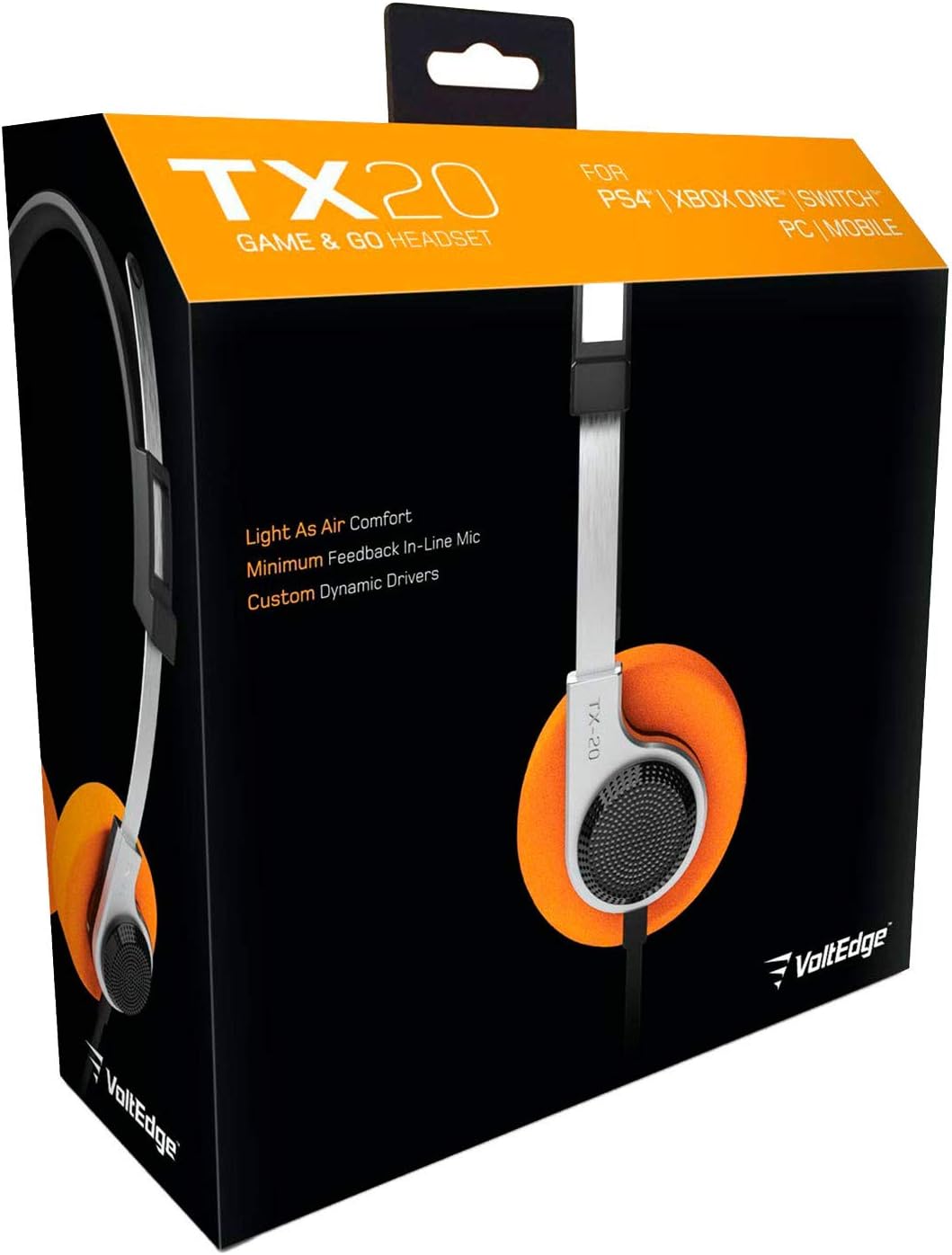
Figura 2: Frontal view of the VoltEdge TX20 Headset, showing the headband and earcups.

Figura 3: lateral view of the VoltEdge TX20 Headset, highlighting the earcup design and TX-20 branding.
3. Instruccions de configuració
3.1 Connexió dels auriculars
- Locate the 3.5mm audio jack on your gaming console controller (e.g., PS4, Xbox One), Nintendo Switch, PC, or mobile device.
- Insert the 3.5mm audio jack from the VoltEdge TX20 headset firmly into the audio port of your device.
- Assegureu-vos que la connexió sigui segura per evitar interrupcions d'àudio.
3.2 Ajust per comoditat
- Gently extend or retract the headband to fit your head size.
- Position the earcups so they rest comfortably over your ears. The on-ear design should provide a snug fit without excessive pressure.
4. Instruccions de funcionament
4.1 Control de volum
The VoltEdge TX20 features an in-line control unit on the cable. To adjust the audio volume, slide the volume wheel up or down. Increase the volume by sliding it up, and decrease it by sliding it down.
4.2 Funció de silenciament del micròfon
To mute the microphone, locate the push-pull switch on the in-line control unit. Push the switch to mute your microphone, preventing your voice from being transmitted. Pull the switch to unmute the microphone and resume voice communication.
4.3 Ús general
- Jocs: Connect to your console or PC for immersive game audio and clear team chat.
- Música i vídeo: Enjoy high-quality audio for music playback and video streaming on compatible devices.
- Mobile Calls: Use the integrated microphone for hands-free calls on your smartphone.
5. Manteniment
5.1 Neteja
- Feu servir un drap suau i sec per netejar les superfícies exteriors dels auriculars.
- Per als auriculars, netegeu suaument amb un drap lleugerament damp drap si cal i assequeu-lo immediatament.
- Avoid using harsh chemicals, solvents, or abrasive cleaners, as these can damage the headset's finish.
5.2 Emmagatzematge
- Guardeu els auriculars en un lloc fresc i sec, allunyat de la llum solar directa i de temperatures extremes.
- Avoid tangling the cable. Consider coiling it loosely when not in use.
5.3 Precaucions de manipulació
- No exposeu els auriculars a l'aigua ni a una humitat excessiva.
- Eviteu deixar caure els auriculars ni sotmetre'ls a impactes forts.
- Do not attempt to disassemble or modify the headset, as this will void any warranty.
6. Solució De Problemes
6.1 Sense so o volum baix
- Comprova la connexió: Ensure the 3.5mm audio jack is fully inserted into the device's audio port.
- Ajustar el volum: Verify that the in-line volume control on the headset is turned up. Also, check the volume settings on your connected device.
- Prova en un altre dispositiu: Connect the headset to a different device (e.g., smartphone, another PC) to determine if the issue is with the headset or the original device.
6.2 Microphone Not Working or Unclear
- Check Mute Switch: Ensure the in-line microphone mute switch is in the "unmute" position.
- Configuració del dispositiu: Verify microphone input settings on your connected device (e.g., PC sound settings, console audio settings). Ensure the TX20 is selected as the input device.
- Configuració de l'aplicació: Some applications (e.g., gaming chat, video conferencing) have their own microphone settings. Check these as well.
- Prova en un altre dispositiu: As with audio, test the microphone on another device to isolate the problem.
6.3 Àudio estàtic o distorsionat
- Comprova la connexió: A loose connection can cause static. Re-insert the 3.5mm jack firmly.
- Interferència: Move away from other electronic devices that might be causing interference.
- Qualitat de la font: Ensure the audio source itself is of good quality.
7. Especificacions tècniques
| Número de model | TX20UNIV |
| Tecnologia de connectivitat | Wired (3.5mm Audio Jack) |
| Material | Stainless Steel, Polypropylene |
| Forma de l'auricular | A l'orella |
| Tipus de controlador d'àudio | Conductor dinàmic |
| Tipus de control | In-line Volume Control, Mute Switch |
| Característica especial | Control de silenci |
| Pes de l'article | 7 unces (aproximadament 0.44 lliures) |
| Dimensions del producte (LxWxH) | 7.5 x 3 x 7.9 polzades |
| Usos recomanats | Gaming, Music, Video, Mobile Calls |
| UPC | 857288008033 |
8. Informació de la garantia
VoltEdge products are manufactured to high-quality standards. For specific warranty details regarding your TX20 Universal Headset, please refer to the warranty card included with your purchase or visit the official VoltEdge weblloc web. Conserveu el comprovant de compra per a qualsevol reclamació de garantia.
9. Atenció al client
If you encounter any issues or have questions not covered in this manual, please contact VoltEdge customer support. You can typically find contact information on the product packaging, the official VoltEdge weblloc web o a través del vostre distribuïdor.
For the most up-to-date support resources, please visit the official VoltEdge weblloc: VoltEdge Store on Amazon