
1. Introducció
The VIOTEK GFT27DB is a 27-inch WQHD Gaming Monitor designed to deliver a superior visual experience for gaming and general use. It combines the rapid response times of a TN panel with enhanced color reproduction, offering a 115% sRGB color gamut. This monitor supports a 144Hz refresh rate and a 1ms response time, ensuring smooth and fluid motion.
Key features include AMD FreeSync with Low Framerate Compensation (LFC) and compatibility with NVIDIA G-SYNC (when manually enabled), providing tear-free and stutter-free gameplay. It also integrates GamePlus Crosshairs for improved aiming accuracy and FPS/RTS optimization for enhanced visibility in dark scenes. The GFT27DB offers flexible connectivity options, including multiple HDMI ports and DisplayPort, along with built-in speakers and a 3.5mm audio output.
2. Informació de seguretat
Si us plau, llegiu atentament totes les instruccions abans d'utilitzar aquest producte. Conserveu aquest manual per a referència futura.
- No exposeu el monitor a la pluja, la humitat ni a temperatures extremes.
- Assegureu-vos d'una ventilació adequada al voltant del monitor per evitar el sobreescalfament.
- Feu servir només l'adaptador de corrent que s'inclou amb el monitor.
- Eviteu col·locar objectes pesats al cable d'alimentació.
- Clean the monitor screen and casing with a soft, lint-free cloth. Do not use abrasive cleaners or solvents.
- No intenteu desmuntar ni reparar el monitor vosaltres mateixos. Encarregueu tot el manteniment a personal qualificat.
- Position the monitor on a stable, level surface to prevent it from falling.
3. Contingut del paquet
Verify that all items listed below are present and in good condition upon opening the package:
- VIOTEK GFT27DB 27-Inch WQHD Gaming Monitor
- Suport de monitor (base i coll)
- Cable d'alimentació
- Cable DisplayPort
- Manual d'usuari (aquest document)
- Cargols per al muntatge del suport
4. Muntatge i muntatge
4.1 Muntatge del suport
- Traieu amb cura el monitor del seu embalatge i col·loqueu-lo cara avall sobre una superfície suau i neta per evitar ratllades.
- Attach the stand neck to the monitor's rear panel. Secure it with the provided screws.
- Connect the stand base to the stand neck and tighten the thumb screw or screws from the bottom.
- Aixequeu amb cura el monitor muntat i col·loqueu-lo sobre una superfície plana i estable.
Note: The monitor also supports VESA mount (75x75mm) for wall mounting or alternative monitor stands.
4.2 Connexió a un dispositiu
The GFT27DB monitor offers multiple input options. Choose the appropriate cable for your device (PC, gaming console, etc.).
- DisplayPort (DP): Connect one end of the DisplayPort cable to the DP port on the monitor and the other end to the DP output on your computer's graphics card. This connection is recommended for achieving the full 144Hz refresh rate and enabling FreeSync/G-SYNC compatibility.
- HDMI: Connect an HDMI cable to one of the three HDMI ports on the monitor and the other end to the HDMI output on your device.
- Sortida d'àudio: For external audio, connect headphones or external speakers to the 3.5mm audio jack on the monitor.

Figure 4.2.1: Monitor Connectivity Ports. This image displays the rear of the monitor, highlighting the audio output, three HDMI ports (one 2.0, two 1.4), and one DisplayPort 1.2 input, illustrating the various connection options available for the monitor.
4.3 Encès
- Connecteu el cable d'alimentació a l'entrada d'alimentació del monitor i després a una presa de corrent.
- Press the power button, typically located on the bottom right side of the monitor, to turn it on. The power indicator light will illuminate.
- Ensure your connected device is also powered on. The monitor should automatically detect the input signal.
5. Funcionament del monitor
5.1 Menú de visualització en pantalla (OSD)
The OSD menu allows you to adjust various monitor settings. The control buttons are located on the bottom right side of the monitor. Press any button to activate the OSD, then use the navigation buttons to select and adjust settings.
- Botó d'encesa: Encén/apaga el monitor.
- Botó de menú: Obre el menú OSD principal.
- Botons de navegació: Used to navigate through menu options and adjust values (Up/Down, Left/Right).
- Botó de sortida: Surt del menú o de l'OSD actual.
5.2 Display Features and Settings
The GFT27DB offers advanced display technologies for an optimized viewexperiència.
- Resolució i freqüència d'actualització: The monitor supports WQHD (2560x1440) resolution at up to 144Hz refresh rate. Ensure your graphics card and cable support these specifications.
- Gamma de colors: Experience vibrant and accurate colors with the 115% sRGB color gamut.
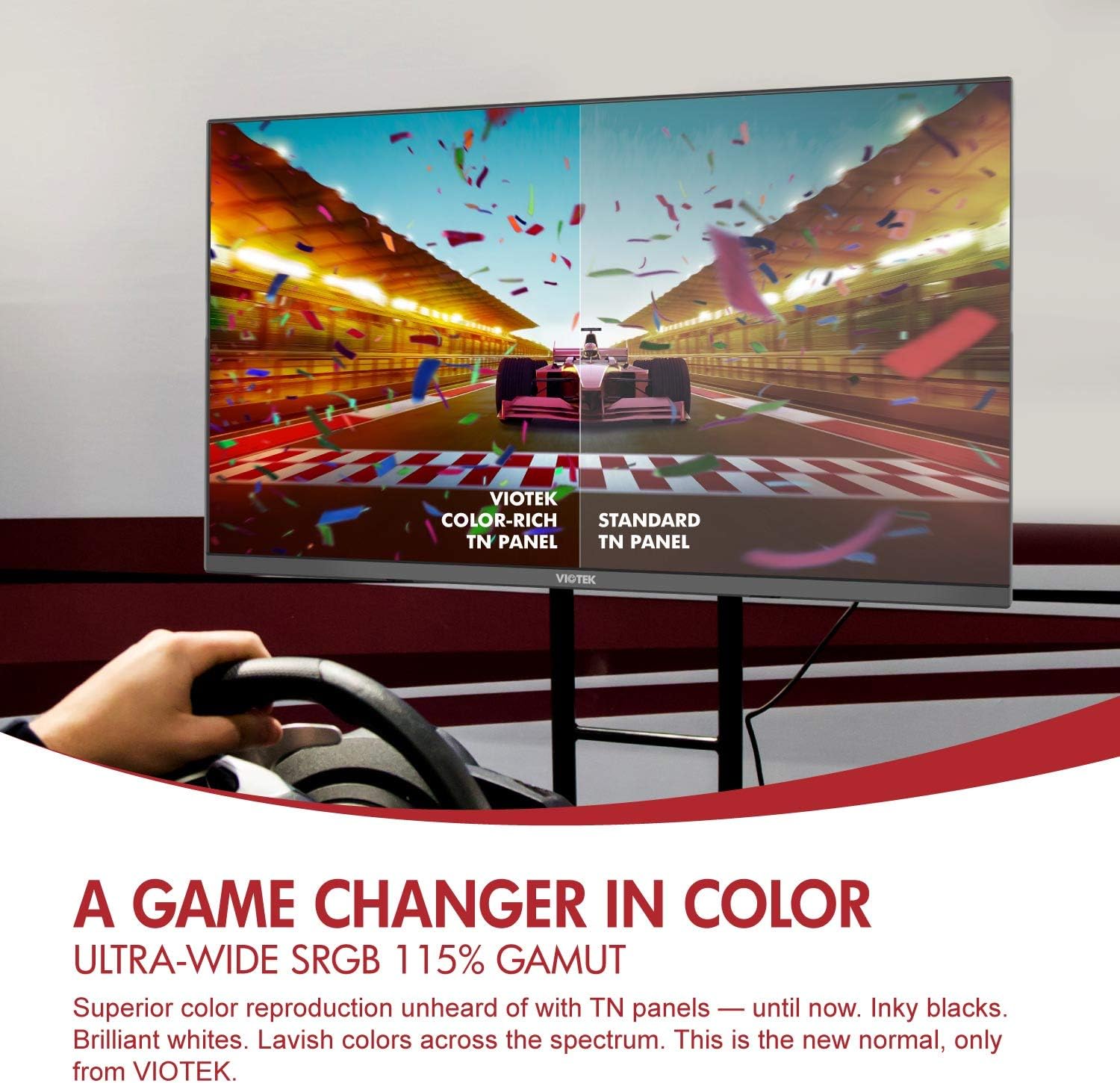
Figure 5.2.1: Enhanced Color Reproduction. This image illustrates the superior color depth and richness of the Viotek GFT27DB's TN panel compared to a standard TN panel, showcasing its 115% sRGB color gamut.
- Temps de resposta: Enjoy a rapid 1ms response time, reducing motion blur and ghosting in fast-paced scenes.

Figure 5.2.2: Blistering Speeds. This image highlights the monitor's performance capabilities, featuring WQHD (1440p) resolution, 144Hz refresh rate, and 1ms response time, with a visual comparison between 144Hz and 60Hz refresh rates in a racing game.
- Mode de llum blava baixa: Reduce eye strain during prolonged use by activating the Low Blue Light mode in the OSD.
- Imatge dins d'imatge (PIP) / Imatge per imatge (PBP): Display content from two different sources simultaneously. Configure these modes via the OSD menu.
5.3 Característiques del joc
- AMD FreeSync & G-SYNC Compatibility: Enable FreeSync in the OSD menu to synchronize the monitor's refresh rate with your AMD GPU's frame rate, eliminating screen tearing and stuttering. For NVIDIA GPUs, G-SYNC compatibility can be manually enabled through NVIDIA's control panel after enabling FreeSync on the monitor.
- GamePlus Crosshairs: Activate built-in crosshairs from the OSD to assist with aiming in games, even those that disable in-game crosshairs.

Figure 5.3.1: Built-in GamePlus Crosshairs. This image demonstrates the GamePlus crosshairs feature, showing various crosshair options overlaid on a first-person shooter game, designed to enhance aiming accuracy.
- FPS/RTS Optimization: Adjust display settings to enhance visibility in specific game genres, bringing out details in dark areas.
6. Manteniment i cura
- Neteja de la pantalla: Netegeu suaument la pantalla amb un drap suau i sense borrissol. Per a marques difícils, netegeu suaument.ampNetegeu el drap amb aigua o un netejador de pantalles especialitzat. No ruixeu líquid directament sobre la pantalla.
- Neteja de la Casing: Feu servir un drap suau i sec per netejar el monitor casing. Eviteu utilitzar productes químics agressius o materials abrasius.
- Emmagatzematge: Si guardeu el monitor durant un període prolongat, desconnecteu tots els cables i guardeu-lo en un lloc fresc i sec, preferiblement en el seu embalatge original.
7. Solució De Problemes
| Problema | Causa possible | Solució |
|---|---|---|
| No hi ha imatge a la pantalla | Power cable not connected; Input source not selected; Device not powered on. | Ensure power cable is securely connected. Check if the input source is correctly selected in the OSD. Verify the connected device is powered on. |
| La imatge és borrosa o distorsionada | Resolució incorrecta; Problema amb el cable. | Set the display resolution to 2560x1440. Check cable connections and try a different cable if necessary. |
| No hi ha so dels altaveus | Volume too low; Audio output not selected; Cable issue. | Increase monitor volume via OSD. Ensure audio output is set to the monitor on your device. Check audio cable if using external speakers. |
| Screen tearing or stuttering (with FreeSync/G-SYNC enabled) | FreeSync/G-SYNC not properly configured; Outdated graphics drivers. | Ensure FreeSync is enabled in the monitor's OSD. For G-SYNC, verify it's enabled in NVIDIA Control Panel. Update graphics drivers to the latest version. Ensure DisplayPort connection is used for G-SYNC compatibility. |
| Image is off-center | Auto-adjustment needed. | Access the OSD and look for an "Auto Adjust" or "Auto Setup" option to automatically center the image. |
8. Especificacions
| Característica | Detall |
|---|---|
| Model | GFT27DB |
| Mida de la pantalla | 27 polzades |
| Tipus de panell | TN |
| Resolució | 2560x1440 (WQHD) |
| Freqüència d'actualització | 144 Hz |
| Temps de resposta | 1 mil·lisegon |
| Relació d'aspecte | 16:9 |
| Gamma de colors | 115% sRGB |
| Relació de contrast | 1000:1 |
| Connectivitat | 3x HDMI (1x 2.0, 2x 1.4), 1x DisplayPort 1.2, 1x 3.5mm Audio Out |
| Compatibilitat VESA | 75x75mm |
| Dimensions (amb suport) | 61.72 x 20.07 x 44.45 cm |
| Pes | 4.4 kg |
| Característiques especials | Adaptive Sync (FreeSync & G-SYNC Compatible), GamePlus Crosshairs, FPS/RTS Optimization, Low Blue Light, PIP/PBP |
9. Garantia i Suport
The VIOTEK GFT27DB monitor is backed by a Garantia limitada de 3 anysAquesta garantia cobreix els defectes de fabricació i garanteix que el producte funcioni tal com s'espera.
VIOTEK also offers a Pixel Perfect Promise, addressing concerns related to dead pixels. For specific details regarding the Pixel Perfect Promise, please refer to the official VIOTEK weblloc o contacteu amb el servei d'atenció al client.
For technical assistance, warranty claims, or general inquiries, please contact our expert customer support team. Our team is fully staffed in the U.S. and ready to assist you.
Informació de contacte:
- Weblloc: www.viotek.com
- Correu electrònic: support@viotek.com
- Telèfon: 1-800-XXX-XXXX
Please have your monitor's model number (GFT27DB) and serial number ready when contacting support to expedite the process.