
Introducció
This manual provides detailed instructions for the operation and maintenance of your NIA X3 Wireless Bluetooth Headphones. Please read this manual thoroughly before using the product to ensure proper function and longevity.
Què hi ha a la caixa
- NIA X3 Wireless Bluetooth Headphones
- Cable de càrrega USB
- Manual d'usuari (aquest document)
- Ear Cushions (pre-installed or spare, as applicable)
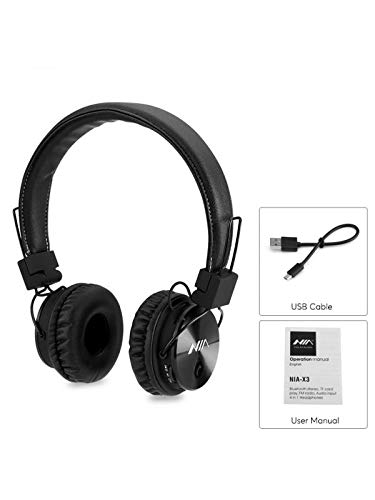
Figura 1: Contents of the NIA X3 package, including the headphones, a USB charging cable, and the user manual.
Producte acabatview
Familiarize yourself with the various parts of your NIA X3 headphones.

Figura 2: Davant view of the NIA X3 headphones, showcasinels auriculars i la diadema.
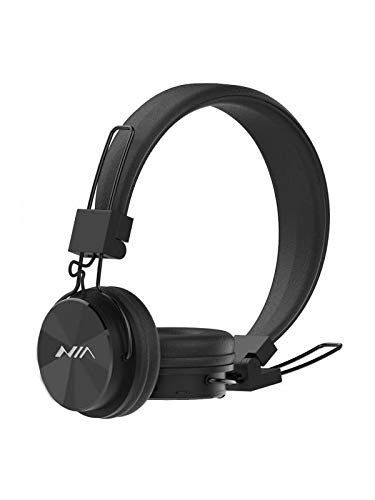
Figura 3: lateral view of the NIA X3 headphones, highlighting the adjustable headband and earcup design.
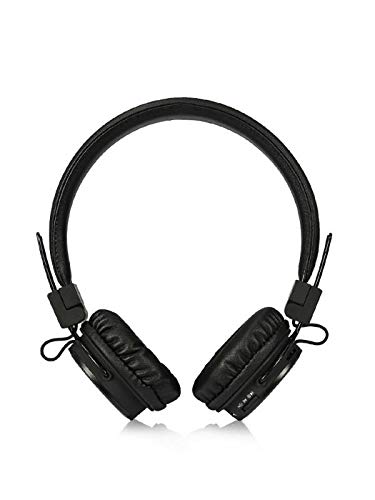
Figura 4: A dalt view of the NIA X3 headphones, showing the overall structure and earcups.
Configuració
1. Càrrega dels auriculars
- Connect the micro USB end of the charging cable to the charging port on the headphones.
- Connect the standard USB end of the cable to a USB power adapter (5V DC, 500mA recommended) or a computer's USB port.
- The LED indicator will illuminate to show charging status.
- La càrrega completa sol trigar aproximadament 2 hores.
- Once fully charged, the LED indicator will change or turn off (refer to specific product LED behavior).
2. Encendre/apagar
- Per encendre: Press and hold the Power button (usually multi-function button) for a few seconds until the LED indicator lights up and an audible prompt is heard.
- Per apagar: Press and hold the Power button for a few seconds until the LED indicator turns off and an audible prompt is heard.
3. Emparellament Bluetooth
- Assegureu-vos que els auriculars estiguin apagats.
- Premeu i manteniu premut el botó d'engegada durant aproximadament 5-7 segons fins que l'indicador LED parpellegi alternativament en vermell i blau, cosa que indica el mode d'emparellament.
- Al dispositiu amb Bluetooth (telèfon intel·ligent, tauleta, ordinador), aneu a la configuració de Bluetooth.
- Cerca available devices. You should see "NIA X3" or a similar name in the list.
- Select "NIA X3" to connect. Once paired, the LED indicator will typically flash blue slowly or remain solid blue, and an audible confirmation will be heard.
- Si se us demana una contrasenya, introduïu "0000".
4. Connexió per cable (mode AUX)
- To use the headphones with a 3.5mm audio cable, ensure the headphones are powered OFF primer.
- Connect one end of a 3.5mm audio cable (not included) to the AUX input port on the headphones.
- Connecteu l'altre extrem a la presa de sortida d'àudio del vostre dispositiu.
- Audio will now be played through the wired connection.
Instruccions de funcionament
1. Mode Bluetooth
- Reproduir/pausa: Premeu el botó multifunció una vegada.
- Pista següent: Premeu i manteniu premut el botó de pujar el volum (+).
- Pista anterior: Premeu i manteniu premut el botó per baixar el volum (-).
- Pujar el volum: Premeu breument el botó d'apujar el volum (+).
- Baixar el volum: Premeu breument el botó per baixar el volum (-).
- Respondre/Finalitzar la trucada: Premeu el botó multifunció una vegada.
- Rebutja la trucada: Manteniu premut el botó multifunció durant 2 segons.
- Torna a marcar l'últim número: Premeu dues vegades el botó multifunció.
2. Reproducció amb targeta Micro SD
- Insert a Micro SD card (up to 32GB, FAT32 format) with supported audio files (MP3/WAV/WMA/FLAC/APE) into the Micro SD card slot.
- The headphones will automatically switch to Micro SD card playback mode.
- Use the Play/Pause, Next Track, Previous Track, Volume Up, and Volume Down buttons as described for Bluetooth mode.
3. Ràdio FM
- Press the Mode button (if available, or Multi-function button with short press) to switch to FM Radio mode.
- Premeu el botó Reproduir/Pausa una vegada per escanejar automàticament i desar les emissores FM disponibles.
- Use the Next Track/Previous Track buttons to navigate between saved stations.
- Adjust volume with the Volume Up/Down buttons.
4. Control APP
- Scan the QR code provided on the product packaging or in the quick start guide to download the dedicated control application.
- Instal·la l'aplicació al teu telèfon mòbil.
- Ensure your headphones are connected via Bluetooth to your phone.
- Open the application to control various functions of the headphones, such as mode switching, equalizer settings, and more.
Manteniment
- Neteja: Feu servir un drap suau i sec per netejar els auriculars. No utilitzeu productes de neteja abrasius ni dissolvents.
- Emmagatzematge: Guardeu els auriculars en un lloc fresc i sec, allunyat de la llum solar directa i de temperatures extremes.
- Cura de la bateria: To prolong battery life, charge the headphones fully at least once every three months if not in regular use. Avoid fully discharging the battery frequently.
- Exposició a l'aigua: Aquests auriculars no són impermeables. Eviteu l'exposició a l'aigua o a una humitat excessiva.
Resolució de problemes
| Problema | Possible solució |
|---|---|
| Els auriculars no s'engeguen. | Ensure the headphones are fully charged. Connect to a power source and try again after a few minutes. |
| No es pot emparellar amb un dispositiu Bluetooth. |
|
| No hi ha so en mode Bluetooth. |
|
| La targeta micro SD no es reprodueix. |
|
| La ràdio FM no funciona o té mala recepció. |
|
Especificacions
| Característica | Detall |
|---|---|
| Model | NIA-X03 |
| Mode de so | estèreo |
| Unitat de controlador d'altaveus | Customized 40mm Nd Driver |
| Impedància | 32 ohms |
| Sensibilitat | 108+/-3dB |
| Resposta de freqüència | 20-20000 Hz |
| Potència d'entrada | 3.7 VDC, 280mAh (Built-in Li-ion Battery) |
| Entrada de càrrega | 5 VDC 500mA, Micro USB |
| Temps de funcionament | 5-6 hores |
| Temps de càrrega | Aprox. 2 hores |
| Versió Bluetooth | 4.0 |
| Freqüència de transmissió | 2402 Mhz a 2480 Mhz |
| Àmbit de comunicació | 10 M (màx.) |
| Temps d'espera | Aprox. 48 hores |
| Bluetooth Profiles | A2DP, AVRCP, HSP, HFP |
| Micro SD Audio Formats | MP3/WAV/WMA/FLAC/APE |
| Capacitat de la targeta Micro SD | 32GB (Max) |
| Format de targeta Micro SD | FAT32 |
| Freqüència de ràdio FM | 88-108 Mhz |
| Entrada d'àudio | Jack de 3.5 mm |
| Material | Plàstic |
| Mètode de control | Toca |
Garantia i Suport
For warranty information or technical support, please refer to the warranty card included with your product or contact NIA customer service through their official weblloc web o el distribuïdor on es va comprar el producte. Conserveu el comprovant de compra per a reclamacions de garantia.