REMAX RB-M26 Multifunction Bluetooth Speaker with FM Radio and Alarm Clock
Manual d'usuari
Introducció
Gràcies per la compraasing the REMAX RB-M26 Multifunction Bluetooth Speaker. This device combines a portable Bluetooth speaker, FM radio, and a dual alarm clock, with additional support for TF card and USB audio playback. This manual provides detailed instructions to help you set up and operate your speaker effectively.
Contingut del paquet
REMAX RB-M26 Bluetooth Speaker
Cable de càrrega USB
Cable d'àudio (AUX)
Manual d'usuari
Producte acabatview
Familiaritzeu-vos amb els components i els controls de l'altaveu.
Figure 1: REMAX RB-M26 Clock Speaker retail packaging, showing the product and key features.
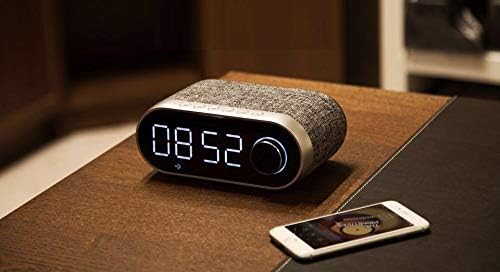
The speaker features a large LED display for time and mode information, along with intuitive buttons and a rotary knob for control. The top panel typically includes buttons for power, mode selection, play/pause, volume, and alarm settings. The rear or side panel houses ports for USB, TF card, AUX input, and charging.
Configuració
1. Carregant l’altaveu
Connecteu l'extrem petit del cable de càrrega USB al port de càrrega de l'altaveu.
Connecteu l'extrem gran del cable USB a un adaptador de corrent USB (no inclòs) o al port USB d'un ordinador.
The charging indicator will illuminate. It will turn off or change color once fully charged.
2. Encès / apagat
To power on, press and hold the Power button until the display lights up.
Per apagar l'aparell, premeu i manteniu premut el botó d'engegada de nou fins que la pantalla s'apagui.
3. Configuració de l'hora
Figure 2: The REMAX RB-M26 speaker on a bedside table, showing the digital clock display.
In clock mode, press and hold the 'Time Set' button (or a similar button, refer to your specific unit's markings).
The hour digits will start flashing. Use the '+' and '-' buttons or the rotary knob to adjust the hour.
Press the 'Time Set' button again to move to minute adjustment. Adjust minutes similarly.
Press 'Time Set' once more to confirm and exit.
Instruccions de funcionament
1. Emparellament Bluetooth
Figure 3: The REMAX RB-M26 speaker connected via Bluetooth to a smartphone.
Engegueu l'altaveu. Entrarà automàticament en mode d'emparellament Bluetooth, cosa que s'indicarà amb una icona Bluetooth parpellejant a la pantalla.
Al telèfon intel·ligent, la tauleta o l'ordinador portàtil, activeu el Bluetooth i cerqueu els dispositius disponibles.
Select "REMAX RB-M26" from the list of devices.
Once paired, the Bluetooth icon will stop flashing and remain solid, and you will hear a confirmation tone.
2. Funcionament de la ràdio FM
Press the 'Mode' button to switch to FM Radio mode.
Premeu i manteniu premut el botó "Reproduir/Pausa" per escanejar i desar automàticament les emissores de FM disponibles.
Use the 'Next/Previous' buttons to navigate between saved stations.
For manual tuning, short press the 'Next/Previous' buttons.
3. TF Card / USB Audio Playback
Insert a TF card (MicroSD) or a USB flash drive with MP3 audio files a la ranura corresponent.
The speaker will automatically switch to TF card or USB mode and begin playback. If not, press the 'Mode' button to select the correct source.
Use the 'Play/Pause' button to control playback.
Use the 'Next/Previous' buttons to skip tracks.
4. Entrada AUX
Connect one end of the 3.5mm audio cable to the AUX port on the speaker.
Connect the other end to the audio output of your external device (e.g., MP3 player, computer).
Premeu el botó «Mode» per canviar al mode AUX.
Audio playback will be controlled from your external device.
5. Funcions del despertador
Configuració de l'alarma 1/2: In clock mode, short press the 'Alarm Set' button (or similar). The alarm time will flash. Use the '+' and '-' buttons or rotary knob to set the hour and minutes. Press 'Alarm Set' again to confirm. Repeat for a second alarm if desired.
Activació/desactivació de l'alarma: After setting, press the 'Alarm Set' button to toggle the alarm on/off. An alarm icon will appear/disappear on the display.
Funció de posposar: When the alarm sounds, press any button (except power off) to activate snooze. The alarm will sound again after a few minutes.
Aturar l'alarma: To stop the alarm completely, press and hold the 'Alarm Set' button when it is sounding.
Manteniment
Netegeu l'altaveu amb un drap suau i sec. No utilitzeu productes de neteja abrasius ni dissolvents.
Eviteu exposar l'altaveu a temperatures extremes, llum solar directa o humitat elevada.
No submergiu l'altaveu en aigua.
Guardeu l'altaveu en un lloc fresc i sec quan no l'utilitzeu durant períodes prolongats.
Resolució de problemes
Problema
Solució
L'altaveu no s'encén.
Assegureu-vos que l'altaveu estigui carregat. Connecteu-lo a una font d'alimentació amb el cable USB.
No hi ha so de l’altaveu.
Check the volume level on both the speaker and the connected device. Ensure the correct mode (Bluetooth, FM, TF, USB, AUX) is selected.
L'aparellament de Bluetooth falla.
Assegureu-vos que l'altaveu estigui en mode d'emparellament Bluetooth. Desactiveu i activeu el Bluetooth al dispositiu. Acosteu el dispositiu a l'altaveu.
La recepció de ràdio FM és deficient.
Adjust the speaker's position. Extend any built-in antenna if available. Try scanning for stations again.
La targeta TF/USB no funciona.
Ensure the TF card/USB is inserted correctly and contains compatible audio files (e.g., MP3). Check if the speaker is in the correct mode.
Tipus de control: Integrated Buttons/Knob (Note: Some models may include a remote control, please check your package contents.)
Reproducció d'àudio: Supports TF Card, USB Audio
Garantia i Suport
The REMAX RB-M26 speaker comes with a standard manufacturer's warranty. Please refer to the warranty card included in your package for specific terms and conditions. For technical support or service inquiries, please contact your local REMAX distributor or the retailer where you purchased the product.
Ask about setup, troubleshooting, compatibility, parts, safety, or missing instructions. Manuals+ will review the question and use this page’s manual context to help answer it.