
1. Introducció
The GameMax Mirage 120mm PC Cooling Fan is designed to provide efficient cooling for computer components while offering customizable RGB lighting. This fan features a dual-ring Rainbow LED design, a hydraulic bearing for quiet operation, and a 7-blade fan structure. It is compatible with 5V addressable 3-pin Aura Sync systems, allowing for synchronized lighting effects with compatible motherboards or controllers.

Imatge 1.1: Frontal view of the GameMax Mirage fan with active Rainbow LED lighting.
2. Informació de seguretat
- Assegureu-vos que el sistema informàtic estigui apagat i desendollat de la presa de corrent abans de la instal·lació o el manteniment.
- Manipuleu els components amb cura per evitar danys causats per l'electricitat estàtica. Penseu en la possibilitat d'utilitzar una corretja antiestàtica per al canell.
- Do not force connectors. Ensure correct orientation before plugging in cables.
- Mantingueu el ventilador allunyat de líquids i d'humitat excessiva.
- No intenteu desmuntar la unitat del ventilador més enllà del que es descriu en aquest manual.
3. Contingut del paquet
Verifiqueu que tots els elements siguin presents al vostre paquet:
- 1 x GameMax Mirage 120mm PC Cooling Fan
- 4 x cargols de muntatge
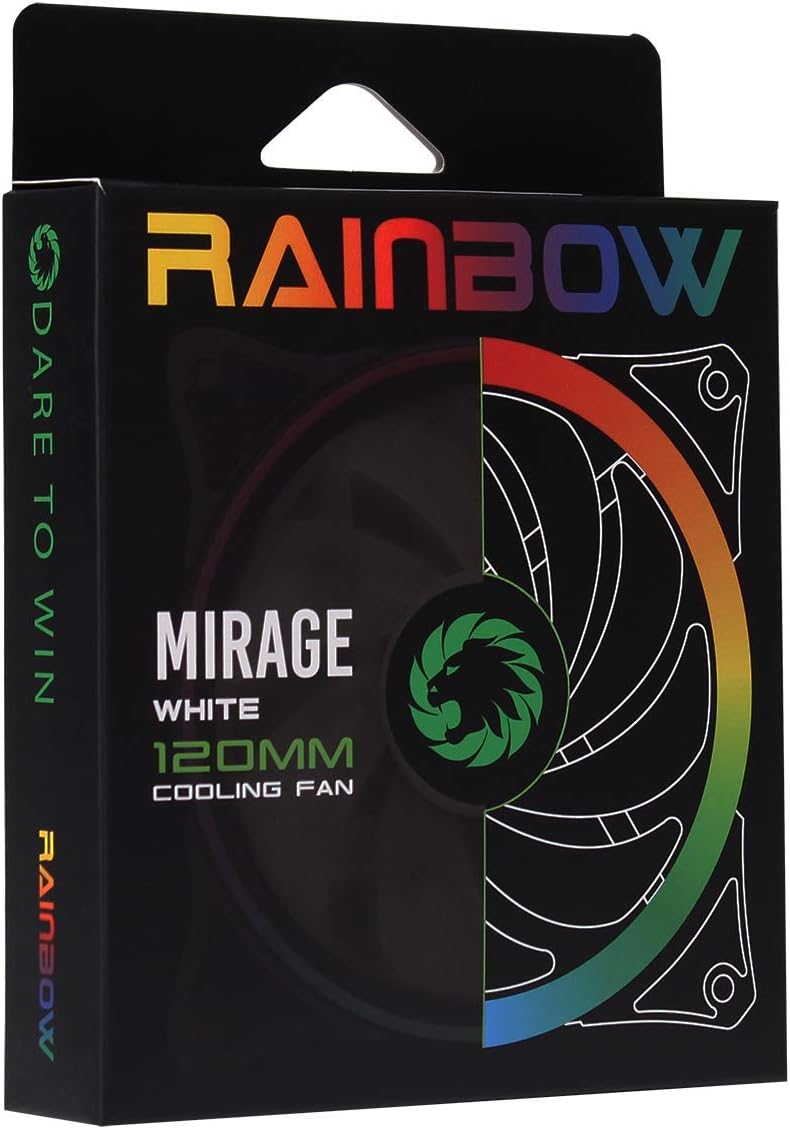
Image 3.1: Retail packaging for the GameMax Mirage fan.
4. Configuració i instal·lació
Follow these steps to install your GameMax Mirage 120mm PC Cooling Fan:
- Prepareu el vostre sistema: Power off your computer and unplug it from the power outlet. Open your computer case to access the fan mounting locations.
- Muntar el ventilador: Position the fan in your desired location (e.g., case front, rear, top, or radiator). Ensure the airflow direction is correct for your cooling setup. Use the four included mounting screws to secure the fan to the chassis or radiator. The fan features rubber pads on the corners to help reduce vibration.
- Connecteu l'alimentació del ventilador: Locate the 3-pin power connector on the fan cable. Connect this cable to an available 3-pin fan header on your motherboard or a fan controller.
- Connect RGB Lighting: Locate the 5V addressable 3-pin Aura connector on the fan cable. Connect this to a compatible 5V ARGB header on your motherboard (often labeled 'VDG' or 'ARGB') or an external RGB controller/hub. Warning: Do not connect this to a 12V RGB header, as it will damage the LEDs.

Image 4.1: The 3-pin power connector (top) and 5V addressable 3-pin Aura connector (bottom).
The fan cables are braided for improved aesthetics and durability, helping to keep your build neat and tidy.
5. Instruccions de funcionament
Once installed, the GameMax Mirage fan operates as follows:
- Control de velocitat del ventilador: The fan speed is controlled via the 3-pin power connector. If connected to a motherboard fan header, the speed can typically be adjusted through your motherboard's BIOS/UEFI settings or dedicated software.
- Control d'il·luminació RGB: The Rainbow LED lighting is controlled via the 5V addressable 3-pin Aura connector.
- If connected to a compatible motherboard (e.g., ASUS Aura Sync, MSI Mystic Light, Gigabyte RGB Fusion, ASRock Polychrome Sync), you can use the motherboard's software to customize lighting effects, colors, and synchronization with other ARGB components.
- If connected to an external RGB hub/controller, refer to the instructions provided with your specific hub/controller for lighting customization options.

Imatge 5.1: Anglesa view of the GameMax Mirage fan showcasing its dual-ring Rainbow LED lighting.
6. Manteniment
Un manteniment regular ajuda a garantir un rendiment òptim i una llarga durada del ventilador:
- Neteja de pols: Periodically inspect the fan blades and frame for dust accumulation. Use compressed air or a soft brush to gently remove dust. Ensure the fan is powered off and unplugged before cleaning.
- Inspecció del cable: Occasionally check the power and RGB cables for any signs of wear or damage.
7. Solució De Problemes
- El ventilador no gira:
- Ensure the 3-pin power connector is securely plugged into a functional fan header on the motherboard or controller.
- Check motherboard BIOS/UEFI settings to ensure the fan header is enabled and configured correctly.
- LEDs Not Lighting Up or Incorrect Colors:
- Verify the 5V addressable 3-pin Aura connector is securely connected to a compatible 5V ARGB header (not 12V RGB).
- Ensure your motherboard's RGB software or external controller is properly installed and configured.
- If using a splitter or hub, ensure it is powered and functioning correctly.
- Soroll excessiu:
- Check for any cables or obstructions interfering with the fan blades.
- Ensure the fan is securely mounted and the rubber pads are properly seated to absorb vibrations.
- Dust accumulation can cause imbalance and noise; clean the fan as described in the Maintenance section.
8. Especificacions
| Característica | Especificació |
|---|---|
| Model | MIRAGEWHITE FINS |
| Mida del ventilador | 120 mm x 120 mm x 25 mm (0.98 x 4.72 x 4.72 polzades) |
| Tipus de rodament | Coixinet hidràulic |
| Pales de ventilador | 7 fulles |
| Tipus de LED | Addressable Rainbow LED (Dual-Ring) |
| Connector d'alimentació del ventilador | 3-pins |
| Connector RGB | 5V Addressable 3-Pin Aura Connector |
| Vol. Operatiutage | 5 Volts (for RGB) / 12 Volts (for fan motor, typical for 3-pin) |
| Valoració de Wattage | 3 watts |
| Velocitat de rotació màxima | 1800 RPM |
| Nivell de soroll | Aproximadament 25 dB(A) |
| Material | Rubber (for vibration dampening) |

Imatge 8.1: Darrere view of the GameMax Mirage fan, displaying the product label with model and electrical specifications.
9. Garantia i Suport
Per obtenir informació sobre la garantia i assistència tècnica, consulteu la pàgina oficial de GAMEMAX. weblloc web o poseu-vos en contacte amb el vostre distribuïdor. Conserveu el comprovant de compra per a reclamacions de garantia.