
Other BTI-010
Other BTI-010 2-in-1 Bluetooth Audio Transmitter and Receiver User Manual
Model: BTI-010
1. Introducció
Gràcies per la compraasing the Other BTI-010 2-in-1 Bluetooth Audio Transmitter and Receiver. This device is designed to add Bluetooth functionality to your audio equipment, allowing you to wirelessly transmit audio from non-Bluetooth devices or receive audio on non-Bluetooth devices. Please read this manual carefully to ensure proper use and optimal performance.
2. Contingut del paquet
- 1 x BTI-010 Bluetooth Transmitter and Receiver Unit
- 1 x cable de càrrega USB
- 1 cable d'àudio de 3.5 mm
- 1 x Manual d'usuari
3. Producte acabatview
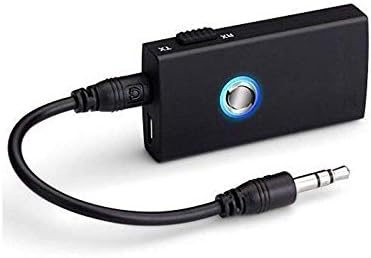
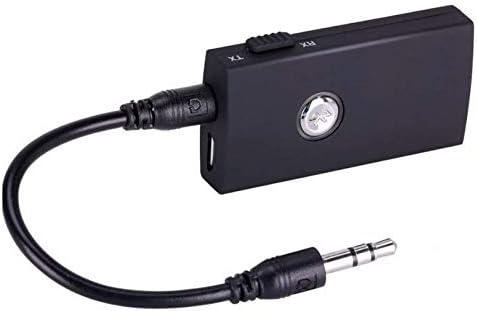
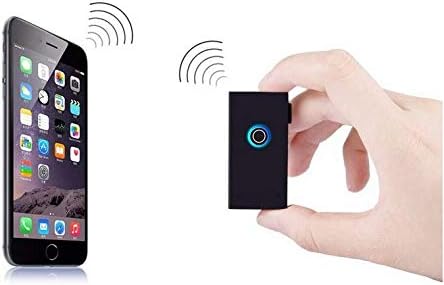
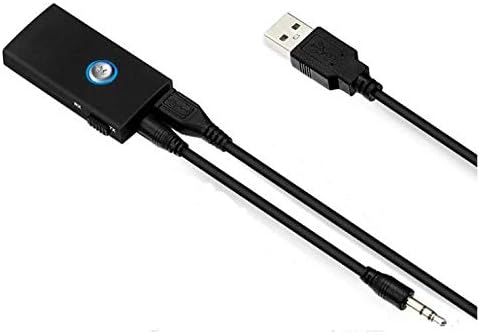
The BTI-010 is a versatile audio adapter that functions as both a Bluetooth transmitter (TX) and a Bluetooth receiver (RX). It features a compact design, a multi-function button, a mode switch, and standard audio and charging ports.

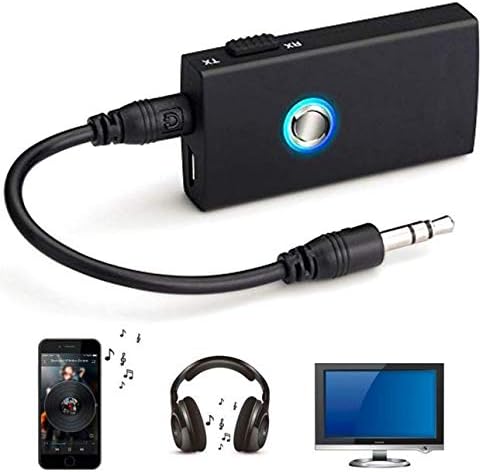
4. Configuració i funcionament
4.1. Càrrega del dispositiu
- Connect the supplied USB charging cable to the micro USB port on the BTI-010.
- Connecteu l'altre extrem del cable USB a un adaptador de corrent USB (no inclòs) o al port USB d'un ordinador.
- The LED indicator will illuminate during charging and turn off when fully charged. Charging typically takes about 2 hours.
4.2. Mode transmissor (TX)
Use TX mode to transmit audio wirelessly from a non-Bluetooth device (e.g., TV, PC, MP3 player) to a Bluetooth-enabled receiving device (e.g., Bluetooth headphones, Bluetooth speaker).
- Slide the mode switch on the BTI-010 to the TX posició.
- Connect the BTI-010 to your non-Bluetooth audio source (e.g., TV's audio out jack) using the 3.5mm audio cable.
- Power on the BTI-010 by pressing and holding the multi-function button until the LED indicator flashes blue rapidly, indicating pairing mode.
- Place your Bluetooth receiving device (headphones, speaker) into pairing mode.
- The BTI-010 will automatically search for and connect to nearby Bluetooth receiving devices. Once connected, the LED will flash blue slowly.
- Adjust the volume on your receiving device.
4.3. Mode receptor (RX)
Use RX mode to receive audio wirelessly from a Bluetooth-enabled device (e.g., smartphone, tablet) and play it through a non-Bluetooth audio system (e.g., car stereo, home stereo, wired headphones).
- Slide the mode switch on the BTI-010 to the RX posició.
- Connect the BTI-010 to your non-Bluetooth audio system (e.g., AUX input of a car stereo) using the 3.5mm audio cable.
- Power on the BTI-010 by pressing and holding the multi-function button until the LED indicator flashes blue and red alternately, indicating pairing mode.
- Al dispositiu amb Bluetooth (telèfon intel·ligent, tauleta), activeu el Bluetooth i cerqueu dispositius nous.
- Select "BTI-010" from the list of available devices to pair. Once connected, the LED will flash blue slowly.
- Play audio on your Bluetooth-enabled device, and it will be streamed to your connected audio system. Adjust volume as needed.
5. Instruccions de funcionament
5.1. Encendre/apagar
- Encès: Premeu i manteniu premut el botó multifunció durant aproximadament 3 segons fins que l'indicador LED s'encengui.
- Apagar: Premeu i manteniu premut el botó multifunció durant aproximadament 3 segons fins que l'indicador LED s'apagui.
5.2. Maridatge
- In TX mode, the device automatically enters pairing mode upon power-on if not connected. The LED flashes blue rapidly.
- In RX mode, the device automatically enters pairing mode upon power-on if not connected. The LED flashes blue and red alternately.
5.3. Canvi de mode
To switch between Transmitter (TX) and Receiver (RX) modes, slide the TX/RX switch located on the side of the device. Ensure the device is powered off before changing modes for optimal performance.
6. Solució De Problemes
- Sense energia: Ensure the device is fully charged. Connect it to a power source using the USB cable.
- No es pot emparellar:
- Ensure the BTI-010 is in the correct TX or RX mode for your intended use.
- Make sure both the BTI-010 and the target Bluetooth device are in pairing mode.
- Move the devices closer to each other (within 10 meters).
- Turn off and restart both devices, then attempt pairing again.
- Sense àudio:
- Verify that the 3.5mm audio cable is securely connected to both the BTI-010 and the audio source/destination.
- Check the volume levels on both the BTI-010 (if applicable) and the connected audio device.
- Ensure the BTI-010 is successfully paired and connected (LED flashes blue slowly).
- Confirm the audio source is playing and outputting sound.
- Mala qualitat d'àudio:
- Reduce the distance between the BTI-010 and the connected Bluetooth device.
- Remove any obstacles that may be interfering with the Bluetooth signal.
- Assegureu-vos que no hi hagi altres senyals sense fils forts a prop que puguin causar interferències.
7. Especificacions tècniques
| Model | BTI-010 |
| Versió Bluetooth | 3.0 (Class II) |
| Bluetooth Profiles | A2DP, AVRCP |
| Distància d'operació | Fins a 10 metres (33 peus) |
| Freqüència de treball | 2.402 GHz - 2.480 GHz |
| Working Time (TX Mode) | Fins a 8 hores |
| Working Time (RX Mode) | Fins a 6 hores |
| Temps de càrrega | Aproximadament 2 hores |
| Capacitat de la bateria | Bateria de liti de 160 mAh |
| Tecnologia de connectivitat | AUX, Bluetooth, USB |
| Font d'alimentació | Funciona amb bateria |
| Dispositius compatibles | Smartphone, Tablet, Audio Systems |
| Pes de l'article | 68 g |
| Dimensions del paquet | 15.01 x 7.19 x 5 cm |
8. Informació de seguretat
- No exposeu el dispositiu a temperatures extremes, llum solar directa ni ambients humits.
- Do not disassemble or attempt to repair the device yourself. This may void the warranty and cause damage.
- Mantingueu el dispositiu allunyat de l'aigua i altres líquids.
- Utilitzeu només el cable USB proporcionat per carregar.
- Desfeu-vos del dispositiu i de la bateria de manera responsable d'acord amb la normativa local.
9. Garantia i Suport
This product comes with a standard manufacturer's warranty. For specific warranty details, please refer to the documentation provided at the time of purchase or contact your retailer. For technical support or inquiries, please reach out to the customer service department of your point of purchase.
Ask a question about this manual
Ask about setup, troubleshooting, compatibility, parts, safety, or missing instructions. Manuals+ will review the question and use this page’s manual context to help answer it.