
1. Introducció
Thank you for choosing the Cuddeback G-5086 CuddeLink Double Barrel 20MP Trail Camera. This manual provides essential information for the proper setup, operation, and maintenance of your camera. Please read it thoroughly before using the device to ensure optimal performance and longevity.
2. Característiques del producte
The Cuddeback G-5086 trail camera is designed for reliable outdoor surveillance and wildlife monitoring, offering advanced features for high-quality image capture.
- 20 Megapixel Camera: Captura imatges fixes d'alta resolució.
- 0.25-Second Trigger Speed: Assegura una captura ràpida de subjectes en moviment.
- CuddeLink Compatibility: Integrates with CuddeLink and CuddeLink Cell networks for remote image transmission.
- Double Barrel Flash Strobe: Utilizes two 1-inch xenon flash tubes for powerful illumination up to 100 feet.
- Picture Recovery Time: Fast 1 to 2 second recovery for subsequent shots.
- Mode de ràfega: Capable of capturing 1 to 5 images per trigger event.
- Font d'alimentació: Funciona amb 4 piles D (no incloses).
3. Contingut del paquet
Verifiqueu que tots els elements siguin presents al vostre paquet:
- Cuddeback G-5086 Trail Camera
- Antena
- Mounting Strap (may vary by package)
- Manual d'usuari (aquest document)
4. Configuració
4.1. Instal·lació de la bateria
The G-5086 camera requires 4 D-cell batteries for operation. For best performance, use high-quality alkaline or lithium batteries.
- Open the battery compartment door located on the side or bottom of the camera.
- Insert 4 D-cell batteries, ensuring correct polarity (+/-) as indicated inside the compartment.
- Close the battery compartment door securely to maintain the weather seal.

Figure 4.1: Battery compartment with D-cell batteries installed.
4.2. Instal·lació de la targeta SD
A Class 10 or higher SD card (up to 32GB recommended) is required to store images and videos.
- Locate the SD card slot, typically found under a protective cover on the camera's side or bottom.
- Insert the SD card with the metal contacts facing down (or as indicated by the slot diagram) until it clicks into place.
- To remove, push the card in gently until it springs out.

Figure 4.2: SD card slot and external ports.
4.3. Instal·lació d'antenes
The antenna is crucial for CuddeLink network communication.
- Screw the provided antenna clockwise into the antenna port located on the top or side of the camera until it is finger-tight.
- Ensure the antenna is oriented vertically for optimal signal reception.
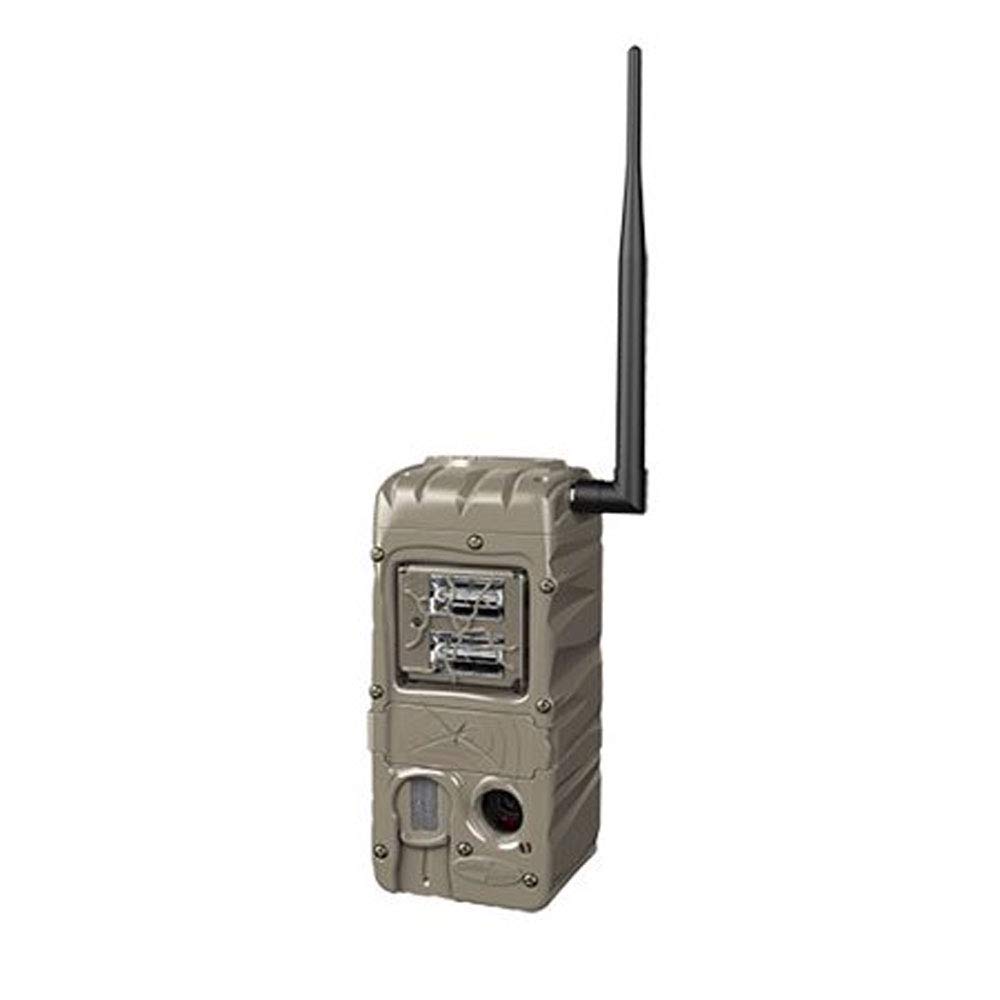
Figure 4.3: Cuddeback G-5086 Trail Camera with antenna.
4.4. Muntatge de la càmera
Mount the camera to a tree or post using the provided strap or a compatible mounting accessory.
- Position the camera approximately 3-6 feet (1-2 meters) off the ground.
- Aim the camera towards the desired monitoring area, avoiding direct sunlight if possible to prevent overexposure.
- Ensure the camera is stable and secure to prevent movement from wind or animals.
5. Instruccions de funcionament
5.1. Encès / apagat
Locate the power switch inside the camera housing. Slide it to the 'ON' position to power on the camera. Slide to 'OFF' to power down.
5.2. Configuració bàsica
Access the camera's menu via the internal display and control buttons to configure settings:
- Mode: Select between Photo, Video, or Time-Lapse.
- Resolució: Set image (e.g., 20MP) or video resolution (e.g., 720p).
- Retard de l'activació: Adjust the time interval before the camera triggers again after an event.
- Esclat: Configure the number of photos taken per trigger (1-5 images).
- Data/Hora: Estableix la data i l'hora actuals per obtenir una hora precisaamps on captures.
5.3. CuddeLink Network Setup
The G-5086 is CuddeLink compatible, allowing it to send images to a CuddeLink Home camera or Cell camera. Refer to the CuddeLink system manual for detailed instructions on network configuration, pairing, and data transmission settings.
5.4. Recuperació de dades
Images and videos are stored on the SD card. To retrieve them:
- Apagueu la càmera.
- Traieu la targeta SD.
- Insert the SD card into a computer's card reader or a compatible device to view i transferència files.
6. Manteniment
6.1. Neteja
Regularly clean the camera lens, flash, and PIR sensor window with a soft, lint-free cloth. Avoid abrasive materials or harsh chemicals.
6.2. Substitució de la bateria
Canvieu les piles quan aparegui l'indicador de bateria baixa o quan el rendiment disminueixi. Canvieu sempre totes les piles alhora per unes de noves del mateix tipus.
6.3. Gestió de targetes SD
Periodically format the SD card using the camera's menu option to ensure optimal performance and prevent data corruption. Back up important files abans de formatar.
7. Solució De Problemes
- La càmera no s'encén: Check battery installation and ensure batteries are fresh. Verify the power switch is in the 'ON' position.
- Poca qualitat d'imatge: Clean the lens and flash window. Ensure the camera is not aimed directly into strong light sources. Check settings for appropriate resolution.
- No images captured: Ensure the SD card is properly inserted and has sufficient free space. Check trigger delay and sensitivity settings. Verify the camera is in an active mode.
- Autonomia curta de la bateria: This can be influenced by extreme temperatures, frequent triggers, or extensive CuddeLink activity. Use high-quality batteries.
- CuddeLink connectivity issues: Ensure the antenna is securely attached. Check the distance between cameras and any obstructions. Refer to the CuddeLink system manual for network diagnostics.
8. Especificacions
| Nom del model | G-5086 |
| Resolució de fixes efectius | 20 MP |
| Velocitat de desencadenament | 0.25 segons |
| Interval de flaix | 100 Feet (Double Barrel Flash Strobe) |
| Picture Recovery Time | 1 a 2 segons |
| Burst Images | 1 to 5 images |
| Tecnologia de connectivitat | Wireless (CuddeLink compatible) |
| Font d'alimentació | 4 D Batteries (not included) |
| Ús interior/exterior | A l'aire lliure |
| Material | Plàstic |
| Dimensions (L x A x A) | 10.05 x 4.35 x 7.4 polzades |
| Pes de l'article | 2.4 unces |
9. Garantia i Suport
For warranty information and technical support, please refer to the official Cuddeback weblloc web o contacteu directament amb el seu servei d'atenció al client. Conserveu el rebut de compra com a comprovant de compra.