
Introducció
Gràcies per la compraasing the AmazonBasics Vertical Ergonomic 2.4G Wireless Optical Mouse. This manual provides essential information for setting up, operating, and maintaining your new mouse. Please read these instructions carefully before use and retain them for future reference.

Image: The AmazonBasics Vertical Ergonomic Wireless Optical Mouse positioned on a white desk alongside a laptop, demonstrating a typical usage scenario.
Contingut del paquet
Si us plau, comproveu el paquet per veure si hi ha els elements següents:
- AmazonBasics Vertical Ergonomic 2.4G Wireless Optical Mouse
- Receptor USB
Nota: Les piles no estan incloses i s'han de comprar per separat.
Característiques
- Disseny vertical ergonòmic: Promotes a natural hand and wrist posture, reducing strain.
- Connectivitat sense fil 2.4G: Provides a reliable connection for use with PCs and laptops.
- Seguiment òptic: Ensures precise and smooth cursor control.
- DPI ajustable: Allows customization of cursor sensitivity for different tasks.
- Multiple Buttons: Includes left/right click, scroll wheel, DPI button, and forward/back buttons for enhanced productivity.
- Funciona amb bateria: Operates on AAA batteries for portability.

Imatge: Un costat view of the AmazonBasics Vertical Ergonomic Wireless Optical Mouse, highlighting its contoured shape, thumb rest, and the forward/back buttons along with the DPI button.
Configuració
1. Instal·leu les bateries
- Localitzeu el compartiment de la bateria a la part inferior del ratolí.
- Gently slide open the battery compartment cover.
- Introduïu dues piles AAA, assegurant-vos de la polaritat correcta (+/-).
- Torneu a col·locar la tapa del compartiment de la bateria fins que sentiu un clic i quedi ben fixada al seu lloc.
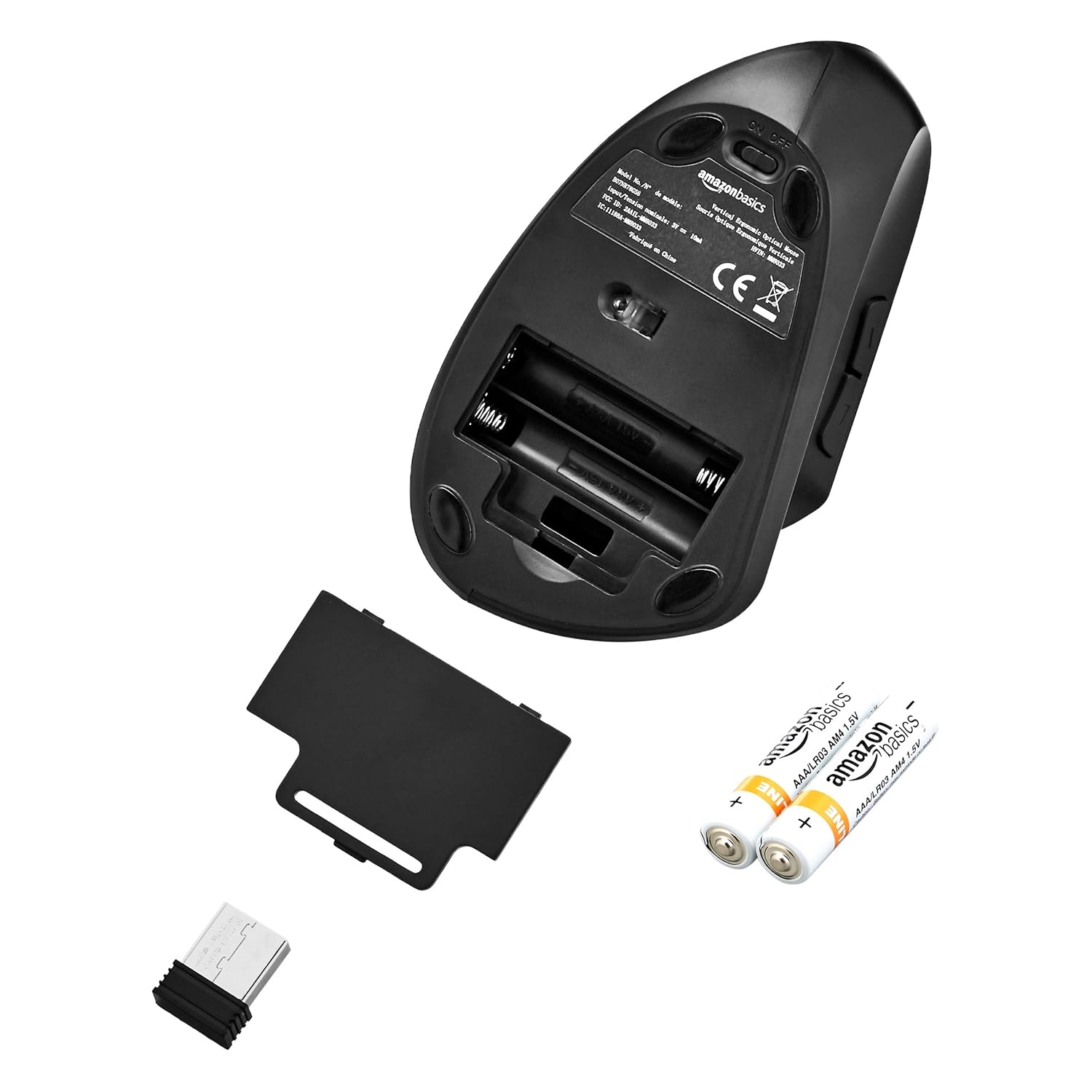
Image: The underside of the mouse with the battery compartment cover removed, showing the slots for two AAA batteries and the storage slot for the USB receiver.
2. Connecteu el receptor USB
- Remove the USB receiver from its storage slot within the battery compartment.
- Plug the USB receiver into an available USB port on your computer (PC or laptop).
- L'ordinador hauria de detectar i instal·lar automàticament els controladors necessaris. Això pot trigar uns instants.
3. Engegueu el ratolí
- Locate the ON/OFF switch on the underside of the mouse.
- Feu lliscar l'interruptor a la posició "ON".
- El ratolí ja està llest per al seu ús.

Image: The bottom of the AmazonBasics Vertical Ergonomic Wireless Optical Mouse, displaying the ON/OFF switch, the optical sensor, and the product label with model information.
Instruccions de funcionament
Funcions bàsiques
- Clic esquerre: Selecció i activació primàries.
- Clic dret: Obre menús contextuals.
- Roda de desplaçament: Documents en rotllana i web pages vertically. Can also be pressed for middle-click functionality.

Imatge: Vista de dalt a baix view of the AmazonBasics Vertical Ergonomic Wireless Optical Mouse, clearly showing the left and right click buttons separated by the scroll wheel.
Funcions avançades
- Botó DPI: Located near the top of the mouse. Press this button to cycle through different DPI (Dots Per Inch) settings, adjusting cursor sensitivity. This allows you to switch between faster and slower cursor speeds as needed.
- Botons Endavant/Enrere: Located on the side of the mouse, accessible by your thumb. These buttons typically function as 'Forward' and 'Back' in web navegadors i file exploradors.
Manteniment
Neteja
To clean the mouse, use a soft, dry cloth. For stubborn dirt, slightly dampRenta el drap amb aigua o una solució de neteja suau. Evita utilitzar productes químics agressius o materials abrasius, ja que poden danyar la superfície del ratolí.
Canvi de bateria
When the mouse's performance degrades or it stops responding, it may be time to replace the batteries. Follow the steps in the "Install Batteries" section under Setup to replace the two AAA batteries.
Resolució de problemes
- El ratolí no respon:
- Ensure the mouse is switched to the "ON" position.
- Comproveu si les piles estan correctament instal·lades i tenen prou càrrega. Substituïu-les si cal.
- Assegureu-vos que el receptor USB estigui ben connectat a un port USB que funcioni de l'ordinador. Proveu-ho amb un altre port USB.
- Reinicieu l'ordinador.
- Moviment erràtic del cursor:
- Netegeu el sensor òptic de la part inferior del ratolí amb un drap suau i sec.
- Assegureu-vos que feu servir el ratolí sobre una superfície adequada. Les superfícies molt reflectants o transparents poden afectar el seguiment. Es recomana una estora de ratolí.
- Comproveu si hi ha interferències d'altres dispositius sense fil.
- Problemes de connexió:
- Apropa el ratolí al receptor USB.
- Avoid placing the receiver near large metal objects or other electronic devices that might cause interference.
Especificacions
| Número de model | MM-8033 |
| Tecnologia de connectivitat | 2.4G sense fil |
| Detecció de moviment | Òptic |
| Nombre de botons | 5 (Esquerra, Dreta, Roda de desplaçament, DPI, Endavant, Enrere) |
| Font d'alimentació | 2 piles AAA (no incloses) |
| Durada mitjana de la bateria | Fins a 12 mesos |
| Sistemes operatius compatibles | Linux, Windows 7, Windows XP (i versions més recents) |
| Compatible Hardware Platforms | Portàtil, PC |
| Dimensions del producte (LxWxH) | 15.32 x 7.8 x 8.92 cm (6.03 x 3.07 x 3.51 polzades) |
| Pes de l'article | 122 g |
Garantia i Suport
For warranty information or technical support, please refer to the AmazonBasics product page or contact Amazon customer service directly. Keep your purchase receipt for warranty claims.