
1. Introducció
This manual provides essential information for the safe and efficient operation of your Strong SRT 32HB3003 32-inch HD LED TV. Please read these instructions carefully before using the television and retain them for future reference.
2. Informació de seguretat
Observeu sempre les precaucions de seguretat següents per evitar descàrregues elèctriques, incendis o danys al televisor:
- No exposeu el televisor a la pluja o la humitat.
- No obriu el televisor casing; demaneu totes les tasques de manteniment a personal qualificat.
- Assegureu-vos una ventilació adequada al voltant del televisor.
- Desendolleu el televisor durant tempestes o quan no l'utilitzeu durant períodes prolongats.
- Mantingueu el televisor allunyat de fonts de calor i de la llum solar directa.
3. Contingut del paquet
Verifiqueu que tots els elements estiguin presents a l'embalatge:
- Strong SRT 32HB3003 LED TV
- Control remot
- 2x piles AAA
- Suport de TV
- Manual d'usuari

Image: The Strong SRT 32HB3003 TV packaging, highlighting key features such as DVB-T2/C/S2 tuner, HDMI, USB, and Dolby Audio.
4. Configuració
4.1 Instal·lació de l'estand
Per instal·lar el suport de TV:
- Col·loqueu amb cura el televisor cara avall sobre una superfície suau i neta per evitar que es facin malbé la pantalla.
- Alineeu les bases del suport amb les ranures corresponents de la part inferior del televisor.
- Fixeu els suports amb els cargols proporcionats.
4.2 Connexions
Connecteu els dispositius externs al televisor mitjançant els ports adequats.
- Antena/cable: Connect your DVB-T2 or DVB-C antenna/cable to the 'ANT IN' port.
- Satèl·lit: Connect your satellite dish to the 'SATELLITE IN' port for DVB-S2 reception.
- Dispositius HDMI: Use HDMI ports for high-definition devices like Blu-ray players, game consoles, or set-top boxes. HDMI 1 supports ARC (Audio Return Channel).
- Dispositius USB: Insert USB drives into the USB 2.0 ports for media playback.
- CI+ Module: Insert a CI+ module (Common Interface) into the CI+ slot for encrypted channels.
- Sortida d'àudio: Use the Headphone jack for private listening or the Digital Optical Output (TOS-Link) for external audio systems.
- AV IN: Per a dispositius més antics, feu servir el port AV IN.

Imatge: Part posterior view of the Strong SRT 32HB3003 TV, illustrating the placement of connection ports including HDMI, USB, and antenna inputs.

Image: A diagram detailing the Common Interface (CI) slot and other connectivity options such as USB, headphone jack, AV IN, HDMI 1, HDMI 2, Satellite IN, and S/PDIF (digital optical audio out).
4.3 Primera instal·lació
After connecting the power cable and turning on the TV, the First Time Installation wizard will guide you through initial setup steps, including language selection, country, and channel scanning for DVB-T2, DVB-C, or DVB-S2.
5. Funcionament
5.1 Control remotview
The remote control allows you to access all TV functions. Insert the two AAA batteries into the remote control, ensuring correct polarity.

Image: The remote control for the Strong SRT 32HB3003 TV, featuring buttons for power, numerical input, volume control, channel selection, menu access, source input, and media playback functions.
5.2 Funcions bàsiques
- Potència: Premeu el botó botó d'engegada vermell to turn the TV on or off.
- Volum: Utilitza el VOL +/- botons per ajustar el volum.
- Canal: Utilitza el CH +/- botons per canviar de canal.
- Silenciar: Premeu el botó MUT botó per silenciar temporalment l'àudio.
5.3 Selecció de la font
Premeu el botó FONT button on the remote control to select the desired input source (e.g., HDMI 1, HDMI 2, DVB-T2, DVB-C, DVB-S2, AV).
5.4 Navegació de menús
Premeu el botó MENÚ botó per accedir al menú principal. Utilitzeu els botons de fletxa per navegar i OK to confirm selections. The TORNAR button returns to the previous menu or exits the current menu.
5.5 Reproducció multimèdia (USB)
Insert a USB storage device into one of the USB ports. The TV supports playback of photos, videos, and music files. Access the media player through the main menu or by selecting the USB source.
5.6 Guia electrònica de programes (EPG)
Premeu el botó EPG botó per view the Electronic Program Guide, which displays program schedules for digital channels.
5.7 Mode Hotel
The TV features a Hotel Mode, which allows for restricted access to certain settings and functions, ideal for hospitality environments. Consult the advanced settings menu for Hotel Mode configuration.
6. Manteniment
6.1 Neteja
- Desendolla sempre el televisor abans de netejar-lo.
- Feu servir un drap suau i sec per netejar la pantalla i la carcassa.
- Per a marques difícils, esbandiu lleugeramentampNetegeu el drap amb aigua o un netejador suau i no abrasiu dissenyat específicament per a electrònica.
- Never spray cleaning liquids directly onto the TV.
6.2 Emmagatzematge
If storing the TV for an extended period, ensure it is kept in a cool, dry place, protected from dust and extreme temperatures. It is recommended to use the original packaging for storage.
7. Solució De Problemes
Si teniu problemes amb el televisor, consulteu les solucions habituals següents:
| Problema | Possible causa/solució |
|---|---|
| Sense poder | Check if the power cable is securely connected. Ensure the power outlet is functional. |
| No hi ha imatge, però hi ha so | Comproveu la selecció de la font d'entrada. Assegureu-vos que els dispositius externs estiguin encesos i connectats correctament. |
| No hi ha so, però hi ha imatge | Check volume level and mute status. Verify audio settings in the menu. |
| El comandament a distància no funciona | Check and replace batteries. Ensure no obstructions between remote and TV sensor. |
| Poca qualitat d'imatge | Check antenna/cable connection. Adjust picture settings in the menu. |
8. Especificacions
Detailed technical specifications for the Strong SRT 32HB3003 HD LED TV:
| Característica | Especificació |
|---|---|
| Número de model | SRT 32HB3003 |
| Mida de la pantalla | 32 polzades (80 cm) |
| Resolució | 1366 x 768 pixels (HD-Ready) |
| Tecnologia de visualització | LED |
| Freqüència d'actualització | 60 Hz |
| Tecnologia del sintonitzador | DVB-C, DVB-S2, DVB-T2 |
| Ports HDMI | 2 (1x HDMI ARC) |
| Ports USB 2.0 | 2 |
| Altres interfícies | Headphone, Digital Optical Out (TOS-Link), CI+ interface, AV IN |
| Característiques especials | Electronic Program Guide (EPG), USB Media Playback, Parental Control, Hotel Mode |
| Consum d'energia | 50 watts |
| Classe d'eficiència energètica | A+ |
| Consum anual d'energia | 45 kWh / any |
| Dimensions del producte (W x H x D) | 73.2 x 43.5 x 7.78 cm |
| Pes | 4.15 kg |

Image: The energy efficiency label for the Strong SRT 32HB3003, indicating an A+ rating and an annual energy consumption of 45 kWh.
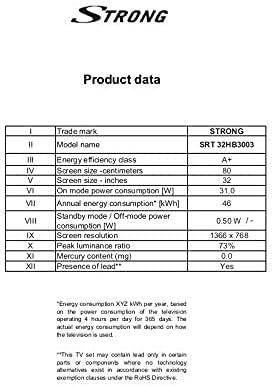
Image: A product data table providing detailed specifications for the Strong SRT 32HB3003, including screen size, resolution, and power consumption.
9. Garantia i Suport
Your Strong SRT 32HB3003 TV comes with a limited warranty. For specific warranty terms and conditions, please refer to the warranty card included in your product packaging or visit the official Strong website. For technical support, troubleshooting assistance, or service inquiries, please contact Strong customer service through their official channels.
Per obtenir més ajuda, visiteu el Strong official weblloc.