
1. Introducció
Thank you for choosing the Proscenic M7 Robot Vacuum Cleaner. This device is designed to provide efficient and thorough cleaning for your home, featuring advanced laser navigation, powerful suction, and intelligent mopping capabilities. Please read this manual carefully before using the product to ensure proper operation and maintenance.
2. Instruccions de seguretat importants
- Llegiu totes les instruccions abans d'utilitzar aquest aparell.
- No permeteu que els nens facin servir el robot aspirador. Superviseu els nens i les mascotes mentre el robot estigui en funcionament.
- Ensure the charging dock is placed against a wall on a level surface, away from water or heat sources.
- Traieu qualsevol cable solt, objecte petit o element fràgil del terra abans de fer funcionar el dispositiu per evitar que s'enredin o que es facin malbé.
- No utilitzeu el robot aspirador en ambients humits ni per netejar líquids.
- Do not use the robot vacuum near open flames or flammable materials.
- Only use the original power adapter and charging dock provided by the manufacturer.
- Turn off the robot and unplug the charging dock before performing any maintenance or cleaning.
3. Producte acabatview
3.1 Característiques clau
- Laser Navigation (LDS): Scans your home in 360 degrees to create real-time maps for efficient cleaning paths.
- App & Alexa Control: Manage cleaning modes, schedules, virtual no-go zones, and spot cleaning via the ProscenicHome app or Alexa voice commands.
- Y-shaped Mopping: Emulates manual mopping for thorough dirt and grime removal with a 500ml electronically controlled water tank.
- Succió potent: Up to 2000Pa suction power with three adjustable modes for various floor types.
- Recarrega i reprèn: Automatically returns to the charging dock when the battery is low and resumes cleaning from where it left off.
3.2 Components del robot
Familiarize yourself with the main components of your Proscenic M7 robot vacuum.

Image: Proscenic M7 Robot Vacuum highlighting its navigation and safety features like SLAM, Anti-Collision, LDS, Anti-falling, and Jam-resistant technology. A map overlay illustrates its ability to plan cleaning routes.
- Sensor LDS: Located on top for 360-degree scanning and mapping.
- Para-xocs: Para-xocs davanter amb sensors anticol·lisió.
- Raspalls laterals: Two side brushes to sweep debris into the main brush path.
- Pinzell principal: Underside brush for deep cleaning.
- Cubell d'escombraries/dipòsit d'aigua: Removable compartments for dry vacuuming and wet mopping.
- Contactes de càrrega: On the underside, for connecting to the charging dock.
- Sensors de caiguda: On the underside, to prevent falling down stairs.
4. Guia de configuració
4.1 Càrrega del robot
- Col·loqueu la base de càrrega contra una paret en una zona oberta, assegurant-vos que no hi hagi obstacles a menys d'1 metre (3 peus) als costats i a 2 metres (6 peus) al davant.
- Connecteu l'adaptador de corrent a la base de càrrega i endolleu-lo a una presa de corrent.
- Place the robot onto the charging dock, ensuring the charging contacts align. The robot will begin charging. Allow it to fully charge before first use (approximately 5 hours).
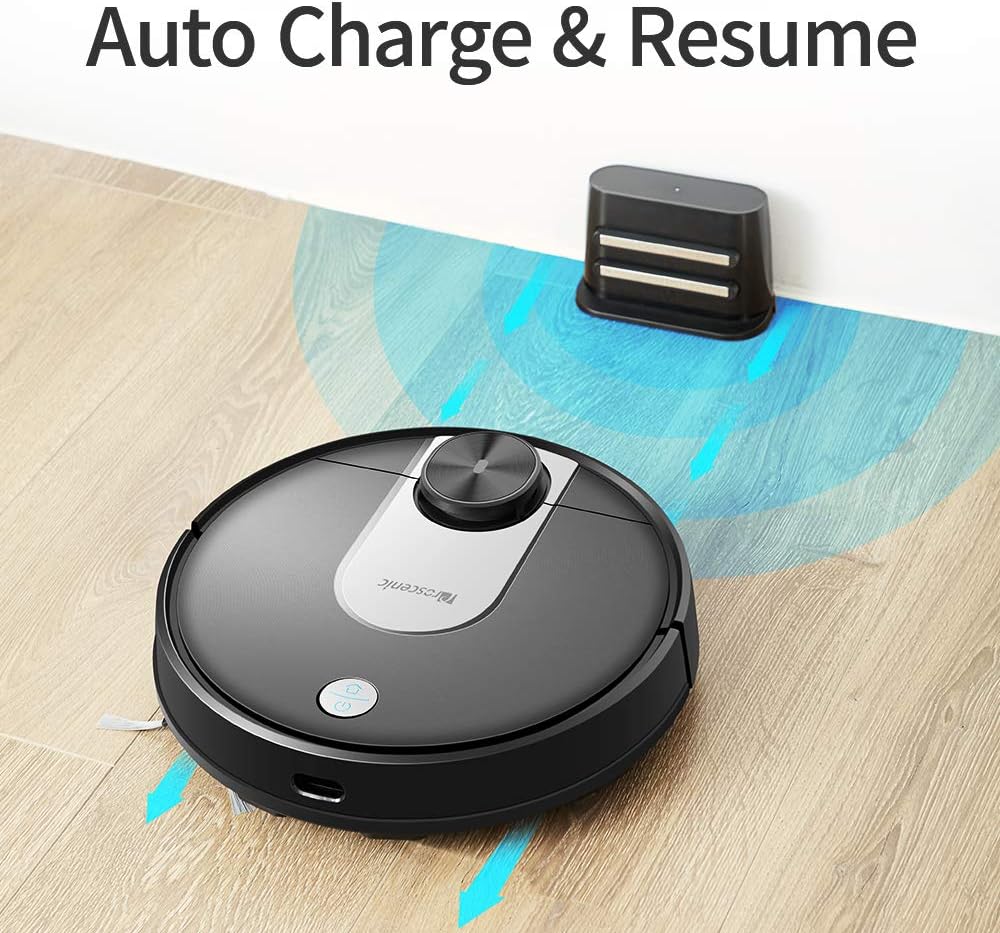
Image: The Proscenic M7 robot vacuum approaching its charging station, demonstrating its auto-charge and resume function.
4.2 Installing the ProscenicHome App
The ProscenicHome app allows you to control your robot vacuum remotely and access advanced features.
- Download the "ProscenicHome" app from the App Store (iOS) or Google Play Store (Android).
- Registreu un compte i inicieu sessió.
- Follow the in-app instructions to add your Proscenic M7 device. Ensure your phone is connected to a 2.4GHz Wi-Fi network, as the robot does not support 5GHz networks.
- During the binding process, ensure the robot is fully charged and near your Wi-Fi router for optimal connection. If you encounter issues, try restarting your router or moving the robot closer.

Image: A smartphone screen displaying the ProscenicHome app interface. It shows a generated cleaning map, current cleaned area, battery level, and cleaning time. Icons for scheduling, map saving, zoned cleaning, mopping, no-go zones, spot cleaning, and remote control are visible, along with compatibility logos for Alexa, Android, and iPhone.
5. Instruccions de funcionament
5.1 Inici d'un cicle de neteja
- Inici manual: Press the power button on the robot once to start a full cleaning cycle.
- Control de l'aplicació: Open the ProscenicHome app and tap "Start" to initiate cleaning.
- The robot will use its laser navigation to map your home and plan an efficient cleaning path.
5.2 modes de neteja
The Proscenic M7 offers various cleaning modes accessible via the ProscenicHome app:
- Neteja automàtica: El robot neteja intel·ligentment tota la zona accessible.
- Neteja de punts: Indica al robot que netegi una petita zona específica de manera intensiva.
- Neteja per zones: Define a rectangular area on the app's map for the robot to clean. This requires a saved map.
- Neteja de vores: The robot cleans along the perimeter of your rooms.
- Mode de fregat: Attach the water tank and mopping pad for wet cleaning.
5.3 Funció de fregar
The M7 features a Y-shaped mopping pattern for effective wet cleaning.
- Fill the 500ml electronically controlled water tank with clean water.
- Attach the mopping pad securely to the water tank.
- Replace the dustbin with the filled water tank assembly.
- Select "Mopping Mode" in the app or allow the robot to detect the water tank and switch automatically.
- Adjust the water flow level via the app if desired.

Imatge: Un primer pla view of the Proscenic M7 robot vacuum, showcasing its large 500ml water tank, designed for extensive mopping coverage.

Imatge: Una imatge superior view of the Proscenic M7 robot vacuum on a wooden floor, illustrating its Y-shaped mopping movement pattern with arrows.
5.4 Map Management and Virtual Walls
- Map Memorization: After completing a full cleaning cycle and successfully returning to the charging dock, the robot will save the generated map. Ensure this feature is enabled in the app.
- Virtual No-Go Zones: Use the app to draw virtual boundaries or "no-go lines" on the map to prevent the robot from entering specific areas.
- Neteja de la zona: Once a map is saved, you can define specific areas for cleaning.
6. Manteniment
Un manteniment regular garanteix un rendiment òptim i allarga la vida útil del teu robot aspirador.
6.1 Neteja del cubell de pols i del filtre
- Premeu el botó d'alliberament de la paperera i traieu-lo.
- Empty the dustbin contents into a trash receptacle.
- Remove the filter and tap it gently to dislodge dust. Rinse the filter with water if necessary, ensuring it is completely dry before reinstallation.
- Netegeu l'interior del contenidor de pols amb un drap sec.
- Torneu a instal·lar el filtre i el contenidor de pols.
6.2 Neteja del dipòsit d'aigua i de la fregona
- Traieu el dipòsit d'aigua del robot.
- Buidar l'aigua que quedi del dipòsit.
- Remove the mopping pad and rinse it thoroughly with water. Allow it to air dry.
- Netegeu el dipòsit d'aigua amb anunciamp cloth and allow it to dry completely before storage or refilling.
6.3 Neteja de raspalls i sensors
- Pinzell principal: Remove the main brush cover and lift out the brush. Use the cleaning tool (if provided) to remove hair and debris.
- Raspalls laterals: Periodically check side brushes for tangled hair or debris. Remove and clean them as needed. Replace if worn.
- Sensors: Gently wipe the LDS sensor, anti-drop sensors, and charging contacts with a clean, dry cloth to ensure they are free of dust and debris.
7. Solució De Problemes
If you encounter issues with your Proscenic M7, refer to the following common problems and solutions.
| Problema | Causa possible | Solució |
|---|---|---|
| El robot no s'engega ni respon. | Bateria baixa; interruptor apagat. | Ensure the robot is fully charged; Check if the main power switch is on. |
| El robot es queda encallat sovint. | Obstacles (cables, rugs, furniture); Drop sensors dirty. | Clear the cleaning area of obstacles. Use virtual no-go zones for problematic areas. Clean drop sensors. |
| App connection issues (Binding Error). | Incorrect Wi-Fi band (5GHz); Weak Wi-Fi signal; Robot not fully charged. | Ensure your phone is on a 2.4GHz Wi-Fi network. Move the robot closer to the router. Ensure the robot is fully charged before binding. Try restarting your router. |
| El robot no torna a la base de càrrega. | Charging dock obstructed; Charging contacts dirty. | Ensure the charging dock area is clear. Clean the charging contacts on both the robot and the dock. |
| Mal rendiment de neteja. | Cubell de les escombraries ple; raspalls enredats; filtre obstruït. | Empty the dustbin. Clean the main and side brushes. Clean or replace the filter. |
| Mopping leaves streaks or misses spots. | Mopping pad dirty or dry; Water tank empty; Water flow setting too low. | Clean or wet the mopping pad. Refill the water tank. Adjust water flow in the app. |
| Map not saving or virtual walls not working. | First full cleaning cycle not completed; App glitch. | Ensure the robot completes a full cleaning cycle and returns to the dock successfully to generate and save the map. Restart the app or robot if issues persist. |
8. Especificacions
| Característica | Detall |
|---|---|
| Marca | Proscènic |
| Nom del model | M7 |
| Característica especial | No-Go Zone |
| Color | Negre |
| Components inclosos | Bateria |
| Tipus de filtre | Cartutx |
| Durada de la bateria | Up to 1.5 Hours (3200mAh capacity) |
| Capacitat de la paperera | 0.5 litres |
| Capacitat del dipòsit d'aigua | 500 ml |
| Font d'alimentació | Funciona amb bateria |
| Mètode de control | Voice (Alexa), App |
| Dispositius compatibles | Amazon Echo (Alexa) |
| Factor de forma | Robòtica |
| Dimensions del producte | 16.5 x 13.4 x 5.5 polzades |
| Pes de l'article | 12.62 lliures |
| Recomanació de superfície | Moqueta, Sòl dur |
9. Garantia i Suport
For warranty information or technical support, please refer to the warranty card included with your product or visit the official Proscenic website. You may also contact Proscenic customer service directly for assistance with product operation, maintenance, or troubleshooting beyond this manual.