1. Introducció
Gràcies per la compraasing the Myra TouYinGer X20 LED Projector. This manual provides essential information for setting up, operating, and maintaining your projector. Please read it thoroughly before use to ensure proper operation and to extend the lifespan of your device.
2. Informació de seguretat
- Use the projector in a dark and cool environment for optimal performance and extended product life.
- Avoid using the projector in dusty or humid conditions.
- No bloquegeu les obertures de ventilació del projector.
- No mireu directament a la lent del projector quan estigui encès.amp està activat.
- This projector is not recommended for office presentations or educational use.
- Ensure the power supply matches the projector's requirements (AC110V~240V 50Hz/60Hz).
3. Contingut del paquet
Carefully unpack the box and ensure all items listed below are present and in good condition. If any items are missing or damaged, please contact customer support.
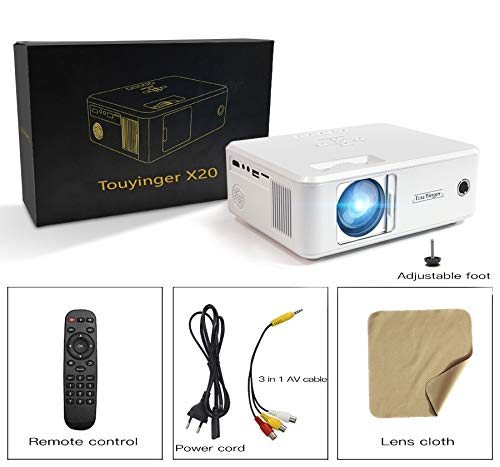
Image: The Myra TouYinGer X20 Projector shown with its packaging box and included accessories: remote control, power cord, 3-in-1 AV cable, and a lens cleaning cloth.
- Myra TouYinGer X20 LED Projector
- Control remot
- Cable d'alimentació
- Cable AV 3 en 1
- Drap de neteja de lents
- Manual d'usuari (aquest document)
4. Producte acabatview
4.1 Dimensions and Components
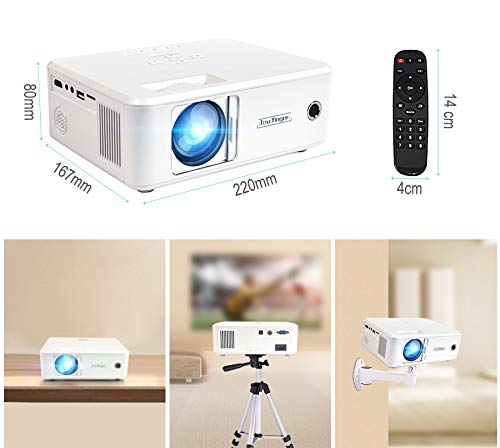
Imatge: Superior view of the Myra TouYinGer X20 Projector showing its dimensions (220mm length, 167mm width, 80mm height). Also shown are the remote control dimensions (14cm length, 4cm width) and examples of projector placement: tabletop, tripod mount, and wall mount.
The projector features a compact design with various ports for connectivity. Key components include the lens, focus ring, keystone correction, input ports (HDMI, USB, VGA, AV, SD card slot), and power input.
4.2 Interfícies
- HDMI: For connecting to devices like laptops, gaming consoles, and Blu-ray players.
- USB: Per connectar unitats flash USB per reproduir contingut multimèdia files. (Note: Supports Pendrive only, not hard disks or phones).
- VGA: For connecting to computers.
- DE: For connecting to older devices using the included 3-in-1 AV cable.
- Ranura per a targeta SD: Per reproduir mitjans filedirectament des d'una targeta SD.
- Port d'àudio de 3.5 mm: Per connectar altaveus externs o auriculars.
5. Configuració
5.1 Col·locació
Position the projector on a stable, flat surface or mount it using a compatible tripod or ceiling mount. Ensure there is adequate ventilation around the projector. The projection distance ranges from 1.2 to 3.8 meters, yielding a screen size of 37 to 130 inches. For best results, use in a dark environment.
5.2 Connexió d'alimentació
- Connecteu el cable d'alimentació a l'entrada d'alimentació del projector.
- Plug the other end of the power cord into a suitable electrical outlet (AC110V~240V, 50Hz/60Hz).
- L'indicador lluminós d'engegada del projector s'il·luminarà.
5.3 Connexió de fonts d'entrada
Connect your desired media source (e.g., laptop, USB drive, DVD player) to the corresponding port on the projector.
- HDMI: Connect an HDMI cable from your device to the projector's HDMI port.
- USB/SD: Inseriu una unitat flash USB o una targeta SD a la ranura corresponent.
- VGA: Connecteu un cable VGA de l'ordinador al port VGA del projector.
- DE: Use the provided 3-in-1 AV cable to connect to devices with RCA outputs.
5.4 Ajust de l'enfocament i la distorsió trapezoidal
- Focus: Gireu l'anell d'enfocament de la lent del projector fins que la imatge projectada sigui clara i nítida.
- Correcció Keystone: Use the keystone adjustment dial (±12 vertical) to correct trapezoidal distortion if the projector is not perfectly perpendicular to the screen.
6. Instruccions de funcionament
6.1 Encès/Apagat
- Encès: Press the power button on the projector or the remote control. The LED lamp s'encendrà.
- Apagar: Press the power button again. Allow the projector to cool down before unplugging it.
6.2 Selecció de la font
Use the 'Source' button on the remote control or projector to cycle through available input sources (HDMI, USB, VGA, AV, SD).
6.3 Reproducció multimèdia (USB/SD)
When a USB drive or SD card is inserted, navigate the on-screen menu using the remote control to select the desired media type (Video, Music, Photo, Text) and then browse for your files.
- Formats d'àudio compatibles: MP3, WMA, AAC
- Formats de vídeo compatibles: MPEG1, MPEG2, MPEG4, H264, RM, RMVB, MOV, MJPEG, VC1, DIVX, FLV (Note: AC3 audio is not supported).
- Formats d'imatge compatibles: JPEG, BMP, PNG
6.4 Funcionalitat 3D
The projector supports Red & Blue 3D format. To view 3D content, you will need compatible Red & Blue 3D glasses (not included).
7. Manteniment
7.1 Neteja de lents
Use the provided lens cleaning cloth or a soft, lint-free cloth to gently wipe the projector lens. Avoid using abrasive cleaners or excessive force.
7.2 Protecció contra la pols
The projector features an embedded lens cover for better lens and dust protection. Always replace the lens cover when the projector is not in use. Regularly clean the projector's exterior with a soft, dry cloth.
7.3 Lamp La vida
El LED lamp has an estimated lifespan of 20,000 hours. Proper ventilation and operating conditions will help maximize lamp vida.
8. Solució De Problemes
Si teniu problemes amb el projector, consulteu els problemes i solucions més comuns següents:
| Problema | Causa possible | Solució |
|---|---|---|
| No hi ha imatge a la pantalla | Incorrect input source selected; Loose cable connection; Power issue | Select the correct input source; Check all cable connections; Ensure projector is powered on. |
| La imatge és borrosa | Focus not adjusted; Projector too far/close to screen | Ajusteu l'anell d'enfocament; Ajusteu la distància de projecció. |
| La imatge és trapezoïdal | Projector no perpendicular a la pantalla | Ajusteu el dial de correcció de la distorsió trapezoidal. |
| Sense so | Volume too low; Audio format not supported; External speakers not connected | Increase volume; Check if audio format is supported (AC3 not supported); Connect external speakers if needed. |
| USB drive not recognized | Unsupported device; Corrupted files | Ensure it's a USB Pendrive (hard disks/phones not supported); Check file system and integrity. |
9. Especificacions
| Característica | Especificació |
|---|---|
| Model | X20 |
| Tecnologia de visualització | TFT-panel LCD únic + tecnologia LED |
| Resolució nativa | 800 x 600 dpi (Supports 720p, 1080p) |
| Brillantor | 2200 lúmens |
| Relació de contrast | 1500:1 |
| Lamp Tipus | LED Lamp |
| Lamp La vida | 20,000 hores |
| Colors visibles | 16.7K |
| Lent | F=126 mm (Manual focusing) |
| Correcció de pedra clau | ±12° Vertical (Manual) |
| Mida de la pantalla de projecció | 37-130 polzades |
| Distància de projecció | 1.2-3.8 metres |
| Relació d'aspecte | 16:9 Natiu, Compatible amb 4:3 |
| Interfície multimèdia | 1*VGA, 1*USB, 1*SD, 1*HDMI, 1*3.5mm Audio port, 1*AV, 1*TV |
| Font d'alimentació | AC110V~240V 50Hz/60Hz |
| Dimensions | 212 mm x 150 mm x 78 mm |
| Pes | 1.5 kg |
| Característiques especials | Portable, Red & Blue 3D Support |
10. Garantia i Suport
The Myra TouYinGer X20 LED Projector comes with a 1 anys de garantia des de la data de compra.
For warranty claims, technical support, or any inquiries, please contact Myra customer service:
- Telèfon: 8955589977
- Correu electrònic: myrakhmshop@gmail.com
Si us plau, tingueu a punt el model del vostre producte (X20) i els detalls de la compra quan us poseu en contacte amb el servei d'assistència.