
1. Introducció
The FeinTech VSW04202 is an advanced HDMI 2.0 switch designed to manage multiple HDMI sources and distribute audio effectively. This device allows you to connect up to four HDMI sources to a single HDMI display, such as a TV or projector, while simultaneously extracting high-definition audio for an AV receiver or soundbar. It supports modern video standards including 4K@60Hz Ultra HD, HDR10, HLG-HDR, and Dolby Vision, ensuring compatibility with the latest entertainment systems. Additionally, it offers versatile audio output options, including HDMI HD audio, analog stereo via 3.5mm jack, and digital 2.0/5.1 audio via SPDIF Toslink.
2. Producte acabatview
The VSW04202 features a compact design with clearly labeled ports and controls for ease of use. It includes four HDMI input ports, two HDMI output ports (one for video/audio, one for audio only), and dedicated audio output ports.
2.1 Tauler frontal
The front panel provides essential controls and indicators:
- Interruptor ON / OFF: Control de potència per al dispositiu.
- Indicador POWER: S'il·lumina quan el dispositiu està encès.
- INPUT SWITCH Button: Manually cycles through HDMI input sources.
- ARC Indicator: Shows the status of the Audio Return Channel.
- SPDIF Indicator: Indicates SPDIF audio output activity.
- AUDIO MODE Button: Cycles through audio EDID modes (PASS, 2.0, 5.1).
- Indicador AUTO: Shows if auto-switching is enabled.
- Receptor IR: Per a senyals de comandament a distància.
- HDMI INPUT Indicators (1-4): Show which HDMI input is currently active.
- AUDIO MODE Indicators (2.0, 5.1, PASS): Show the selected audio EDID mode.

Figura 1: Frontal view of the FeinTech VSW04202 HDMI switch, showing power button, input switch, audio mode button, and various indicator lights for inputs and audio settings.
2.2 Panell posterior
The rear panel houses all connection ports:
- CC 5V: Port d'entrada d'alimentació.
- HDMI IN 1-4: HDMI input ports for connecting source devices (e.g., gaming consoles, Blu-ray players, streaming devices).
- OUT A (ARC): Main HDMI output for connecting to your TV or display. Supports Audio Return Channel (ARC).
- OUT B (AUDIO ONLY): Dedicated HDMI output for connecting to an AV receiver or soundbar for HD audio extraction.
- SORTIDA SPDIF: Optical digital audio output (Toslink).
- Sortida d'àudio de 3.5 mm: Analog stereo audio output for headphones or active speakers.

Figura 2: posterior view of the FeinTech VSW04202 HDMI switch, displaying the HDMI input ports (1-4), HDMI output ports (A and B), SPDIF optical output, and 3.5mm audio jack.
2.3 Control remot
The included remote control provides convenient access to all functions, including input switching and audio mode selection.

Figure 3: The FeinTech VSW04202 HDMI switch shown alongside its compact remote control, which allows for easy selection of inputs and audio modes.
3. Configuració
Follow these steps to set up your FeinTech VSW04202 HDMI switch:
3.1 Connexió de dispositius
- Connectar fonts HDMI: Use high-quality HDMI cables to connect your source devices (e.g., gaming console, UHD Blu-ray player, streaming player) to the HDMI IN 1-4 ports on the VSW04202.
- Connecta a la pantalla: Connect the HDMI OUT A (ARC) port of the VSW04202 to the HDMI input of your TV or display.
- Connect to Audio System (Optional):
- For HD audio (e.g., Dolby Atmos, DTS-HD) to an AV receiver or soundbar, connect the HDMI OUT B (AUDIO ONLY) port to an HDMI input on your audio system.
- For digital 2.0/5.1 audio, connect the SPDIF OUT port to your audio system's optical input.
- For analog stereo audio, connect the 3.5mm Audio Out port to headphones or active speakers.
- Connectar l'alimentació: Plug the included 5V power adapter into the DC 5V port on the VSW04202 and then into a power outlet.

Figure 4: Connection diagram illustrating how to connect various 4K HDMI sources (gaming console, UHD Blu-ray player, Fire TV 4K, streaming player) to the FeinTech VSW04202, which then connects to an Ultra-HD TV and an AV receiver for 7.1 sound.
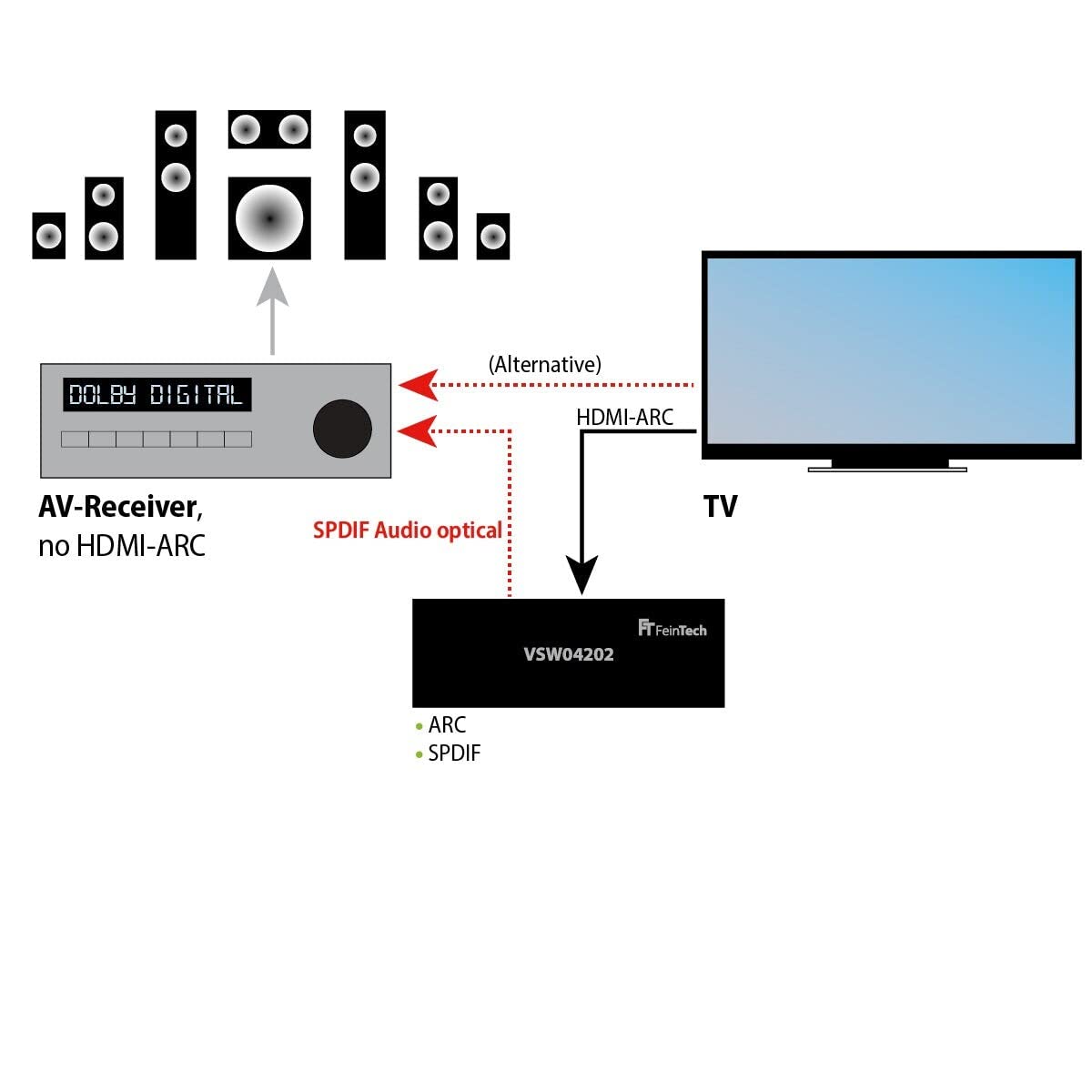
Figure 5: Alternative connection diagram demonstrating how the FeinTech VSW04202 can connect to a TV and an AV receiver, utilizing either HDMI ARC or SPDIF optical audio for sound output.
3.2 Audio EDID Settings
The VSW04202 allows manual adjustment of the audio EDID (Extended Display Identification Data) via the AUDIO MODE button on the front panel or remote. This setting determines the audio format that the HDMI source provides. Note that the selected sound format applies to all outputs simultaneously.
- PASSA: In this mode, the output audio format is based on the best sound format supported by the device connected to HDMI OUT B. This allows for 7.1 sound if your AV receiver supports it.
- 2.0: The audio output will be stereo (2.0 LPCM) on all outputs.
- 5.1: The audio output will be in 5.1 surround sound format, provided the source material contains a 5.1 soundtrack.
For HD audio formats like Dolby TrueHD or DTS-HD, these can only be transmitted via HDMI. SPDIF Toslink can output digital stereo (LPCM 2.0) or 5.1 sound (Dolby Digital / AC-3 or DTS) depending on the source material. Digital audio formats via SPDIF do not have volume control; volume must be adjusted on the connected audio amplificador o receptor.
4. Funcionament
4.1 Input Switching
The VSW04202 supports both automatic and manual input switching:
- Automatic Switching (Auto-Switching): When a connected HDMI source is turned on, the switch will automatically activate that input. If the active HDMI source is turned off, the switch will revert to the previously used HDMI input.
- Canvi manual: You can manually switch between inputs using the INPUT SWITCH button on the front panel or the corresponding buttons on the remote control. If you experience issues with auto-switching (e.g., a source not turning off its HDMI output in standby), you can disable the auto-switching function.
4.2 Audio Return Channel (ARC)
The VSW04202 supports Audio Return Channel (ARC) for outputting TV sound via its digital audio outputs (HDMI OUT B and SPDIF OUT). Please note that ARC is not supported via the analog 3.5mm output.
5. Manteniment
To ensure optimal performance and longevity of your FeinTech VSW04202, follow these maintenance guidelines:
- Neteja: Use a soft, dry cloth to clean the device. Do not use liquid cleaners or aerosols, as they may damage the unit.
- Col·locació: Col·loqueu l'interruptor en un lloc ben ventilat, allunyat de la llum solar directa, de fonts de calor i d'humitat excessiva.
- Manipulació: Manipuleu el dispositiu amb cura. Eviteu deixar-lo caure ni sotmetre'l a impactes forts.
- Potència: Disconnect the power adapter if the device will not be used for an extended period.
6. Solució De Problemes
If you encounter issues with your FeinTech VSW04202, refer to the following common problems and solutions:
- Sense imatge ni so:
- Ensure all HDMI cables are securely connected to both the source devices, the VSW04202, and the display/audio system.
- Verify that the VSW04202 is powered on and the POWER indicator is lit.
- Check the selected input on the VSW04202 matches the active source.
- Confirm the correct input is selected on your TV/display and AV receiver.
- No 7.1 Audio Output:
- Set the AUDIO MODE switch to PASSA.
- Ensure your AV receiver supports 7.1 audio.
- After connecting, restart your media player by disconnecting and reconnecting its power.
- Many 7.1 audio tracks are in English. Ensure the playback language for movies is set to original/English if available.
- Auto-Switching Issues:
- Some source devices may not fully turn off their HDMI output in standby, causing the switch to remain on that input. In such cases, disable the auto-switching function and switch inputs manually.
- Signal Loss Over Long Cables:
- The maximum recommended cable lengths are: 1080p: 8m input + 8m output; 4K: 5m input + 5m output. Using cables longer than these specifications may result in signal degradation or loss.
7. Especificacions
| Característica | Especificació |
|---|---|
| Número de model | VSW04202 |
| Versió HDMI | HDMI 2.0b |
| Resolució màxima | 4K@60Hz YUV 4:4:4 Ultra HD 2160p |
| Suport HDR | HDR10, HLG-HDR, Dolby Vision |
| Versió HDCP | HDCP 2.2 |
| Ample de banda | 18 Gbps |
| Entrades HDMI | 4 |
| Sortides HDMI | 2 (1x Video/Audio, 1x Audio Only) |
| Sortides d'àudio | HDMI HD Audio, SPDIF Toslink, 3.5mm Stereo |
| Formats d'àudio compatibles | Dolby Atmos, DTS-HD, Dolby TrueHD, DTS, Dolby Digital, LPCM 2.0/5.1/7.1 |
| Suport ARC | Yes (via digital outputs) |
| Canvi automàtic | Sí (es pot desactivar) |
| Dimensions (L x A x A) | 20.5 x 7.5 x 2.3 cm |
| Pes | 586 grams |
| Consum d'energia | <3 W |
| Font d'alimentació | DC 5V |
| Bateria inclosa | 1 Lithium metal (for remote) |
8. Garantia i Suport
For information regarding warranty coverage, terms, and conditions, please refer to the documentation provided with your purchase or visit the official FeinTech website. For technical support, product inquiries, or assistance with troubleshooting beyond this manual, please contact FeinTech customer service directly.