
1. Introducció
Thank you for choosing the Hoco E30 Wireless Earphone. This manual provides essential information for setting up, operating, and maintaining your earphone. Please read it carefully before use to ensure optimal performance and longevity of your device.
2. Informació de seguretat
To prevent damage to your device or injury to yourself and others, please observe the following safety precautions:
- Eviteu l'exposició prolongada a nivells de volum elevats per evitar danys auditius.
- Do not use the earphone while driving or in situations where you need to be aware of your surroundings.
- Manteniu el dispositiu allunyat de l'aigua, la humitat i les temperatures extremes.
- Do not attempt to disassemble, repair, or modify the earphone. This will void the warranty.
- Feu servir només els cables i adaptadors de càrrega proporcionats o certificats.
- Mantenir fora de l'abast dels nens i mascotes.
3. Contingut del paquet
Marqueu la casella per als elements següents:
- Hoco E30 Wireless Earphone
- Cable de càrrega USB
- Manual d'usuari
4. Producte acabatview
Familiarize yourself with the components of your Hoco E30 Wireless Earphone:

Figura 4.1: lateral view of the Hoco E30 Wireless Earphone, highlighting its sleek design and ear hook.

Figura 4.2: The Hoco E30 Wireless Earphone positioned next to a smartphone, illustrating its compact size and wireless connectivity.
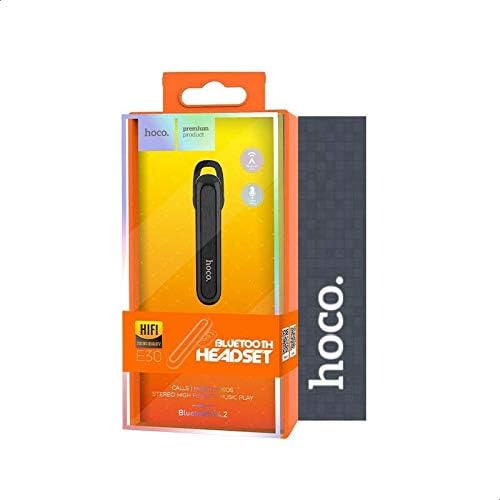
Figura 4.3: The retail packaging for the Hoco E30 Wireless Earphone, displaying branding and key features.
5. Configuració
5.1 Charging the Earphone
Before first use, fully charge your Hoco E30 earphone.
- Connect the provided USB charging cable to the charging port on the earphone.
- Connect the other end of the USB cable to a DC 5V power source (e.g., a USB wall adapter or computer USB port).
- El llum indicador de càrrega s'il·luminarà.
- Charging typically takes approximately 2 hours. The indicator light will change or turn off once charging is complete.
5.2 Vinculació amb un dispositiu
To connect your Hoco E30 earphone to your smartphone or other Bluetooth-enabled device:
- Ensure the earphone is fully charged and turned off.
- Press and hold the multi-function button on the earphone until the indicator light flashes red and blue alternately, indicating it is in pairing mode.
- Al dispositiu, activa el Bluetooth i cerca els dispositius disponibles.
- Select "Hoco E30" from the list of found devices.
- Once paired, the indicator light on the earphone will flash blue slowly, and you will hear a confirmation tone.
- The earphone has a transmission range of up to 10 meters (33 feet).
6. Instruccions de funcionament
6.1 Encès/Apagat
- Encès: Press and hold the multi-function button for approximately 3 seconds until the blue indicator light flashes and you hear a power-on tone.
- Apagar: Press and hold the multi-function button for approximately 5 seconds until the red indicator light flashes and you hear a power-off tone.
6.2 Gestió de trucades
- Respon a la trucada: Briefly press the multi-function button when an incoming call rings.
- Finalitzar la trucada: Premeu breument el botó multifunció durant una trucada.
- Rebutja la trucada: Press and hold the multi-function button for 2 seconds when an incoming call rings.
- Torna a marcar l'últim número: Premeu dues vegades el botó multifunció quan no esteu fent una trucada.
6.3 Reproducció de música
- Reproduir/pausa: Briefly press the multi-function button to play or pause music.
- Pista següent: Press and hold the multi-function button for 2 seconds to skip to the next track.
- Pista anterior: Press and hold the multi-function button for 2 seconds (during playback) to go to the previous track.
Note: The Hoco E30 supports A2DP and AVRCP protocols for high-quality audio streaming and remote control. Volume control is typically managed via the connected device.
6.4 Battery Status Display
The Hoco E30 earphone supports battery level display on compatible Apple iOS devices and some Android smartphones. Check your device's notification bar or Bluetooth settings for this feature.
7. Manteniment
- Neteja: Use a soft, dry cloth to clean the earphone. Do not use harsh chemicals or abrasive materials.
- Emmagatzematge: Store the earphone in a cool, dry place away from direct sunlight and extreme temperatures.
- Cura de la bateria: To prolong battery life, avoid fully discharging the earphone frequently. Charge it regularly, even if not in use for extended periods.
8. Solució De Problemes
If you encounter issues with your Hoco E30 earphone, try the following solutions:
| Problema | Solució |
|---|---|
| Earphone does not power on. | Ensure the earphone is fully charged. Connect it to a power source and try again. |
| No es pot emparellar amb el dispositiu. |
|
| No hi ha so o hi ha mala qualitat de so. |
|
| La càrrega no funciona. |
|
9. Especificacions
| Característica | Detall |
|---|---|
| Model | E30 |
| Versió Bluetooth | V4.2 WT |
| Protocols compatibles | Auriculars, mans lliures, A2DP, AVRCP |
| Rang de transmissió | 10 metres (33 peus) |
| Freqüència de transmissió | 2.4 GHz |
| Vol. De càrregatage | DC 5V |
| Temps de càrrega | Aprox. 2 hores |
| Capacitat de la bateria | 60 mAh |
| Temps de conversa | Aprox. 3.5 hores |
| Temps de reproducció de música | Aprox. 3.5 hores |
| Temps d'espera | Aprox. 110 hores |
| Pes net del producte | 6 grams |
| Dimensions (L x A x A) | 58 mm x 14 mm x 25 mm |
| Material | Plàstic |
| Mètode de control | Toca |
| Color | Negre i Plata |
10. Garantia i Suport
Hoco products are designed and manufactured to the highest quality standards. This product is covered by a limited warranty from the date of purchase. Please refer to the warranty card included in your package for specific terms and conditions.
For technical support or warranty claims, please contact your local Hoco distributor or visit the official Hoco weblloc per obtenir més informació.


