
1. Introducció
This manual provides detailed instructions for the safe and effective operation of the AOPUTTRIVER AP-570T-APP Bluetooth Digital Clamp Multimeter. This device is designed for measuring AC/DC voltage, AC/DC current, resistance, capacitance, frequency, duty cycle, and temperature. It also features diode testing, continuity testing, and a data hold function. The integrated Bluetooth connectivity allows for remote monitoring and data logging via a dedicated mobile application.

Figure 1: AOPUTTRIVER AP-570T-APP Digital Clamp Multimeter. This image shows the front view of the multimeter, highlighting its display and rotary switch.
2. Informació de seguretat
To ensure safe operation, please read and understand all safety warnings and operating instructions before using this instrument. Failure to observe these warnings can result in severe injury or death.
- Respecteu sempre els codis de seguretat locals i nacionals.
- No utilitzeu el mesurador si sembla danyat o si l'aïllament dels cables de prova està compromès.
- Verificar el funcionament del mesurador amb un volum coneguttagla font abans d'usar-la.
- No apliqueu més del volum nominaltage, tal com està marcat al comptador, entre els terminals o entre qualsevol terminal i terra.
- Tingueu precaució quan treballeu amb voltagper sobre de 30 V CA RMS, 42 V pic o 60 V CC. Aquests voltagsuposen un risc de xoc.
- Desconnecteu sempre l'alimentació del circuit i descarregueu totes les emissions d'alt volum.tagcondensadors abans de realitzar mesures de resistència, continuïtat, díodes o capacitància.
- Mantingueu els dits darrere dels protectors de dits de les sondes de prova durant les mesures.
- Substituïu la bateria immediatament quan aparegui l'indicador de bateria baixa per garantir lectures precises.
- The device is rated IEC 61010-1, CAT IV 600 V, CAT III 1000 V, Class 2, with double insulation.
3. Característiques del producte
The AOPUTTRIVER AP-570T-APP offers a range of features for comprehensive electrical testing:
- Digital Multimeter Functions: 4000 counts, optional auto/manual range for AC current. Auto range for DC current, AC/DC voltage, resistance, capacitance, frequency, and duty cycle. Backlit display, data hold, temperature (℃/℉), diode test, relative value, continuity test with audible alarm.
- Mesura de la temperatura: Measures temperature in Celsius (℃) and Fahrenheit (℉) with an included thermocouple probe, ranging from -20℃ to 1000℃.
- Connectivitat Bluetooth: Connects to Android/iOS phones for remote control, monitoring, continuous testing, and data logging. Data can be saved in TXT or Excel formats.
- High Precision Clamp Mesurador: Offers 1A resolution for AC/DC current from 1A to 1000A, suitable for high and low current measurements. Jaw opening of 45mm.
- Disseny durador: Engineered to withstand drops and harsh work site conditions, meeting IEC 61010-1 safety standards.
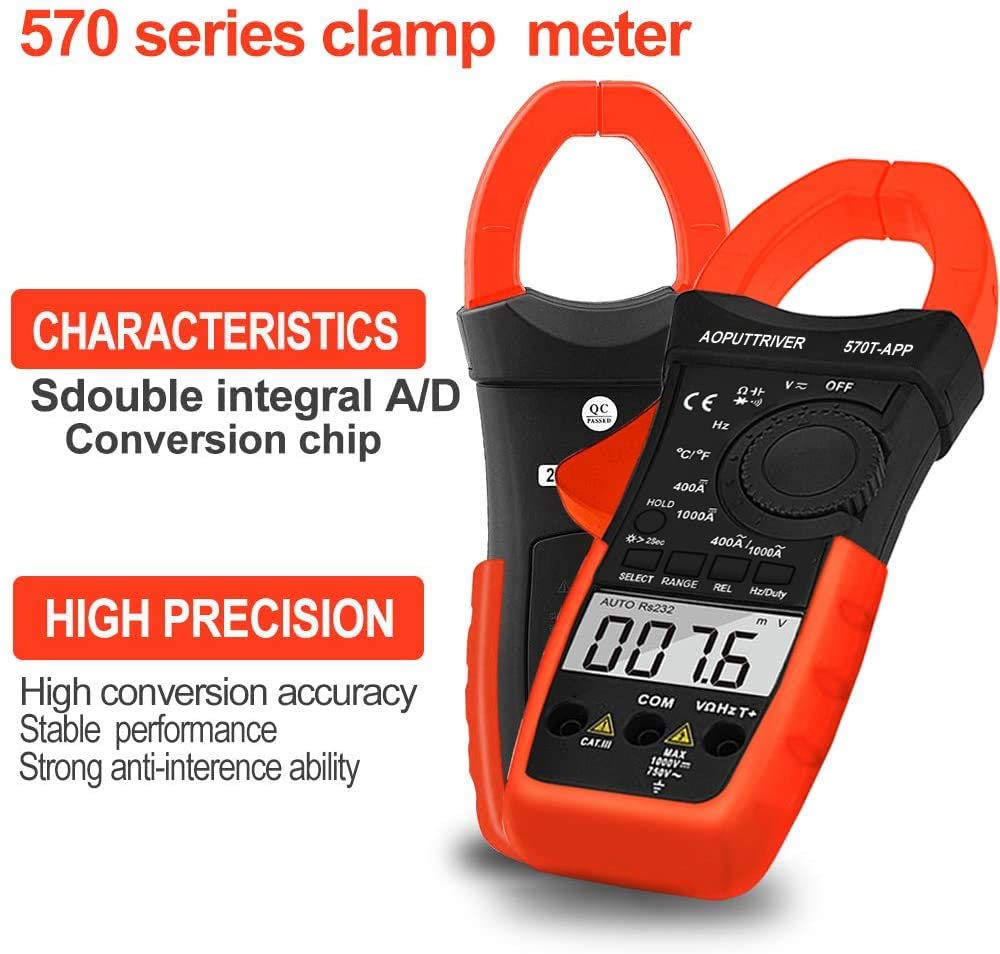
Figure 2: Key characteristics of the AP-570T-APP clamp meter, highlighting its double integral A/D conversion chip and high precision for stable performance.
4. Components i controls
Familiarize yourself with the parts of your AP-570T-APP multimeter:
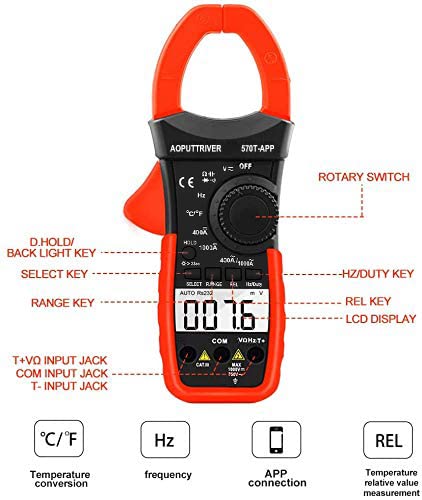
Figure 3: Diagram illustrating the main controls and input jacks of the AP-570T-APP multimeter.
- Interruptor rotatiu: Used to select measurement functions (e.g., V~, V-, A~, A-, Ω, Hz, ℃/℉, Diode, Continuity).
- Pantalla LCD: Mostra lectures de mesura, unitats i indicadors de funció.
- D.HOLD / Backlight Key: Press briefly to hold the current reading; press and hold to activate/deactivate the backlight.
- Tecla SELECT: Toggles between different measurement modes within a function (e.g., AC/DC voltage, Díode/Continuitat).
- RANGE Key: Switches between auto-ranging and manual-ranging modes.
- REL Key: Activates the relative measurement function.
- Hz/Duty Key: Selecciona la mesura de freqüència o cicle de treball.
- Preses d'entrada:
- COM: Common input jack for all measurements.
- VΩHzT+: Positive input jack for voltage, mesures de resistència, freqüència i temperatura.
- T-: Negative input jack for temperature measurements (used with thermocouple).
- Clamp Mandíbula: Used for non-contact AC/DC current measurement. Maximum opening: 45mm.

Figura 4: Primer pla view de l'actual clamp jaw, showing its 45mm opening and the secure closure mechanism.
5. Configuració
5.1 Instal·lació de la bateria
The multimeter requires one 9V battery (included). To install or replace the battery:
- Assegureu-vos que el multímetre estigui APAGAT.
- Localitzeu la tapa del compartiment de la bateria a la part posterior del dispositiu.
- Use a small screwdriver (included) to loosen the screw securing the cover.
- Traieu la coberta.
- Connect the 9V battery to the battery clips, observing correct polarity.
- Col·loqueu la bateria al compartiment i torneu a col·locar la tapa, fixant-la amb el cargol.
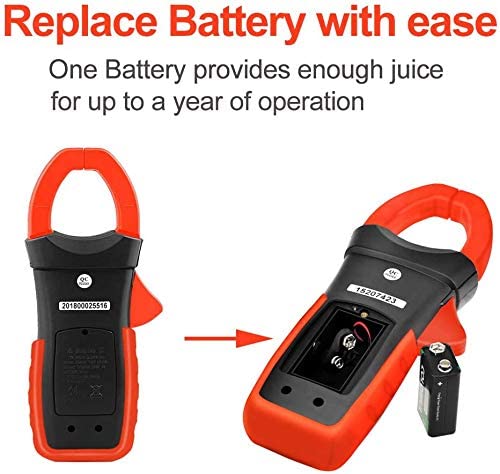
Figure 5: Illustration of how to access and replace the 9V battery in the AP-570T-APP multimeter.
5.2 Mobile App Connection (Bluetooth)
The AP-570T-APP can connect to your smartphone via Bluetooth for enhanced functionality.
- Download the "AP-570T-APP" application from your device's app store (Android/iOS).
- Assegureu-vos que el Bluetooth estigui habilitat al vostre telèfon intel·ligent.
- Turn on the AOPUTTRIVER AP-570T-APP multimeter.
- Open the downloaded application on your phone.
- The app should automatically detect and connect to the multimeter. Follow any on-screen prompts if pairing is required.
- Un cop connectat, pots view real-time measurements, log data, and control certain functions remotely.

Figure 6: The AP-570T-APP multimeter displayed alongside a smartphone showing its connected application interface, demonstrating remote monitoring capabilities.
6. Instruccions de funcionament
Always ensure the meter is set to the correct function and range before making any measurements. Connect test leads to the appropriate input jacks.
6.1 AC/DC Voltage Mesura
- Insert the red test lead into the VΩHzT+ jack and the black test lead into the COM jack.
- Turn the rotary switch to the V~ (AC Voltage) o V- (Volum de corrent continutage) posició.
- If measuring AC voltage, press the SELECT button to toggle between AC and DC if necessary (for combined V~ / V- position).
- Connecteu les sondes de prova en paral·lel al circuit o component que s'està provant.
- Llegeix el voltage valor a la pantalla LCD.

Figura 7: Example of performing a DC current test using the clamp function on electrical wiring.
6.2 Mesura de corrent AC/DC (Clamp)
For current measurements, use the clamp jaw. Do not use test leads for current measurement with the clamp funció.
- Turn the rotary switch to the 400A/1000A~ (AC Current) or 400A/1000A- (DC Current) position.
- Obriu el clamp jaw and enclose only one conductor of the circuit. Ensure the jaw is fully closed.
- Llegiu el valor actual a la pantalla LCD.
6.3 Mesura de la Resistència
- Insert the red test lead into the VΩHzT+ jack and the black test lead into the COM jack.
- Turn the rotary switch to the Ω position.
- Ensure the circuit is de-energized before connecting the probes.
- Connecteu les sondes de prova al component que s'ha de mesurar.
- Llegiu el valor de la resistència a la pantalla LCD.
6.4 Prova de continuïtat
- Insert the red test lead into the VΩHzT+ jack and the black test lead into the COM jack.
- Turn the rotary switch to the Ω position. Press SELECT until the continuity symbol (speaker icon) appears.
- Assegureu-vos que el circuit estigui desenergitzat.
- Connect the test probes across the component or circuit path.
- If continuity exists (resistance below approximately 50Ω), the meter will emit an audible beep.
6.5 Prova de díodes
- Insert the red test lead into the VΩHzT+ jack and the black test lead into the COM jack.
- Turn the rotary switch to the Ω position. Press SELECT until the diode symbol (triangle with line) appears.
- Assegureu-vos que el circuit estigui desenergitzat.
- Connecteu la sonda vermella a l'ànode i la sonda negra al càtode del díode. Un voltatge directetage drop (e.g., 0.5V to 0.8V) will be displayed.
- Reverse the probes. The display should show "OL" (Open Loop) for a good diode.
6.6 Mesura de la capacitat
- Insert the red test lead into the VΩHzT+ jack and the black test lead into the COM jack.
- Turn the rotary switch to the capacitance symbol (capacitor icon).
- Assegureu-vos que el condensador estigui completament descarregat abans de fer la prova.
- Connecteu les sondes de prova als terminals del condensador.
- Llegiu el valor de la capacitat a la pantalla LCD.
6.7 Mesura de freqüència i cicle de treball
- Insert the red test lead into the VΩHzT+ jack and the black test lead into the COM jack.
- Gireu el commutador giratori a la posició Hz.
- Press the Hz/Duty key to toggle between frequency (Hz) and duty cycle (%).
- Connect the test probes in parallel to the circuit where the frequency or duty cycle is to be measured.
- Llegiu el valor a la pantalla LCD.
6.8 Mesura de la temperatura
- Ensure the multimeter is OFF.
- Insert the thermocouple probe into the VΩHzT+ (positive) and T- (negative) jacks. Observe polarity.
- Turn the rotary switch to the ℃/℉ position.
- Press the SELECT button to toggle between Celsius and Fahrenheit.
- Col·loqueu la punta de la sonda del termopar sobre o a prop de l'objecte la temperatura del qual es vol mesurar.
- Llegiu el valor de la temperatura a la pantalla LCD.
7. Manteniment
Un manteniment adequat garanteix la longevitat i la precisió del vostre multímetre.
- Neteja: Netegeu el cas amb l'anunciamp drap i detergent suau. No utilitzeu abrasius ni dissolvents.
- Substitució de la bateria: Replace the 9V battery when the low battery indicator appears on the display. Refer to Section 5.1 for instructions.
- Emmagatzematge: Si el mesurador no s'utilitza durant un període prolongat, traieu la pila per evitar fuites. Guardeu-lo en un lloc fresc i sec, allunyat de la llum solar directa.
- Calibració: For professional use, periodic calibration by a qualified technician is recommended to maintain accuracy.
8. Solució De Problemes
If you encounter issues with your AP-570T-APP multimeter, refer to the table below:
| Problema | Causa possible | Solució |
|---|---|---|
| El comptador no s'encén. | Bateria morta o instal·lada incorrectament. | Check battery polarity; replace battery if dead. |
| Es mostra "OL" (sobrecàrrega). | La mesura supera el rang seleccionat o la capacitat màxima del mesurador. | Select a higher range or ensure the measurement is within the meter's specifications. |
| Lectures inexactes. | Low battery, incorrect function/range, or poor test lead connection. | Replace battery, verify function/range, ensure secure test lead connection. |
| El Bluetooth es desconnecta amb freqüència. | Interference, distance from phone, or app issue. | Reduce distance to phone, minimize interference, restart multimeter and app. |
| No hi ha cap bip de continuïtat. | Circuit resistance too high, or continuity function not selected. | Ensure continuity function is active; check for open circuit. |
9. Especificacions
| Paràmetre | Valor |
|---|---|
| Número de model | AP-570CAPP-UK |
| Mostra | 4000 Counts LCD with Backlight |
| Rang de corrent AC/DC | 1A to 1000A (1A resolution) |
| Volum AC / DCtage Rang | Rang automàtic |
| Interval de resistència | Rang automàtic |
| Interval de capacitat | Rang automàtic |
| Interval de freqüència | Rang automàtic |
| Interval de temperatura | -20℃ to 1000℃ (or -4℉ to 1832℉) |
| Obertura de la mandíbula | 45 mm |
| Classificació de seguretat | IEC 61010-1, CAT IV 600 V, CAT III 1000 V, Class 2, Double Insulation |
| Font d'alimentació | 1 x bateria de 9V |
| Dimensions del producte (L x A x A) | 22.5 x 9.7 x 4 cm |
| Pes | 600 grams |
| UPC | 778469101803 |
10. Garantia i Suport
AOPUTTRIVER provides a 24-month warranty for this product. For technical support, warranty claims, or further assistance, please contact AOPUTTRIVER customer service through your purchase platform or the official brand weblloc.