
ZIHNIC WH-816
ZIHNIC WH-816 Bluetooth Over-Ear Headphones User Manual
Model: WH-816 | Brand: ZIHNIC
Introducció
Thank you for choosing the ZIHNIC WH-816 Bluetooth Over-Ear Headphones. This manual provides essential information for setting up, operating, and maintaining your headphones to ensure optimal performance and longevity. Please read this manual thoroughly before using the product.

Image: ZIHNIC WH-816 Bluetooth Over-Ear Headphones in gray, shown with their protective carrying case.
Contingut del paquet
Assegureu-vos que tots els elements estiguin presents al vostre paquet:
- ZIHNIC WH-816 Bluetooth Over-Ear Headphones
- Cable d'àudio de 3.5 mm
- Funda de transport premium
- Cable de càrrega micro USB

Image: ZIHNIC WH-816 headphones folded with included accessories: a micro USB charging cable, a 3.5mm audio cable, and a protective carrying case.
Producte acabatview
The ZIHNIC WH-816 headphones are designed for versatility and comfort, offering both wireless Bluetooth and wired connectivity. They feature soft memory-protein foam earcups and an adjustable headband for prolonged wearing comfort. The headphones are foldable for easy portability.
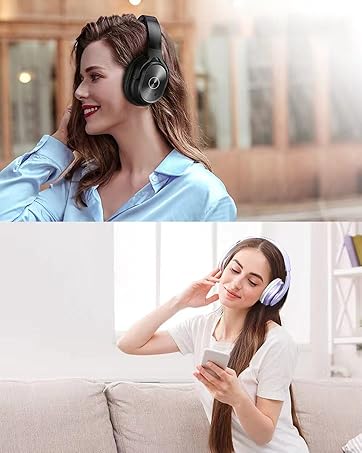
Imatge: Mostra els detallsasing the comfortable design of the headphones, including soft memory foam earcups, an adjustable headband, and the ability to flex for different head shapes.
Característiques principals:
- Mode dual: Wireless Bluetooth and Wired (3.5mm audio cable)
- Controls integrats: Volume, Play/Pause, Mode selection, Call management
- Reproducció multimèdia: Micro SD/TF card support, FM Radio function
- Disseny de comoditat: Soft memory-protein foam earcups, adjustable and foldable headband
- Llarga vida útil de la bateria: Up to 14 hours of music time on a single charge
Demostració del producte:
Vídeo: Un breu resumview of the ZIHNIC WH-816 headphones, showcasing their foldable design, controls, and various features like Bluetooth connectivity, Micro SD card slot, and wired option. The video highlights the product's versatility and ease of use.
Controls i ports:

Imatge: Detallada view of the right earcup, highlighting the multifunction button (play/pause/call), volume/next track buttons, mode button (M), Micro SD/TF card slot, ON/OFF switch, headphone jack, USB charging port, and LED indicator.
- Multifunction Button (Play/Pause/Call): Press once to Play/Pause music or Answer/End calls. Press and hold to reject calls.
- Puja el volum / Pista següent: Press once for Volume Up. Press and hold for Next Track.
- Baixada de volum / Pista anterior: Press once for Volume Down. Press and hold for Previous Track.
- Botó de mode (M): Press to switch between Bluetooth, FM Radio, and Micro SD/TF card modes.
- Ranura per a targetes Micro SD/TF: Insert a Micro SD/TF card (up to 32GB) for direct music playback.
- Interruptor ON / OFF: Slide to power the headphones on or off.
- Presa d'auriculars (3.5 mm): Per a connexió d'àudio amb cable.
- Port de càrrega USB: Connecteu el cable de càrrega micro USB aquí.
- Indicador LED: Displays power status, pairing mode, and charging status.
Instruccions de configuració
1. Càrrega dels auriculars
Before first use, fully charge your headphones. Connect the Micro USB charging cable to the USB Charging Port on the headphones and the other end to a USB power source (e.g., computer, wall adapter). The LED indicator will show charging status and turn off when fully charged (approx. 2.5 hours).
2. Encendre/apagar
To power on, slide the ON/OFF switch to the "ON" position. The LED indicator will light up. To power off, slide the ON/OFF switch to the "OFF" position.
3. Emparellament Bluetooth
- Assegureu-vos que els auriculars estiguin apagats.
- Slide the ON/OFF switch to "ON". The headphones will enter pairing mode, indicated by a blinking blue LED.
- Al dispositiu (telèfon intel·ligent, tauleta, PC), activeu el Bluetooth i cerqueu els dispositius disponibles.
- Seleccioneu "WH-816" de la llista de dispositius.
- Un cop emparellat, l'indicador LED mostrarà una llum blava fixa.
4. Connexió per cable
To use the headphones in wired mode, connect the 3.5mm audio cable to the Headphone Jack on the headphones and the other end to your audio device. This mode works even if the headphone battery is depleted.
5. Micro SD/TF Card Mode
Insert a Micro SD/TF card (pre-loaded with MP3 files) into the Micro SD/TF Card Slot. The headphones will automatically switch to Micro SD mode and begin playing music from the card. Use the Mode Button (M) to cycle through modes if needed.
6. Mode de ràdio FM
Press the Mode Button (M) to switch to FM Radio mode. Use the Volume Up/Down buttons to scan for stations. Performance may vary based on signal strength.
Instruccions de funcionament
Reproducció de música:
- Reproduir/pausa: Premeu el botó multifunció una vegada.
- Pista següent: Premeu i manteniu premut el botó de pujar el volum.
- Pista anterior: Manteniu premut el botó de baixar el volum.
- Ajust de volum: Press the Volume Up or Volume Down buttons briefly.
Call Management (Bluetooth Mode):
- Respondre/Finalitzar la trucada: Premeu el botó multifunció una vegada.
- Rebutja la trucada: Press and hold the Multifunction Button.
- Torna a marcar l'últim número: Premeu dues vegades el botó multifunció.
Manteniment
- Clean the headphones with a soft, dry cloth. Avoid using harsh chemicals or abrasive materials.
- Store the headphones in the provided premium carrying case when not in use to protect them from dust and damage.
- Eviteu exposar els auriculars a temperatures extremes, humitat o llum solar directa.
- No intenteu desmuntar ni modificar els auriculars, ja que això anul·larà la garantia.
Resolució de problemes
| Problema | Solució |
|---|---|
| Els auriculars no s'engeguen. | Assegureu-vos que els auriculars estiguin carregats. Connecteu-los a una font d'alimentació amb el cable micro USB. |
| No es pot emparellar per Bluetooth. |
|
| No hi ha so en mode amb cable. | Ensure the 3.5mm audio cable is securely connected to both the headphones and the audio source. Check the volume levels on both devices. |
| Micro SD/TF card not playing. | Ensure the card is inserted correctly and contains compatible audio files (MP3). Try reformatting the card if issues persist. |
| Mala recepció de ràdio FM. | Move to an area with better signal strength. The headphones' antenna performance can be affected by environment. |
Especificacions
| Característica | Detall |
|---|---|
| Nom del model | WH-816 |
| Marca | ZIHNIC |
| Tecnologia de connectivitat | Bluetooth, connector de 3.5 mm |
| Tecnologia de comunicació sense fils | Bluetooth |
| Versió Bluetooth | 5.0 |
| Interval Bluetooth | 10 metres |
| Col·locació de l'orella | Sobre l'orella |
| Factor de forma | Sobre l'orella |
| Control de soroll | Aïllament acústic |
| Resposta de freqüència | 20 kHz |
| Impedància | 32 ohms |
| Durada de la bateria | 14 Hours (music time) |
| Temps de càrrega | 2.5 hores |
| Pes de l'article | 10.6 unces (0.3 quilograms) |
| Dimensions del producte | 6.7 x 6.7 x 3.35 polzades |
| Material | Plastic (earcups), Hard Plastic (carrying case) |
| Dispositius compatibles | Smartphones, Tablets, PC, Cellphones, Other Devices with 3.5mm plug cable |
| Característica especial | Wired and wireless Bluetooth headphones, Micro SD/TF, FM Radio |
Garantia i Suport
ZIHNIC headphones come with a 12-month warranty. For any product-related inquiries or support, please contact our 24/7 Customer Support service. Refer to the warranty card included in your package for detailed terms and conditions.
For further assistance, please visit the official ZIHNIC store: ZIHNIC Store on Amazon
Ask a question about this manual
Ask about setup, troubleshooting, compatibility, parts, safety, or missing instructions. Manuals+ will review the question and use this page’s manual context to help answer it.