
1. Introducció
This manual provides essential information for the safe and effective operation, maintenance, and troubleshooting of your Sharp KC-G60EUW Air Purifier with Humidifier. Please read this manual thoroughly before using the appliance and keep it for future reference.
The Sharp KC-G60EUW is designed to purify and humidify the air in rooms up to 50 square meters. It features a 5-stage filtration system and Plasmacluster Ion technology to improve air quality by removing various pollutants, allergens, and odors.
2. Informació de seguretat
Seguiu sempre les precaucions de seguretat bàsiques quan utilitzeu aparells elèctrics per reduir el risc d'incendi, descàrrega elèctrica i lesions.
- Assegureu-vos que la font d'alimentació voltage coincideix amb l'etiqueta de classificació de la unitat.
- No feu servir la unitat amb un cable d'alimentació o un endoll danyats.
- Keep the unit away from water and moisture. Do not immerse in water.
- No bloquegeu les entrades o sortides d'aire.
- Desendolleu la unitat abans de netejar-la o realitzar qualsevol manteniment.
- Aquest aparell no està pensat per ser utilitzat per persones (inclosos nens) amb capacitats físiques, sensorials o mentals reduïdes, o amb manca d'experiència i coneixements, tret que hagin rebut la supervisió o instruccions sobre l'ús de l'aparell per una persona responsable de la seva seguretat.
- No utilitzeu la unitat a prop de gasos inflamables o materials combustibles.
3. Producte acabatview
The Sharp KC-G60EUW combines air purification and humidification functions. Key components include the control panel, air inlets/outlets, water tank, and a multi-stage filter system.
3.1 Unitat principal

Imatge 3.1: Davant view of the Sharp KC-G60EUW Air Purifier, showing the Sharp logo and Plasmacluster ion indicator.
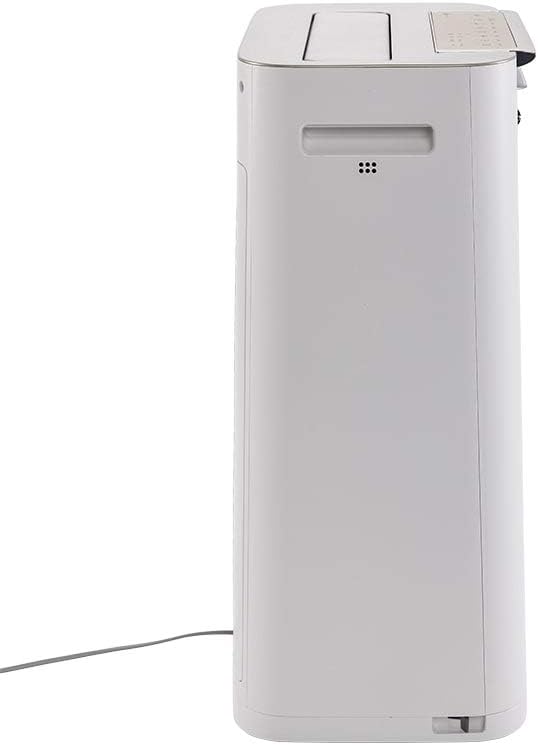
Imatge 3.2: lateral view of the Sharp KC-G60EUW Air Purifier, illustrating its slim profile and power cord connection.
3.2 Tauler de control
The control panel is located on the top of the unit and allows you to manage all functions.

Imatge 3.3: A dalt view of the Sharp KC-G60EUW, showing the control panel with various function buttons and indicators.

Imatge 3.4: Detallada view of the control panel buttons, including Power, Mode, Humidification, Spot, and Intelligent Auto mode.
3.3 Sistema de filtració
The unit employs a 5-stage filtration system for comprehensive air purification:
- Prefiltre: Captures large particles like dust, hair, and pet dander (up to 240 microns).
- Carbon Filter with Silica Gel: Absorbs unpleasant odors, volatile organic compounds (VOCs) such as benzene, formaldehyde, and benzo(a)pyrene. The silica gel layer enhances the removal of nitrogen and sulfur oxides.
- Filtre HEPA H13: Removes 99.97% of PM 2.5 particles, pollen, and other fine airborne allergens.
- Humidifier Filter: Retains sediment from water, reducing scale buildup and ensuring clean humidification.
- Plasmacluster Ionizer: Generates positive and negative ions to neutralize airborne viruses, bacteria, mold spores, and odors.
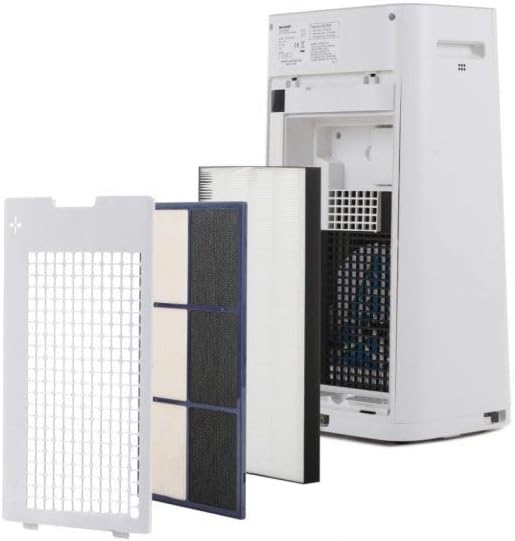
Imatge 3.5: El multi-stage filtration system of the Sharp KC-G60EUW, showing the individual filters removed from the back of the unit.
4. Configuració
Follow these steps to set up your air purifier for the first time:
- Desempaquetar la unitat: Traieu amb cura el purificador d'aire del seu embalatge. Conserveu l'embalatge per a futurs transports o emmagatzematge.
- Eliminar l'embalatge del filtre: Open the back cover of the unit. Remove all filters (pre-filter, carbon filter, HEPA filter) and unwrap them from their protective plastic bags. Reinstall the filters in the correct order, ensuring they are securely seated. Refer to Image 3.5 for filter arrangement.
- Fill Water Tank (for Humidification): Remove the water tank from the side of the unit. Fill it with clean tap water. Do not use distilled water or water with additives. Reinsert the water tank securely.
- Posicioneu la unitat: Place the air purifier on a flat, stable surface, ensuring there is adequate space (at least 20 cm) around the air inlets and outlets for optimal airflow.
- Connectar l'alimentació: Connecteu el cable d'alimentació a una presa de corrent adequada.
5. Instruccions de funcionament
The Sharp KC-G60EUW offers various operating modes and settings.
5.1 Encès/Apagat
- Premeu el botó ON/OFF botó del tauler de control per encendre o apagar la unitat.
5.2 Selecció del mode
Premeu el botó MODE button to cycle through different purification modes:
- Mode automàtic: The unit automatically adjusts fan speed and humidification based on sensor readings (dust, odor, humidity). This is the recommended mode for general use.
- Mode màxim: Operates at maximum fan speed for rapid air purification.
- Med Mode: Medium fan speed for balanced purification.
- Mode baix: Baixa velocitat del ventilador per a un funcionament silenciós.
- Mode de repòs: Operates at the lowest fan speed with dimmed indicators for undisturbed sleep.
5.3 Funció d'humidificació
To activate or deactivate humidification:
- Premeu el botó HUMIDIFY ON/OFF button. The humidification indicator will light up when active.
- Ensure the water tank is filled for humidification to function.
5.4 Plasmacluster Ion Function
The Plasmacluster Ion function is typically active by default. If there is a dedicated button, press the ION button to toggle it on or off. The Plasmacluster indicator will confirm its status.
5.5 Intelligent Auto Mode
Premeu el botó MODE INTEL·LIGENT button to engage the advanced automatic operation, which optimizes purification and humidification based on environmental conditions detected by the unit's sensors.
6. Manteniment
Un manteniment regular garanteix un rendiment òptim i allarga la vida útil del purificador d'aire.
6.1 Cleaning the Pre-filter
- Freqüència: Approximately once a month, or when the filter indicator lights up.
- Procediment:
- Desendolleu la unitat.
- Traieu el panell posterior.
- Carefully remove the pre-filter.
- Use a vacuum cleaner to remove dust and debris from the pre-filter. For stubborn dirt, wash it gently with water and a mild detergent. Rinse thoroughly and allow it to air dry completely before reinstalling.
- Reinstall the pre-filter and back panel.
6.2 Cleaning the Humidifier Filter and Water Tank
- Freqüència: Weekly or as needed, especially if scale buildup is visible.
- Procediment:
- Desendolleu la unitat.
- Remove the water tank and humidifier filter assembly.
- Buidar l'aigua que quedi del dipòsit.
- Clean the water tank with a soft brush and mild detergent. Rinse thoroughly.
- Clean the humidifier filter by rinsing it under running water. For scale buildup, soak the filter in a descaling solution (e.g., citric acid solution) as per the solution's instructions, then rinse thoroughly.
- Allow all parts to air dry completely before reassembling and reinstalling.
6.3 HEPA and Carbon Filter Replacement
- Freqüència: The HEPA and Carbon filters are not washable and must be replaced periodically. Refer to the filter replacement indicator on the unit or the manufacturer's recommendations (typically every 2-5 years depending on usage and air quality).
- Procediment:
- Desendolleu la unitat.
- Remove the back panel and the old HEPA and Carbon filters.
- Install new, genuine Sharp replacement filters, ensuring correct orientation.
- Tanqueu el panell posterior.
- Reset the filter replacement indicator (refer to the control panel instructions, usually by pressing and holding a specific button for 3 seconds).
7. Solució De Problemes
If you encounter issues with your Sharp KC-G60EUW, refer to the following common problems and solutions:
| Problema | Causa possible | Solució |
|---|---|---|
| La unitat no s'encén. | Sense font d'alimentació. | Comproveu si el cable d'alimentació està ben connectat a la unitat i a la presa de corrent. Assegureu-vos que la presa de corrent funciona. |
| Sense humidificació. | Water tank is empty or not properly installed. Humidification function is off. | Fill the water tank. Ensure the tank is correctly seated. Press the HUMIDIFY ON/OFF button. |
| Weak airflow or poor purification. | Filters are dirty or blocked. Air inlets/outlets are obstructed. | Clean the pre-filter. Check if HEPA/Carbon filters need replacement. Ensure no objects are blocking air vents. |
| Soroll inusual. | Foreign object inside the unit. Filters not installed correctly. | Unplug the unit and check for any foreign objects. Reinstall filters correctly. If noise persists, contact customer support. |
| L'olor persisteix. | Carbon filter is saturated. | Replace the carbon filter. |
Si el problema persisteix després de provar aquestes solucions, poseu-vos en contacte amb el servei d'atenció al client de Sharp.
8. Especificacions
| Característica | Detall |
|---|---|
| Número de model | KC-G60EUW |
| Marca | Afilat |
| Superfície aplicable | Fins a 50 m² (538 peus quadrats) |
| Max Purification Efficiency | 408 m³/h |
| Max Humidification Efficiency | 630 ml/h |
| Nivell de soroll | 24 dB (mínim) |
| Sistema de filtració | 5-stage (Pre-filter, Carbon, HEPA H13, Humidifier, Plasmacluster Ionizer) |
| Particle Retention (Pre-filter) | Fins a 240 micres |
| Característiques especials | Plasmacluster Technology, Intelligent AUTO mode |
| Font d'alimentació | Elèctric amb cable |
| Mètode de control | Comandament a distància, control de botons |
| Pes de l'article | 28.44 lliures (aprox. 12.9 kg) |
9. Garantia i Suport
Sharp products are manufactured to high-quality standards and are warranted against manufacturing defects. For specific warranty terms and conditions, please refer to the warranty card included with your product or visit the official Sharp weblloc per a la vostra regió.
For technical assistance, troubleshooting beyond this manual, or to order replacement parts/filters, please contact Sharp customer support:
- Assistència en línia: Visit the official Sharp support weblloc.
- Suport telefònic: Consulteu la documentació del producte o el servei de Sharp weblloc web per a números de contacte locals.
- When contacting support, please have your model number (KC-G60EUW) and serial number ready.