
Walfront PZEM-022
Manual d'usuari del mesurador digital de CA Walfront PZEM-022
Model: PZEM-022
1. Introducció
The Walfront PZEM-022 is a multi-function AC digital meter designed for measuring electrical parameters such as voltage, current, active power, energy, frequency, and power factor. It features a large LCD display with backlight, an overload alarm function, and data storage capability. This manual provides detailed instructions for the safe and effective use of your PZEM-022 meter.
2. Informació important de seguretat
Please read and understand all safety warnings and instructions before installation and operation. Failure to follow these instructions may result in electric shock, fire, or serious injury.
- Aquest mòdul està dissenyat per a només per a ús interior. Do not use it outdoors or in wet environments.
- The applied load must not exceed the rated power of 100A/22000W. Overloading can damage the device and pose a safety risk.
- Assegureu-vos el wiring order is correct as per the provided diagrams. Incorrect wiring can lead to malfunction or damage.
- All electrical work should be performed by a qualified electrician or knowledgeable individual.
- Desconnecteu l'alimentació abans de fer qualsevol connexió o desconnexió.
3. Producte acabatview
The Walfront PZEM-022 meter consists of the main display unit and a closed-type current transformer (CT). The display unit shows various electrical parameters, while the CT measures the current flowing through the circuit.

Figure 3.1: Walfront PZEM-022 AC Digital Meter and Closed Type Current Transformer.
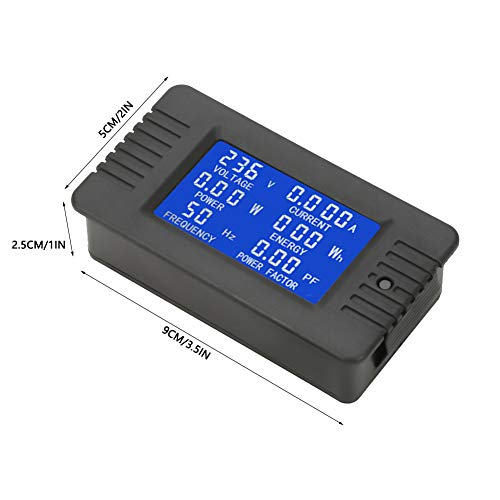
Figure 3.2: Physical dimensions of the PZEM-022 meter (approx. 9cm x 5cm x 2.5cm).
4. Especificacions
| Paràmetre | Valor |
|---|---|
| Vol. Operatiutage | 80 ~ 260 VCA |
| Prova Voltage | 80 ~ 260 VCA |
| Valoració actual | 100A |
| Potència nominal | 100A/22000W |
| Freqüència de funcionament | 45-65 Hz |
| Precisió de la mesura | 1.0er grau |
| Dimensions del producte (L x A x A) | 9 x 5 x 2.5 cm (3.5 x 2 x 1 polzades) |
| Longitud del cable CT | 19 cm (7.5 polzades) |
| Pes de l'article | Aprox. 110 g (3.9 oz) |
5. Configuració i instal·lació
Proper installation is crucial for the accurate and safe operation of the PZEM-022 meter. Refer to the wiring diagram below and follow the steps carefully.
5.1 Esquema de cablejat

Figure 5.1: Wiring connections for the PZEM-022 meter and current transformer.
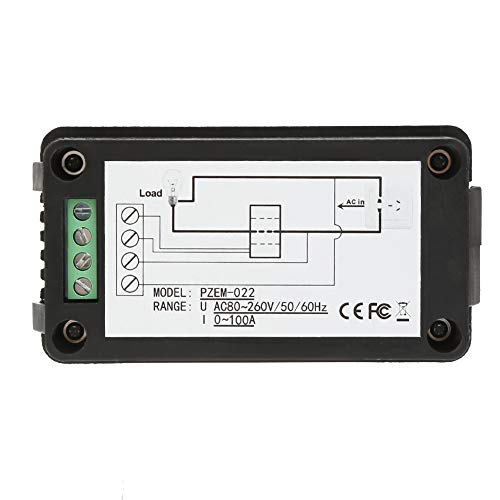
Figura 5.2: Esquena view of the meter showing terminal connections and simplified wiring.
5.2 Passos d'instal·lació
- Desconnexió d'alimentació: Before starting any wiring, ensure that the main power supply to the circuit is completely disconnected to prevent electric shock.
- Connecteu l'entrada d'alimentació: Connect the AC power supply (80-260V AC) to the input terminals of the meter. Typically, these are labeled as 'AC IN' or similar. Refer to the diagram for specific terminal locations.
- Connectar la sortida de càrrega: Connect the load to the output terminals of the meter. These are usually labeled 'LOAD'.
- Install Current Transformer (CT): Pass the live wire of the circuit through the hole of the closed-type current transformer. Ensure the direction of current flow through the CT matches the indicated direction if any.
- Connect CT to Meter: Connect the two wires from the current transformer to the dedicated CT input terminals on the meter. These are typically distinct from the main power terminals.
- Verifica les connexions: Double-check all wiring connections to ensure they are secure and correctly aligned with the wiring diagram. Incorrect wiring can cause damage or inaccurate readings.
- Restaura l'alimentació: Once all connections are verified, restore power to the circuit. The meter display should illuminate.
6. Funcionament
The PZEM-022 meter provides real-time measurement of various electrical parameters and offers convenient control functions.
6.1 Funcions de visualització
The large LCD display shows the following parameters simultaneously:
- Voltage (V): Mesura el vol ACtage del circuit.
- Corrent (A): Measures the AC current flowing through the circuit.
- Active Power (W): Displays the instantaneous active power consumed by the load.
- Energia (Wh): Accumulates the total energy consumed over time. This value is stored when power is off.
- Freqüència (Hz): Shows the frequency of the AC power supply.
- Factor de potència (PF): Indicates the power factor of the load.
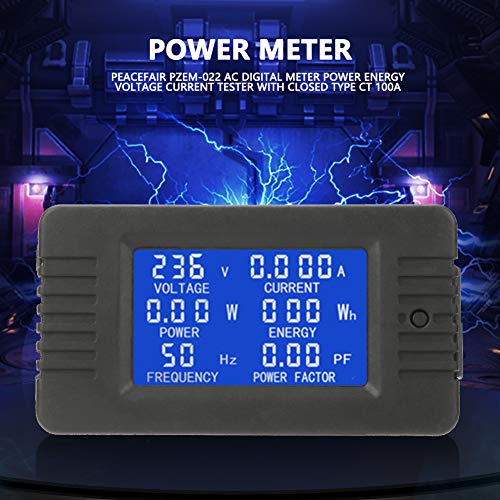
Figure 6.1: The meter's LCD display showing various electrical parameters.
6.2 Funcions dels botons
The meter features a single button for controlling the backlight and resetting energy data.
- Control de la llum de fons: A premsa curta of the button will toggle the backlight on or off. The backlight has a memory function, retaining its last state (on or off) even after power is disconnected.
- Alarma de sobrecàrrega: If the active power exceeds the preset alarm threshold, the backlight and the power value will flash to indicate an overload condition.
6.3 Resetting Energy Data
To reset the accumulated energy (Wh) value, follow these steps:
- Pas 1: Premsa llarga the button for approximately 5 seconds. The energy value on the display will begin to flash. Release the button once flashing begins.
- Pas 2: While the energy value is flashing, premsa curta the button again. The energy value will be cleared (reset to 0), and the display will exit the flashing state.
- Pas 3: If there is no button operation within 5 seconds after the energy value starts flashing (from Step 1), the energy value will not be cleared, and the meter will exit the reset state, retaining the current energy reading.
7. Manteniment
The Walfront PZEM-022 meter requires minimal maintenance to ensure its longevity and accurate performance.
- Neteja: Feu servir un drap suau i sec per netejar la pantalla iasing. Do not use abrasive cleaners or solvents, as they may damage the surface.
- Medi ambient: Keep the meter in a dry, dust-free environment. Avoid exposure to extreme temperatures, direct sunlight, or high humidity.
- Connexions: Periodically check all wiring connections to ensure they remain tight and secure. Loose connections can lead to inaccurate readings or potential hazards.
8. Solució De Problemes
If you encounter issues with your PZEM-022 meter, refer to the following common problems and solutions:
| Problema | Causa possible | Solució |
|---|---|---|
| La pantalla està en blanc | Sense subministrament d'alimentació; Cablejat incorrecte; Unitat danyada. | Check power connections and ensure voltage is within 80-260VAC. Verify wiring against diagram. If issues persist, the unit may be faulty. |
| Lectures inexactes | Incorrect CT installation; Loose wiring connections; Load exceeds rated power. | Ensure the live wire passes correctly through the CT. Check all terminal connections for tightness. Verify that the load does not exceed 100A/22000W. |
| Energy (Wh) not resetting | Seqüència incorrecta de prémer els botons. | Follow the energy reset steps precisely: long press until flashing, then short press to confirm. |
| Backlight not responding | Button malfunction; Internal issue. | Ensure a clear, short press. If unresponsive, there might be an internal fault. |
Si el problema persisteix després d'intentar aquestes solucions, poseu-vos en contacte amb el servei d'atenció al client de Walfront per obtenir més ajuda.
9. Garantia i Suport
Walfront products are manufactured to high-quality standards. For information regarding warranty coverage, technical support, or service, please refer to the product packaging or contact Walfront customer service through their official channels. Please have your model number (PZEM-022) and purchase details ready when contacting support.
Ask a question about this manual
Ask about setup, troubleshooting, compatibility, parts, safety, or missing instructions. Manuals+ will review the question and use this page’s manual context to help answer it.