
1. Introducció
Thank you for choosing the UBISHENG U-003 Digital TV Converter Box. This device is designed to convert over-the-air ATSC digital broadcast signals for display on analog and digital televisions. It features 1080P output, DVR recording capabilities, Electronic Program Guide (EPG), and a USB media player. Please read this manual thoroughly before operation to ensure proper setup and usage.

Figure 1: UBISHENG U-003 Digital TV Converter Box and included remote control.
2. Producte acabatview
2.1 Tauler frontal
The front panel of the U-003 converter box features essential controls and indicators:
- Botó d'encendre: Encén o apaga la unitat.
- Botons VOL+ / VOL-: Ajusta el nivell de volum.
- Botó MENÚ: Accesses the main menu for settings and features.
- Botons CH+ / CH-: Canvia de canal amunt o avall.
- Botó D'acord: Confirma les seleccions del menú.
- Port USB 2.0: For connecting USB storage devices for DVR recording and media playback.
- Pantalla LED: Shows current channel number or time.
2.2 Panell posterior
The rear panel provides various connection ports for your television and antenna:
- FORMIGA A: Connects to your external antenna.
- FORMIGA FORMA: Passes through the antenna signal to another device (e.g., TV tuner).
- Interruptor CH3/CH4: Selects the RF output channel for older TVs.
- HDMI 1080: High-Definition Multimedia Interface output for digital TVs and projectors.
- VIDEO (Yellow RCA): Composite video output for analog TVs.
- L (White RCA): Left audio output for analog TVs.
- R (Red RCA): Right audio output for analog TVs.
- Entrada d'alimentació de CA: Es connecta a l'adaptador de corrent.

Figura 2: Detallada view of the front and rear panels, highlighting controls and connection ports.
3. Instruccions de configuració
3.1 Connecting the Converter Box
- Connectar l'antena: Connecteu l'antena exterior o interior a FORMIGA EN port on the rear of the converter box.
- Connectar-se al televisor:
- For Digital TVs (HDTVs): Connect an HDMI cable (not included) from the HDMI 1080 port on the converter box to an available HDMI input on your TV.
- For Analog TVs (Older TVs): Connect an AV cable (red, white, yellow RCA) from the VÍDEO, L, i R ports on the converter box to the corresponding AV input ports on your TV. Alternatively, you can use a coaxial cable from the FORMIGA FORMA port to your TV's antenna input and set the converter box's CH3/CH4 switch to match your TV's input.
- Connectar l'alimentació: Plug the power cord into the AC Power Input on the converter box and then into a standard electrical outlet.
- Encès: Turn on your TV and the converter box. Select the correct input source on your TV (e.g., HDMI 1, AV, or TV/Antenna if using coaxial output).
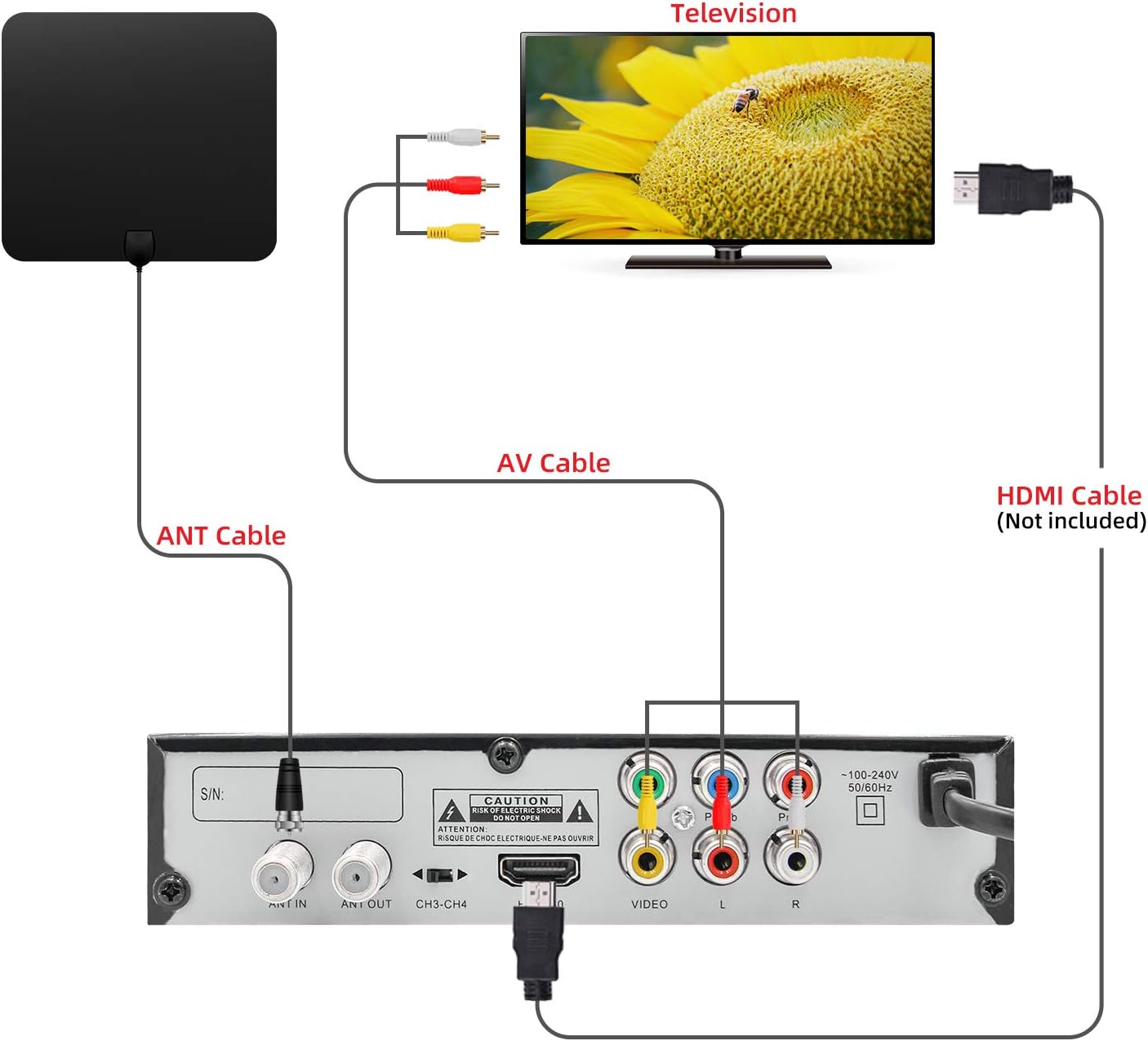
Figure 3: Connection diagram illustrating how to connect the converter box to an antenna and a television using either AV or HDMI cables.
3.2 Initial Channel Scan
Upon first power-on or after connecting a new antenna, you will need to perform a channel scan:
- Use the remote control to navigate to the MENÚ.
- Seleccioneu Cerca de canals or Escaneig automàtic del menú.
- Confirm your country/region settings.
- Initiate the scan. The converter box will search for available digital channels. This process may take several minutes.
- Once the scan is complete, the channels will be saved, and you can begin watching TV.
4. Instruccions de funcionament
4.1 Basic TV Viewing
- Selecció de canals: Utilitza el CH+ / CH- buttons on the remote or front panel to change channels. You can also enter channel numbers directly using the numeric keypad on the remote.
- Control de volum: Utilitza el VOL + / VOL- botons per ajustar el nivell d'àudio.
- Silenciar: Premeu el botó MUT button on the remote to silence the audio.
- Visualització d'informació: Premeu el botó INFO botó per view current program details, channel number, and time.
4.2 DVR Recording
To record live TV, a USB storage device (not included) must be connected to the USB 2.0 port.
- Connecta el dispositiu USB: Insert a formatted USB flash drive or external hard drive into the USB port on the front panel.
- Enregistrament instantani: Mentre mireu un programa, premeu la tecla REGISTRAR button on the remote to start recording. Press it again to stop.
- Scheduled Recording (EPG): Accedeix al EPG (Guia electrònica de programes) from the menu. Navigate to the desired program and press the REGISTRAR button to schedule a recording.
- Enregistraments de reproducció: Aneu a la Multimèdia section from the main menu, then select PVR to access and play your recorded files.

Figure 4: Recording TV programs by plugging in a USB flash drive and accessing the PVR function.
4.3 USB Media Player
The U-003 supports playback of various media files from a connected USB storage device.
- Connecta el dispositiu USB: Ensure your USB device is connected to the USB port.
- Access Multimedia: Al menú principal, seleccioneu Multimèdia opció.
- Select Media Type: Trieu entre Música, Foto, o Pel·lícula to browse your files.
- Reproducció: Navigate to your desired file i premeu OK per iniciar la reproducció.
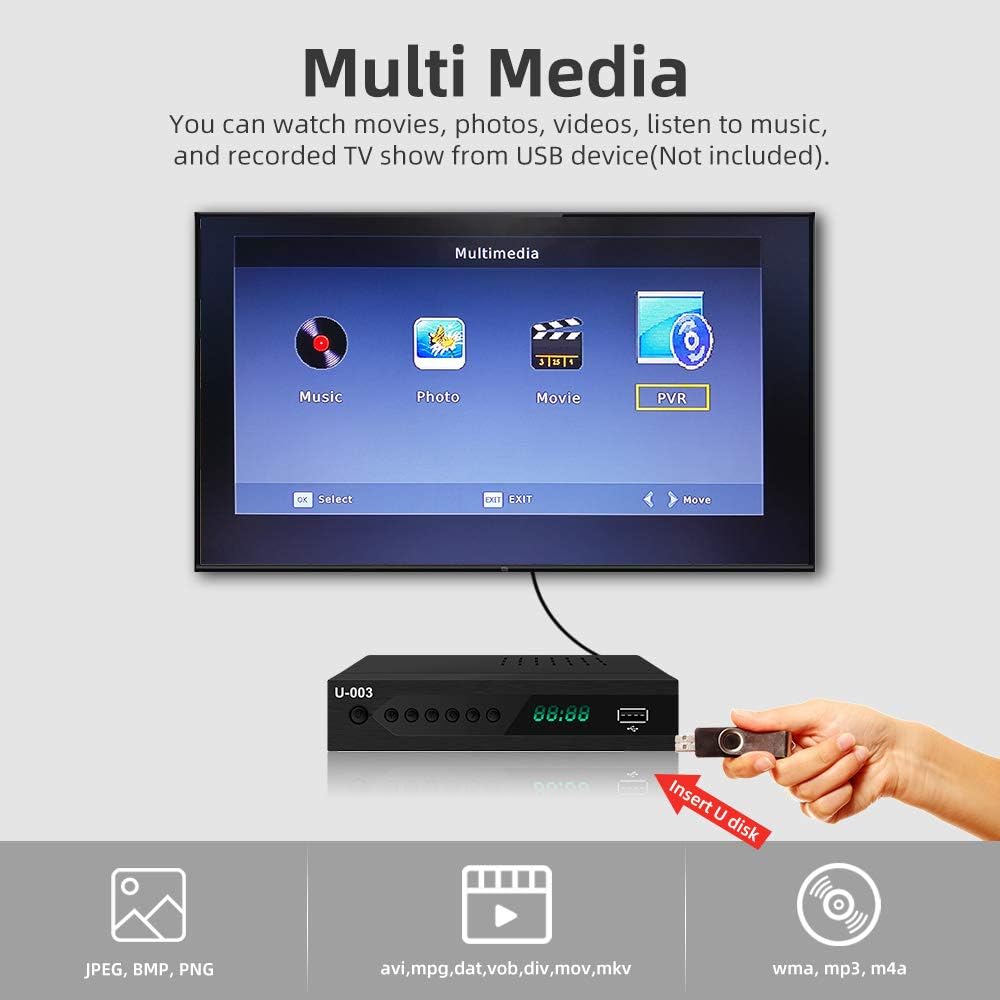
Figure 5: The Multimedia interface allows playback of various file types from a USB device.
4.4 Guia electrònica de programes (EPG)
The EPG provides a schedule of upcoming programs.
- Premeu el botó EPG button on the remote to access the program guide.
- Use the arrow keys to navigate through channels and program listings.
- Select a program to view more details or to schedule a recording.
5. Manteniment
- Neteja: Use a soft, dry cloth to clean the exterior of the converter box. Do not use liquid cleaners or abrasive materials.
- Ventilació: Ensure the ventilation slots on the top and sides of the unit are not blocked to prevent overheating.
- Emmagatzematge: Si guardeu la unitat durant un període prolongat, desconnecteu-la de l'alimentació i guardeu-la en un lloc fresc i sec.
6. Solució De Problemes
6.1 Sense imatge/so
- Comproveu les connexions: Ensure all cables (antenna, HDMI/AV, power) are securely connected.
- Entrada de TV: Verify your TV is set to the correct input source (e.g., HDMI 1, AV).
- Potència: Confirm the converter box is powered on and the power indicator light is active.
- Escaneig de canals: Perform a channel scan if you haven't done so or if channels are missing.
6.2 Poor Signal Reception
- Posició de l'antena: Adjust your antenna's position or direction. Try different locations for better signal strength.
- Tipus d'antena: Consider upgrading to a more powerful outdoor antenna if you are in a weak signal area.
- Torna a escanejar els canals: After adjusting the antenna, perform another channel scan.
6.3 El comandament a distància no funciona
- Bateries: Canvieu les piles del comandament a distància (requereix 2 piles AAA).
- Línia de visió: Ensure there are no obstructions between the remote and the converter box.
- Distància: Operate the remote within the effective range of the converter box.
7. Especificacions
| Característica | Especificació |
|---|---|
| Marca | UBISHENG |
| Número de model | U-003 |
| Tipus de muntatge | Coaxial, HDMI Cable, Plug Mount, Surface Mount |
| Tipus d'interfície | Coaxial, HDMI, USB |
| Dimensions del producte | 6.6 x 3.9 x 1.4 polzades |
| Pes de l'article | 10.6 unces |
| Piles necessàries | 2 piles AAA (per al comandament a distància) |
8. Garantia i Suport
For warranty information or technical support, please refer to the documentation included with your purchase or contact UBISHENG customer service. Keep your purchase receipt as proof of purchase.

