
1. Introducció
The Zealot S11 is a portable, wireless Bluetooth speaker designed for versatile use, including outdoor activities. It features IP67 waterproofing, a multi-mode flashlight, a power bank function, and supports various audio input methods. This manual provides detailed instructions for its setup, operation, and maintenance.

Image 1: Zealot S11 Waterproof Bluetooth Speaker
2. Contingut del paquet
Abans d'utilitzar-lo, comproveu que tots els elements estiguin presents al paquet:
- Zealot S11 Bluetooth Speaker
- Bike/Cycle Mount
- Cable d'àudio de 3.5 mm
- Cable de càrrega USB
- Manual d'usuari
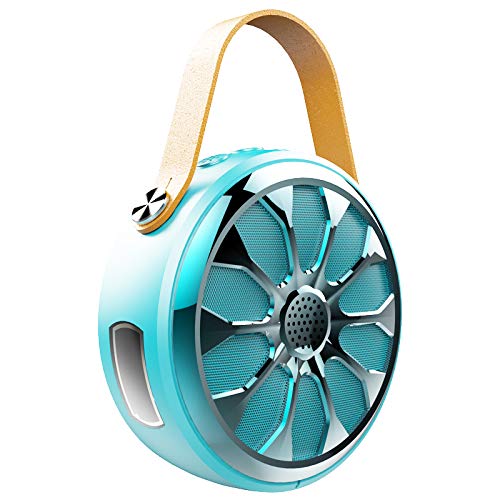
Image 2: Zealot S11 Speaker with included accessories
3. Disseny del producte
3.1 Ports i connectors

Imatge 3: Lateral view of the Zealot S11 showing the AUX-in port, USB-out port (for power bank), USB-in port (for charging), Power ON/OFF switch, and TF card slot.
- IN (USB-in): Port micro USB per carregar l'altaveu.
- OFF / ON: Power switch to turn the speaker on or off.
- TF: Slot for a TF (MicroSD) card for local music playback.
- OUT (USB-out): Standard USB port for using the speaker as a power bank.
- AUX: 3.5mm audio input jack for wired connection.
3.2 botons de control

Imatge 4: Part superior view of the Zealot S11 showing the control buttons for Flashlight, Mode Switch, Volume Down/Previous Track, and Volume Up/Next Track.
- Botó de la llanterna: Activates and cycles through flashlight modes.
- M (Mode Switch): Switches between Bluetooth, TF card, and AUX modes.
- Vol-/Pre Track: Premeu curt per baixar el volum, premeu llargament per anar a la pista anterior.
- Vol+/Pista següent: Premeu curt per pujar el volum, premeu llargament per passar a la següent pista.
4. Configuració
4.1 Càrrega de l'altaveu
- Connecteu el cable de càrrega USB proporcionat al IN port de l'altaveu.
- Connect the other end of the USB cable to a 5V/1A USB power adapter (not included) or a computer's USB port.
- The charging indicator light will illuminate. Once fully charged, the light will change or turn off (refer to specific LED behavior in the quick start guide if available).
- Una càrrega completa proporciona aproximadament 20 hores de reproducció de música.
4.2 Mounting on a Bike/Cycle
The Zealot S11 includes a mount for attachment to a bike or cycle handlebar.
- Locate the screw hole on the bottom of the speaker.
- Attach the provided bike mount to the speaker using the screw.
- Securely fasten the mount to your bike's handlebar. Ensure the speaker is stable before riding.
5. Instruccions de funcionament
5.1 Encès/Apagat
- Per engegar, feu lliscar el OFF/ON interruptor a la posició 'ON'.
- Per apagar, feu lliscar el botó OFF/ON switch to the 'OFF' position.
5.2 Vinculació Bluetooth
- Ensure the speaker is powered on and in Bluetooth mode (indicated by a flashing LED, if applicable). If not, press the M botó per canviar al mode Bluetooth.
- Al vostre telèfon intel·ligent o tauleta, activeu el Bluetooth i cerqueu els dispositius disponibles.
- Select "Zealot S11" from the list of devices.
- Un cop emparellat, l'altaveu emetrà una confirmació audible i l'indicador LED deixarà de parpellejar.
5.3 Reproducció de música

Image 5: The Zealot S11 supports three major player modes: Bluetooth, TF card, and AUX input.
- Bluetooth Play: Després de l'emparellament correcte, reprodueix música des del dispositiu connectat.
- Joc de targetes TF: Insert a TF (MicroSD) card with music files a la TF slot. The speaker will automatically switch to TF card mode or you can press the M botó per seleccionar-lo.
- AUX Play: Connect an audio device using the 3.5mm audio cable to the AUX port. Press the M botó per canviar al mode AUX.
5.4 Trucades de mans lliures

Image 6: The Zealot S11 allows for hands-free phone calls when connected via Bluetooth.
When connected via Bluetooth to your smartphone, the speaker can be used for hands-free calls.
- Respon a la trucada: Premeu el botó M botó una vegada per respondre una trucada entrant.
- Finalitzar la trucada: Premeu el botó M botó una vegada durant una trucada per finalitzar-la.
- Rebutja la trucada: Manteniu premut el botó M botó per rebutjar una trucada entrant.
5.5 Funcionament de la llanterna
The speaker features a 3-mode flashlight.
- Premeu el botó Botó de la llanterna once to turn on the flashlight.
- Press again to cycle through the different modes (e.g., high, low, SOS).
- Press a third time to turn off the flashlight.
5.6 Funció de bateria externa
The Zealot S11 can act as a power bank to charge other devices.
- Connect your mobile phone or other USB-powered device to the FORA (USB-out) port on the speaker using a compatible USB cable.
- The speaker will begin providing 5V/1A current to charge your device.
6. Manteniment
- Classificació impermeable: The Zealot S11 is IP67 waterproof and dustproof. This means it can withstand immersion in water up to 1 meter for 30 minutes and is protected against dust ingress. Ensure all port covers are securely closed before exposure to water or dust.
- Neteja: Netegeu l'altaveu amb un suau, damp tela. No utilitzeu productes químics aggressivs ni netejadors abrasius.
- Emmagatzematge: Guardeu l'altaveu en un lloc fresc i sec, allunyat de la llum solar directa i de temperatures extremes.
- Cura de la bateria: To prolong battery life, fully charge the speaker before first use and at least once every three months if not used regularly. Avoid completely draining the battery frequently.
7. Solució De Problemes
- L'altaveu no s'encén: Assegureu-vos que la bateria estigui carregada. Connecteu l'altaveu a una font d'alimentació amb el cable de càrrega USB.
- No es pot emparellar per Bluetooth:
- Assegureu-vos que l'altaveu estigui en mode d'emparellament Bluetooth (LED parpellejant).
- Assegureu-vos que el Bluetooth del dispositiu estigui activat i que estigui dins del seu abast (normalment 10 metres).
- Forget "Zealot S11" from your device's Bluetooth list and try pairing again.
- Reinicieu tant l'altaveu com el dispositiu Bluetooth.
- Sense so:
- Comproveu els nivells de volum tant de l'altaveu com del dispositiu connectat.
- Ensure the correct playback mode (Bluetooth, TF, AUX) is selected.
- Si feu servir AUX, assegureu-vos que el cable estigui completament inserit i que funcioni.
- La llanterna no funciona: Ensure the speaker is powered on and press the flashlight button.
- Power bank not charging device: Ensure the speaker has sufficient charge. Verify the USB cable and the connected device are functional.
8. Especificacions
| Característica | Especificació |
|---|---|
| Model | S11 |
| Marca | Fanàtic |
| Tecnologia de connectivitat | Bluetooth, Auxiliary, Wireless |
| Nivell de resistència a l'aigua | Impermeable IP67 |
| Font d'alimentació | Funciona amb bateria |
| Capacitat de la bateria | Bateria de liti de 4000 mAh |
| Durada mitjana de la bateria | 20 Hours (Music Time) |
| Mètode de control | Tàctil (botons) |
| Característiques especials | Bluetooth, Portable, Wireless, Flashlight (3 Modes), Power Bank, TF Card Support, Hands-Free Calling |
| Dispositius compatibles | Smartphone, tauleta |
| Mode de sortida d'àudio | estèreo |
| Pes de l'article | 360 grams |
| Dimensions del producte (LxWxH) | 11.5 x 11.5 x 4.5 cm |
9. Vídeo del producteview
Aquest vídeo ofereix una visió generalview of the Zealot S11 speaker's features, including its flashlight, design, and various playback options. Please note that the video source URL is a placeholder as a direct m3u8 link was not provided in the product data.
10. Garantia i Suport
For warranty information and customer support, please refer to the documentation included with your purchase or visit the official Zealot weblloc web. Conserveu el comprovant de compra per a qualsevol reclamació de garantia.


