
Introducció
This manual provides detailed instructions for the setup, operation, and maintenance of your Homtime C1 Mini Snooze Alarm Clock. Please read this manual thoroughly before using the product to ensure proper function and longevity.

Image: The Homtime C1 Mini Alarm Clock, light blue in color, is shown on a decorative tray next to a small potted plant. The digital display shows the time 20:08.
Producte acabatview
The Homtime C1 Mini is a compact digital alarm clock designed for convenience and functionality. It features a clear LCD display, dual USB charging ports for mobile devices, and a snooze function. Its design is suitable for various environments including bedrooms, offices, and for travel.
Característiques principals:
- Pantalla de temps digital
- Funció de posposar
- Ports de càrrega USB duals
- Dimmable LCD Screen
- Disseny compacte i portàtil
Contingut del paquet:
- Homtime C1 Mini Alarm Clock
- Adaptador d'alimentació
- Manual d'usuari (aquest document)
Configuració
- Connexió d'alimentació: Connect the provided power adapter to the DC input port on the back of the alarm clock. Plug the adapter into a standard wall outlet. The display will illuminate.
- Battery Installation (Optional for backup): For time and alarm settings backup during power outages, install 3 AAA batteries (not included) into the battery compartment located on the bottom of the unit. Ensure correct polarity.
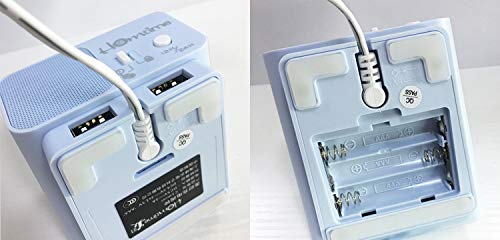
Image: A split image showing the bottom of the Homtime C1 Mini. The left side displays the rear with two USB charging ports and a power input. The right side shows the open battery compartment, designed for AAA batteries.
Instruccions de funcionament
1. Configuració de l'hora
- Manteniu premut el botó "Time Set" button (usually located on the top or back) until the hour digits begin to flash.
- Utilitza el "+" or "-" buttons to adjust the hour. Pay attention to AM/PM indicators if present.
- Premeu el botó "Time Set" de nou per confirmar l'hora i passar a l'ajust dels minuts.
- Utilitza el "+" or "-" botons per ajustar els minuts.
- Premeu el botó "Time Set" button one last time to save the time setting.
2. Configuració de l'alarma
- Manteniu premut el botó "Alarm Set" fins que els dígits de l'hora de l'alarma comencin a parpellejar.
- Utilitza el "+" or "-" botons per ajustar l'hora de l'alarma.
- Premeu el botó "Alarm Set" button again to confirm the alarm hour and move to alarm minute adjustment.
- Utilitza el "+" or "-" botons per ajustar els minuts de l'alarma.
- Premeu el botó "Alarm Set" button one last time to save the alarm setting.
- Per activar/desactivar l'alarma, premeu el botó "Alarm On/Off" button (or a dedicated alarm icon button). An alarm icon will appear on the display when active.
3. Funció de posposició
When the alarm sounds, press the large button on the top of the clock (often labeled "Dormitar" or simply the main control button). The alarm will pause for approximately 9 minutes and then sound again. To turn off the alarm completely, press any other button or let it sound for its full duration.
4. Brillantor de la pantalla
The LCD screen has multiple brightness levels. Press the "Dimmer" button (or a dedicated light icon button) repeatedly to cycle through the available brightness settings (e.g., High, Medium, Low, Off).
5. Ports de càrrega USB
The Homtime C1 Mini features dual USB charging ports on the back of the unit. These ports are designed to charge compatible mobile devices such as smartphones and tablets. Simply connect your device's USB charging cable to one of the ports. Charging will begin automatically.
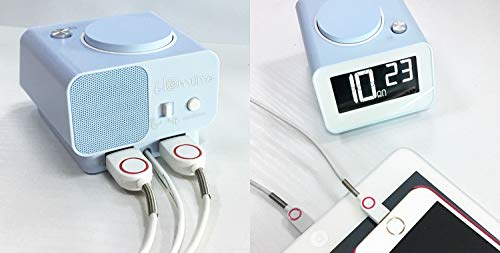
Imatge: La part posterior view of the Homtime C1 Mini alarm clock, showing two white USB charging cables plugged into its dual USB ports. This illustrates the charging functionality.
Manteniment
- Neteja: Wipe the unit with a soft, dry cloth. Do not use abrasive cleaners or solvents, as they may damage the surface.
- Potència: Ensure the power adapter is securely connected. Disconnect from power during extended periods of non-use.
- Medi ambient: Avoid placing the clock in direct sunlight, near heat sources, or in excessively humid environments.
Resolució de problemes
| Problema | Causa possible | Solució |
|---|---|---|
| La pantalla del rellotge està en blanc. | Sense poder ni podertage. | Check power adapter connection. If using battery backup, ensure batteries are installed correctly and are not depleted. |
| L'alarma no sona. | L'alarma no està activada o està configurada incorrectament. | Ensure the alarm is turned ON (alarm icon visible). Verify the alarm time is set correctly. |
| La càrrega USB no funciona. | Problema amb el cable o incompatibilitat del dispositiu. | Try a different USB cable. Ensure the device is compatible with USB charging. Check if the clock is powered on. |
| La pantalla és massa brillant/tenua. | Cal ajustar la configuració de la brillantor. | Press the "Dimmer" button to cycle through brightness levels. |
Especificacions
- Marca: Hora local
- Model: C1 Mini
- Tipus de visualització: LCD digital
- Font d'alimentació: Electricitat (adaptador de CA)
- Còpia de seguretat de la bateria: 3 piles AAA (no incloses)
- Característiques especials: Alarm, Dual USB Charging Ports, Dimmable Screen
- Material del marc: Acrilonitril butadiè estirè, plàstic
- Tipus de muntatge: Taula
- País d'origen: Xina
Garantia i Suport
For warranty information and customer support, please refer to the warranty card included with your product or visit the official Homtime weblloc. Conserveu el rebut de compra per a reclamacions de garantia.
For further assistance, you may contact Homtime customer service through their official channels. Please have your model number (C1 Mini) and purchase details ready.