
1. Introducció
Thank you for choosing the Dacom Athlete G05 Bluetooth Headset. This manual provides comprehensive instructions to help you set up, operate, and maintain your new wireless headphones. Please read this manual carefully before use to ensure optimal performance and longevity of your device.
2. Contingut del paquet
Verifiqueu que tots els elements que s'enumeren a continuació s'inclouen al vostre paquet:
- 1 x Dacom Athlete G05 Bluetooth Headset
- 1 x cable de càrrega USB
- 1 x Manual d'usuari (aquest document)
3. Producte acabatview
The Dacom Athlete G05 is a wireless stereo earphone designed for sports and running, featuring a comfortable in-ear design with ear hooks for secure fit. It connects via Bluetooth V4.1.
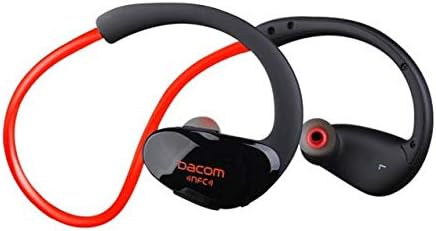
Figura 3.1: Davant view of the Dacom Athlete G05 Bluetooth Headset, showing the earbud and ear hook design.
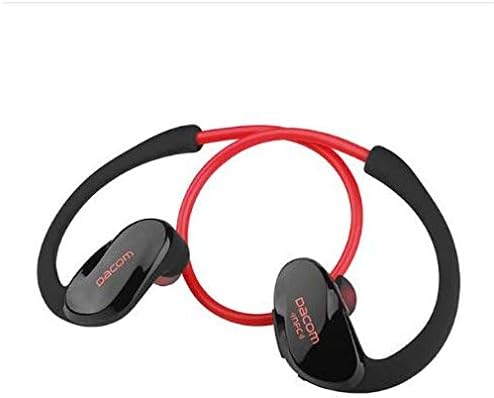
Figura 3.2: posterior view of the Dacom Athlete G05 Bluetooth Headset, illustrating the connecting cable between the two earbuds.
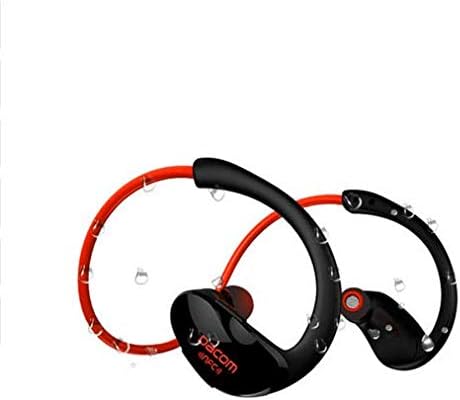
Figura 3.3: Dacom Athlete G05 Bluetooth Headset demonstrating water resistance, suitable for sports activities.
4. Configuració
4.1 Càrrega dels auriculars
Before first use, fully charge your Dacom Athlete G05 headset. A full charge typically takes approximately 1.5 to 2 hours.
- Connect the provided USB charging cable to the charging port on the headset.
- Connect the other end of the USB cable to a power adapter (DC5V 150mAh output recommended) or a computer's USB port.
- The battery indicator light will illuminate during charging and change color or turn off once fully charged.
A fully charged headset provides approximately 8 hours of talk time or music playback, and up to 180 hours of standby time.
4.2 Vinculació Bluetooth
To connect your headset to a Bluetooth-enabled device (e.g., smartphone, tablet):
- Assegureu-vos que els auriculars estiguin completament carregats i apagats.
- Press and hold the multi-function button on the headset until the Bluetooth indicator light flashes red and blue alternately, indicating it is in pairing mode.
- Al dispositiu, activa el Bluetooth i cerca els dispositius disponibles.
- Select "Dacom Athlete G05" (or similar name) from the list of found devices.
- Si se us demana una contrasenya, introduïu "0000" (quatre zeros).
- Once paired, the Bluetooth indicator light will flash blue slowly or turn solid blue, and you will hear a confirmation tone.
The headset supports Bluetooth V4.1 and profiles such as Headset, Handsfree, A2DP, AVRC, and APT-X.
5. Instruccions de funcionament
5.1 Encès/Apagat
- Encès: Press and hold the multi-function button for approximately 3 seconds until the indicator light flashes blue and you hear a power-on tone.
- Apagar: Press and hold the multi-function button for approximately 5 seconds until the indicator light flashes red and you hear a power-off tone.
5.2 Gestió de trucades
- Respon a la trucada: Premeu breument el botó multifunció quan rebeu una trucada.
- Finalitzar la trucada: Premeu breument el botó multifunció durant una trucada.
- Rebutja la trucada: Premeu i manteniu premut el botó multifunció durant 2 segons quan rebeu una trucada.
- Torna a marcar l'últim número: Premeu dues vegades el botó multifunció quan no esteu fent una trucada.
5.3 Reproducció de música
- Reproduir/pausa: Premeu breument el botó multifunció.
- Pista següent: Premeu llargament el botó Volum +.
- Pista anterior: Premeu llargament el botó de volum -.
- Pujar el volum: Premeu breument el botó Volum +.
- Baixar el volum: Premeu breument el botó de volum -.
Note: The headset features touch control for various functions.
6. Manteniment i cura
- Keep the headset dry. Do not expose it to extreme temperatures or humidity.
- Netegeu els auriculars i els contactes de càrrega regularment amb un drap suau i sec.
- Eviteu deixar caure els auriculars ni sotmetre'ls a impactes forts.
- Guardeu els auriculars en un lloc fresc i sec quan no els feu servir.
- Do not attempt to disassemble or modify the headset, as this will void the warranty.
7. Solució De Problemes
| Problema | Possible solució |
|---|---|
| Els auriculars no s'encén. | Assegureu-vos que els auriculars estiguin completament carregats. Connecteu-los a una font d'alimentació i torneu-ho a provar. |
| No es pot emparellar amb el dispositiu. |
|
| Sense so o amb un volum baix. |
|
| Connexió intermitent. |
|
8. Especificacions
| Característica | Detall |
|---|---|
| Nom del producte | Athlete sports Bluetooth headset |
| Número de model | G05 |
| Versió Bluetooth | V4.1 |
| Classe Bluetooth | Classe 2 |
| Pro compatiblefiles | Headset, Handsfree, A2DP, AVRC, APT-X |
| Entrada de càrrega | DC5V 150mAh (Power adapter output) |
| Tipus de bateria | High-performance lithium polymer battery |
| Temps de conversa | Aproximadament 8 hores |
| Temps de joc | Aproximadament 8 hores |
| Temps d'espera | Aproximadament 180 hores |
| Rang de freqüència d'àudio | 20Hz-20kHz |
| BT Radio Frequency | 2.400-2.481 GHz |
| Impedància de sortida | 16Ω 3mW |
| Sensibilitat | 100-105 dB |
| Factor de forma dels auriculars | A l'orella |
| Tecnologia de connectivitat | Sense fil |
| Mètode de control | Toca |
| Material | Plàstic |
| Color | Vermell |
9. Garantia i Suport
Dacom products are manufactured to the highest quality standards. For warranty information or technical support, please refer to the warranty card included with your purchase or visit the official Dacom weblloc web. Si us plau, conserveu el comprovant de compra per a reclamacions de garantia.