HP LaserJet Pro M404n Monochrome Printer Instruction Manual
Model: M404n
Introducció
This manual provides detailed instructions for setting up, operating, maintaining, and troubleshooting your HP LaserJet Pro M404n Monochrome Printer. Please read this manual thoroughly before using the printer to ensure optimal performance and longevity.
Imatge: Frontal view of the HP LaserJet Pro M404n Monochrome Printer.
1. Configuració
1.1 Desembalatge i col·locació inicial
Carefully remove the printer from its packaging. Ensure all packing materials are removed. Place the printer on a stable, flat surface with adequate ventilation. The compact design allows it to fit conveniently in shared work areas.
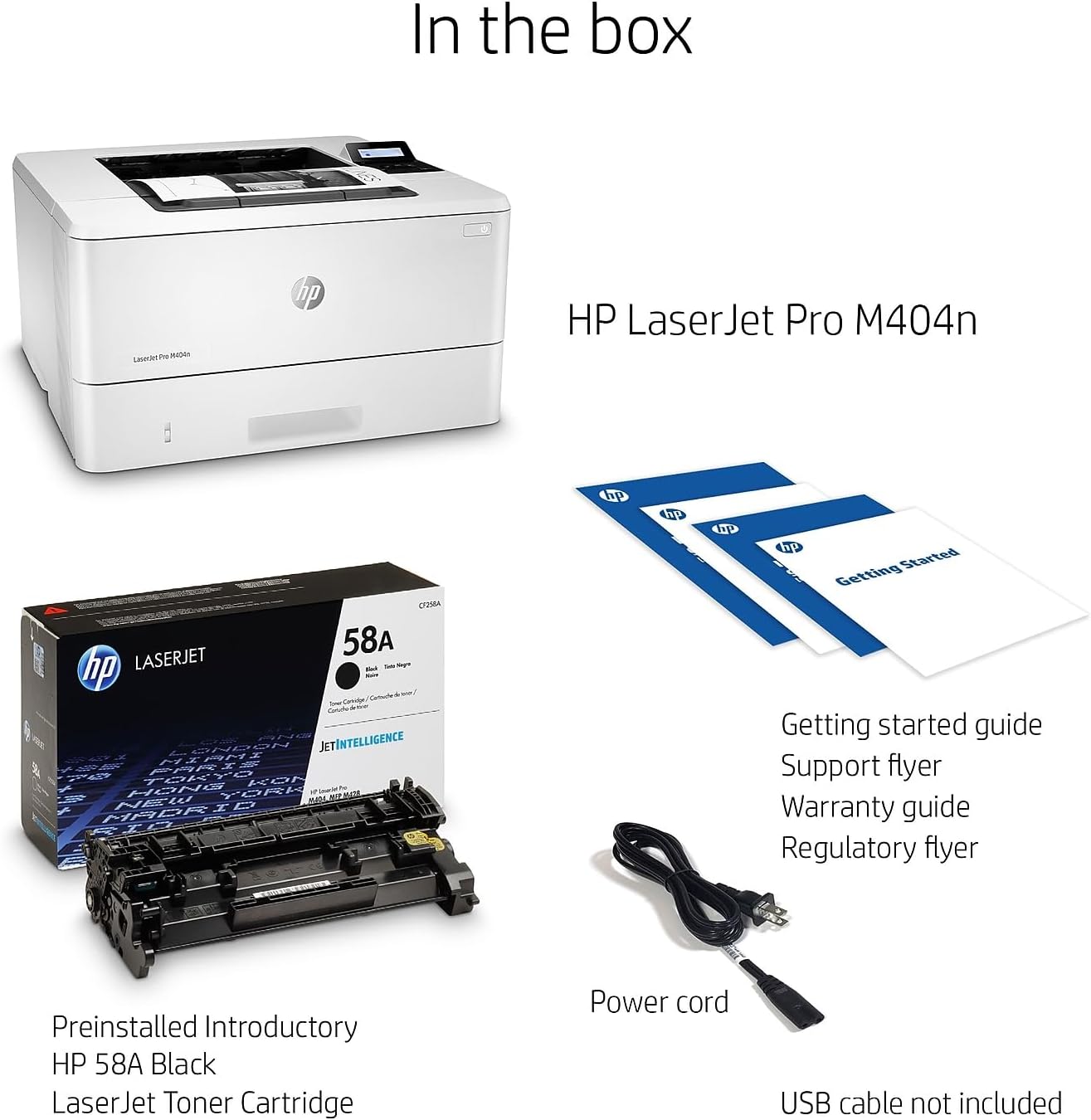
The box typically includes:
Impressora HP LaserJet Pro M404n
Preinstalled HP Black LaserJet Toner Cartridge (yield ~1,500 pages)
Guia d'iniciació
Fullet de suport
Guia de garantia
Flyer de normativa
Cable d'alimentació
USB Cable (AP Only)
Image: Contents of the HP LaserJet Pro M404n box, including the printer, toner cartridge, and documentation.
1.2 Càrrega de paper
The printer features a 250-sheet input tray. To load paper:
Pull out the paper tray located at the front of the printer.
Adjust the paper guides to fit the size of your paper (e.g., Letter, Legal, A4, A5).
Load the paper stack into the tray, ensuring it is aligned with the guides.
Empenyeu suaument la safata de paper cap a dins de la impressora fins que encaixi al seu lloc.
Image: The HP LaserJet Pro M404n showing an optional paper tray and highlighting its Energy Star certification.
1.3 Connectivitat
The HP LaserJet Pro M404n offers both Ethernet and USB connectivity.
Ethernet: Connect the printer to your network using an Ethernet cable for shared access.
USB: Connect the printer directly to a computer using a USB cable.
Imatge: Part posterior view of the HP LaserJet Pro M404n, highlighting the USB 2.0 port for PC connection, a USB port for job storage, and the Ethernet port.
2. Funcionament de la impressora
2.1 Tauler de control
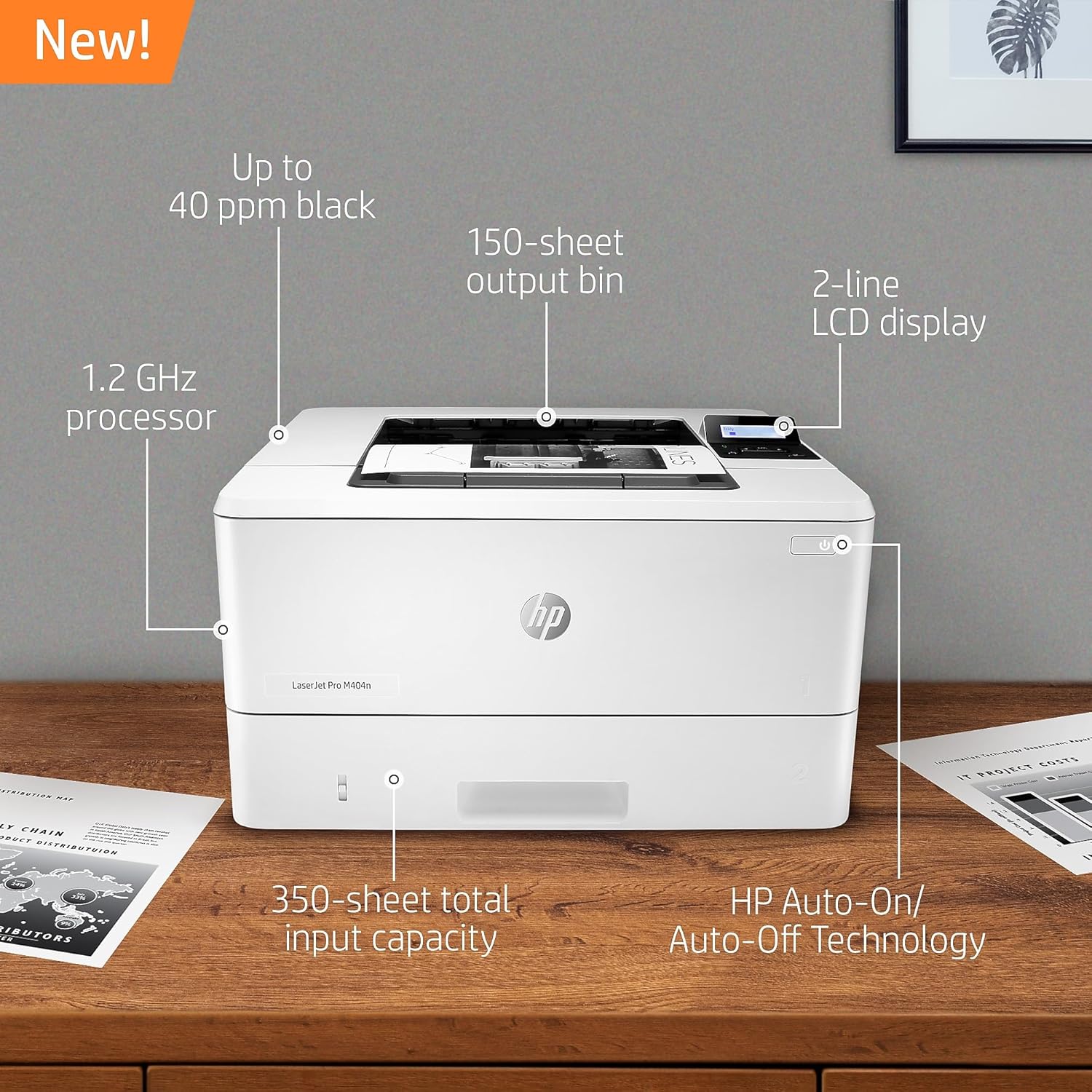
The printer features a 2-line LCD display and minimal buttons for easy navigation and control. You can access basic system settings and manage print jobs directly from the control panel.
Imatge: De dalt a baix view of the HP LaserJet Pro M404n, highlighting features like up to 40 ppm black print speed, 150-sheet output bin, 2-line LCD display, 1.2 GHz processor, 350-sheet total input capacity, and HP Auto-On/Auto-Off Technology.
2.2 Impressió de documents
The HP LaserJet Pro M404n delivers fast print speeds of up to 40 pages per minute (ppm) for monochrome documents. It also supports HP Auto-On/Auto-Off Technology for enhanced energy efficiency.
You can print wirelessly even without a network connection, staying connected with dual-band Wi-Fi and Wi-Fi Direct. Print effortlessly from any device, virtually anywhere, securely through the cloud.
3. Manteniment
3.1 Substitució del cartutx de tòner
To maintain print quality, use Original HP 58A/58X toner cartridges. The printer is designed to work only with cartridges containing original HP chips or circuitry.
To replace the toner cartridge:
Obriu la porta d'accés frontal de la impressora.
Traieu amb cura el cartutx de tòner antic.
Desembaleu el nou cartutx de tòner HP i sacsegeu-lo suaument per distribuir el tòner.
Introduïu el cartutx nou a la impressora fins que encaixi al seu lloc.
Tanqueu la porta d'accés frontal.
Image: The HP LaserJet Pro M404n highlighting the use of reliable cartridges and HP EcoSmart black toner for energy saving.
3.2 Eliminació d'embussos de paper
If a paper jam occurs, the printer's display will indicate the location of the jam. Follow the on-screen instructions or consult the detailed steps in the full user manual. Always turn off the printer before attempting to clear a jam.
4. Solució De Problemes
For common issues such as print quality problems, connectivity errors, or paper jams, refer to the troubleshooting section of the comprehensive user manual available on the HP support website. Ensure your printer's firmware is up-to-date, as periodic updates maintain the effectiveness of security measures and compatibility.
This printer uses dynamic security, which may be updated periodically by firmware updates. The printer is intended to be used solely with cartridges using an original HP chip. Cartridges using a non-HP chip may not function or may cease to function. More information is available at www.hp.com/learn/ds.
5. Especificacions
Característica
Detall
Marca
HP
Nom del model
M404n
Tecnologia d'impressió
Làser
Sortida de la impressora
Monocrom
Velocitat màxima d'impressió en monocrom
38 ppm
Tecnologia de connectivitat
Ethernet, USB
Pes de l'article
18.12 lliures
Dimensions del producte
8.5 "P x 14.06" W x 15" H
Capacitat màxima de fulls
350 (with optional 550-sheet tray)
Compatibilitat amb la mida del paper
3 x 5 to 8.5 x 14 inch, Letter, Legal, Envelope
Resolució
1200 x 1200 ppp
Impressió dúplex
Manual
Característiques especials
Compact Design, Display Screen, Easy Cartridge Replacement, Energy Star, Fast First Page Out, HP Auto-On/Auto-Off Technology, HP EcoSmart Black Toner, Simple Out-of-Box Setup
Image: The HP LaserJet Pro M404n with its dimensions clearly marked: 8.5" H, 14.06" D, and 15" W.
6. Garantia i Suport
The HP LaserJet Pro M404n comes with a one-year limited hardware warranty (Bench/Depot Repair warranty). For assistance, HP offers 24-hour, 7 days a week free web support. Refer to the specification sheet for complete terms and conditions.
Seguretat HP Wolf Pro
This printer includes HP Wolf Pro Security, designed to protect company data and safeguard against cyberattacks with protection built into the printer hardware, firmware, and operating system.
Image: The HP LaserJet Pro M404n with a graphic indicating strong security features designed to detect and stop attacks.
Ask a question about this manual
Ask about setup, troubleshooting, compatibility, parts, safety, or missing instructions. Manuals+ will review the question and use this page’s manual context to help answer it.