
1. Producte acabatview
The We R Memory Keepers Mini Precision Press & Stamp is designed for precise and consistent stamping. This kit includes a stamp press, various acrylic stamps, dies, and embossing folders to enhance your crafting projects. It allows for accurate placement and repeated stamping, ensuring professional results.

Image 1.1: Back of product packaging detailing the included components: 2 die and embossing folders, 1 embossing folder, 4 layered stamps, 13 acrylic stamps, 6 dies, and 1 stamp press. The UPC 633356607229 és visible.
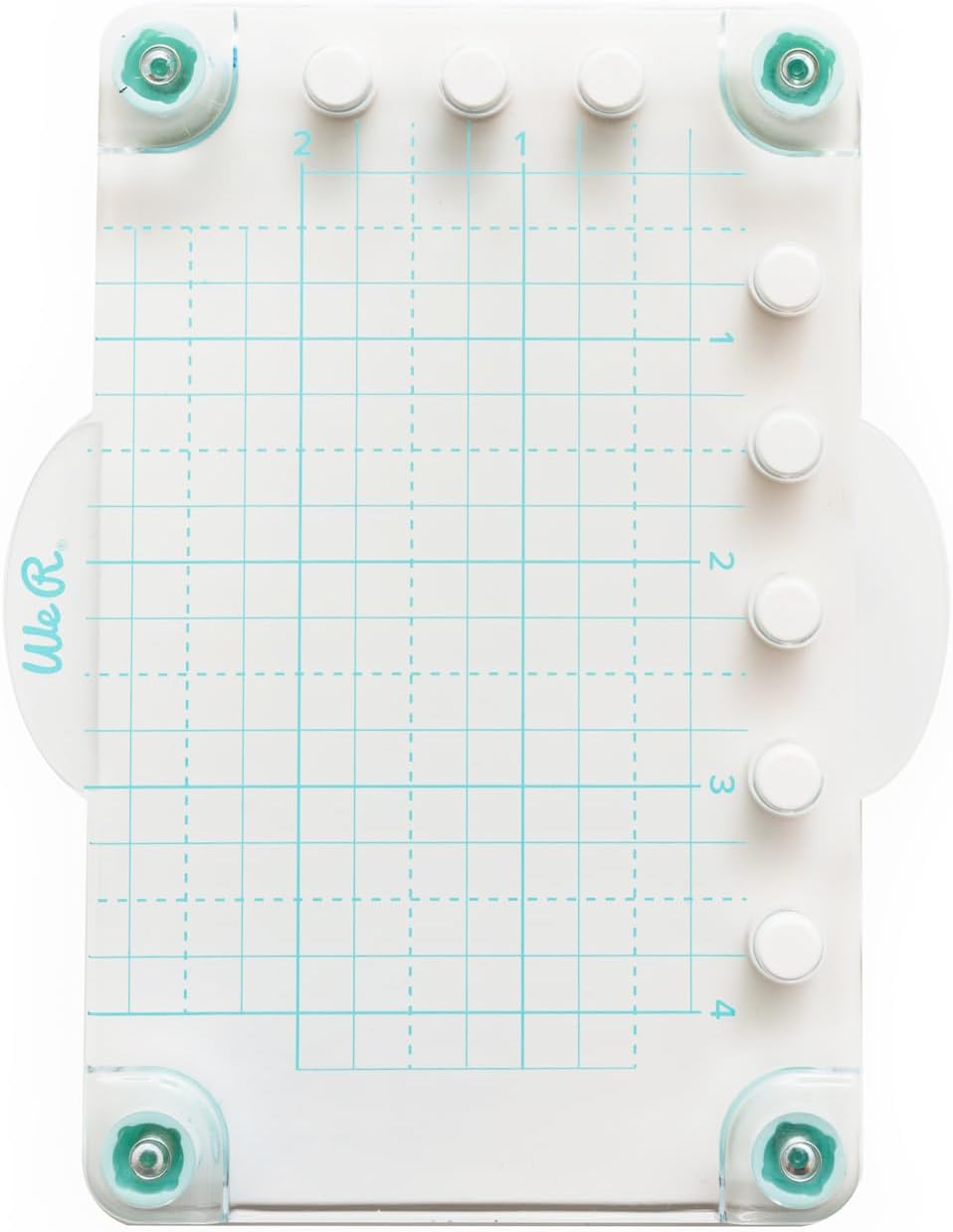
Image 1.2: The Mini Precision Press features a clear grid surface for accurate stamp and paper placement.
2. Informació de seguretat
- Mantenir fora de l'abast dels nens petits a causa de les peces petites.
- Utilitzeu-ho sobre una superfície estable i plana.
- Handle dies with care as they may have sharp edges.
- Do not apply excessive force to the press, as this may cause damage.
3. Configuració
Follow these steps to set up your Mini Precision Press for use:
- Desembaleu tots els components de l'embalatge.
- Place the Mini Precision Press on a clean, flat, and stable work surface.
- Remove the protective film from both sides of the clear acrylic stamps.
- Position your paper or cardstock onto the base of the press, aligning it with the grid lines as needed.
- Place the desired clear acrylic stamp(s) onto your paper in the desired position. The stamps will temporarily cling to the paper.
4. Instruccions de funcionament
4.1 Stamping with the Precision Press
- After placing your paper and stamps (as per Setup), close the clear hinged lid of the press, ensuring the stamps adhere to the lid.
- Open the lid and apply ink evenly to the surface of the stamp(s).
- Carefully close the lid, pressing down firmly and evenly across the entire surface of the stamp(s) to transfer the ink to your paper.
- Lift the lid to reveal your stamped image. If the impression is not dark enough or uneven, re-ink the stamp(s) and press again, as the precise alignment of the press allows for multiple impressions in the exact same spot.

Image 4.1: The press enables precise placement for stamping multiple phrases or designs on cards.

Image 4.2: Achieve clear and consistent results when stamping intricate designs like this llama.
4.2 Using Dies and Embossing Folders
The included dies and embossing folders are designed to be used with a compatible die-cutting and embossing machine, such as other We R Memory Keepers Mini Evolution accessories. Refer to your die-cutting machine's instruction manual for specific usage guidelines.

Image 4.3: The press is ideal for adding precise stamped elements to tags and other small projects.

Imatge 4.4: Ex.amples of finished projects demonstrating the versatility of the included stamps and other crafting tools.

Image 4.5: A close-up showing the crisp and well-aligned text achieved through precision stamping.

Imatge 4.6: Un example of a decorative tag created using the stamping press and coordinating elements.
5. Manteniment
- Cleaning the Press: Wipe the clear hinged lid and base with a soft, damp cloth after each use to remove any ink residue. Avoid abrasive cleaners.
- Cleaning Stamps: Clean acrylic stamps immediately after use with a stamp cleaner or mild soap and water. Pat dry with a lint-free cloth.
- Emmagatzematge: Store the press and all components in a clean, dry place away from direct sunlight and extreme temperatures. Keep stamps on their original backing sheets to maintain their cling properties.
6. Solució De Problemes
- Stamps difficult to remove from plastic sheeting: Gently peel the stamps from the plastic backing. If they are very stubborn, try flexing the plastic sheet slightly to help release them. Avoid using sharp objects.
- Uneven or faint impressions: Ensure you are applying even pressure across the entire lid when stamping. Re-ink the stamp and press again, utilizing the press's ability to stamp in the exact same spot for a darker impression.
- Stamps not adhering to the press lid: Clean both the stamp and the press lid with a damp cloth to remove any dust or oils. Ensure the stamps are dry before attempting to adhere them.
- Paper shifting during stamping: Use low-tack tape or a repositionable adhesive to secure your paper to the press base if it tends to move.
7. Especificacions
| Nom de marca | We R Memory Keepers |
| Número de model | 660722 |
| Número d'identificació comercial global (GTIN) | 00633356607229 |
| Pes de l'article | 0.04 quilos |
| Tipus de material | Acrílic |
| Mida | 1.5 polzades x 2 polzades |
| Recompte d'unitats | 1.0 recompte |
8. Garantia i Suport
Garantia: The manufacturer's warranty description for this product is not applicable.
Suport: For further assistance or inquiries regarding your We R Memory Keepers Mini Precision Press & Stamp, please refer to the official We R Memory Keepers weblloc o poseu-vos en contacte amb el seu departament d'atenció al client.