
Audiolab 8300XP
Audiolab 8300XP Power Ampmés viu
Manual d'usuari
1. Introducció
The Audiolab 8300XP is a high-performance stereo power amplifier designed to deliver exceptional audio fidelity and power. It can operate in stereo mode, providing 280 Watts per channel, or be bridged to deliver 480 Watts as a monoblock amplifier. This manual provides essential information for the safe and optimal use of your 8300XP ampmés viu.

Figure 1.1: Audiolab 8300XP Power Amplificador, angle frontal view. This image shows the sleek black chassis with the power button and Audiolab logo visible on the front panel.
2. Informació de seguretat
Please read all safety instructions carefully before operating the amplificador. Conserveu aquest manual com a referència futura.
- Font d'alimentació: Connect the unit only to an AC power source of the type marked on the rear panel. Ensure the voltage coincideix amb la vostra font d'alimentació local.
- Ventilació: No bloquegeu cap obertura de ventilació. Assegureu-vos que hi hagi un flux d'aire adequat al voltant de la unitat per evitar el sobreescalfament.
- Aigua i humitat: No exposeu la unitat a la pluja ni a la humitat. No col·loqueu objectes plens de líquids, com ara gerros, a sobre de la unitat.
- Calor: No col·loqueu la unitat a prop de fonts de calor com ara radiadors, registres de calor, estufes o altres aparells (inclosos amplificadors) que produeixen calor.
- Manteniment: No intenteu atendre aquest producte vosaltres mateixos. Consulteu tots els serveis a personal de servei qualificat.
- Posada a terra: Ensure the power cord is properly grounded to prevent electric shock.
3. Desembalatge i contingut
Desembaleu amb cura el amplifier. Retain the packing materials for future transport. Inside the box, you should find:
- Audiolab 8300XP Power Ampmés viu
- Cable d'alimentació CA
- Manual d'usuari (aquest document)
If any items are missing or damaged, contact your dealer immediately.
4. Connexions
4.1 Tauler frontal

Figure 4.1: Audiolab 8300XP Power Amplificador, frontal view. This image highlights the minimalist front panel design, featuring only the power button on the right and the Audiolab logo on the bottom right.
The front panel of the 8300XP is designed for simplicity and elegance. It features:
- Botó d'encesa: Located on the right side, used to turn the ampmés viu encès o apagat.
- LED indicador d'alimentació: A small LED (typically red) indicates the power status of the unit.
4.2 Panell posterior
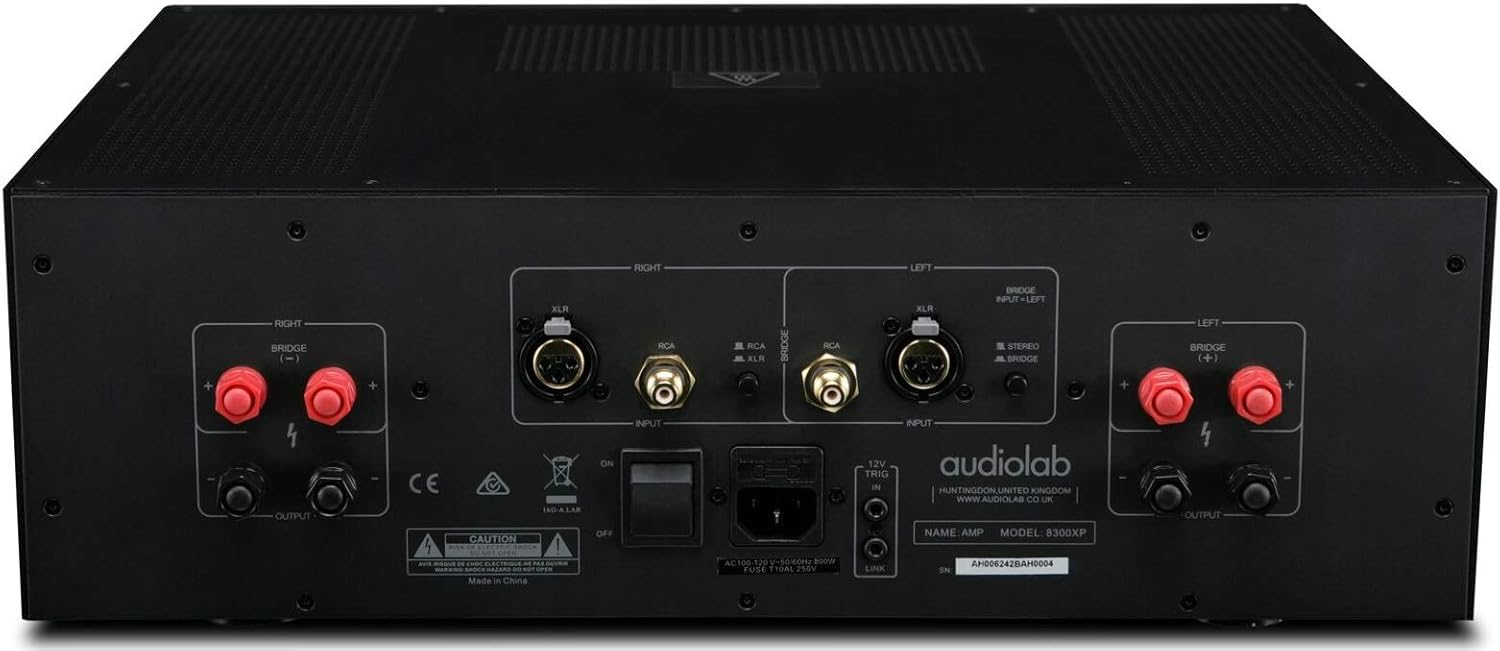
Figure 4.2: Audiolab 8300XP Power Amplifier, rear panel. This detailed view shows all input and output terminals, including XLR and RCA inputs, speaker terminals, and the power inlet.
The rear panel provides all necessary connections for integrating the 8300XP into your audio system:
- Balanced XLR Inputs (Left/Right): For connecting sources with balanced outputs, offering superior noise rejection.
- Unbalanced RCA Inputs (Left/Right): For connecting sources with unbalanced outputs.
- Speaker Outputs (Left/Right): High-quality binding posts for connecting your loudspeakers. Ensure correct polarity (+ to + and - to -).
- Bridge Mode Switch: A switch to select between Stereo and Bridged (Mono) operation. When in bridged mode, only use the designated input and speaker terminals.
- Entrada/sortida de disparador de 12 V: Allows for remote power control with other compatible components.
- Entrada d'alimentació CA: For connecting the supplied AC power cord.
5. Configuració
5.1 Col·locació
Place the 8300XP on a stable, level surface away from direct sunlight, heat sources, and excessive moisture. Ensure there is adequate space around the unit for ventilation, especially above and behind it.
5.2 Connectar altaveus
- Assegureu-vos el amplifier is turned off and unplugged from the mains power.
- Connect your loudspeakers to the corresponding speaker output terminals on the rear panel.
- For stereo operation, connect the left speaker to the 'LEFT' terminals and the right speaker to the 'RIGHT' terminals. Ensure the positive (+) terminal on the amplifier connects to the positive (+) terminal on the speaker, and similarly for the negative (-) terminals.
- For bridged (mono) operation, set the 'BRIDGE' switch to 'ON'. Connect your single speaker to the designated bridged output terminals (refer to the markings on the rear panel).
5.3 Connexió de fonts d'àudio
- Connect your pre-amplifier or audio source to either the Balanced XLR Inputs or Unbalanced RCA Inputs. Do not use both simultaneously for the same channel.
- If using balanced connections, ensure the XLR cables are securely connected.
- If using unbalanced connections, ensure the RCA cables are securely connected.
5.4 Connexió d'alimentació
- Once all audio and speaker connections are made, connect the supplied AC power cord to the AC inlet on the rear panel of the ampmés viu.
- Plug the other end of the power cord into a suitable mains power outlet.
6. Instruccions de funcionament
6.1 Engegada/apagada
- Per encendre el amplifier, press the Power button on the front panel. The power indicator LED will illuminate.
- Per apagar el amplifier, press the Power button again. The power indicator LED will turn off.
6.2 Stereo vs. Bridged Mode
The 8300XP can operate as a two-channel stereo amplifier or a single-channel monoblock amplifier (bridged mode).
- Mode estèreo: For typical two-channel audio systems. Ensure the 'BRIDGE' switch on the rear panel is set to 'OFF'.
- Mode pont: For higher power output to a single speaker. Ensure the 'BRIDGE' switch on the rear panel is set to 'ON'. When in bridged mode, use only the designated input (typically the Left channel) and the specified bridged speaker terminals. Consult the rear panel markings for precise connections.
Caution: Ensure the amplifier is powered off before changing the Stereo/Bridge mode switch to prevent damage to the ampmés alt o altaveus.
7. Manteniment
- Neteja: Utilitzeu un drap suau i sec per netejar-lo amplifier's exterior. Do not use abrasive cleaners, waxes, or solvents.
- Ventilació: Comproveu periòdicament que les obertures de ventilació estiguin netes de pols i deixalles.
- Cable d'alimentació: Inspect the power cord regularly for any signs of damage. If damaged, replace it with an approved cord of the same type.
8. Solució De Problemes
If you experience issues with your Audiolab 8300XP, please consult the following table before contacting service personnel.
| Problema | Causa possible | Solució |
|---|---|---|
| Sense poder | Power cord not connected; Power outlet faulty; Internal fuse blown | Check power cord connection; Try a different outlet; Contact service for fuse replacement |
| Sense so | Input cables loose/incorrect; Speaker cables loose/incorrect; Source component off/faulty; Amplifier in standby mode | Check all cable connections; Ensure source is active; Press power button to exit standby |
| So distorsionat | Input signal too high; Speaker impedance mismatch; Faulty cables | Reduce source volume; Check speaker impedance (should be 4-16 ohms); Replace cables |
| Sobreescalfament | Insufficient ventilation; Blocked vents | Ensure adequate space around amplifier; Clear any obstructions from vents |
9. Especificacions
Key technical specifications for the Audiolab 8300XP Power Ampmés viu:
- Número de model de l'article: 8300XP
- Fabricant: Audiolab
- Voltage: 100 Volts, 12 Volts (Trigger)
- Tipus de muntatge: Muntatge en superfície
- Nombre de canals: 2 (estèreo)
- Power Output (Stereo): 280 watts per canal
- Power Output (Bridged Mono): 480 watts
10. Garantia i Suport
Your Audiolab 8300XP amplifier is covered by a manufacturer's warranty. Please refer to the warranty card included with your product or visit the official Audiolab weblloc web per obtenir informació detallada sobre els termes i condicions de garantia específics de la vostra regió.
For technical support, service, or further inquiries, please contact your authorized Audiolab dealer or distributor. You can also find support information on the official Audiolab weblloc: www.audiolab.co.uk
Ask a question about this manual
Ask about setup, troubleshooting, compatibility, parts, safety, or missing instructions. Manuals+ will review the question and use this page’s manual context to help answer it.