
1. Introducció
This manual provides detailed instructions for the installation, setup, and operation of your ChiliTec Pilota Casa Wireless Wall Switch and Built-in Radio Receiver. This system allows for convenient wireless control of lighting and other electrical devices up to 2300W (incandescent) or 300W (LED) at 230V.
The system operates on a 433.92 MHz radio frequency and offers a range of up to 70 meters in open areas. It is designed for use with other ChiliTec Pilota Casa series components.
2. Instruccions de seguretat
ADVERTIMENT: La instal·lació elèctrica només l'ha de dur a terme un electricista qualificat. Una instal·lació incorrecta pot provocar descàrregues elèctriques, incendis o danys al dispositiu.
- Always disconnect power at the main circuit breaker before installing or servicing the receiver.
- Assegureu-vos que el voltage supply matches the device's requirements (230V AC).
- Do not exceed the maximum load capacity: 2300W for incandescent bulbs, 300W for LED bulbs.
- This product is designed for indoor use. Ensure the installation location is dry and protected from moisture.
- Mantenir fora de l'abast dels nens.
- Do not attempt to repair or modify the device. Contact qualified personnel for service.
3. Components del producte
The ChiliTec Pilota Casa system consists of two main components:
- Interruptor de paret sense fil: A battery-operated switch for remote control.
- Built-in Radio Receiver: A compact module installed behind a light fixture or in a flush-mounted box, which receives signals from the wall switch and controls the connected device.

Figura 1: The ChiliTec Pilota Casa Wireless Wall Switch (left) and the Built-in Radio Receiver (right).

Figura 2: Acabatview of the Pilota Casa wireless system, showing the receiver's central role in connecting various optional wireless transmitters like motion detectors, magnetic contacts, and remote controls.
4. Configuració i instal·lació
4.1 Instal·lació del receptor
- Desconnecteu l'alimentació: Abans de començar, desconnecteu l'alimentació principal al disjuntor per evitar descàrregues elèctriques.
- Preparació del cablejat: The receiver requires a phase (L) and a neutral (N) conductor for operation, and outputs switched phase (L') to the load.
- Connecteu els cables:
- Connect the incoming phase wire to the 'L' terminal on the receiver.
- Connect the incoming neutral wire to the 'N' terminal on the receiver.
- Connect the load (e.g., light fixture) phase wire to the 'L'' terminal on the receiver.
- Connect the load neutral wire directly to the incoming neutral wire.
- Receptor de muntatge: Place the receiver into a standard flush-mounted wall box (dimensions: 50 x 50 x 25 mm). Ensure it fits securely and wires are not pinched.
- Restaura l'alimentació: Once all connections are secure and the receiver is mounted, restore power at the circuit breaker.

Figura 3: Wiring diagram for the built-in radio receiver, showing connections for phase (L), neutral (N), and switched phase (L') to the load. Optional wireless components are also shown.
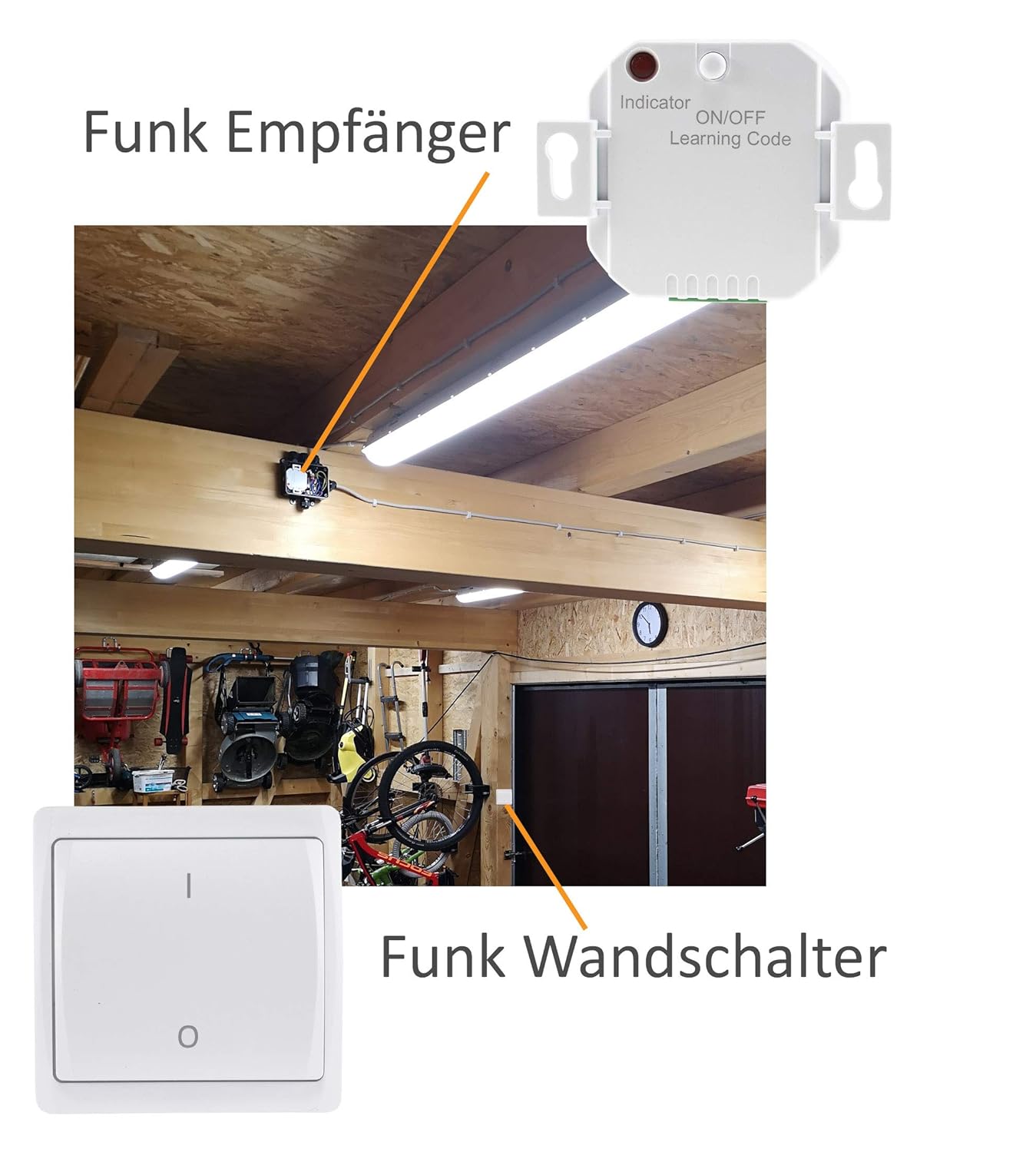
Figura 4: Example installation of the receiver in a ceiling fixture, demonstrating its compact size for discreet placement.
4.2 Instal·lació de l'interruptor de paret
- Inserció de la bateria: Carefully open the wall switch housing to access the battery compartment. Insert the required battery type (typically a 12V A23 battery, as seen in product images), ensuring correct polarity.
- Muntatge: The wireless wall switch can be mounted on any flat surface using screws or adhesive tape (not included). Its slim design (20mm build height) allows for flexible placement.

Figura 5: The wireless wall switch showing its battery compartment, typically housing a 12V A23 battery.

Figura 6: Side profile of the wireless wall switch, illustrating its slim 20mm build height for easy surface mounting.
4.3 Pairing (Learning Code)
The receiver and wall switch must be paired for wireless communication.
- Activate Learning Mode on Receiver: Briefly press the 'ON/OFF Learning Code' button on the receiver (refer to Figure 1 for location). The indicator LED on the receiver will start flashing, indicating it is in learning mode.
- Transmit Signal from Switch: Within a few seconds of activating learning mode, press the 'ON' button on your wireless wall switch. The receiver's LED will stop flashing and illuminate steadily, confirming successful pairing.
- Funcionalitat de prova: Press the 'ON' and 'OFF' buttons on the wall switch to verify that the connected device responds correctly.
- Multiple Switches/Receivers: A single receiver can be paired with up to 20 wireless transmitters (switches, remote controls, motion detectors). Multiple receivers can also be controlled by a single switch. The system automatically filters surrounding frequencies to prevent interference.

Figura 7: Examples of system configurations: multiple switches controlling one receiver, multiple switches controlling multiple receivers, and one switch controlling multiple receivers.
5. Instruccions de funcionament
Once paired, operating the ChiliTec Pilota Casa system is straightforward:
- Interruptor de paret sense fil: Press the 'I' (ON) button to turn on the connected device. Press the 'O' (OFF) button to turn off the connected device.
- Manual Control on Receiver: The receiver itself has an 'ON/OFF Learning Code' button. A brief press of this button will manually toggle the connected device ON or OFF.
6. Manteniment
- Neteja: Clean the wall switch and receiver with a soft, dry cloth. Do not use abrasive cleaners or solvents.
- Substitució de la bateria: When the wireless wall switch's range decreases or it becomes unresponsive, replace the battery (typically a 12V A23 battery). Ensure proper disposal of old batteries according to local regulations.
- Condicions ambientals: Ensure the receiver is not exposed to extreme temperatures, direct sunlight, or high humidity.
7. Solució De Problemes
- El dispositiu no respon:
- Check if the receiver has power.
- Ensure the wall switch battery is not depleted.
- Verify that the wall switch and receiver are correctly paired (refer to Section 4.3).
- Check if the connected load (e.g., light bulb) is functional.
- Rang limitat:
- Replace the wall switch battery.
- Ensure there are no significant obstructions (e.g., thick concrete walls, large metal objects) between the switch and receiver.
- Avoid placing the receiver near other devices that emit strong radio frequencies.
- Interferències amb altres dispositius:
- The Pilota Casa system features automatic frequency matching to minimize interference. If issues persist, ensure no other 433.92 MHz devices are operating in very close proximity.
- Note that this system is only compatible with other Pilota Casa series components and not with devices from other manufacturers.
8. Especificacions
| Marca | ChiliTec |
| Número de model | 23250_22277_22278 |
| Vol. Operatiutage | 230 volts de corrent altern |
| Càrrega màxima (incandescent) | 2300 W |
| Càrrega màxima (LED) | 300 W |
| Valoració actual | 10 A |
| Freqüència de ràdio | 433.92 MHz |
| Interval | Fins a 70 metres (en camp obert) |
| Dimensions del receptor (L x A x A) | 50 x 50 x 25 mm |
| Wall Switch Dimensions (L x W x H) | 50 x 50 x 24 mm |
| Material | Plàstic |
| Mode de funcionament | ON-OFF |
| Tipus de contacte | Normalment obert |
| Tipus de connector | Terminals de cargol |
9. Garantia i Suport
For warranty information and technical support, please refer to the documentation provided with your purchase or contact ChiliTec customer service directly. Keep your proof of purchase for warranty claims.
Fabricant: ChiliTec GmbH