
Electronic Spices 12C2APSBPCBPO2
Electronic Spices 12V 2A SMPS Power Supply PCB Circuit Board User Manual
Model: 12C2APSBPCBPO2
1. Introducció
This manual provides comprehensive instructions for the safe installation, operation, and maintenance of the Electronic Spices 12V 2A SMPS Power Supply PCB Circuit Board. This power supply is designed to convert 220V AC input to a stable 12V DC output at 2 Amperes, making it suitable for various electronic applications such as chargers, microcontroller projects, portable amplifiers, audio-video players, Bluetooth/Wi-Fi modules, DC motors, and LED light circuits. Its optocoupler-based design enhances reliability, and its compact size allows for integration into space-constrained projects.
2. Característiques clau
- Tipus: AC / DC power supply
- Mètode de modulació: Pulse Width Modulation (PWM) for efficient power conversion.
- Transistor Connection: Full bridge configuration.
- Entrada Voltage: Wide range of 100-240V AC.
- Potència de sortida: 24 Watts, providing 12V DC at 2 Amperes.
- Compact PCB design for easy integration.
- Optocoupler-based for enhanced stability and safety.
3. Contingut del paquet
Cada paquet conté:
- SMPS Power Supply PCB Circuit Board (Quantity: 2 for this pack)
4. Informació de seguretat
ADVERTIMENT: This product involves working with high voltage AC electricity. Improper handling can result in electric shock, injury, or death. Always exercise extreme caution.
- Ensure all connections are made by a qualified professional or someone with adequate electrical knowledge.
- Disconnect the power source before making any connections or adjustments to the PCB.
- Do not touch exposed terminals or components when the board is powered.
- Operate the power supply within its specified input voltage and output current limits.
- Keep the PCB away from moisture, dust, and extreme temperatures.
- Mount the PCB in an enclosure to prevent accidental contact and ensure proper ventilation.
- Verify correct polarity for DC output connections to prevent damage to connected devices.
5. Configuració i instal·lació
Seguiu aquests passos per a una instal·lació segura i correcta:
- Identificar terminals: Locate the AC input terminals (typically marked "AC IN" or similar) and the DC output terminals (typically marked "+12V" and "GND" or "-").
- Connexió d'entrada de CA:
Connect your 100-240V AC mains power supply to the designated AC input terminals. Ensure a secure connection. It is recommended to use insulated wires of appropriate gauge.

Imatge: Superior view of the power supply PCB, highlighting component layout and connection points.
- DC Output Connection:
Connect your 12V DC load (e.g., microcontroller, LED strip, motor) to the DC output terminals. Ensure correct polarity: connect the positive (+) terminal of your load to the +12V output of the PCB and the negative (-) terminal of your load to the GND (-) output of the PCB.
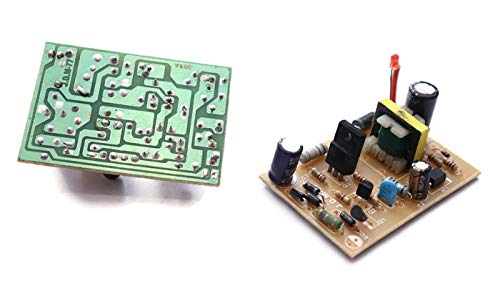
Imatge: Anvers i revers views of the PCB, illustrating the circuit traces and component placement for proper connection.
- Muntatge: Securely mount the PCB within a suitable, non-conductive enclosure to protect it from environmental factors and accidental contact. Ensure adequate airflow for cooling.
- Comprovació final: Before applying power, double-check all connections for correctness and security.
6. Instruccions de funcionament
Once the power supply PCB is correctly installed and all connections are verified:
- Aplicar potència: Connect the AC mains power to the input of the power supply. The board should power on, and if an indicator LED is present, it will illuminate.
- Verifica la sortida: Use a multimeter to confirm that the output voltage is approximately 12V DC before connecting sensitive devices.
- Connectar càrrega: Connect your 12V DC device to the output terminals, ensuring the load does not exceed 2 Amperes.
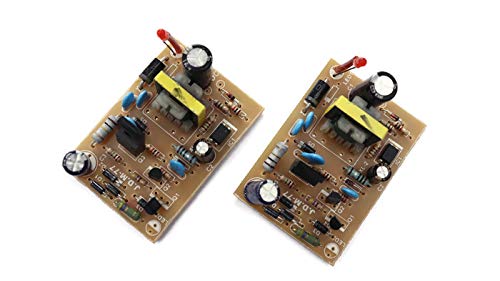
Image: Two power supply PCBs, demonstrating the product as a pack of two units.
7. Especificacions tècniques
| Especificació | Valor |
|---|---|
| Número de model | 12C2APSBPCBPO2 |
| Entrada Voltage | 100-240V AC |
| Vol. De sortidatage | 12V DC |
| Corrent de sortida | 2 Amperes (Max) |
| Potència de sortida | 24 watts |
| Mètode de modulació | PWM (modulació d'amplada de pols) |
| Transistor Connection | Pont complet |
| Dimensions del producte (LxWxH) | 11 x 10 x 3 cm |
| Pes de l'article | 30 g |
| Fabricant | ELECTRONIC SPICES |
| País d'origen | Índia |
8. Solució De Problemes
| Problema | Causa possible | Solució |
|---|---|---|
| Sense sortida voltage / Power LED off | No AC input power, faulty input connection, internal fault. | Check AC power source and input wiring. Ensure connections are secure. If problem persists, discontinue use and contact support. |
| Volum de sortidatage is incorrect or unstable | Overload, faulty load, internal component failure. | Disconnect the load and measure output voltage. Si voltage is correct, the load might be faulty or drawing too much current. If voltage is still incorrect, discontinue use. |
| Board becomes excessively hot | Overload, insufficient ventilation, short circuit in load. | Reduce load current. Ensure proper airflow around the PCB. Check load for short circuits. |
Nota: For complex issues, it is recommended to seek assistance from a qualified electronics technician.
9. Cura i Manteniment
- Keep the power supply PCB clean and free from dust and debris. Use a soft, dry brush or compressed air for cleaning.
- Avoid exposing the board to liquids or excessive humidity.
- Ensure the operating environment has adequate ventilation to prevent overheating.
- Do not attempt to repair the PCB yourself if you are not qualified. Unauthorized modifications can be dangerous and void any potential warranty.
10. Garantia i Suport
For any technical assistance, warranty inquiries, or support regarding your Electronic Spices 12V 2A SMPS Power Supply PCB, please contact the manufacturer directly:
Fabricant: ELECTRONIC SPICES
Adreça: Main, Ismailpur Rd, near Gyan Mandir Chowk, F- Block, Jaitpur, New Delhi, Haryana 110044, India
Número de contacte: 8929992403
Please refer to the product's purchase documentation for specific warranty terms and conditions.
Ask a question about this manual
Ask about setup, troubleshooting, compatibility, parts, safety, or missing instructions. Manuals+ will review the question and use this page’s manual context to help answer it.