
1. Introducció
The MASTECH MS8260E is a versatile 2000-count digital multimeter designed for a wide range of electrical and electronic measurements. It features a large LCD display, non-contact voltage (NCV) detection, and capabilities for measuring AC/DC voltage, AC/DC current, resistance, capacitance, and inductance. This manual provides essential information for the safe and effective operation, maintenance, and troubleshooting of your device.
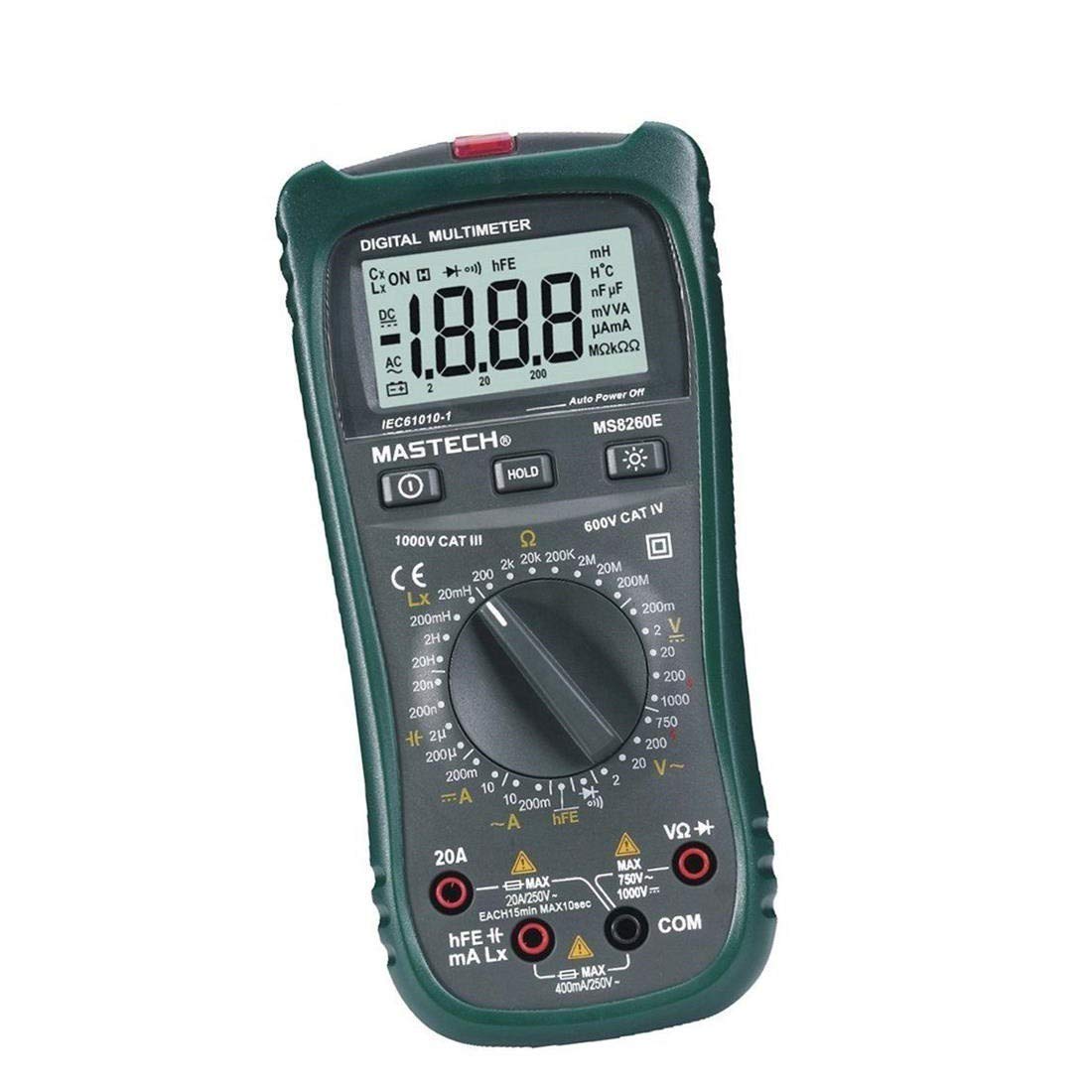
Figura 1: Frontal view of the MASTECH MS8260E Digital Multimeter, showing the LCD display, function rotary switch, and input jacks.
2. Informació de seguretat
Per garantir un funcionament i un manteniment segurs del comptador, seguiu aquestes pautes de seguretat:
- Llegiu i enteneu totes les instruccions d'aquest manual abans d'utilitzar el mesurador.
- Respecteu sempre els codis de seguretat locals i nacionals.
- No utilitzeu el mesurador si sembla danyat o si l'aïllament dels cables de prova està compromès.
- Observe the input limits for each measurement range to prevent electrical shock or damage to the meter. This meter is rated for CAT.IV 600V.
- Tingueu precaució quan treballeu amb voltagper sobre de 30 V CA RMS, 42 V pic o 60 V CC. Aquests voltagsuposen un risc de xoc.
- Desconnecteu sempre l'alimentació del circuit i descarregueu totes les emissions d'alt volum.tage capacitors before making resistance, continuity, diode, or capacitance measurements.
- Substituïu la bateria immediatament quan aparegui l'indicador de bateria baixa per garantir lectures precises.
- No feu funcionar el mesurador en entorns amb gasos, vapors o pols explosius.
3. Producte acabatview
The MS8260E multimeter is equipped with several features to facilitate accurate and convenient measurements:
- Large 2000 Counts LCD Display: Provides clear digital readings.
- Vol. incorporat sense contactetage (NCV) Detector: Detecta AC voltage greater than 110V without physical contact, indicated by a flash warning.
- Funció de retenció de dades: Congela la lectura mostrada per facilitar el registre.
- Il·luminació de fons de pantalla: Improves visibility in dimly lit conditions.
- Apagat automàtic: Conserves battery life by automatically turning off the meter after a period of inactivity.
- Indicació de bateria baixa: Alerts the user when the battery needs replacement.
- Indicació de polaritat: Automatically displays negative polarity.
- 30-Range Rotary Switch: Selects various measurement functions including AC/DC voltage, AC/DC current, resistance, capacitance, inductance, diode check, continuity test, and transistor (hFE) check.
4. Configuració
4.1 Instal·lació de la bateria
The MS8260E requires one 9V battery (NEDA 1604/6F22). To install or replace the battery:
- Ensure the meter is turned off and disconnect all test leads from the input terminals.
- Localitzeu la tapa del compartiment de la bateria a la part posterior del mesurador.
- Descargoleu el(s) cargol(s) de subjecció i traieu la coberta.
- Insert the 9V battery, observing the correct polarity.
- Torneu a col·locar la tapa del compartiment de la bateria i fixeu-la amb el(s) cargol(s).
4.2 Connexió dels cables de prova
Always connect the black test lead to the "COM" (common) input jack. Connect the red test lead to the appropriate input jack based on the desired measurement:
- Per al voltage, Resistance, Capacitance, Inductance, Diode, Continuity, and hFE measurements: Connect the red lead to the "VΩCAPHz" jack.
- For Current measurements up to 200mA: Connect the red lead to the "mA" jack.
- For Current measurements up to 10A: Connect the red lead to the "10A" jack.
Ensure test leads are fully inserted into the jacks before taking measurements.
5. Instruccions de funcionament
Turn the rotary switch to the desired function. The meter will display "OL" (Overload) if no input is present or if the input exceeds the range.
5.1 DC Voltage Mesurament (DCV)
- Set the rotary switch to the desired DCV range (200mV, 2V, 20V, 200V, 1000V).
- Connect the black test lead to the "COM" jack and the red test lead to the "VΩCAPHz" jack.
- Connecteu els cables de prova al component o circuit que s'ha de mesurar, observant la polaritat.
- Llegeix el voltage valor a la pantalla LCD.
5.2 AC Voltage Mesurament (ACV)
- Set the rotary switch to the desired ACV range (2V, 20V, 200V, 750V).
- Connect the black test lead to the "COM" jack and the red test lead to the "VΩCAPHz" jack.
- Connecteu els cables de prova a través del voltatge de CAtage font.
- Llegeix el voltage valor a la pantalla LCD.
5.3 DC Current Measurement (DCA)
- Set the rotary switch to the desired DCA range (200mA, 10A).
- For measurements up to 200mA, connect the red lead to the "mA" jack. For measurements up to 10A, connect the red lead to the "10A" jack. The black lead connects to "COM".
- Open the circuit where current is to be measured and connect the meter in series with the load.
- Llegiu el valor actual a la pantalla LCD.
5.4 AC Current Measurement (ACA)
- Set the rotary switch to the desired ACA range (200mA, 10A).
- For measurements up to 200mA, connect the red lead to the "mA" jack. For measurements up to 10A, connect the red lead to the "10A" jack. The black lead connects to "COM".
- Open the circuit where current is to be measured and connect the meter in series with the load.
- Llegiu el valor actual a la pantalla LCD.
5.5 Mesura de resistència (Ω)
- Set the rotary switch to the desired Ω range (200Ω, 2kΩ, 20kΩ, 200kΩ, 2MΩ, 20MΩ, 200MΩ).
- Connect the black test lead to "COM" and the red test lead to "VΩCAPHz".
- Assegureu-vos que el circuit estigui desenergitzat i que tots els condensadors estiguin descarregats.
- Connecteu els cables de prova a la resistència o al component.
- Llegiu el valor de la resistència a la pantalla LCD.
5.6 Capacitance Measurement (CAP)
- Set the rotary switch to the desired CAP range (20nF, 200nF, 2uF, 200uF).
- Connect the black test lead to "COM" and the red test lead to "VΩCAPHz".
- Assegureu-vos que el condensador estigui completament descarregat abans de connectar els cables de prova.
- Connecteu els cables de prova a través del condensador.
- Llegiu el valor de la capacitat a la pantalla LCD.
5.7 Inductance Measurement (L)
- Set the rotary switch to the desired Inductance range (20mH, 200mH, 2H, 20H).
- Connect the black test lead to "COM" and the red test lead to "VΩCAPHz".
- Connecteu els cables de prova a través de l'inductor.
- Read the inductance value on the LCD display.
5.8 Prova de díodes
- Ajusteu l'interruptor rotatiu al símbol del díode.
- Connect the black test lead to "COM" and the red test lead to "VΩCAPHz".
- Connecteu el cable vermell a l'ànode i el cable negre al càtode del díode. Un voltatge directetage drop (typically 0.5V to 0.8V for silicon diodes) will be displayed.
- Reverse the leads. The display should show "OL" for a good diode.
5.9 Prova de continuïtat
- Poseu l'interruptor rotatiu al símbol de continuïtat.
- Connect the black test lead to "COM" and the red test lead to "VΩCAPHz".
- Connecteu els cables de prova a través del circuit o component.
- Si la resistència és inferior a aproximadament 30 Ω, sonarà el brunzidor, indicant continuïtat.
5.10 Transistor (hFE) Test
- Col·loqueu l'interruptor giratori a la posició hFE.
- Identify the type (NPN or PNP) and pinout (Emitter, Base, Collector) of the transistor.
- Insert the transistor leads into the corresponding sockets in the hFE test socket on the meter.
- Read the hFE (DC current gain) value on the LCD display.
5.11 Vol. sense contactetage (NCV) Detecció
- Set the rotary switch to the NCV position.
- Hold the top front part of the meter near the AC voltagfont d'alimentació (per exemple, una presa de corrent o un cable aïllat).
- Si AC voltage greater than 110V is detected, the NCV indicator light will flash, and the buzzer may sound.
6. Manteniment
6.1 Neteja
Netegeu el comptador amb anuncisamp cloth and a mild detergent. Do not use abrasives or solvents. Ensure the meter is dry before use.
6.2 Substitució de la bateria
When the "BAT" symbol appears on the display, the battery needs to be replaced. Refer to Section 4.1 for battery installation instructions.
6.3 Canvi de fusibles
If the current measurement function fails, the fuse may need replacement. This operation should only be performed by qualified personnel. Refer to the service manual or contact customer support for fuse specifications and replacement procedures.
6.4 Emmagatzematge
If the meter is not to be used for an extended period, remove the battery to prevent leakage and damage to the meter. Store the meter in a cool, dry place away from direct sunlight.
7. Solució De Problemes
| Problema | Causa possible | Solució |
|---|---|---|
| Sense pantalla o pantalla tènue | Low battery; Meter off | Replace battery; Turn on meter |
| Es mostra "OL" | Input exceeds range; Open circuit (for resistance/continuity) | Select higher range; Check circuit connection |
| Lectures incorrectes | Low battery; Incorrect range selected; Poor test lead contact | Replace battery; Select appropriate range; Ensure good contact |
| La mesura de corrent no funciona | Fusible cremat | Replace fuse (by qualified personnel) |
8. Especificacions
| Funció de mesura | Interval | Precisió |
|---|---|---|
| DC Voltage (DCV) | 200mV, 2V, 20V, 200V, 1000V | ±0.5% (200mV-200V), ±0.8% (1000V) |
| Vol. ACtage (ACV) | 2V, 20V, 200V, 750V | ±0.8% (2V-200V), ±1.2% (750V) |
| Corrent DC (DCA) | 200mA, 10A | ±1.5% (200mA), ±2.0% (10A) |
| Corrent CA (ACA) | 200mA, 10A | ±1.8% (200mA), ±3.0% (10A) |
| Resistència (Ω) | 200Ω, 2kΩ, 20kΩ, 200kΩ, 2MΩ, 20MΩ, 200MΩ | ±0.8% (200Ω-2MΩ), ±1.0% (20MΩ), ±5.0% (200MΩ) |
| Capacitat (CAP) | 20nF, 200nF, 2uF, 200uF | ±4.0% (20nF-2uF), ±5.0% (200uF) |
| Inductància (L) | 20mH, 200mH, 2H, 20H | ±3.0% |
| Continuïtat audible | Buzzer sounds at <30Ω | N/A |
| Prova de díode | 1 mA, 2.8 V | N/A |
| Transistor (hFE) | 0-1,000 | N/A |
Especificacions generals:
- Visualització: LCD de 2000 recomptes
- Classificació de seguretat: CAT.IV 600V
- Potència: 9V battery (NEDA 1604/6F22)
- Pes: Approximately 1 kg (including battery)
9. Garantia i Suport
For warranty information, technical support, or service inquiries, please refer to the warranty card included with your product or visit the official Mastech website. Do not attempt to repair the meter yourself, as this may void the warranty and pose safety risks.