
Teslong NTS500-5.5-3M-DL
Teslong NTS500 Dual Lens Endoscope User Manual
Model: NTS500-5.5-3M-DL
1. Informació de seguretat
This inspection camera is mainly used for industrial machinery inspection or house pipeline inspection. It is not intended for medical purposes, nor should it be used as a children's toy. Always operate the device in accordance with local regulations and safety guidelines.
2. Producte acabatview
The Teslong NTS500 Dual Lens Endoscope is a versatile industrial inspection tool designed for detailed visual inspection in hard-to-reach areas. Featuring a 5-inch IPS LCD screen and dual camera lenses, it provides clear images and videos for various applications.
Característiques principals:
- Lents duals: Equipped with both front-view and side-view cameras for comprehensive inspection without additional mirrors.
- 5" 720P IPS Screen: A large, high-resolution display for clear and detailed observation.
- Impermeable IP67: The probe is rated IP67 for use in wet and inclement environments.
- Llums LED ajustables: Six LED lights on the front camera and one on the side camera provide adjustable brightness for optimal illumination in dark spaces.
- Llanterna incorporada: Additional lighting on the main unit for working in dark environments.
- Enregistrament de fotos i vídeos: Capture high-quality images and videos with audio for documentation and analysis.
- Built-in Memory Card: Comes with a 32GB MicroSD card for ample storage of inspection data.
- Bateria recarregable: Integrated 3500mAh battery provides up to 5 hours of continuous operation.
- Estoig de transport: Durable case for convenient storage and transport of the device and accessories.

Figure 2.1: Teslong NTS500 Endoscope Main Unit and Probe.
3. Què hi ha a la caixa
- Teslong NTS500 Main Unit
- Dual Lens Probe (9.8FT / 3M length)
- Cable de càrrega USB
- Targeta MicroSD de 32 GB (preinstal·lada)
- Manual d'usuari
- Maleta de transport
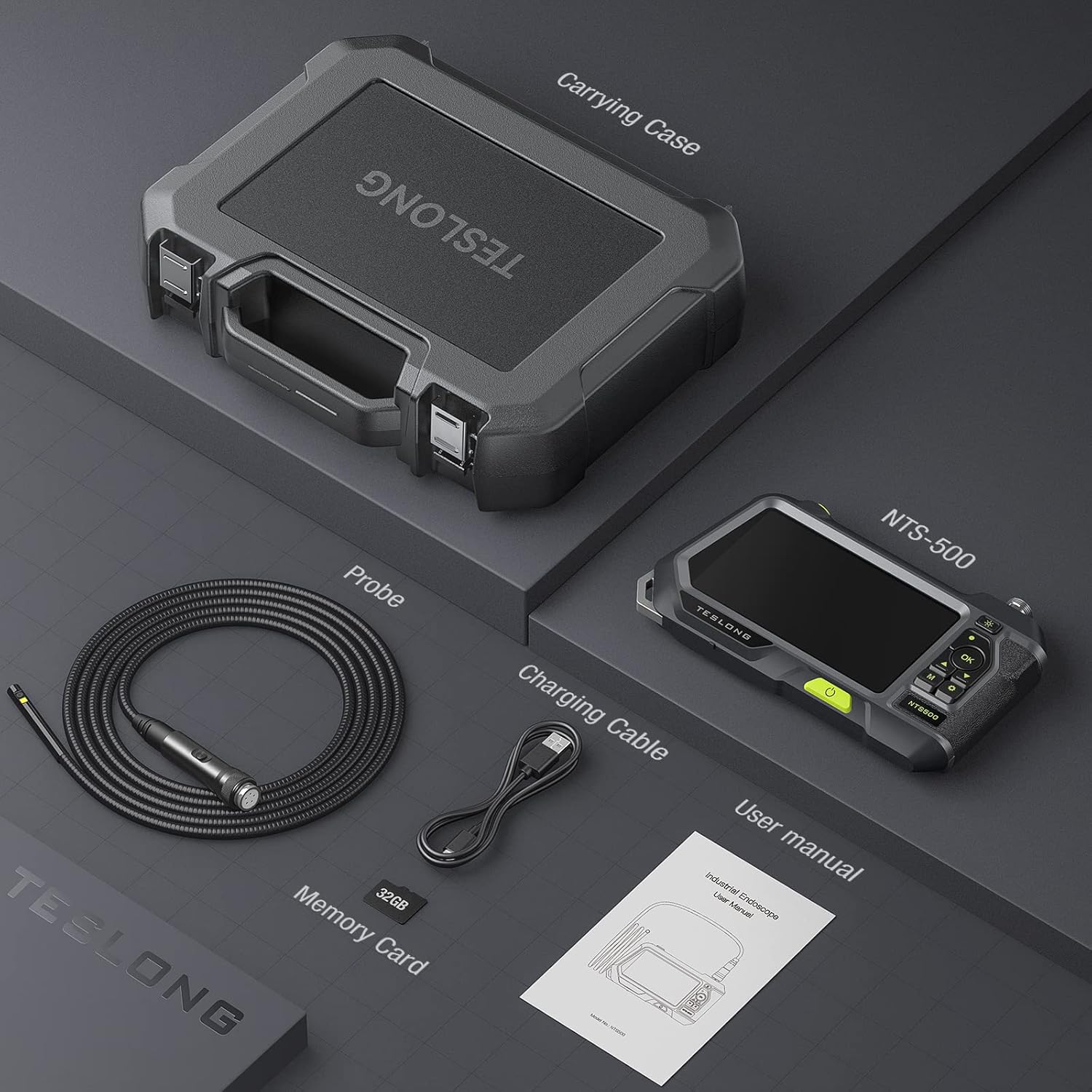
Figure 3.1: All components included in the Teslong NTS500 package.
4. Guia de configuració
4.1 Càrrega del dispositiu
Before first use, fully charge the Teslong NTS500 unit. Connect the provided USB charging cable to the charging/data slot on the main unit and plug the other end into a compatible USB power adapter (not included).
4.2 Inserció de la targeta MicroSD
The 32GB MicroSD card is typically pre-installed. If not, locate the MicroSD slot on the side of the unit and insert the card with the gold contacts facing down until it clicks into place.
4.3 Connexió de la sonda
- Align the connector of the dual lens probe with the port on the top of the main unit.
- Gently push the probe connector into the port until it is securely seated.
- Twist the locking ring on the probe connector clockwise to secure it.

Figure 4.1: The slim 0.21-inch probe easily connects to the main unit.
5. Instruccions de funcionament
5.1 Engegada/apagada
Press and hold the Power Button (green button on the front) for a few seconds to turn the device On or Off.
5.2 Switching Lenses
The Teslong NTS500 features dual lenses (front and side). Press the 'Switch Lens' button on the probe cable to toggle between the front-view and side-view càmeres.

Figure 5.1: The dual lens system provides both front and side views for comprehensive inspection.
5.3 Ajust de la brillantor del LED
Use the 'Adjust Light Brightness' button (sun icon) on the main unit to cycle through different brightness levels for the probe's LED lights. The side camera has its own illumination.

Figure 5.2: The probe features adjustable LED lights for clear visibility in various conditions.
5.4 Captura de fotos i vídeos
En directe view mode, press the 'Capture Image/Take Video' (camera icon) button to take a photo. To record a video, press the 'M' button to switch to video mode, then press the 'OK' button to start/stop recording.
5.5 Reproducció
Per tornarview captured media, press the 'M' button to enter playback mode. Use the Up/Down arrow buttons to navigate through photos and videos. Press 'OK' to view un element seleccionat.

Figure 5.3: Control panel showing buttons for light adjustment, capture, navigation, and menu.
5.6 Vídeos oficials de productes
Vídeo 5.1: Producte oficial acabatview of the Teslong NTS500 Industrial Waterproof Borescope, demonstrating its features and applications.
Video 5.2: A concise demonstration of the TESLONG NTS500 Industrial endoscope in action.
Video 5.3: Real-world test of the Teslong NTS500 Endoscope with 5mm and 8mm probes, showcasing its performance in various scenarios.
6. Manteniment i cura
6.1 Neteja de la sonda
After each use, especially in dirty or wet environments, gently wipe the probe with a soft, damp cloth. For stubborn grime, a mild detergent can be used. Ensure the probe is completely dry before storage.
6.2 Emmagatzematge
Store the endoscope and all accessories in the provided carrying case. Keep the device in a cool, dry place away from direct sunlight and extreme temperatures.
6.3 Cura de la bateria
To prolong battery life, avoid fully discharging the unit frequently. Recharge the battery regularly, even if the device is not in use for extended periods.

Figure 6.1: The IP67 waterproof probe allows for inspection in wet conditions, but proper cleaning and drying are essential.
7. Solució De Problemes
| Problema | Causa possible | Solució |
|---|---|---|
| El dispositiu no s'encén. | Bateria baixa. | Carregueu el dispositiu completament. |
| Cap imatge a la pantalla. | Probe not connected properly. | Ensure the probe is securely connected and locked. |
| La imatge és borrosa. | Lens is dirty or focus distance is incorrect. | Clean the lens. Adjust the distance between the probe and the object (optimal focus is 1.2-4.0 inches). |
| No es poden gravar fotos/vídeos. | MicroSD card issue (full, corrupted, or not formatted). | Check MicroSD card storage. Format the card (this will erase all data). Replace the card if corrupted. |
| Device powers off when attempting to capture/record. | Possible MicroSD card issue or low battery. | Ensure battery is fully charged. Reformat or replace the MicroSD card. (Refer to customer video for similar issue: Bad SD Card Issue) |
8. Especificacions
| Característica | Detall |
|---|---|
| Número de model | NTS500-5.5-3M-DL |
| Mida de la pantalla | LCD IPS de 5 polzades |
| Resolució de captura de vídeo | 720p (Display), 1080p (Recording) |
| Diàmetre de la sonda | 0.21 polzades (5.5 mm) |
| Longitud de la sonda | 9.8 peus (3 metres) |
| Classificació impermeable | IP67 (Sonda) |
| Bateria | Polímer de liti de 3500 mAh (inclòs) |
| Pes de l'article | 1.21 lliures |
| Tipus de suport | MicroSD Card (32GB included) |
| Fabricant | Teslong |
9. Garantia i Suport
For warranty information, technical support, or service inquiries, please refer to the contact details provided on the Teslong official website or the product packaging. Keep your purchase receipt for warranty claims.
Ask a question about this manual
Ask about setup, troubleshooting, compatibility, parts, safety, or missing instructions. Manuals+ will review the question and use this page’s manual context to help answer it.