
1. Introducció
This manual provides detailed instructions for the installation, operation, and maintenance of the EASYGUARD EC203 2 Way Car Alarm System. This system is designed to enhance the security of your vehicle by providing real-time monitoring and alerts via an LCD pager display. It is compatible with most DC12V petrol and diesel vehicles.
The EC203 system includes an ultrasonic sensor for detecting intrusion and a shock sensor for impact detection, offering comprehensive protection for your vehicle.
2. Producte acabatview i Components
The EASYGUARD EC203 system is a sophisticated 2-way car alarm designed for robust vehicle security. It provides real-time feedback to the LCD pager display, keeping you informed about your vehicle's status.
2.1 Característiques clau
- 2-Way communication with LCD Pager Display
- Ultrasonic sensor for interior intrusion detection
- Shock sensor for impact and vibration detection
- Real-time vehicle status feedback
- Universal compatibility with most DC12V petrol & diesel cars
- Multiple alarm triggers: door, ACC ON, hood, tailgate
- Funció anti-segrest
- Remote trunk release capability (requires additional solenoid kit)
- Automatització de tancament centralitzat de portes
- Panic mode/car finding
- Memòria d'apagada
- Mode valet
2.2 Components del sistema
The EC203 system typically includes the following components:
- Control Module (Main Unit)
- Two LCD Pager Key Fobs
- Wire Harnesses (12-pin main, 8-pin auxiliary)
- Sensor d'ultrasons
- Sensor de xoc
- Sirena
- Indicador LED
- Antena d'alarma
- Interruptor de programació

Figure 1: Complete set of EASYGUARD EC203 2 Way Car Alarm System components, including the main control unit, two LCD pager remotes, wiring harnesses, ultrasonic sensor, shock sensor, and siren.

Figure 2: Diagram illustrating the main features of the EC203 system, highlighting the 2-way communication, ultrasonic sensor, and shock alarm warning capabilities.
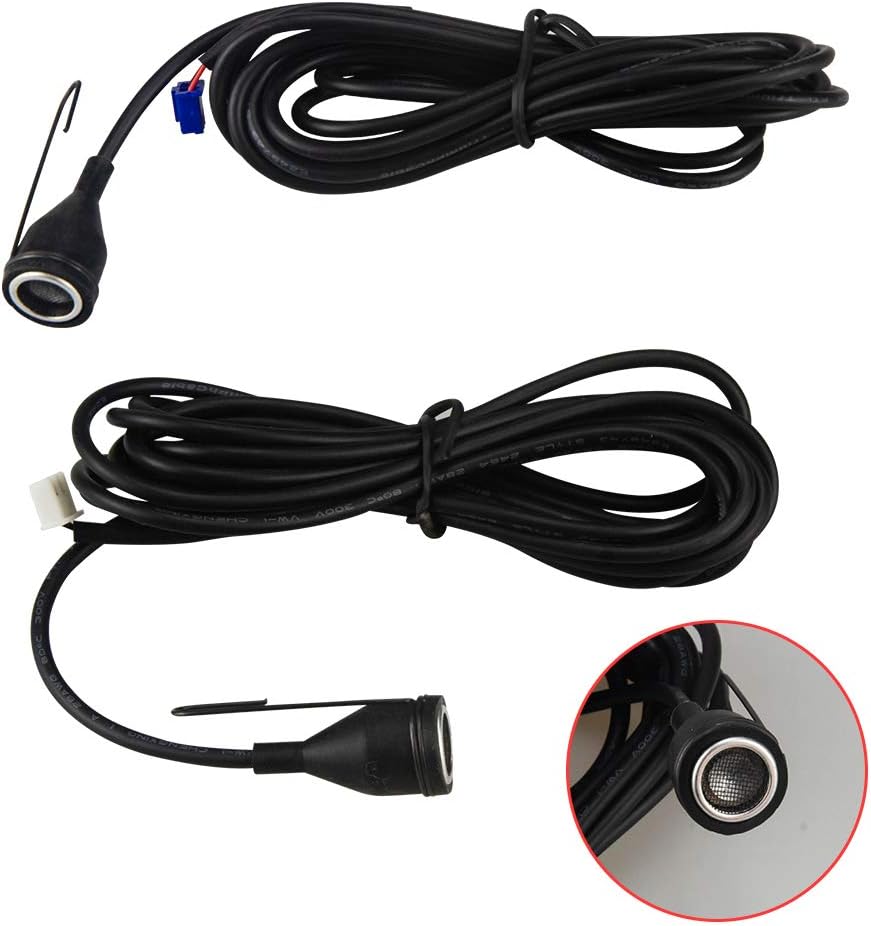
Figure 3: Visual representation of the ultrasonic sensor detecting illegal intrusion into the vehicle's interior, triggering an alarm.
3. Configuració i instal·lació
Important Note: Professional installation by a qualified car alarm installer is strongly recommended for this product. Incorrect installation can lead to system malfunction or damage to your vehicle's electrical system. Please ensure you can find a professional installer before purchasing.
An English user manual and wiring diagram are included with the product. Additional copies are available upon request from EASYGUARD customer support.
3.1 General Installation Guidelines (Consult Wiring Diagram for Details)
- Mòdul de control principal: Install the main control module in a secure, hidden location within the vehicle, such as behind the dashboard or in a kick panel, to prevent easy access by unauthorized individuals.
- Wiring Harnesses: Connect the 12-pin main wire harness and 8-pin auxiliary wire harness to the control module and integrate them with your vehicle's electrical system according to the provided wiring diagram. Ensure all connections are secure and insulated.
- Sirena: Mount the siren in a secure location under the hood, away from direct water spray, ensuring its sound is not obstructed.
- Sensor de xoc: Install the shock sensor on a solid surface within the vehicle, such as a metal beam or firewall, to accurately detect impacts. Adjust sensitivity as needed.
- Sensor d'ultrasons: Position the ultrasonic sensor inside the vehicle cabin, typically on the dashboard or headliner, to cover the interior space effectively.
- Indicador LED: Install the LED indicator in a visible location on the dashboard to deter potential thieves and provide system status at a glance.
- Antena d'alarma: Mount the antenna in a location that maximizes signal reception, typically on the windshield or a non-metallic surface.
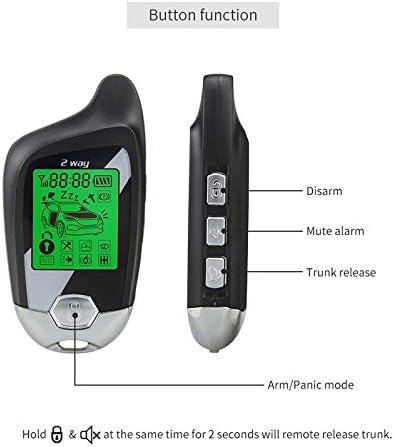
Figure 4: The ultrasonic sensor unit with its connecting cable, designed to detect movement within the vehicle's cabin.

Figure 5: The ultrasonic sensor module along with its wiring, ready for integration into the alarm system.
4. Instruccions de funcionament
The EASYGUARD EC203 system is operated primarily using the LCD pager key fobs. Familiarize yourself with the button functions and display icons for optimal use.
4.1 Key Fob Button Functions

Figure 6: Illustration of the key fob, detailing the functions of each button: Arm/Panic mode, Disarm, Mute alarm, and Trunk release.
- Arm/Panic Mode: Press the bottom button (lock icon) to arm the system. Hold for 2 seconds to activate panic mode (siren sounds).
- Desarma: Press the top button (unlock icon) to disarm the system.
- Silenciar l'alarma: Press the middle-top button (bell with slash icon) to mute the alarm sound.
- Alliberament del tronc: Press the middle-bottom button (trunk icon) to remotely open the trunk. (Note: An extra trunk release solenoid kit may be required for this function, e.g., ASIN: B00N4RP8VM).
- Remote Trunk Release (Alternative): Hold the Arm/Panic button and Mute alarm button simultaneously for 2 seconds to remotely release the trunk.
4.2 Core System Functions
- Arma/Desarma:
- To Arm: Press the arm button on the remote. The vehicle lights will flash, and the siren will chirp once. The LCD pager will display "Armed" status.
- To Disarm: Press the disarm button on the remote. The vehicle lights will flash, and the siren will chirp twice. The LCD pager will display "Disarmed" status.
- Braç silenciós: Press the silent arm button on the remote. The system will arm without siren chirps.
- Vibration Alarm Warning: If the shock sensor detects a light impact, the system will issue a warning chirp. A stronger impact will trigger a full alarm.
- Ultrasonic Sensor Detecting: The ultrasonic sensor monitors the vehicle's interior. If unauthorized movement is detected, the alarm will trigger.
- Door Intrusion Alarm: If a door is opened while the system is armed, the alarm will trigger.
- ACC ON Trigger, Hood Trigger & Tailgate Trigger: The alarm will trigger if the ignition (ACC) is turned on, the hood is opened, or the tailgate is opened while the system is armed.
- Emergency Alarm & Disarm: In an emergency, you can trigger the alarm or disarm it using specific button combinations (refer to the detailed wiring diagram for specific emergency disarm procedures).
- Antisegrestament: This feature can be activated to prevent vehicle theft during a hijacking attempt. Consult the wiring diagram for activation methods.
- Door Opening Flashing Turn On/Off Setting: Configure whether the turn signals flash when doors are opened.
- Arm Reminding and Auto-Arm: The system can be set to remind you to arm the vehicle or to auto-arm after a set period if you forget.
- Door Unclosed Well Reminding, Hood Unclosed Well Reminding & Tailgate Unclose Well Reminding: The system will alert you via the pager if any doors, the hood, or the tailgate are not properly closed when attempting to arm.
- Anti-False Disarm: Features to prevent accidental or unauthorized disarming.
- Central Door Locking Automation: The system can automatically lock doors when the ignition is turned on and unlock them when the ignition is turned off.
- Panic Mode/Car Finding: Pressing the panic button will sound the siren and flash the lights, useful for locating your car in a crowded parking lot or deterring threats.
- Apagueu la memòria: The system retains its armed/disarmed status even after power interruption.
- Window Rolls Up Automatically (Optional): Requires an extra window closer module (e.g., ASIN: B00N3RKA8E) for this function.
- Triggering Memory: The system records the last trigger event, which can be reviewed on the LCD pager.
- Power Status Indication: The LCD pager displays the battery status of the remote and the vehicle.
- Electrical/Pneumatic Central Locking: The system supports both electrical and pneumatic central locking systems (default is electrical locking).
- Mode valet: Temporarily disables the alarm functions for vehicle servicing without disarming the system.
- Dome Light Delay Supervision: Allows for a delay in arming until the dome light turns off.
- Code Learning/Programming Method: Instructions for pairing new remotes or reprogramming existing ones are detailed in the full user manual.
5. Manteniment
To ensure the longevity and optimal performance of your EASYGUARD EC203 system, follow these general maintenance guidelines:
- Keep Components Dry: Avoid exposing the main control module, sensors, and key fobs to water or excessive moisture.
- Netegeu suaument: Clean the key fobs and visible components with a soft, dry cloth. Do not use harsh chemicals or abrasive cleaners.
- Substitució de la bateria: Replace the key fob batteries when the low battery indicator appears on the LCD display to ensure reliable operation.
- Comprovacions periòdiques: Periodically test the alarm functions (arming, disarming, shock sensor, ultrasonic sensor) to ensure they are working correctly.
- Inspecció professional: Consider having the system professionally inspected if you notice any persistent issues or reduced performance.
6. Solució De Problemes
If you encounter issues with your EASYGUARD EC203 system, refer to the following common troubleshooting steps. For complex problems, professional assistance is recommended.
| Problema | Causa possible | Solució |
|---|---|---|
| Alarm triggers frequently (false alarms) |
|
|
| L'abast del comandament a distància és baix |
|
|
| System does not arm/disarm |
|
|
| LCD pager display is blank or unresponsive |
|
|
7. Especificacions
| Característica | Detall |
|---|---|
| Número de model | EC203 |
| Vol. Operatiutage | DC12V |
| Tipus de control remot | 2-Way LCD Pager Display |
| Interval remot màxim | Approximately 500 meters (in open space, actual range may vary) |
| Noise Level (Siren) | 10 dB |
| Pes de l'article | Aproximadament 2.53 lliures (1.15 kg) |
| Dimensions del paquet | 10 x 8.11 x 4.09 polzades (25.4 x 20.6 x 10.4 cm) |
| Dispositius compatibles | Most DC12V petrol & diesel vehicles |

Figure 7: Dimensions of the LCD pager key fob: 77.2mm length, 40mm width, and 17.6mm thickness.

Figure 8: Dimensions of the main control unit: 121mm length, 69mm width, and 25mm height, showing various ports and sensors.
8. Garantia i Suport
For warranty information, technical support, or to request additional user manuals and wiring diagrams, please contact EASYGUARD directly using the information below.
- Correu electrònic: sales@ieasyguard.com
- Telèfon: +86-760-2211-3597
- Weblloc: www.ieasyguard.com
- Adreça: 2nd floor, building 3, NO. 77 Caihong Road, Zhongshan city, Guangdong, China
- WeChat: Scan the QR code for WeChat support: Enllaç de WeChat

Figure 9: Back of the product packaging showing contact information for EASYGUARD support.