
Introducció
Thank you for choosing the Blueendless 2-Bay SATA HDD/SSD Docking Station HD05. This device is designed to provide convenient access to 2.5-inch and 3.5-inch SATA hard drives and solid-state drives (HDDs/SSDs) for data transfer and offline duplication. Please read this manual carefully to ensure proper installation and operation.
Producte acabatview
Característiques principals:
- Supports simultaneous reading of two 2.5-inch or 3.5-inch SATA HDDs/SSDs.
- Integrated Hard Drive Duplicator Function (Offline Clone) for standalone drive duplication.
- Connects to a computer via USB 3.0 for use as an external hard drive dock.
- On/Off power switch for easy control.
- LED indicators for power and activity status.
- Hot-swappable, plug and play functionality; no drivers required for most operating systems.
- USB 3.0 interface provides data transfer rates up to 5 Gbps.
- Compatible with OS X, Linux, Windows 2000/XP/Vista/7/8/10 (32-bit & 64-bit), and Android (Smart TV).
Contingut del paquet:
- Blueendless HDD Docking Station HD05
- Cable de dades USB 3.0
- Font d'alimentació
- Manual d'usuari (aquest document)
Diagrama del producte:

Figura 1: Frontal view of the Blueendless HD05 Docking Station, showing the two drive bays and power button.
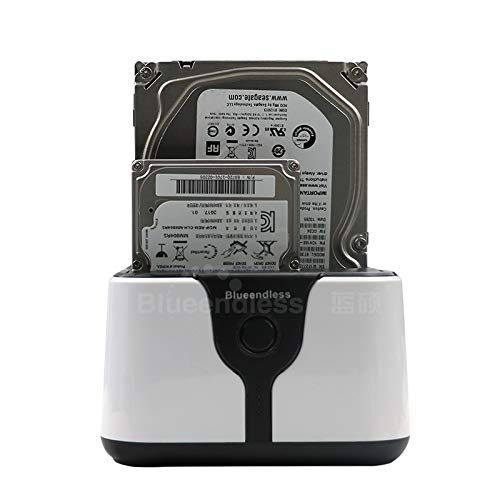
Figure 2: The docking station with a 3.5-inch HDD and a 2.5-inch HDD/SSD inserted into the bays, demonstrating drive compatibility.
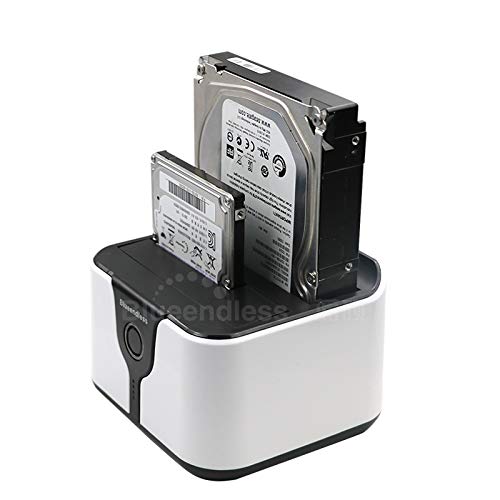
Figura 3: Un angle view of the docking station with both 2.5-inch and 3.5-inch drives inserted, highlighting the compact design.
Configuració
- Connectar l'alimentació: Connect the provided power adapter to the docking station's power input and then to a wall outlet.
- Connect to Computer (Optional for Data Transfer): If using for data transfer, connect the supplied USB 3.0 data cable from the docking station's USB port to an available USB 3.0 port on your computer.
- Inserir unitats: Carefully insert your 2.5-inch or 3.5-inch SATA HDDs/SSDs into the drive bays (Slot 1 and Slot 2). Ensure they are fully seated.
- Encès: Press the On/Off power switch on the docking station. The power LED indicator will illuminate.
- Instal·lació del controlador: For most modern operating systems (Windows, OS X, Linux), no additional drivers are required. The device should be recognized automatically.
Instruccions de funcionament
A. Mode de transferència de dades (connectat a l'ordinador)
- Assegureu-vos que l'estació d'acoblament estigui engegada i connectada a l'ordinador mitjançant el cable USB 3.0.
- Insert one or two SATA HDDs/SSDs into the drive bays.
- Your operating system should detect the drives as external storage devices. You can now access, read, and write data to them as you would with any other external drive.
- To safely remove a drive, always use the "Safely Remove Hardware" option in your operating system before physically removing the drive or powering off the docking station.
B. Offline Clone Function (Standalone Duplication)
The offline clone function allows you to duplicate a hard drive without connecting to a computer. This is ideal for creating backups or upgrading drives.
- Preparar les unitats:
- Inseriu el Unitat font (la unitat DES de la qual voleu copiar) a Slot 1 (Source).
- Inseriu el target Drive (la unitat a la qual voleu copiar) Slot 2 (Target).
- Important: The target drive must be of equal or larger capacity than the source drive. All data on the target drive will be overwritten during the cloning process. Ensure you have backed up any important data from the target drive before proceeding.
- Disconnect from Computer: Ensure the USB data cable is disconnected from the docking station and your computer. The cloning process must be performed offline.
- Encès: Connect the power adapter and turn on the docking station.
- Iniciar clon: Press and hold the "Clone" button (usually located near the drive bays) for approximately 3-5 seconds until the clone progress LEDs begin to flash.
- Supervisar el progrés: The LED indicators will show the cloning progress (e.g., 25%, 50%, 75%, 100%). Do not interrupt the process.
- Finalització: Once all progress LEDs are solid, the cloning process is complete. You can now safely power off the docking station and remove the drives.
Nota: The cloning speed depends on the drive capacities and types. Larger drives will take longer to clone.
Manteniment
- Mantingueu l'estació d'acoblament neta i sense pols. Feu servir un drap suau i sec per netejar-la.
- Eviteu exposar el dispositiu a temperatures extremes, humitat o llum solar directa.
- No intenteu desmuntar ni reparar el dispositiu vosaltres mateixos. Això podria anul·lar la garantia.
- Ensure proper ventilation around the device during operation, especially during long cloning processes.
Resolució de problemes
- Issue: Drives not recognized by computer.
- Ensure the docking station is powered on and the USB 3.0 cable is securely connected to both the docking station and the computer.
- Proveu de connectar-vos a un altre port USB de l'ordinador.
- Test with a different USB 3.0 cable.
- Check if the drives are properly seated in the bays.
- Verify that the drives themselves are functional by testing them in another enclosure or directly connected to a computer.
- For new drives, they may need to be initialized and formatted in Disk Management (Windows) or Disk Utility (OS X) before they appear.
- Issue: Offline clone fails or does not start.
- Ensure the USB data cable is disconnected from the computer. The clone function is offline only.
- Verify that the source drive is in Slot 1 and the target drive is in Slot 2.
- Confirmeu que la capacitat de la unitat de destinació és igual o superior a la capacitat de la unitat d'origen.
- Ensure both drives are properly inserted and detected by the docking station (power on, then insert drives, check activity LEDs).
- Press and hold the clone button for the required 3-5 seconds until the progress LEDs start flashing.
- If the drives are very old or have bad sectors, cloning might fail.
- Problema: Velocitats de transferència de dades lentes.
- Assegureu-vos que esteu connectat a un port USB 3.0 de l'ordinador. Els ports USB 2.0 tindran velocitats més lentes.
- Verify that the USB 3.0 cable is not damaged.
- The actual transfer speed also depends on the speed of the installed HDDs/SSDs.
Especificacions
| Característica | Detall |
|---|---|
| Model | HD05 |
| Tipus de unitat compatibles | 2.5-inch / 3.5-inch SATA I/II/III HDD & SSD |
| Nombre de badies | 2 |
| Interfície | USB 3.0 (compatible enrere amb USB 2.0) |
| Velocitat de transferència de dades | Fins a 5 Gbps (USB 3.0) |
| Offline Clone Function | Supported (Standalone) |
| Sistemes operatius compatibles | OS X, Linux, Windows 2000/XP/Vista/7/8/10, Android (Smart TV) |
| Dimensions (L x A x A) | 118 x 115 x 89 mm (aprox. 12 x 12 x 8 cm) |
| Pes de l'article | 254 g |
| Font d'alimentació | Adaptador d'alimentació extern (inclòs) |
Garantia i Suport
This Blueendless HD05 Docking Station comes with a 6 mesos de garantia des de la data de compra. Aquesta garantia cobreix els defectes de fabricació en condicions d'ús normal.
For technical support, warranty claims, or further assistance, please contact your retailer or the Blueendless customer service department through their official website or contact channels. Please have your product model number (HD05) and proof of purchase ready when contacting support.