
1. Introducció
This manual provides detailed instructions for the installation, operation, and maintenance of the PELCO PE-EVO05LID Evolution 05 Mini 5MP Network Mini Dome Camera. This camera is designed for indoor surveillance, offering a 5-megapixel resolution and a fisheye lens for a wide field of view. Please read this manual thoroughly before using the product to ensure proper setup and functionality.
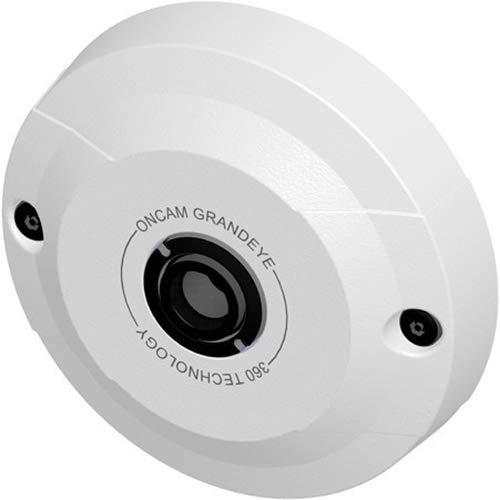
Figure 1: PELCO PE-EVO05LID Evolution 05 Mini 5MP Network Mini Dome Camera. This image shows the compact dome design of the camera, typically mounted on a ceiling.
2. Informació de seguretat
- Assegureu-vos que totes les connexions elèctriques compleixin els codis i les normatives locals.
- Use only the specified power source (Power over Ethernet - PoE).
- Do not expose the camera to water or excessive moisture. This camera is IP40 rated for indoor use only.
- Avoid placing the camera in areas with extreme temperatures or high humidity.
- No intenteu desmuntar ni modificar la càmera. Encarregueu tot el manteniment a personal qualificat.
- Mantenir fora de l'abast dels nens.
3. Contingut del paquet
Verifiqueu que tots els elements siguin presents al paquet:
- PELCO PE-EVO05LID Evolution 05 Mini 5MP Network Mini Dome Camera
- Maquinari de muntatge (cargols, ancoratges)
- Plantilla d'instal·lació
- Guia d'inici ràpid
Note: An Ethernet cable for network connection and PoE power is not typically included and must be supplied separately.
4. Producte acabatview
The PELCO PE-EVO05LID is a compact 5MP network dome camera featuring a fisheye lens for a wide 180 x 168° field of viewLes característiques principals inclouen:
- Alta resolució: Up to 2592 x 1944 video resolution.
- Ampli rang dinàmic (WDR): Electronic WDR for clear images in varying lighting.
- Emmagatzematge flexible: Integrated microSD slot supporting up to 128GB for edge recording.
- Alimentació per Ethernet (PoE): Single cable for power and data.
- ONVIF Compliant: Profile S for broad compatibility.
- Detecció de moviment: Eight configurable regions.
- Enmascarament de privadesa: Ten configurable zones.
5. Configuració
5.1 Muntatge de la càmera
- Choose a suitable indoor location for ceiling mount, ensuring a clear view de la zona de vigilància desitjada.
- Use the provided installation template to mark drilling points on the ceiling.
- Perforeu forats pilot i inseriu ancoratges de paret si cal.
- Secure the camera base to the ceiling using the provided screws.
- Adjust the camera's orientation as needed before final tightening.
5.2 Cablejat i alimentació
The camera supports Power over Ethernet (PoE), simplifying installation by delivering both power and data through a single Ethernet cable.
- Connect one end of an RJ45 Ethernet cable to the camera's Ethernet port.
- Connecteu l'altre extrem del cable Ethernet a un commutador de xarxa compatible amb PoE o a un injector PoE.
- Ensure the network switch or injector is powered on. The camera will power up automatically.

Figure 2: RJ45 Ethernet Cable. This image displays a standard RJ45 Ethernet cable, used for both data and Power over Ethernet (PoE) connection to the camera.
5.3 Configuració inicial
Upon initial power-up, the camera will acquire an IP address from your network's DHCP server. Refer to the Quick Start Guide for instructions on discovering the camera's IP address and accessing its web interfície per a una configuració detallada.
6. Instruccions de funcionament
6.1 Accés a la xarxa
Accedir a la càmera web interfície introduint la seva adreça IP a a web browser. You will be prompted for login credentials. Refer to the Quick Start Guide for default credentials.
6.2 Configuració de vídeo
Dins del web interface, navigate to the video settings to adjust:
- Resolució: Select desired resolution up to 2592 x 1944.
- Velocitat de fotogrames: Adjust frames per second.
- Compressió: Choose between H.264 and MJPEG streams to optimize storage and bandwidth.
- Millores d'imatge: Configure electronic Wide Dynamic Range (WDR), automatic white balance, brightness, contrast, saturation, and exposure settings.
6.3 Detecció de moviment
The camera supports eight regions of motion detection. Configure these zones to trigger alerts or recording when movement is detected within specified areas of the camera's field of view.
6.4 Enmascarament de privadesa
Ten configurable privacy masking zones are available. Use these to block out sensitive areas from being recorded or viewed, ensuring privacy compliance.
6.5 Edge Recording
Insert a microSD card (up to 128GB) into the camera's integrated slot for local storage of video footage. Configure recording schedules and event-triggered recording via the web interfície.
7. Manteniment
7.1 Neteja
To maintain optimal image quality, periodically clean the camera lens and housing with a soft, dry cloth. Do not use harsh chemicals or abrasive materials.
7.2 actualitzacions de microprogramari
Comproveu el del fabricant website for available firmware updates. Regularly updating the firmware ensures optimal performance, security, and access to new features. Follow the provided instructions carefully when performing updates.
8. Solució De Problemes
- Sense energia: Ensure the Ethernet cable is securely connected to both the camera and a PoE-enabled device. Verify the PoE device is powered on.
- Sense connexió de xarxa: Check the Ethernet cable for damage. Verify network settings and ensure the camera's IP address is correct and not conflicting with other devices.
- Mala qualitat d'imatge: Clean the camera lens. Adjust video settings such as resolution, brightness, contrast, and WDR in the web interface. Ensure adequate lighting in the surveillance area.
- No es pot accedir Web Interfície: Verify the camera's IP address. Ensure your computer is on the same network segment. Try clearing your browser's cache or using a different browser.
- Problemes de gravació: Check if a microSD card is properly inserted and formatted. Verify recording schedules and motion detection settings.
9. Especificacions
| Característica | Especificació |
|---|---|
| Model | PE-EVO05LID |
| Resolució | Up to 2592 x 1944 (5 MP) |
| Sensor | CMOS d'1/2.5" |
| Lent | Fixed Fisheye Lens, f/2.0 Aperture |
| Camp de View | 180 x 168° |
| Il·luminació mínima | 0.2 lux |
| Compressió de vídeo | H.264, MJPEG |
| Emmagatzematge | microSD slot, supports up to 128GB |
| Connectivitat | Ethernet RJ45 amb PoE |
| Protocols | ONVIF Compliant (Profile S) |
| Ús interior/exterior | Interior |
| Classificació IP | IP40 |
| Tipus de muntatge | Muntatge al sostre |
| Característiques especials | Motion Sensor, Electronic WDR, Auto White Balance |
10. Garantia i Suport
10.1 Informació de la garantia
This PELCO product is covered by a limited warranty. Please refer to the warranty card included with your product or visit the official Pelco weblloc web per obtenir informació detallada sobre els termes i condicions de la garantia. Conserveu el comprovant de compra per a reclamacions de garantia.
10.2 Suport tècnic
For technical assistance, troubleshooting, or product inquiries, please contact Pelco customer support. Contact information can be found on the official Pelco weblloc (www.pelco.com) or in the documentation provided with your camera.