
1. Introducció
This manual provides detailed instructions for the installation, operation, and maintenance of your ESX VN715-E39-DAB In-Car Navigation and Multimedia System. Please read this manual thoroughly before using the device to ensure proper functionality and to prevent damage. Keep this manual for future reference.
2. Producte acabatview i Característiques
The ESX VN715-E39-DAB is an advanced in-car multimedia system designed to enhance your driving experience with navigation, entertainment, and connectivity features. It integrates seamlessly into compatible BMW vehicles.
Característiques principals:
- High-Resolution 8-inch Touchscreen: Provides clear visuals and intuitive control.
- Advanced Android i15 Operating System: Offers a familiar and customizable user interface.
- Google Maps Navigation: Supports both online and offline navigation for reliable route guidance.
- Mobile Internet Connectivity: Connects via Wi-Fi hotspot for online services.
- Ràdio digital DAB+: Includes a DAB antenna for high-quality digital radio reception with station logos.
- AM/FM Radio with RDS: Standard analog radio reception with Radio Data System functionality.
- Multi-format DVD Player: Supports DVD, DVD-R/RW, DVD+R/RW, VCD, CD, CD Text, CD-R/RW, and MP3 formats.
- Bluetooth Hands-Free Kit: Enables safe phone calls and audio streaming with an internal microphone and optional external microphone connection.
- Integració del telèfon intel·ligent: Connect iPhone or Android smartphones via USB for various functions.
- Control de veu: Utilize voice commands through a connected smartphone.
- Sortides d'àudio: pre-amplifier outputs for front, rear, subwoofer, and center channels.
- Entrada de la càmera: One adjustable camera input for reverse cameras.
- Entrades/sortides auxiliars: One AUX video input, two audio/video outputs, and one AUX audio input.
- Ports USB: Two USB ports for media and connectivity.
- Ranura per a targetes Micro SD: Dedicated slot for navigation data and media files.
- Personalització: Personalize with customizable logos and wallpapers.
- Authenticity Certificate: Included with the product.
3. Configuració i instal·lació
Installation of the ESX VN715-E39-DAB system requires technical knowledge and should ideally be performed by a qualified professional. Incorrect installation can lead to damage to the device or vehicle electrical system.
Compatibilitat:
This unit is compatible with specific BMW models and connector types:
- BMW 5 Series E39 (1996-2001) with 17-pin system connector.
- BMW 5 Series E39 (2002-2003) with 40-pin system connector.
- BMW X5 E53 (2000-2001) with 17-pin system connector.
- BMW X5 E53 (2002-2007) with 40-pin system connector.
- BMW M5 (1996-2003) with 17/40-pin system connector.
Passos generals d'instal·lació (es recomana la instal·lació professional):
- Desconnecta la bateria: Desconnecteu sempre la bateria del vehicle abans de començar qualsevol treball elèctric.
- Eliminar la unitat existent: Carefully remove the factory radio or navigation system from the dashboard.
- Connecteu l'arnès de cablejat: Connect the appropriate wiring harness (17-pin or 40-pin) to the vehicle's electrical system and the ESX unit. Ensure all connections are secure.
- Connecteu les antenes: Connect the GPS antenna, DAB antenna, and radio antenna to their respective ports on the unit. Position the antennas for optimal reception.
- Connecteu els perifèrics: Connect any optional accessories such as a reverse camera, external microphone, USB devices, or auxiliary inputs/outputs.
- Muntar la unitat: Securely mount the ESX unit into the dashboard opening.
- Torneu a connectar la bateria: Torneu a connectar la bateria del vehicle i proveu el sistema.

4. Instruccions de funcionament
Familiarize yourself with the touchscreen interface and physical buttons for optimal use.
4.1 Funcionament bàsic
- Encès/apagat: Press and hold the power button (usually the VOL knob) to turn the unit on or off. A short press typically mutes or unmutes the audio.
- Control de volum: Rotate the VOL knob to adjust the audio volume.
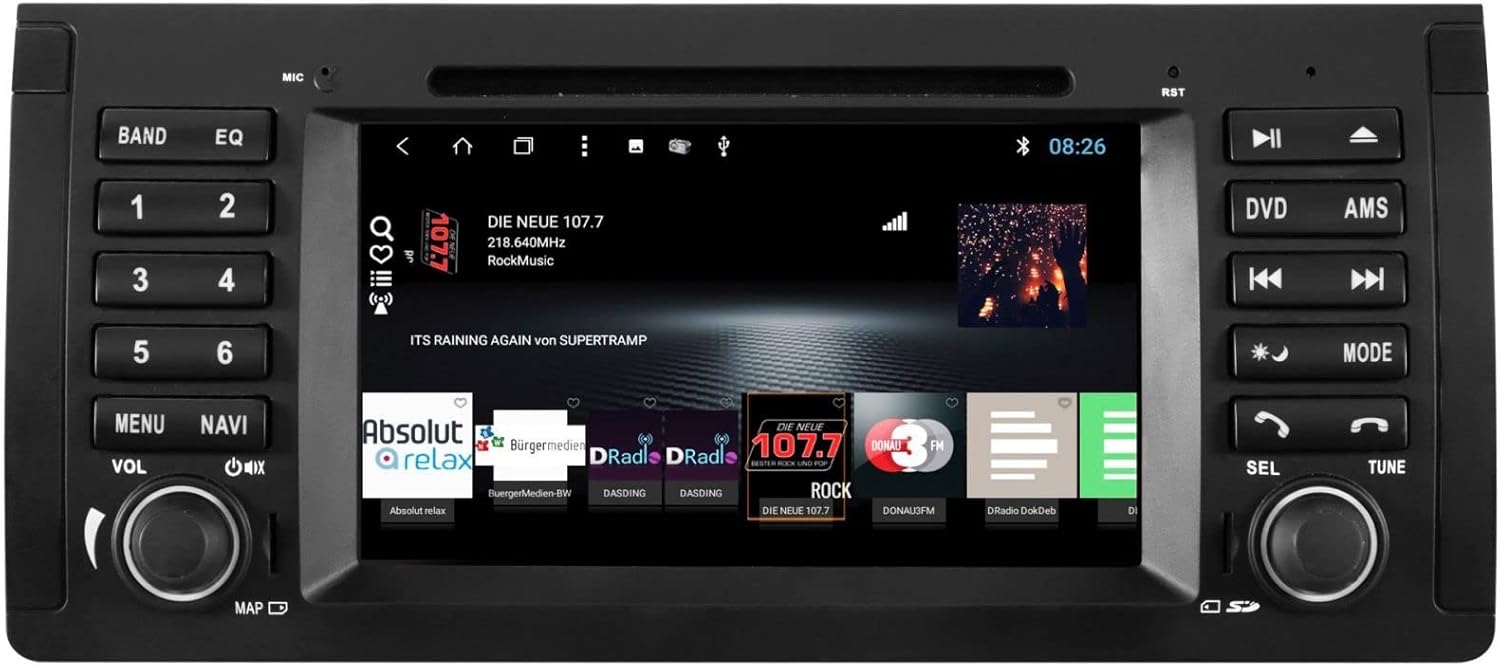
- Interfície de pantalla tàctil: Navegueu pels menús i les aplicacions tocant, lliscant i pessigant a la pantalla tàctil de 8 polzades.

4.2 Navegació
Access the navigation application (e.g., Google Maps) from the home screen. Input your destination, and the system will provide turn-by-turn directions. Ensure GPS antenna is properly connected for accurate positioning.

4.3 Radio (DAB+/AM/FM)
- Seleccioneu el mode: Tap the 'Radio' or 'DAB+' icon on the home screen or press the 'BAND' button.
- Estacions d'escaneig: Use the 'AMS' (Auto Memory Store) button or on-screen controls to scan and save available stations.
- Sintonització: Manually tune using the 'TUNE' knob or on-screen frequency controls.
- Presets: Save your favorite stations to preset buttons (1-6) for quick access.

4.4 Connectivitat Bluetooth
- Maridatge: Go to the Bluetooth settings on the unit and your smartphone. Cerca available devices and select 'ESX VN715-E39-DAB'. Enter the PIN if prompted (usually '0000' or '1234').
- Trucades mans lliures: Once paired, you can make and receive calls directly through the unit.
- Transmissió d'àudio: Play music from your smartphone via Bluetooth A2DP.
4.5 Media Playback (DVD/USB/SD)
- DVD: Insert a DVD into the disc slot. The system will automatically switch to DVD mode or prompt you to select it.
- USB/SD: Insert a USB drive into a USB port or an SD card into the Micro SD slot. Access media files through the 'Media' or 'File Explorer' application.
5. Manteniment
Regular maintenance ensures the longevity and optimal performance of your ESX VN715-E39-DAB system.
- Neteja de la pantalla: Feu servir un drap suau i sense borrissol per netejar suaument la pantalla tàctil. Per a taques difícils, fregueu lleugeramentampNetegeu el drap amb aigua o un netejador de pantalles. Eviteu productes químics agressius.
- Actualitzacions de programari: Periodically check for software updates from the manufacturer's official website or through the unit's system settings (if available) to ensure you have the latest features and bug fixes.
- Disc Drive Care: Keep the DVD slot free of dust and debris. Avoid inserting damaged or non-standard discs.
6. Solució De Problemes
If you encounter issues with your unit, refer to the following common troubleshooting steps:
| Problema | Causa possible | Solució |
|---|---|---|
| Sense poder | Connexió d'alimentació fluixa, fusible fundit, problema amb la bateria del vehicle. | Check power cables and fuse. Ensure vehicle battery is charged. Consult a professional if issues persist. |
| Sense so | Volume muted, speaker wires disconnected, incorrect audio source. | Check volume level and mute status. Verify speaker connections. Select the correct audio source. |
| Pèrdua de senyal GPS | GPS antenna improperly connected or obstructed, unit in an area with poor satellite reception. | Assegureu-vos que l'antena GPS estigui connectada correctament i que tingui una visió clara view del cel. Mou-te a una zona oberta. |
| Error d'emparellament Bluetooth | Bluetooth not enabled on device, incorrect PIN, device out of range. | Ensure Bluetooth is active on both devices. Re-enter PIN. Bring devices closer. Restart both devices. |
| La pantalla tàctil no respon | El sistema es congela, brutícia a la pantalla. | Perform a soft reset (refer to device settings or power cycle). Clean the screen. |
Si aquests passos no resolen el problema, poseu-vos en contacte amb l'atenció al client o amb un tècnic de servei qualificat.
7. Especificacions
Detailed technical specifications for the ESX VN715-E39-DAB unit:
- Marca: ESX
- Model: VN715-E39-DAB
- Mida de la pantalla: 8 polzades
- Tipus de visualització: LCD
- Sistema operatiu: Android i15
- Tecnologia de connectivitat: Bluetooth, USB, Wi-Fi (via hotspot)
- Tipus de suport: DVD, DVD-R/RW, DVD+R/RW, VCD, CD, CD Text, CD-R/RW, MP3, USB, Micro SD
- Sintonitzador de ràdio: DAB+, AM/FM with RDS
- Navegació: Google Maps (online/offline)
- Compatibilitat: BMW 5 Series E39 (1996-2003), BMW X5 E53 (2000-2007), BMW M5 (1996-2003)
- Origen: Xina
8. Garantia i Suport
For warranty information, please refer to the documentation provided with your purchase or contact your retailer. For technical support, please visit the official ESX website or contact their customer service department. Ensure you have your model number (VN715-E39-DAB) and proof of purchase available when seeking support.