
1. Introducció
The EPEVER eBox-Wifi 2.4G RJ45 D WiFi Adapter is designed to enable wireless monitoring and communication for EPEVER solar charge controllers and inverters via WLAN. It facilitates data exchange with PCs and smartphones, offering convenient remote management of your solar system. This manual provides essential information for the proper setup, operation, and maintenance of your eBox-Wifi adapter.

Figure 1: EPEVER eBox-Wifi 2.4G RJ45 D WiFi Adapter and its connection cable.
2. Característiques i especificacions del producte
2.1 Característiques clau
- Wireless monitoring of EPEVER solar charge controllers and inverters via WLAN.
- No external power supply required; powered directly by the RS485 port.
- Ultra-low power consumption for efficient operation.
- High-speed data processing capability.
- Supports smartphone applications for easy configuration and monitoring (Plug and Play).
2.2 Especificacions tècniques
| Especificació | Valor |
|---|---|
| Distància de comunicació | Fins a 20 metres |
| Dimensions (L x A x A) | 63 x 19 x 10 mm |
| Pes | 7.7 grams |
| Classe de protecció | IP30 |
| Vol. Operatiutage | 5V ± 0.5V (Powered by RS485 port) |
| Peak Emission Power Consumption | 150 mA |
| Consum d'energia en espera | 310 uA |
| Paràmetres de comunicació | 115200 Bps, 8N1 |
| Material | Plàstic |
| País d'origen | Xina |
2.3 Compatibilitat
The eBox-Wifi adapter is compatible with the following EPEVER products:
- Compatible Charge Controllers: XTRA Series, TRIRON Series, Tracer-AN Series.
- Inversors compatibles: IP-Plus Series, UPower-HI Series.
3. Instruccions de configuració
Follow these steps to set up your EPEVER eBox-Wifi adapter:
- Identify the RS485 Port: Locate the RS485 communication port on your compatible EPEVER solar charge controller or inverter. This port is typically an RJ45 connector.
- Connect the eBox-Wifi: Plug the eBox-Wifi adapter directly into the RS485 port. For some EPEVER models, an RJ45 extension cable (often included with the eBox-Wifi) may be necessary to facilitate connection due to space constraints or port orientation. Ensure the connection is firm and secure.

Figure 2: Direct connection of eBox-Wifi to a charge controller.

Figure 3: eBox-Wifi connected via extension cable to a larger controller.
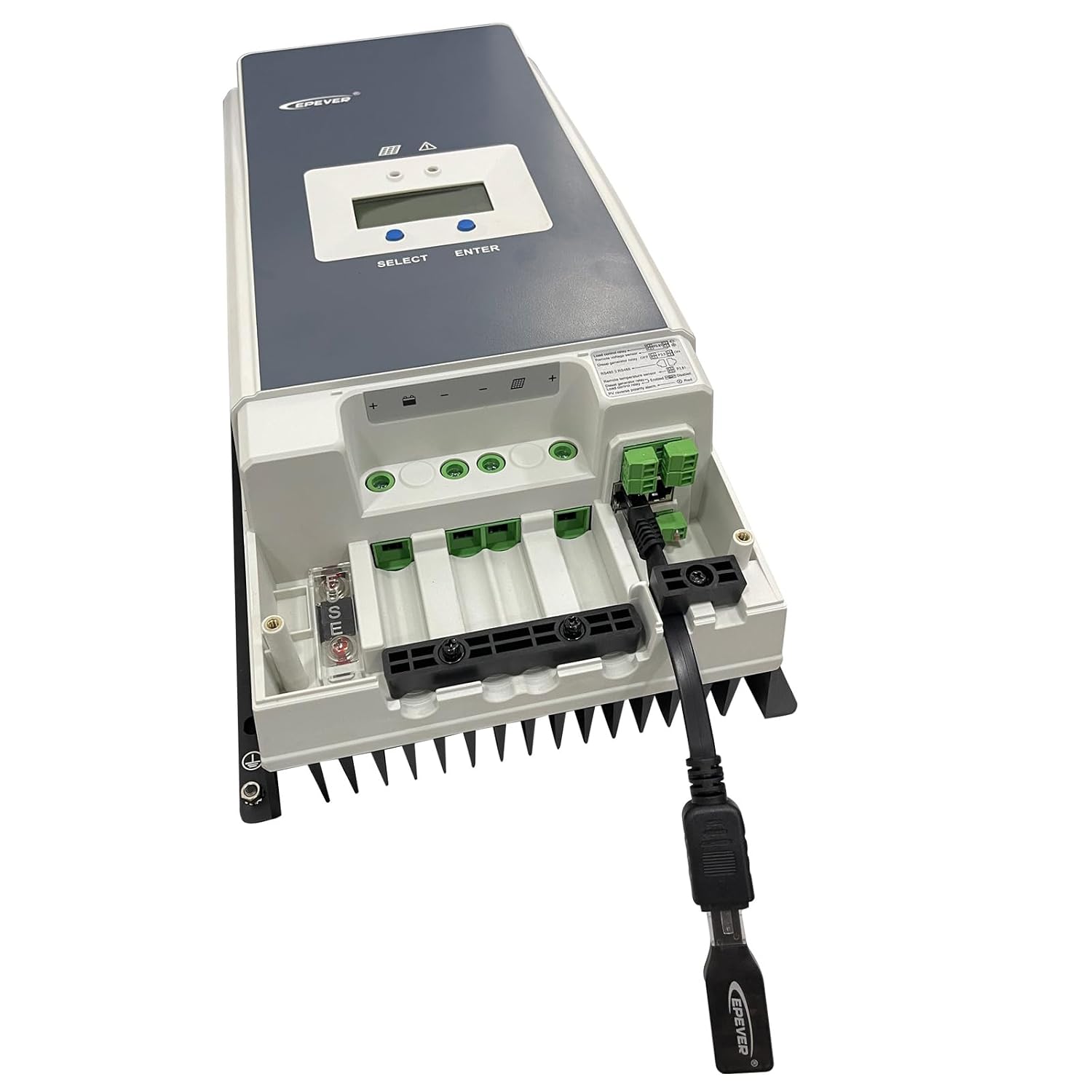
Figura 4: Detallada view of the RJ45 cable connection.
- Encès: The eBox-Wifi adapter draws its power directly from the RS485 port of the connected EPEVER device. Ensure your EPEVER charge controller or inverter is powered on.
- Descarrega l'aplicació: Download the official EPEVER monitoring application (e.g., 'EPEVER Pair' or 'EP-01' depending on your device and platform) from your smartphone's app store or the EPEVER official weblloc.
- Connecteu-vos mitjançant Wi-Fi: Open the EPEVER app. Your smartphone will need to connect to the Wi-Fi network broadcast by the eBox-Wifi adapter. This network typically has a name like 'EPEVER-XXXX'. You may need to temporarily disconnect from your home Wi-Fi network to connect to the eBox-Wifi's direct network.
- Begin Monitoring: Once connected, the app will display real-time data and allow you to configure settings for your EPEVER device.
4. Operating the eBox-Wifi Adapter
The eBox-Wifi adapter functions as a bridge for wireless communication between your EPEVER solar equipment and your monitoring device (smartphone or PC). Once successfully set up:
- Dades en temps real: Use the EPEVER monitoring app to view live operational data from your charge controller or inverter, including battery voltage, charging current, load status, and more.
- Dades històriques: Access historical data logs to track performance trends over time.
- Configuració dels paràmetres: Adjust various operational parameters of your connected EPEVER device directly through the app, such as battery type, charging voltage limits, and load control settings.
- Actualitzacions de firmware: The app may also provide options for firmware updates for your EPEVER device or the eBox-Wifi itself, ensuring optimal performance and access to new features.
5. Manteniment
The EPEVER eBox-Wifi adapter requires minimal maintenance to ensure long-term reliable operation:
- Neteja: Keep the adapter clean and free from dust and debris. Use a soft, dry cloth for cleaning. Do not use liquid cleaners or solvents.
- Medi ambient: Avoid exposing the device to extreme temperatures, direct sunlight, high humidity, or corrosive environments. The operating temperature range is typically specified in the product's full technical manual.
- Connexions: Periodically check that the RJ45 connection to your EPEVER device is secure and free from damage.
- Firmware: Regularly check for and install any available firmware updates for the eBox-Wifi and your connected EPEVER device via the monitoring app to ensure compatibility and optimal performance.
6. Solució De Problemes
If you encounter issues with your EPEVER eBox-Wifi adapter, refer to the following common troubleshooting tips:
- Cannot connect to the eBox-Wifi network:
- Ensure the eBox-Wifi is properly connected to your EPEVER charge controller/inverter and that the EPEVER device is powered on. The eBox-Wifi draws power from the RS485 port.
- Temporarily disable your smartphone's mobile data and any other Wi-Fi connections (e.g., home Wi-Fi) to ensure it attempts to connect only to the eBox-Wifi's direct network.
- Restart your smartphone and try again.
- App not displaying data or showing connection errors:
- Verify that your smartphone is successfully connected to the eBox-Wifi's Wi-Fi network.
- Ensure you are using the correct and latest version of the EPEVER monitoring application for your specific device. Check for app updates in your app store.
- Confirm that your EPEVER charge controller or inverter model is compatible with the eBox-Wifi adapter (refer to Section 2.3).
- Check the physical connection of the eBox-Wifi to the EPEVER device's RS485 port. Re-seat the adapter if necessary.
- Slow or intermittent connection:
- Ensure your smartphone is within the communication range (up to 20 meters) of the eBox-Wifi adapter.
- Minimize physical obstructions between the eBox-Wifi and your smartphone.
- Eviteu les fortes interferències electromagnètiques d'altres dispositius electrònics.
7. Garantia i Suport
7.1 Informació de la garantia
The EPEVER eBox-Wifi 2.4G RJ45 D WiFi Adapter comes with a Garantia del fabricant de 2 anys des de la data de compra. Aquesta garantia cobreix els defectes de materials i de fabricació en condicions d'ús normal. Conserveu el comprovant de compra per a reclamacions de garantia.
7.2 Atenció al client
For technical assistance, warranty claims, or further inquiries, please contact EPEVER customer support through their official website or the contact information provided with your product packaging. When contacting support, please have your product model (eBox-Wifi) and any relevant serial numbers (e.g., SN:05240166093G88U7-00083, found on the device label) ready.

Figure 5: EPEVER eBox-Wifi adapter with serial number visible.


