
VisionTechShop TVP-60B
VisionTechShop TVP-60B Price Computing Scale User Manual
Model: TVP-60B
Introducció
This manual provides comprehensive instructions for the setup, operation, and maintenance of your VisionTechShop TVP-60B Price Computing Scale. Designed for accuracy and durability, this scale features Lb/Oz/Kg switchable units, a 60lb capacity with 0.01lb readability, and is NTEP Legal for Trade (COC #19-038) and NSF Certified. Please read this manual thoroughly before using the device to ensure proper function and longevity.

Figure 1: VisionTechShop TVP-60B Price Computing Scale, front view.
Configuració
Connexió d'alimentació
Ensure the scale is placed on a stable, level surface. Connect the provided AC/DC adapter to the scale's power input and then to a suitable power outlet. The scale also features a built-in rechargeable battery for portable use.

Figure 2: Power adapter connection point on the scale.
Connecting to an ECR (Electronic Cash Register)
The TVP-60B scale can be connected to an ECR for integrated weighing and transaction processing. This requires an RS-232 crossover cable and specific configuration settings on both the scale and the ECR.
Video 1: Instructions for connecting the TVP Series Scale to an ECR.
For detailed steps on connecting the TVP Series Scale to an HK-7200 Series ECR, refer to the video above. Key steps include:
- Connect the devices using a 236 RS Crossover Cord.
- Turn power on while holding the TARE key.
- Enter password (default is "0000").
- Press TARE key to enter/PLU and M+ to navigate.
- Press TARE key to enter CAL Menu.
- Navigate to F11.
- Press TARE key to enter.
- Press PLU key to go to PC-100.
- Press TARE key then ZERO key to save.
- Navigate through F11 menu to confirm setting values.
- Turn ECR key to the 6 o'clock position to enter Service Mode.
- Press 5, then CASH to define port.
- Select the correct port (e.g., Port 1) and confirm settings match the scale (Baud Rate: 9600, Parity: NONE, Data Bits: 8 Bits, Stop Bits: 1 Bit, Device: Scale, Printer: None, Display: Epson, Scale: CAS, KP Start Line: 0, KP End Line: 7, Slip Start Line: 0).
- Press CLEAR 3 times to save new values and exit.
Video 2: Detailed guide on connecting the TVP Series Scale to the HK-7200 Series ECR.
Instruccions de funcionament
Pesatge bàsic
Place the item to be weighed on the stainless steel platter. The weight will be displayed on the LCD screen. The scale supports Lb/Oz/Kg units, which can be switched using the UNIT key.

Figure 3: LCD display showing weight and unit options (Lb/Oz/Kg).
The scale features separate displays for operator and customer viewing, ensuring transparency during transactions.
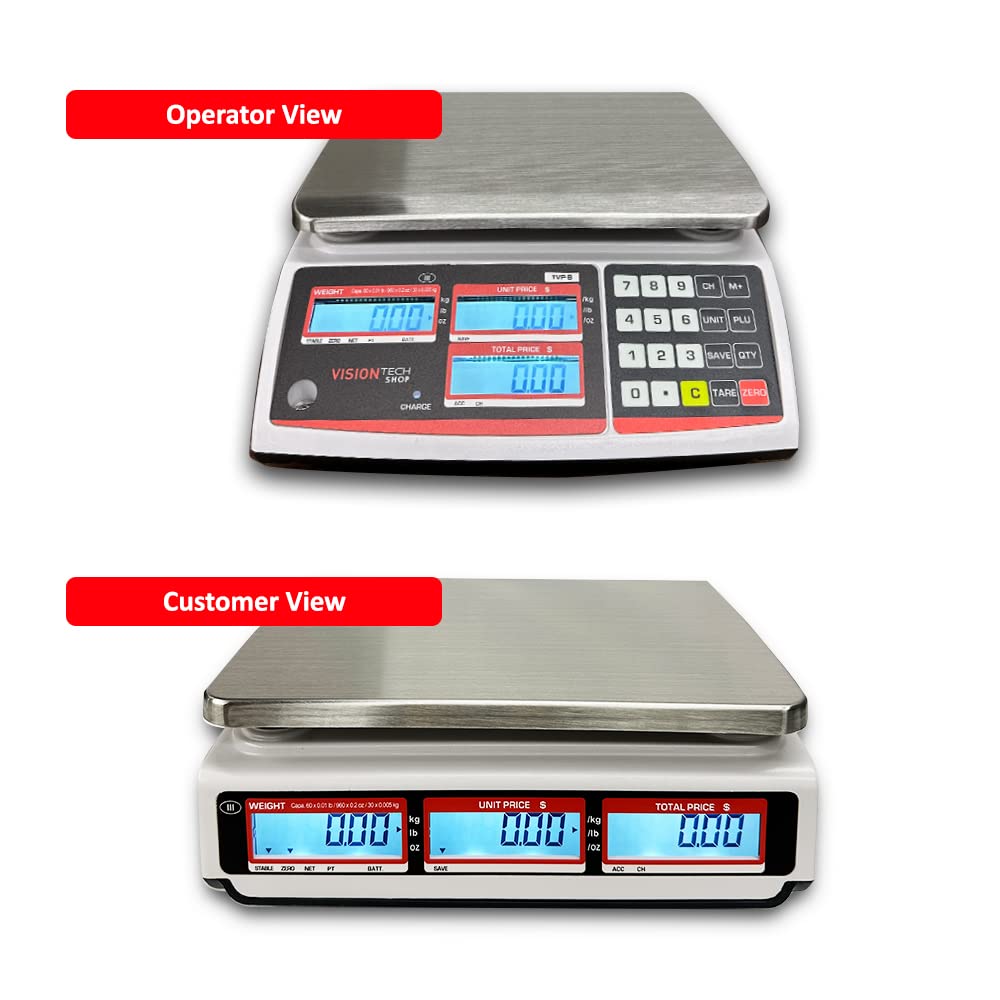
Figura 4: superior view (Operator) and rear view (Customer) displays of the scale.
Creating PLU Profiles
The scale allows you to save Product Look-Up (PLU) profiles for frequently sold items, simplifying pricing and transactions.
Video 3: Guide on creating and saving PLU profiles on the scale.
Follow these steps to create and save PLU profiles:
- Introduïu el preu unitari desitjat mitjançant el teclat numèric.
- Hold the "PLU" key for 3 seconds until "Save Pos" appears.
- Select the desired PLU number (0-9) where you want to save the price.
- To recall a saved PLU, clear the current price, press the "PLU" key, and then the corresponding profile nombre.
- Press "M+" to print the label (if connected to a compatible printer).
DLP-50 Label Printer Quick Start Guide
If you have a DLP-50 Label Printer, this guide provides quick setup instructions for printing labels directly from your scale.
Video 4: Quick start guide for the DLP-50 Label Printer.
Manteniment
Regular maintenance ensures the accuracy and longevity of your scale.
- Neteja: Utilitzeu un suau, damp cloth to clean the scale's exterior. The stainless steel platter is removable for easy cleaning. Avoid abrasive cleaners or harsh chemicals.
- Platter Care: The 0.8mm high-strength stainless tray is designed to be anti-deform. Ensure it is properly seated on the anti-slip rubber pads to prevent movement during weighing.
- Bateria: The built-in rechargeable battery provides long-lasting power (up to 100 hours). Recharge as needed using the AC/DC adapter.

Figure 5: Removable stainless steel platter and anti-slip rubber pads for stability.
Resolució de problemes
If you encounter issues with your scale, consider the following common solutions:
- Lectures inexactes:
- Ensure the scale is on a level and stable surface.
- Check for any obstructions under or around the platter.
- Verify that the unit of measurement (Lb/Oz/Kg) is correctly selected.
- If issues persist, recalibration may be necessary (refer to advanced settings or contact support).
- Problemes de visualització:
- Check power connection and battery charge.
- Ensure the display is clean and free from debris.
- Connectivity Problems (RS-232):
- Verify the RS-232 cable is securely connected to both the scale and the ECR.
- Double-check all communication settings (Baud Rate, Parity, Data Bits, Stop Bits) on both devices as outlined in the Setup section.
- Ensure the correct port is selected on the ECR.
Especificacions
| Característica | Detall |
|---|---|
| Marca | VisionTechShop |
| Model | TVP-60B |
| Capacitat | 60lb x 0.01lb, 960oz x 0.2oz, 30kg x 0.005kg |
| Dimensions del producte | 11 x 12 x 4 polzades (288 x 313 x 108.8 mm) |
| Pes net | 8.78 lliures (4.1 kg) |
| Mida del plat | 10.5 x 8 inches (W x D) |
| Tipus de visualització | Liquid Crystal Display (LCD) with Backlight |
| Interfície | Estàndard RS-232 |
| Certificacions | NTEP Legal for Trade (COC #19-038), NSF Certified |
| Font d'alimentació | AC/DC Charging with built-in rechargeable battery |
| Durada de la bateria | Fins a 100 hores |
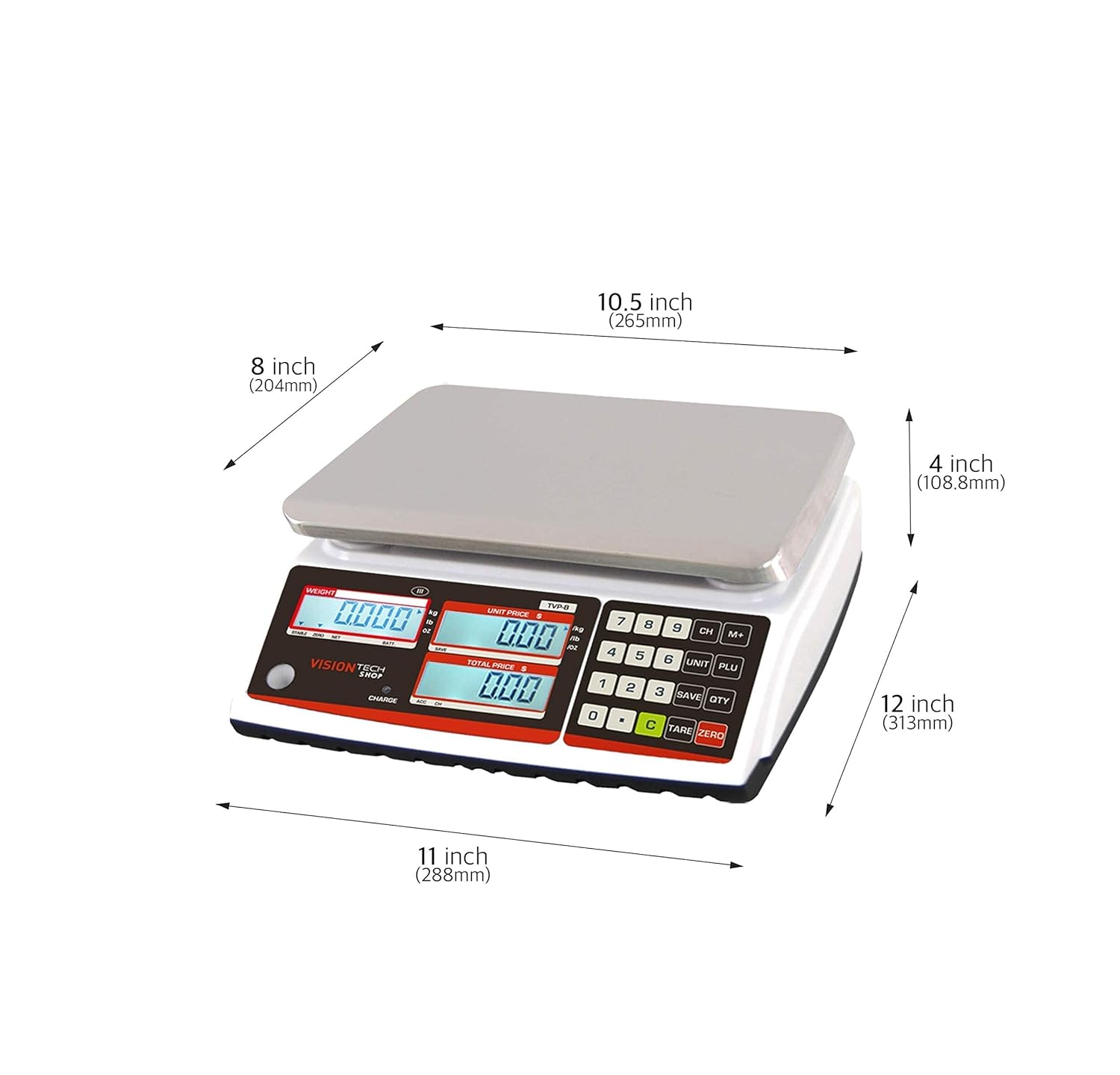
Figure 6: Detailed dimensions of the TVP-60B scale.

Figure 7: NTEP Certificate of Conformance for VisionTechShop TVP-xxB and TVP-xxP Series scales.
Garantia i Suport
VisionTechShop products are manufactured to high-quality standards. For specific warranty details, please refer to the product packaging or contact VisionTechShop customer service directly.
For technical support, troubleshooting assistance, or any inquiries regarding your TVP-60B scale, please visit the official VisionTechShop store or contact their support team:
- Visit the VisionTechShop Store on Amazon
- Consulteu la informació de contacte que trobareu a l'embalatge del producte per obtenir assistència directa.
Ask a question about this manual
Ask about setup, troubleshooting, compatibility, parts, safety, or missing instructions. Manuals+ will review the question and use this page’s manual context to help answer it.